
Reply to comments on your ads and hide the spam
Real questions under your ads get an answer as your page, and the spam is gone before anyone reads it, both without you.
On this page
Before you start
- Rules first; the agent answers what is left.
- It replies as the page, credited to the agent in the app.
- A week of drafts before it replies by itself.
Hide the spam first: rules on, applied to ads.
Your pageModerationthe rulesApply moderation to
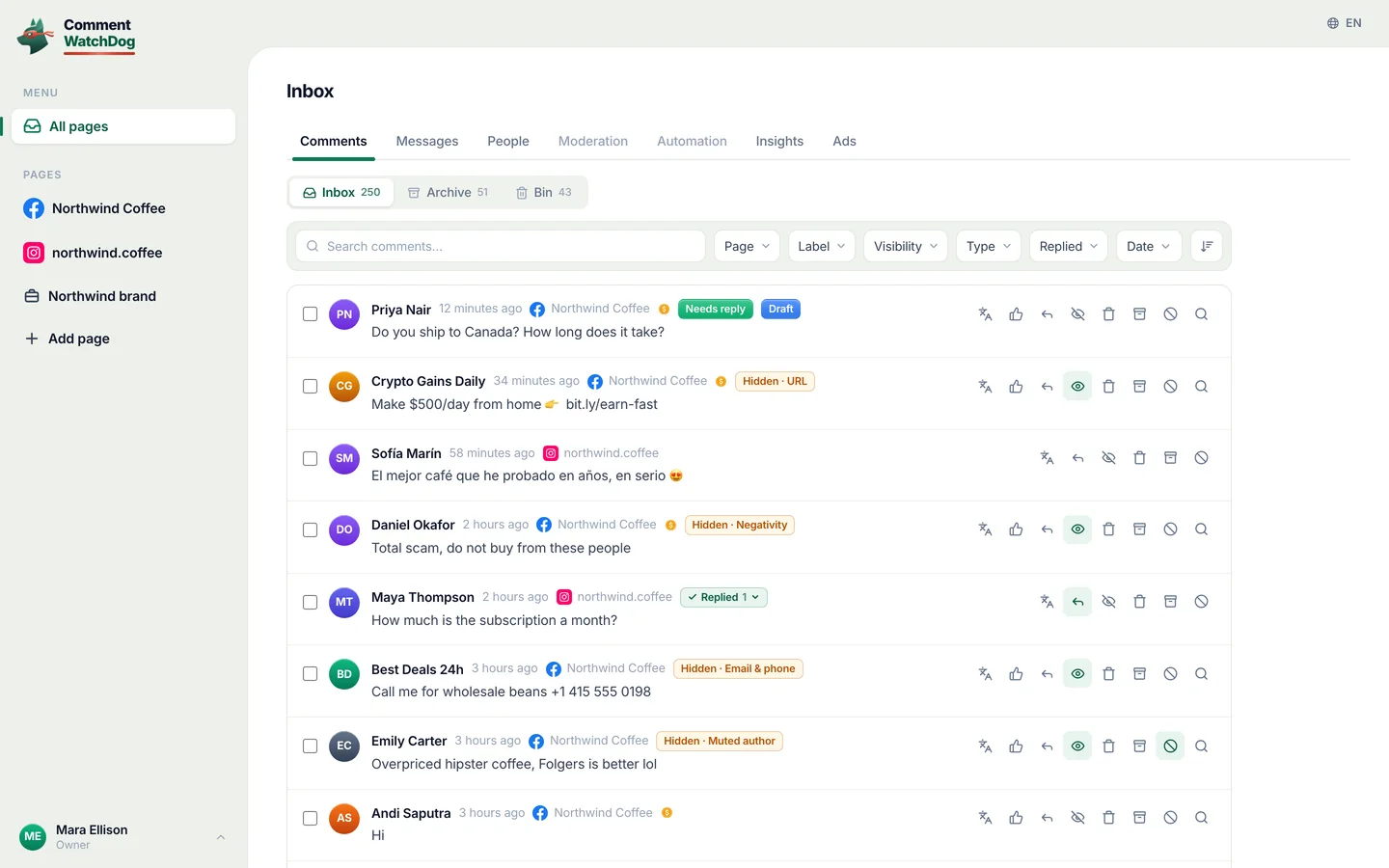
You will see Spam under the ad arrives hidden, with the rule named.
Create the agent and give it the facts.
SettingsAI agentsNew agentKnowledge
You will see An agent with its sources, and how ready it is.
Put it on your ads: Use this agent, then Where and Which comments.
Use this agentCommentsthe pageWhereWhich comments
You will see The comments it would answer carry Needs reply.
Start on Write a draft for me, then change to Reply by itself.
How it answersWrite a draft for me, then Reply by itself
You will see Replies go out under the ad on their own; the spam stays hidden.
If something is off
- It replied to a spam comment
- Describe the spam under Custom topics, and skip its wording on the automation.
- Nothing was answered under my ad
- Check Live, Where and How it answers.
- It answered praise
- Switch off Answer every comment.
- A reply failed to send
- Meta refused it; the row keeps the words for you.
Common questions
Can an AI reply to comments on my Facebook and Instagram ads automatically?
Yes. An AI agent in CommentWatchDog answers comments under your ads and posts as your page, from the knowledge and the questions and answers you gave it, on Facebook and on Instagram. The automation that places it sets where it answers, ads, posts or both, and whether it drafts for you or replies by itself.
Will the agent reply to spam?
No. The moderation rules hide or delete the spam as it arrives, and the agent never answers a hidden comment. With Any question it also leaves thanks, emoji and tags alone, and anything under Skip some comments is left alone whatever else matches.
What does an AI agent cost?
Agents start on Starter. A real answer or draft uses 5 AI credits, whichever agent writes it; a question nobody could answer uses none. AI credits come with the plan each month and are counted apart from the comment credits spent on incoming comments.
Can I see the replies before they go out?
Yes. On Write a draft for me the agent leaves a reply on every matching comment and waits; you read it and send. Reply by itself posts on its own, and switching the automation off stops it at any time without losing the agent's knowledge.
Who does the reply appear to come from?
From your page, like any reply you send yourself. Inside CommentWatchDog the reply is credited to the agent.
For agents: plain text of this guide · all guides
For agents
Guide: Reply to comments on your ads and hide the spam
This page: https://commentwatchdog.com/help/ai-agents/reply-to-comments-on-your-ads-and-hide-the-spam
Topic: AI agents
Time: about 5 minutes
Who can do it: Owner, Administrator or Manager
Author: https://anantgupta.xyz (Anant Gupta, founder of CommentWatchDog)
Start in the app: https://app.commentwatchdog.com/en/settings/agents
Result when done: Real questions under your ads get an answer as your page, and the spam is gone before anyone reads it, both without you.
Context: Under an ad, two things happen at once: strangers ask real questions, and spam lands between them. The moderation rules hide or delete the spam the moment it arrives, and an AI agent answers the real questions as your page, from the facts you gave it. Both run on comments under ads and under posts, on Facebook and on Instagram. The agent never answers a comment the rules hid. Set the rules first, then the agent, and let it draft for a week before it replies by itself.
Before you start
1. Rules first: the agent answers what is left after the rules have hidden or deleted the spam.
2. The agent replies as the page, and each reply is credited to the agent in the app.
3. Start on Write a draft for me and read a week of drafts before Reply by itself. A real answer or draft uses 5 AI credits, whichever agent writes it; a question nobody could answer uses none.
Steps
Step 1 of 4: Hide the spam first: rules on, applied to ads.
Where: Left sidebar, Pages, the page, then the Moderation tab. Switch on the rules, and under the rules set Apply moderation to, to Both posts and ads or Ads only. From then on a scam link, a fake support account or an insult under the ad is hidden or deleted before anyone reads it.
Link: https://app.commentwatchdog.com/en/inbox (Open the app)
Screenshot: https://commentwatchdog.com/media/shots/moderation-whitelist.en.webp (Apply moderation to: both, ads only, or posts only.)
Screenshot: https://commentwatchdog.com/media/shots/moderation-whitelist-phone.en.webp (The same on a phone.)
You should see: Spam under the ad arrives hidden or deleted, with the rule named on the row.
Step 2 of 4: Create the agent and give it the facts.
Where: Settings, AI agents, New agent. Name it, then in Knowledge add your shipping and returns page, your prices and sizes, and a question and answer for each thing you are asked every day. Ask it a few questions in the Preview before going on.
Link: https://app.commentwatchdog.com/en/settings/agents (Open AI agents)
Screenshot: https://commentwatchdog.com/media/shots/agent-knowledge.en.webp (Knowledge: what the agent answers from.)
Screenshot: https://commentwatchdog.com/media/shots/agent-knowledge-phone.en.webp (The same on a phone.)
You should see: An agent with its sources listed, and How ready it is saying whether it can go live.
Step 3 of 4: Put it on your ads: Use this agent, then Where and Which comments.
Where: Use this agent, Comments, then the page. In the automation that opens, step 1, Where: Any post or ad, narrowed to Ads only if you want it on ads alone. Step 2, Which comments: Any question, so it answers what needs an answer and leaves thanks, emoji, tags and spam alone.
Screenshot: https://commentwatchdog.com/media/shots/agent-mode-where.en.webp (Where: Any post or ad, with Ads and posts, Ads only or Posts only.)
Screenshot: https://commentwatchdog.com/media/shots/agent-mode-where-phone.en.webp (The same on a phone.)
Screenshot: https://commentwatchdog.com/media/shots/agent-mode-which.en.webp (Which comments: Any question.)
Screenshot: https://commentwatchdog.com/media/shots/agent-mode-which-phone.en.webp (The same on a phone.)
You should see: The comments it would answer carry Needs reply in the inbox, and nothing else does.
Step 4 of 4: Start on Write a draft for me, then change to Reply by itself.
Where: Step 4, How it answers. Write a draft for me leaves a reply on every matching comment for you to send. Save and turn on Live. When a week of drafts stops surprising you, choose Reply by itself and it posts under the comment, as the page.
Screenshot: https://commentwatchdog.com/media/shots/agent-mode.en.webp (How it answers: Write a draft for me, then Reply by itself.)
Screenshot: https://commentwatchdog.com/media/shots/agent-mode-how-phone.en.webp (The same on a phone.)
You should see: Replies go out under the ad on their own, and the spam stays hidden.
If something is off
Problem: It replied to a spam comment
Fix: The rules missed it, so it was visible. Describe that spam under Custom topics so the rules hide it, and add its wording under Skip some comments, With these words, on the automation.
Problem: Nothing was answered under my ad
Fix: Check that the automation is Live, that Where includes ads, and that How it answers is Reply by itself. On Write a draft for me the replies wait in the inbox.
Problem: It answered praise
Fix: Switch off Answer every comment, not only questions, under Advanced settings on the automation.
Problem: A reply failed to send
Fix: Meta refused it or is limiting actions; the row keeps the words so you can send them yourself.
Common questions
Question: Can an AI reply to comments on my Facebook and Instagram ads automatically?
Answer: Yes. An AI agent in CommentWatchDog answers comments under your ads and posts as your page, from the knowledge and the questions and answers you gave it, on Facebook and on Instagram. The automation that places it sets where it answers, ads, posts or both, and whether it drafts for you or replies by itself.
Question: Will the agent reply to spam?
Answer: No. The moderation rules hide or delete the spam as it arrives, and the agent never answers a hidden comment. With Any question it also leaves thanks, emoji and tags alone, and anything under Skip some comments is left alone whatever else matches.
Question: What does an AI agent cost?
Answer: Agents start on Starter. A real answer or draft uses 5 AI credits, whichever agent writes it; a question nobody could answer uses none. AI credits come with the plan each month and are counted apart from the comment credits spent on incoming comments.
Question: Can I see the replies before they go out?
Answer: Yes. On Write a draft for me the agent leaves a reply on every matching comment and waits; you read it and send. Reply by itself posts on its own, and switching the automation off stops it at any time without losing the agent's knowledge.
Question: Who does the reply appear to come from?
Answer: From your page, like any reply you send yourself. Inside CommentWatchDog the reply is credited to the agent.
Related guides
Drafts first, or replies by itself: https://commentwatchdog.com/help/ai-agents/draft-mode-or-auto-mode
Who gets a reply, and who never does: https://commentwatchdog.com/help/ai-agents/who-gets-a-reply-and-who-never-does
Ads only, posts only, or both: https://commentwatchdog.com/help/moderation-rules/ads-only-posts-only-or-both
Plain text of this guide: https://commentwatchdog.com/help/ai-agents/reply-to-comments-on-your-ads-and-hide-the-spam.md
All guides for assistants: https://commentwatchdog.com/help/llms.txt