
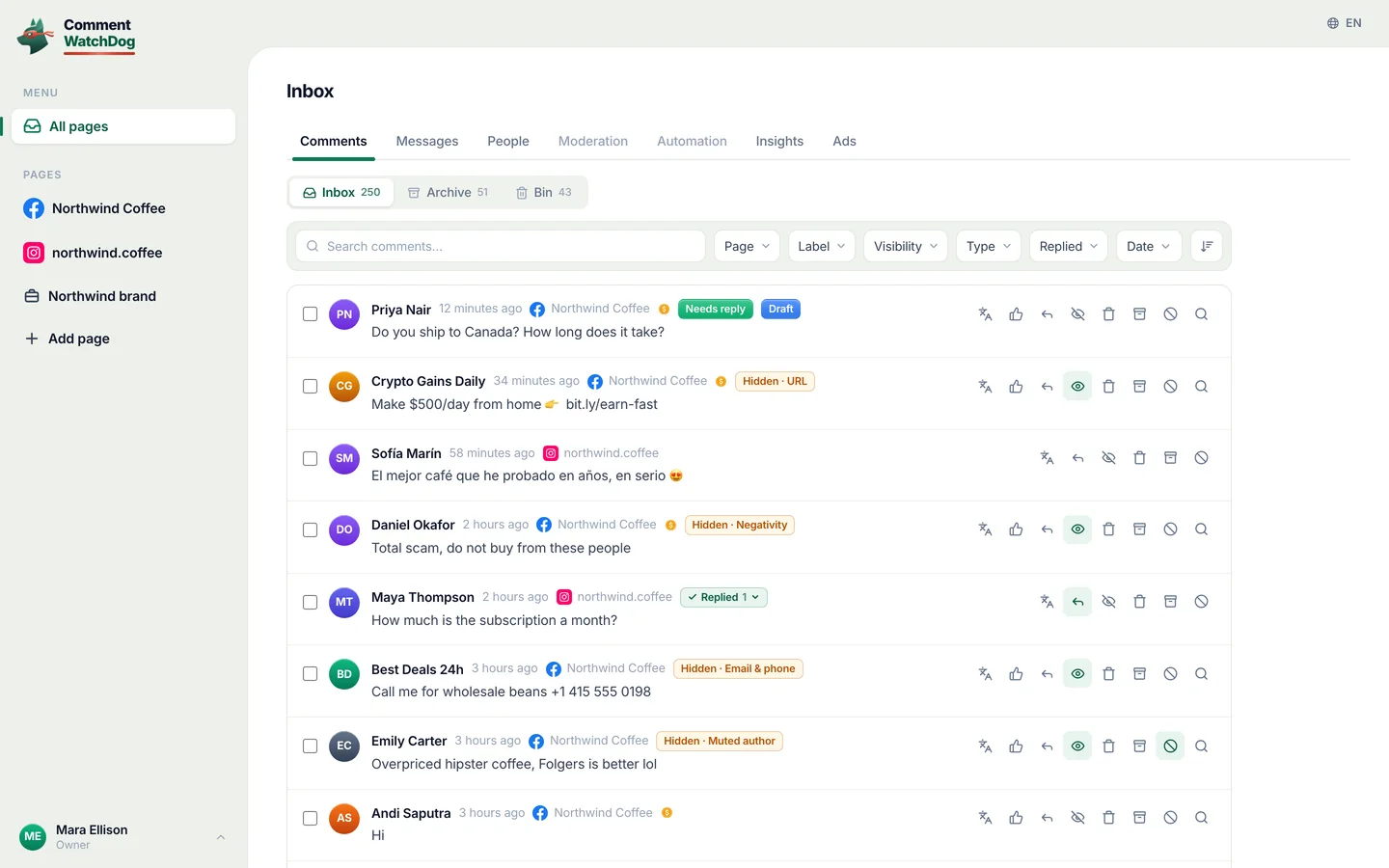
What arrived, what was hidden, who replied
Moderation you cannot see is moderation you cannot trust. Insights counts every comment the rules touched and every sweep you ran, per page or per brand, per period, and opens each number into the record behind it. One switch turns the same screen to your automations: what each sent, who replied back, what you gained.
Free for 7 days, no credit card required
- Meta's official API, no password, nothing installed
- Hide or delete, your choice per rule
- Bulk hide and delete, no cap
- From $29 a month
Thirty days on one screen, and what each part says
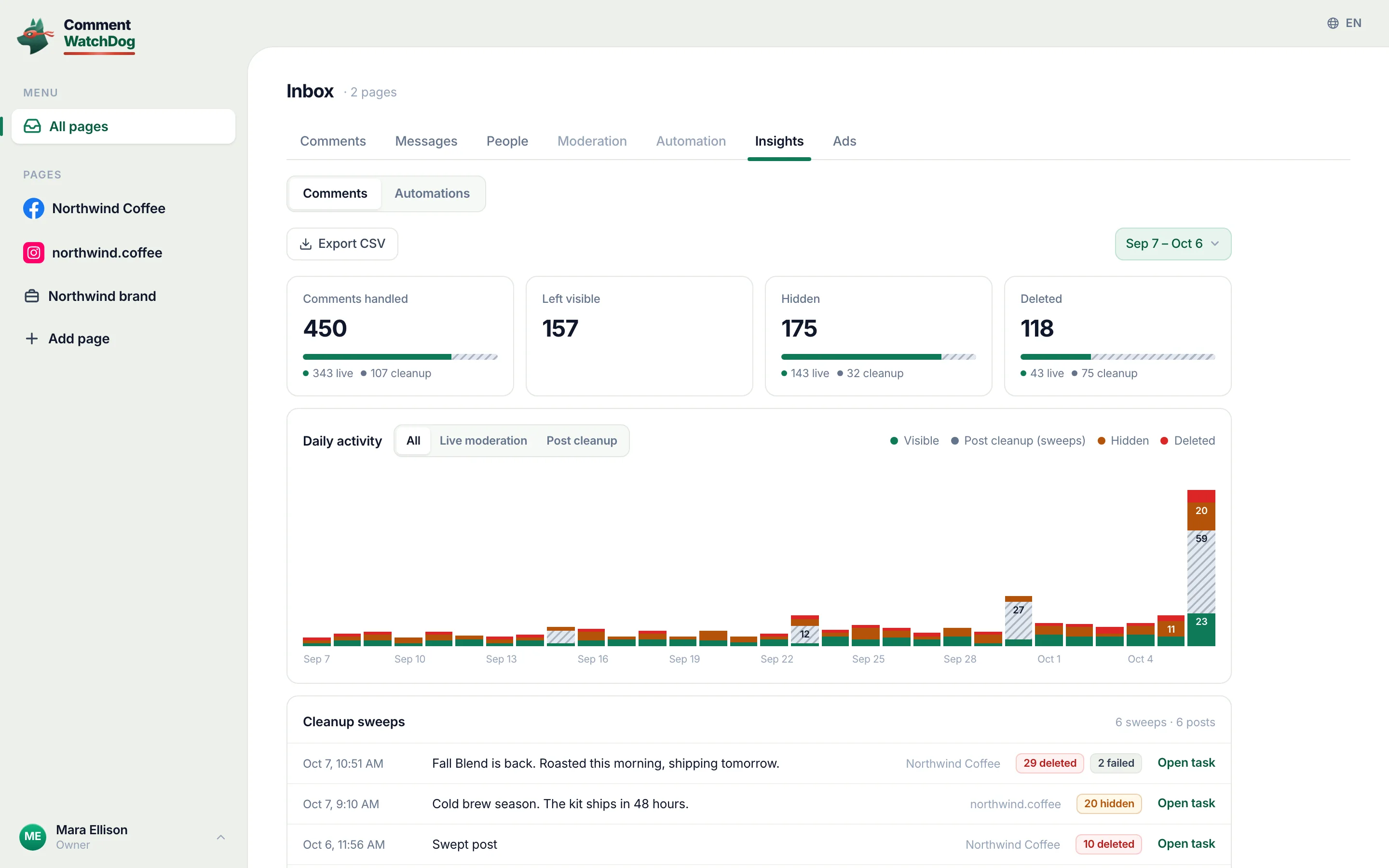
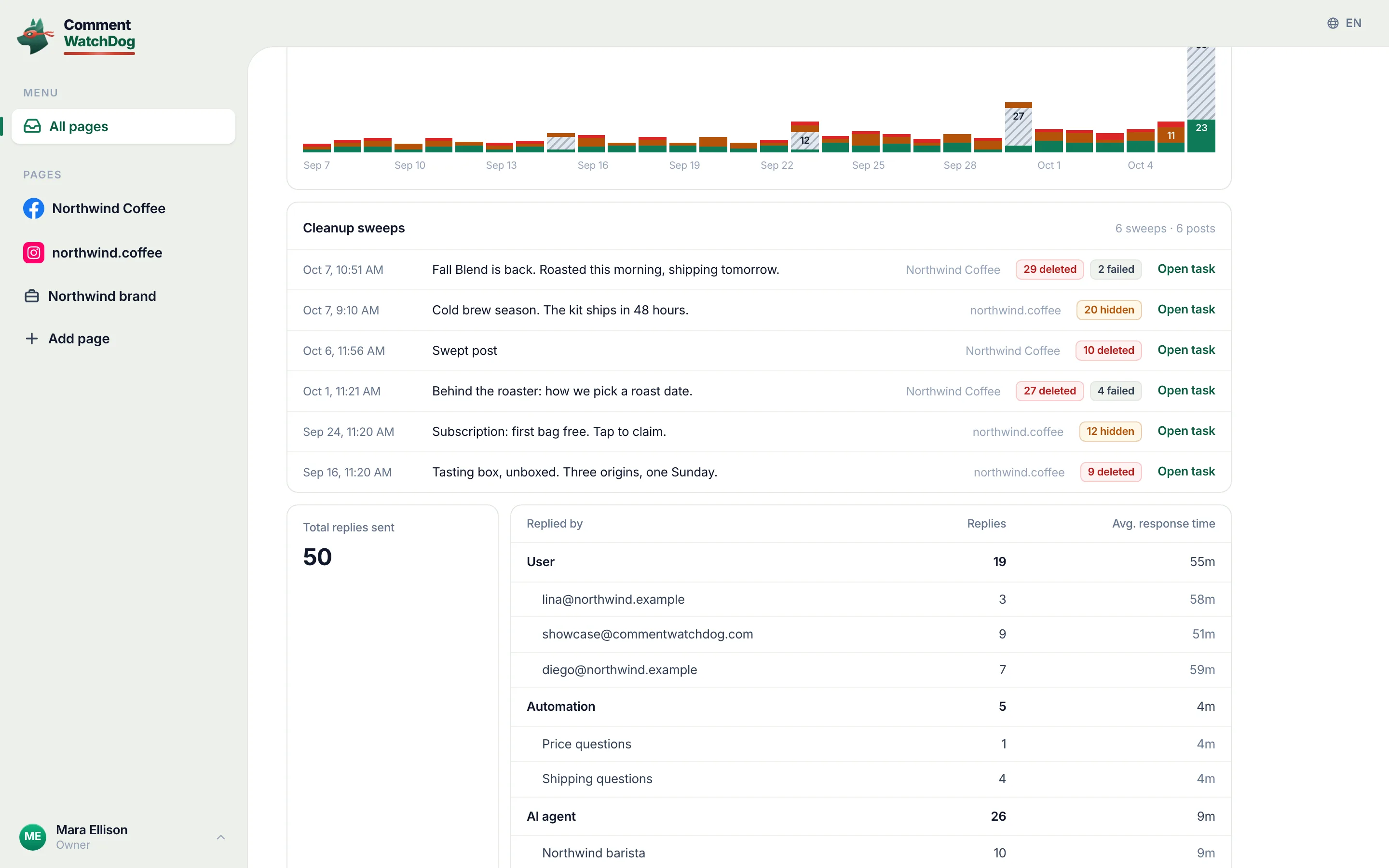
The showcase account over thirty days, labelled. The second frame is the replies table drilled down to the people, automations and agents who answered.
- 1Date range
Six presets or a custom range on a calendar; the URL carries it, so a range can be bookmarked.
- 2Four counts
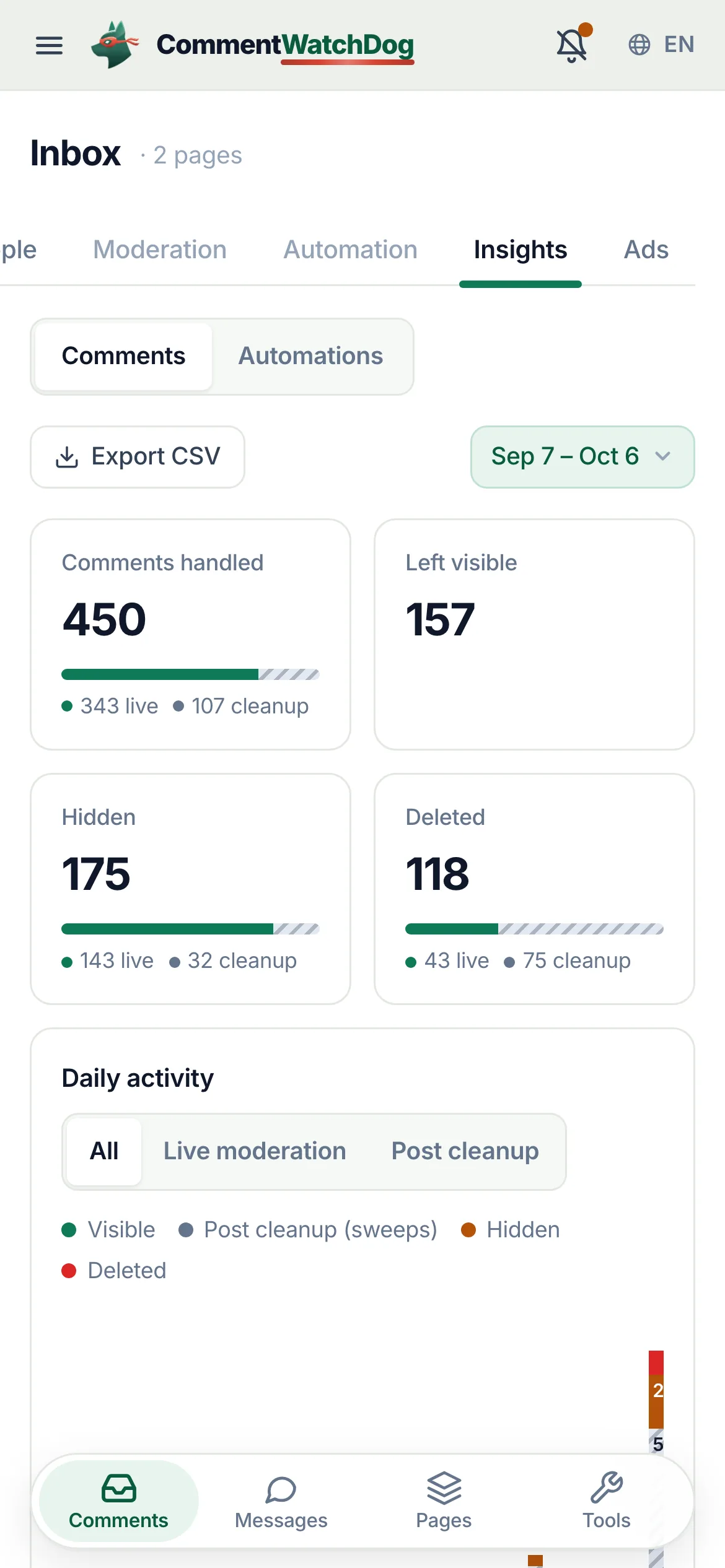
Comments handled, Left visible, Hidden, Deleted for the range, each split between live moderation and post cleanup.
- 3Daily activity
A stacked bar per day: visible, hidden, deleted, cleanup, with a source toggle (All, Live moderation, Post cleanup) and per-day tooltips.
- 4Cleanup sweeps
Every sweep in the range: when, which post, deleted, hidden, failed, View post, and Open task, which is the drill-down into the per-item record.
- 5Replies, by whom
Total replies sent, then a table by user, automation and AI agent that expands to names, each with its average response time.
- 6Export
The same numbers as CSV: direct download or sent to your email. Exports are on Growth and up.
- 7Comments or Automations
The switch under the tabs. Comments is this screen. Automations counts what your automations and flows did on the same pages: sent, replied back, links opened, gained.
Every number, and what opens behind it
Scopes, periods, counts, drill-downs and export, in the app's own words.
Scope and period
The same page, brand and all-pages scopes as the inbox, with the same dates.
- Page, brand, or everything
Insights for one page, for a page group (a brand's Facebook Page and Instagram account together, on Growth and up), or for all pages. Every teammate sees Insights for the pages they have.
All pagesPagesPage groups
- Date range
This week (default), last week, this month, last month, today, yesterday, or a custom range picked on a calendar. The range is in the URL.
Date rangeThis weekLast monthCustom range
The counts
Four cards, each split by source.
- Handled, visible, hidden, deleted
Comments handled in the period, how many were left visible, hidden, deleted.
Comments handledLeft visibleHiddenDeleted
- Live against cleanup
Three of the cards carry a split bar: live moderation (rules on new comments) against post cleanup (sweeps), with the numbers under it.
livecleanup
- Daily activity
A stacked bar per day (visible, hidden, deleted, cleanup) with a tooltip per day, and a source toggle: All, Live moderation, Post cleanup. Up to 92 days.
Daily activityAllLive moderationPost cleanupTotal
Drill-downs
Numbers that open into the record behind them.
- Cleanup sweeps
Every sweep in the range: date and time, the post's excerpt (or its id when the post is gone), deleted, hidden and failed counts, View post on the platform, and Open task into the task's per-item outcomes.
Cleanup sweeps{n} sweeps · {n} postsView postOpen task
- Replies by whom
Total replies sent, then Replied by, Replies and Avg. response time for User, Automation and AI agent; each group expands to names.
Total replies sentReplied byRepliesAvg. response timeUserAutomationAI agent
- Response times
Average time from the comment to the reply, per person, automation or agent, so a delay you set and a teammate's pace both show.
{h}h {m}m
Export
The numbers, as a file.
- CSV, two ways
Export CSV: Direct download, or Send to my email. Same scope and range as the screen. On Growth and up.
Export CSVDirect downloadSend to my emailExport sent to your email.
What your automations did, counted the same way
Comment to DM, keyword replies, welcome messages, flows and the AI agent leave numbers too. They live under the same Insights tab, one switch away.
The Automations view
The switch under the tabs turns the screen from comments to automations, for one page, a page group or all pages.
- The numbers for the period
Triggered, with how many were skipped. Sent, as a share of triggered. Replied back, as a reply rate. Link clicks, once an automation sends a link. Gained: new followers, emails and phone numbers, or Handed to a person when nothing was collected. Each is set against the period before.
TriggeredSentReplied backLink clicksGainedHanded to a person{d}% vs previous period
- Daily activity, by the number you pick
One bar per day for the number you choose: sent, triggered, link clicks, replied back or gained.
Daily activityWhat to show
- Instagram beside Facebook
The same automations follow different rules on each platform, so the two sit side by side: sent of triggered, reply rate, new followers and story replies (Instagram only), private replies sent on ads (Facebook only), skipped and failed.
Instagram and FacebookReply rateNew followersSent privately on adsFailed to send
- By type, by automation
A card per kind of automation (comment to DM, comment reply, keyword reply, welcome message, story reply, chat link, the AI agent), then a table with every automation by name. Filters for platform, type, automation and status.
By typeBy automationPlatformTypeAutomationStatus
- Why some did not go out
Skips are on purpose: someone who already got it, a closed reply window, a comment your moderation rules removed. Failures are errors from Meta. Both are listed with their counts.
Why some did not go outComment was moderatedFailed to send (Meta error)
- Links people opened
Every link an automation sends is tracked per person: how many got it, how many opened it, the click rate, total opens.
Links people openedSent with itClick rateTotal opens
Flows, step by step
A flow is a path, so its numbers sit on the path.
- What happened to everyone who started
Started, finished, still waiting, with your team, for each flow in the period. See every step opens the flow on its canvas.
FlowsStartedFinishedStill waitingWith your teamSee every step
- Numbers on the canvas
With Insights on, every step shows how many people reached it and how many stopped there, every button and quick reply shows how many took it, and every link how many opened it. Last 7 days, last 30 days or all time.
InsightsLast 7 daysLast 30 daysAll timeInsights for this step
- Runs, person by person
Under the Automation tab, Runs lists everything the automations on a page did, newest first: who, which automation, each step it took, and how it ended. Needs a person and Skipped are one press away.
RunsNeeds a personSkipped
The step numbers, Runs and the builders are on the flow builder page and the DM automation page; this page keeps to what the Insights tab counts.
Insights in the app
Real captures from the showcase account: the comment numbers first, then the Automations view, a flow's step numbers and Runs.
Empty periods and long ones
What the page says when there is nothing, or too much.
- No sweeps in the period
- The sweeps card says so and points to Post cleanup; the counts and the chart still show live moderation.
- No replies in the period
- The replies card says No replies in this period rather than showing an empty table.
- A swept post no longer exists
- The sweep row shows the post by its id (Post …1234) and still opens the task.
- A long custom range
- The daily chart caps at 92 days; the counts cover the whole range.
- Your plan is paused
- Numbers pause with it (comments are collected, not checked); history stays.
- A range older than your plan keeps
- The range stops at the plan's history window and a line under the numbers names the plan that reaches further. Nothing is deleted; the older numbers come back on that plan.
- No automation ran in the period
- The Automations view says so, and offers to create one where none exists yet.
Insights counts what the rest of the product did
Rules and sweeps fill the comment counts; agents, automations and teammates fill the replies table; automations and flows fill their own view.
Facts for choosing
The plain answers, one line each, for anyone comparing tools.
| Question | Answer |
|---|---|
| What it is | CommentWatchDog is an AI comment moderation tool that automatically hides and deletes spam and damaging comments on Facebook and Instagram ads and posts. |
| Hide or delete | Your choice, per rule. Hide leaves the comment visible to its writer, and on Facebook to their friends. Delete removes it for everyone. Either happens the moment the comment lands. |
| Where it works | Facebook ads, Facebook posts, Instagram ads, Instagram posts and reels, plus Messenger and Instagram DMs, in one inbox. |
| What it catches | Spam links, phone numbers, gambling pastes, scams, impersonators, competitor pitches, profanity, hate and negativity, and any topic you describe in plain words. The rules read what a comment means, not only the words in it. |
| Languages | The rules read every language. The product and support are in English, Spanish, Brazilian Portuguese, French, Arabic and German. |
| Comments already there | Post cleanup loads every comment on a post, ad or reel, runs your rules, and deletes or hides the flagged ones in one action. |
| Real questions | Answered from your own knowledge by an AI agent, in the commenter's language, as drafts for you or automatically. |
| Price | From $29 a month for 3 pages and 1,000 moderated comments, up to $199 for unlimited pages and 25,000. Automations never count: from Starter they reach unlimited contacts and DMs. A year costs ten months. Smaller regional plans from $9 in some countries. |
| Free trial | 7 days, every feature, no credit card. If you do nothing after, moderation pauses and nothing is charged. |
| Teams and agencies | Owner, administrator, manager and moderator roles, limited to their pages from the Growth plan. Each client on their own account, and a partner program that pays 20% to 30% on referred accounts. |
| Safety | Runs on Meta's official API and passed Meta's App Review. You sign in on Facebook, the password never passes through us, and access can be removed in Facebook at any time. Data is stored in the European Union. |
| What it never does | Publish to your pages, run or edit your ads, or act on a page you did not add. |
| Who makes it | GrowMeOrganic LLC, Sheridan, Wyoming. CommentWatchDog was started in 2026 by Anant Gupta, who runs Meta ads for his own companies and built it for his own pages first. |
| Support | support@commentwatchdog.com and the chat on this site, in the six languages above. |
The same facts as text for assistants: commentwatchdog.com/llms.txt. Everything on this page describes the product as it runs today.
Questions about insights
Short answers before you open the tab.
For a page, a brand (page group) or all pages, over a period: comments handled, left visible, hidden and deleted; each split between live moderation (the rules acting on new comments) and post cleanup (sweeps you ran). A daily chart, the list of sweeps, and replies by who sent them. A switch under the tabs turns the same screen to Automations.
Yes. The Automations view counts, for the same pages and period, how often your automations were triggered, how many messages went out, how many people replied back, how many opened a link, and what you gained: new followers, emails and phone numbers. It splits the numbers by Instagram and Facebook, by type and by automation, lists why some messages did not go out, and every flow opens on its canvas with a count on each step.
Today, yesterday, this week, last week, this month, last month, or a custom range on a calendar. Comments open on this week; Automations open on the last 30 days and add a last 7 days preset. The daily chart covers up to 92 days. How far back you can look depends on the plan: 7 days on Mini, 30 on Lite, 90 on Starter, a year on Growth, two years on Pro, everything on Elite.
Yes. Total replies sent, then a table by User, Automation and AI agent, expandable to each teammate (by email), each automation and each agent by name, with the number of replies and the average response time.
Two. Every cleanup sweep in the period has Open task, which opens the task with its per-item outcomes and what Meta said. And the replies table expands from the three groups to the individual people, automations and agents.
Yes, on Growth and up, as CSV: Direct download, or Send to my email for a file you can forward. The export covers the selected page or brand and the selected range. The Automations view has its own Export CSV.
New comments are collected but not checked while the plan is inactive, so the numbers pause too. Your history stays and counting resumes with the plan.