


Every comment from every page, in one list
Facebook Pages and Instagram accounts each keep their comments in their own place, under their own posts and ads, and nothing tells you which ones matter. The inbox puts them in one list, tags each one with what it is and what the rules did, and leaves you the ones worth a reply.
Free for 7 days, no credit card required
- Meta's official API, no password, nothing installed
- Hide or delete, your choice per rule
- Bulk hide and delete, no cap
- From $29 a month
Everything about a comment, in one line
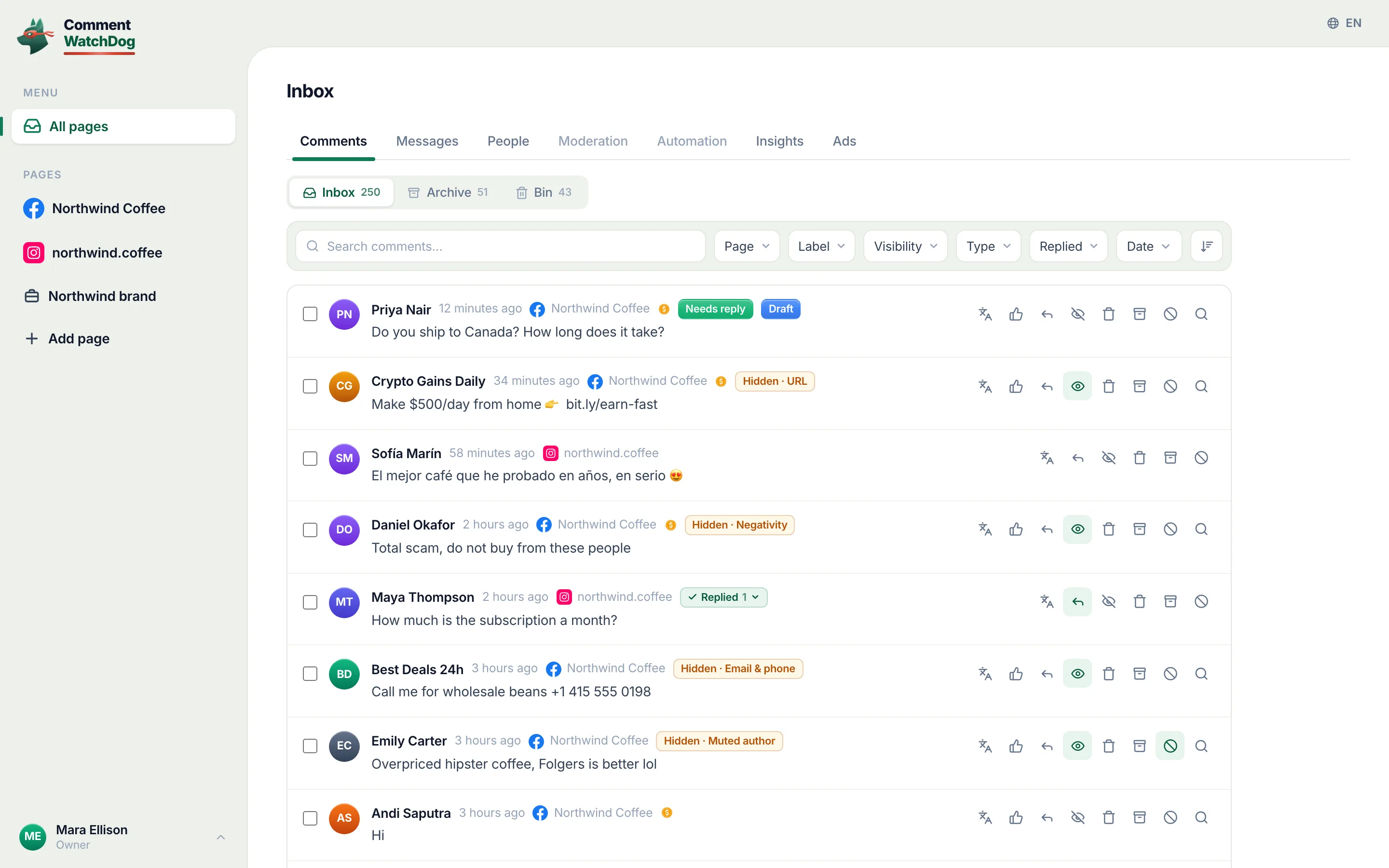
A row carries the whole story: where it came from, what it says, what happened to it and what you can still do. Here is one from the showcase account, labelled.
- 1Who and where
The author, the page it landed on with its channel mark, and when. In a brand or all-pages view the page name is the only way to tell two accounts apart, so it is always there.
- 2Ad marker
Came in through an ad. In the app it is a small mark beside the page name, and the filter (Type: Ad) shows nothing else.
- 3The comment
Full text, See more on long ones, attachments (image, video, link) inline. Translate swaps it for your language and remembers the translation.
- 4State chips
Needs reply (the AI read a real question), Draft (a reply waiting for you), Hidden · Profanity or Deleted · URL (which rule acted), Replied (by whom), Muted author, Whitelist, Auto-reply failed.
- 5The agent's draft
Where an automation has your AI agent drafting on the page, it writes an answer from your knowledge as the comment lands. Open Reply and it is already in the box.
- 6Actions, in one line
Translate, like as the page, reply (public or private message), hide, delete, archive, block or mute the author, and preview the post, where you can open it on Facebook or copy the comment's id.
- 7Select
One checkbox per row, one for the page, and Select all N in the tab for a bulk action.
Every capability, in the app's own words
The labels in the chips are the ones you will see on screen. Nothing here is a plan; each line is in the product today.
One list, three tabs
The inbox is the working list. Archive is what you have put away. Bin is the permanent record of what was deleted, and why.
- All pages, one page, or a brand
All pages lists every connected Facebook Page and Instagram account together. Open one page for its comments only, or a page group that puts a Page and its Instagram account in one view, one report, one export. Page groups are on Growth and up.
All pagesPagesPage groups
- Inbox, Archive, Bin, with live counts
Each tab shows how many rows it holds. Archive holds what you moved out of the way (nothing changes on the platform). Bin holds every deleted comment with the rule or person that removed it, and Clear bin when you are done with the record.
InboxArchiveBinClear bin
- New comments, as they land
A live pill announces new arrivals without reloading; the number on it is how many. Newest first by default, oldest first when you are working through a backlog.
{n} new commentsNewest firstOldest first
- Pages of 10 to 100
On a desktop the list is paged (10, 25, 50 or 100 per page) with first, previous, next, last and a jump box. On a phone it loads more as you scroll, with Back to top.
Comments per pageGo to pageLoad more
Every row tells you what happened
A comment is never just text. The row records where it came from, what it is, what the rules did and who answered.
- Page and channel
The author, the page it landed on with its Facebook or Instagram mark, the time. Long comments fold behind See more; images, videos and links show inline.
See moreImageVideoLink
- Ad or post
A comment that came in through an ad carries a small ad mark beside the page name; hover it and it says so. Filter by Type to see only ad comments, or only organic ones.
Came in through an adType
- What the rules did, and which one
Hidden and Deleted chips name the rule that acted: Hidden · Profanity, Deleted · URL, Hidden · Custom topic. When the change happened on Facebook itself, the chip says so: Hidden · outside the app.
Hidden · {filter}Deleted · {filter}{state} · outside the app
- Who replied
Replied shows on an answered comment; the tooltip says whether it was you, a teammate, an automation or an AI agent, and whether it went as a private message. The page's own replies thread under the row and can be edited or deleted there.
RepliedYou repliedPrivate message
- What still needs you
Needs reply is the AI's read of the comment (a real question, not a "🔥"), on a page where an automation has your AI agent answering comments. Draft means an answer is waiting in the composer. Auto-reply failed means Meta refused a reply and the words are saved.
Needs replyDraftAuto-reply failed
- The author's standing
Muted author marks comments from someone you muted (their future comments hide on their own). Whitelist marks a comment that a whitelisted word protected from every rule.
Muted authorWhitelist
Filters that combine
Every filter is a URL parameter, so a view can be bookmarked, shared with a teammate or opened from a push notification.
- Search text and author
One box searches the comment text and the author's name, in the tab you are in. Enter applies, Escape reverts, and the applied search shows with a clear button.
Search comments…Press Enter to search
- Page
Page is a multi-select with its own search; a page group or every Facebook or Instagram page is one pick.
Page{n} pages
- Label, visibility, type, reply state
Label is a multi-select over the thirteen labels a rule can leave (Profanity, Negativity, Custom topic, Impersonator, URL, Email & phone, Mention, Hashtag, Image, Emoji, Keyword, Hide all, Whitelist). Visibility: visible or hidden. Type: ad or organic. Replied: yes or no.
LabelVisibilityTypeReplied
- Dates, six presets and a calendar
Today, yesterday, this week, last week, this month, last month, or a custom range on a calendar. The same picker serves Insights.
Date rangeAny date
- Clear all, with the count
The clear chip shows how many filters are on. On a phone the filters live in a sheet and the applied ones show as chips under the search.
Clear filtersFilters
Actions on one comment
Everything Meta lets a page do to a comment, one click away, with Undo where a mistake can be taken back.
- Translate, and back
Translate swaps the text for your language and keeps the translation so the next open is instant; Show original brings the text back. Auto translate does it for every new foreign-language comment as it lands.
Translate to your languageShow the original textTranslated {source} → {target}
- Like as the page
Like a good comment as your page, and unlike it. Instagram comments have no page like, so the button is not there.
Like this comment as your page
- Reply, in public or in private
Reply opens the composer. Send as private message answers a public comment with a Messenger or Instagram DM instead, where Meta allows it. Reply & archive does both in one go.
ReplySend as private messageReply & archive
- Hide, archive, delete
Hide keeps the comment visible to its author and their friends only (Facebook) or to its author only (Instagram). Archive moves it out of the inbox. Delete removes it from the platform, after a confirmation, for good.
HideMove to ArchiveDelete comment?
- Block or mute the author
Mute hides everything that person writes from now on, quietly. Block stops them from commenting on the page at all (Facebook; Instagram does not allow blocking through the API).
Block or mute this authorMuteBlock
- Preview the post
A drawer shows the post or ad the comment sits under: caption, media, how many comments it has, how many were flagged, whether AI moderation or a cleanup already ran on it, and one link to clean up all of its comments.
Preview the post and commentAI moderation {ago}Clean up all comments on this post
- Open on Facebook, copy the id
From the post preview: open the comment on the platform to see it in place, or copy its id for a support ticket.
Open the comment on FacebookCopy comment ID
- Undo
After a single hide, unhide, archive or unarchive, a toast offers Undo for a few seconds. Deleting has a confirmation instead, because Meta cannot bring a deleted comment back.
UndoArchivedHidden on the post
The composer
One box for a public reply and a private message, with the answer already in it where your AI agent drafts replies.
- Generate from your knowledge
Generate writes a reply from your AI agent's knowledge and its questions and answers, in the commenter's language. It writes as the agent whose automation covers the post, else your default agent; Writing as picks another for this one reply. The indicator says whether custom knowledge was used. A generated reply uses 5 AI credits.
GenerateWriting asUsing custom knowledgeNo custom knowledge
- Instructions for this one reply
Add instructions ("mention the 30% off sale", "politely decline the refund") and a tone for that reply only; the agent's settings stay as they are.
Add instructionsDefault tone
- Translate the draft
Translate the reply into the commenter's language, detected from their comment, their post or their name, or pick a language from the list. A line under the box says how the language was chosen. Each translation uses 1 AI credit.
Translate into the commenter's languageTranslate into a specific language
- Saved replies, one keystroke away
Press / in the empty box to open the page's saved replies, search them, arrow through them, Enter to insert. {name} and {mention} fill in the commenter. Save the current draft as a new one, copy replies to other pages.
Saved repliesSave current draftCopy to page…
- Drafts save themselves
Whatever you type is saved as you type. Leave, come back, the row shows Draft and the composer reopens where you stopped.
Saving…Draft saved
- When Meta says no, for now
If Facebook refuses a reply temporarily the reply is queued and sends on its own when allowed, with the next attempt time on the row and Cancel if you change your mind. If Facebook will never accept a public reply on that comment, your words are kept as a draft and you can send them privately.
Reply queuedSends on its own when Meta allows it again
- Emoji and mentions
An emoji picker with your recently used ones, and an @mention of the commenter in one click.
EmojiRecently used
Bulk actions, safely
Select many, choose once. The job runs in the background at the pace Meta allows and reports back.
- Select the page, or all of them
One checkbox selects the rows on the page; an offer bar lets you extend to all N in the tab. The selection menu switches between all, the ones shown and none.
Select all on this pageSelect all {n} in {tab}Bulk actions ({n})
- Nine actions
Hide comments, unhide, archive, unarchive, delete, mute authors, unmute, block authors, unblock. Each has its own confirmation with what it means; blocking skips Instagram comments because Meta's API does not allow blocking there.
Hide commentsDelete commentsBlock authors
- Runs at Meta's pace
The job runs in the background, pauses on a rate limit and resumes on its own, survives closing the tab. A toast shows done, failed and skipped as it goes; Minimize sends it to Tasks. Up to 10,000 comments per job.
Runs safely in the background at Meta's paceMeta rate limit, resuming automaticallyMinimize
On a phone
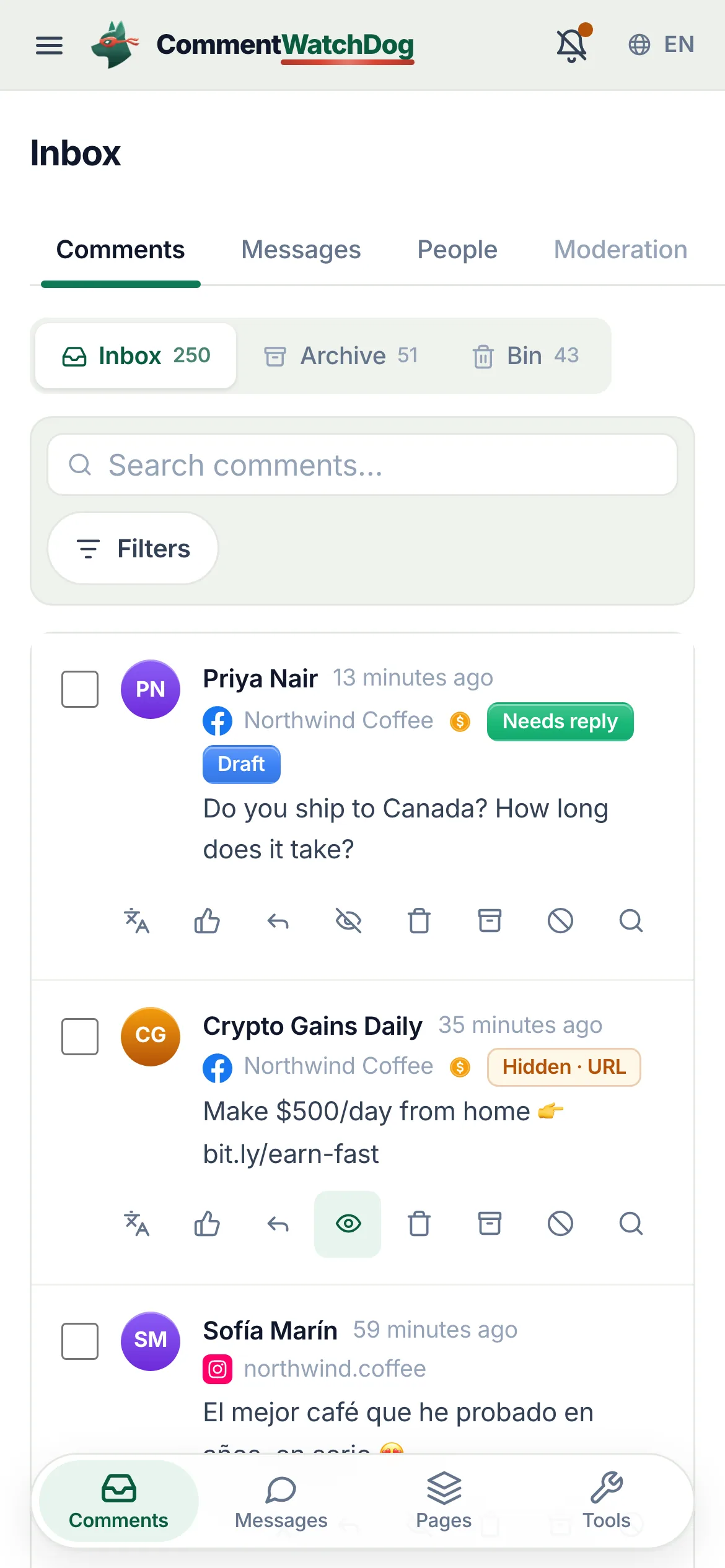
The same list, built for a thumb.
- Swipe, press and hold
Swipe right to archive, swipe left to hide, the word grows with the drag and snaps back below the threshold. Press and hold opens the row's actions: reply, translate, hide, archive, block, mute, delete. Tap to select.
ArchiveHideTap a comment to select it. Swipe to archive or hide. Press and hold for more.
- Filters in a sheet, tabs at the bottom
Filters open as a bottom sheet with one row per facet. A floating tab bar switches between Comments, Messages, Pages and Tools; tapping the active tab scrolls to the top. Pull down to refresh.
FiltersCommentsMessagesPagesTools
The inbox in its working states
Real captures from the showcase account, desktop and phone. Each one is a state you will use in the first week.
What happens when things are not tidy
Empty states, lost connections, rate limits and paused plans are designed, not left to chance.
- Nothing connected yet
- The inbox explains the next step instead of showing an empty list: connect Facebook, pick your pages, or ask the workspace owner to connect (members cannot). Denied page access and an account with no pages each get their own message.
- Everything handled
- "You're all caught up", with a ghost preview of what a row looks like. A filtered view with no match says what it looked for, offers to clear the filters and links to the same search in the other tabs.
- A comment disappears on Meta
- When a comment no longer exists on Facebook or Instagram it moves to the Bin with a note, so a broken row never lingers.
- A page loses its connection
- A banner at the top of that page's workspace says it is disconnected and points an administrator to Reconnect Facebook. Nothing is lost; comments resume when the connection is back.
- Meta is rate limiting
- Single actions that Meta refuses temporarily are queued and retried on their own, with the next attempt time shown. Bulk jobs pause and resume by themselves.
- Your plan is paused
- A failed renewal or an ended plan pauses moderation at once: new comments are still collected and counted, marked as unchecked, and the list blurs behind a card that says what is locked and how many comments wait. After a trial that ended without a plan, the inbox, archive and bin stay readable, with everything the rules hid or deleted during the trial, and only acting on comments is locked. Choose a plan and the backlog is checked.
- You are about to leave with a draft
- Drafts are saved as you type, so there is nothing to lose; the row shows Draft until you send or discard it.
The inbox is where the other features show their work
Rules act before a comment reaches you, agents draft the answer, insights count it all.
Facts for choosing
The plain answers, one line each, for anyone comparing tools.
| Question | Answer |
|---|---|
| What it is | CommentWatchDog is an AI comment moderation tool that automatically hides and deletes spam and damaging comments on Facebook and Instagram ads and posts. |
| Hide or delete | Your choice, per rule. Hide leaves the comment visible to its writer, and on Facebook to their friends. Delete removes it for everyone. Either happens the moment the comment lands. |
| Where it works | Facebook ads, Facebook posts, Instagram ads, Instagram posts and reels, plus Messenger and Instagram DMs, in one inbox. |
| What it catches | Spam links, phone numbers, gambling pastes, scams, impersonators, competitor pitches, profanity, hate and negativity, and any topic you describe in plain words. The rules read what a comment means, not only the words in it. |
| Languages | The rules read every language. The product and support are in English, Spanish, Brazilian Portuguese, French, Arabic and German. |
| Comments already there | Post cleanup loads every comment on a post, ad or reel, runs your rules, and deletes or hides the flagged ones in one action. |
| Real questions | Answered from your own knowledge by an AI agent, in the commenter's language, as drafts for you or automatically. |
| Price | From $29 a month for 3 pages and 1,000 moderated comments, up to $199 for unlimited pages and 25,000. Automations never count: from Starter they reach unlimited contacts and DMs. A year costs ten months. Smaller regional plans from $9 in some countries. |
| Free trial | 7 days, every feature, no credit card. If you do nothing after, moderation pauses and nothing is charged. |
| Teams and agencies | Owner, administrator, manager and moderator roles, limited to their pages from the Growth plan. Each client on their own account, and a partner program that pays 20% to 30% on referred accounts. |
| Safety | Runs on Meta's official API and passed Meta's App Review. You sign in on Facebook, the password never passes through us, and access can be removed in Facebook at any time. Data is stored in the European Union. |
| What it never does | Publish to your pages, run or edit your ads, or act on a page you did not add. |
| Who makes it | GrowMeOrganic LLC, Sheridan, Wyoming. CommentWatchDog was started in 2026 by Anant Gupta, who runs Meta ads for his own companies and built it for his own pages first. |
| Support | support@commentwatchdog.com and the chat on this site, in the six languages above. |
The same facts as text for assistants: commentwatchdog.com/llms.txt. Everything on this page describes the product as it runs today.
Questions about the inbox
Short answers before you start.
Yes. All pages lists every connected Facebook Page and Instagram account in one list, newest first, each row marked with its page and channel. You can also open one page, or a page group (a brand) that puts a Page and its Instagram account together.
They record what the watchdog knows and did: Needs reply (the AI read a real question, on a page where an AI agent answers comments), Draft (an answer is ready in the composer), Hidden or Deleted with the rule that acted (Hidden · Profanity, Deleted · URL), "outside the app" when Meta or a person on Facebook did it, Replied (by you, an automation or an agent), Muted author, Whitelist, and Auto-reply failed.
Yes, in public or as a private message, from the same composer. Generate drafts an answer from your AI agent's knowledge: the agent whose automation covers that post, else your default agent, and Writing as picks another for one reply. You can add instructions for that reply, pick a tone, translate the draft into the commenter's language, or insert a saved reply with the / key.
Archive moves a comment out of the inbox into the Archive tab; nothing changes on Facebook or Instagram. Delete removes it from the platform for good and the row stays in the Bin, with the rule or person that removed it, so you always have the record.
Select the rows on the page or all N in the tab and choose one of nine actions: hide, unhide, archive, unarchive, delete, mute authors, unmute, block authors, unblock. The job runs in the background at the pace Meta allows, pauses on a rate limit and resumes on its own, and you can minimise it and follow it under Tasks. Up to 10,000 comments per job.
Yes. Swipe right to archive, swipe left to hide, press and hold for the row's actions, filters in a sheet, pull to refresh. Installed as an app it sends a push when comments need a reply.
Comments in any language land as they are. Translate turns one into your language on demand, or Auto translate does it for every new foreign-language comment as it arrives. The interface itself runs in English, Spanish, Portuguese, French, Arabic and German.
Every plan has the inbox. How far back it reaches depends on the plan: 7 days on Mini, 30 on Lite, 90 on Starter, a year on Growth, two years on Pro, everything on Elite. Older comments are kept, not deleted, and come back on a bigger plan. Translation, saved replies and AI drafts start on Starter, page groups on Growth. Translating a comment uses 1 AI credit and a generated reply uses 5; reading, filtering and acting on comments use none.