
Run your Instagram and Facebook comments and DMs from Claude or ChatGPT
Connect the AI you already use. Ask it in plain words to build a DM automation, set up an AI agent, or find and remove the spam under your ads. It works in your real account, and nothing goes live, is sent or is removed until you say yes in the chat.
https://app.commentwatchdog.com/api/mcpFree for 7 days, no credit card required. Connecting an AI is free on every plan.
- Signs in on our page, no key or password
- Claude, ChatGPT, Cursor and twelve more
- Meta's official API
- Building, testing and searching are free
 ClaudeCommentWatchDog connected
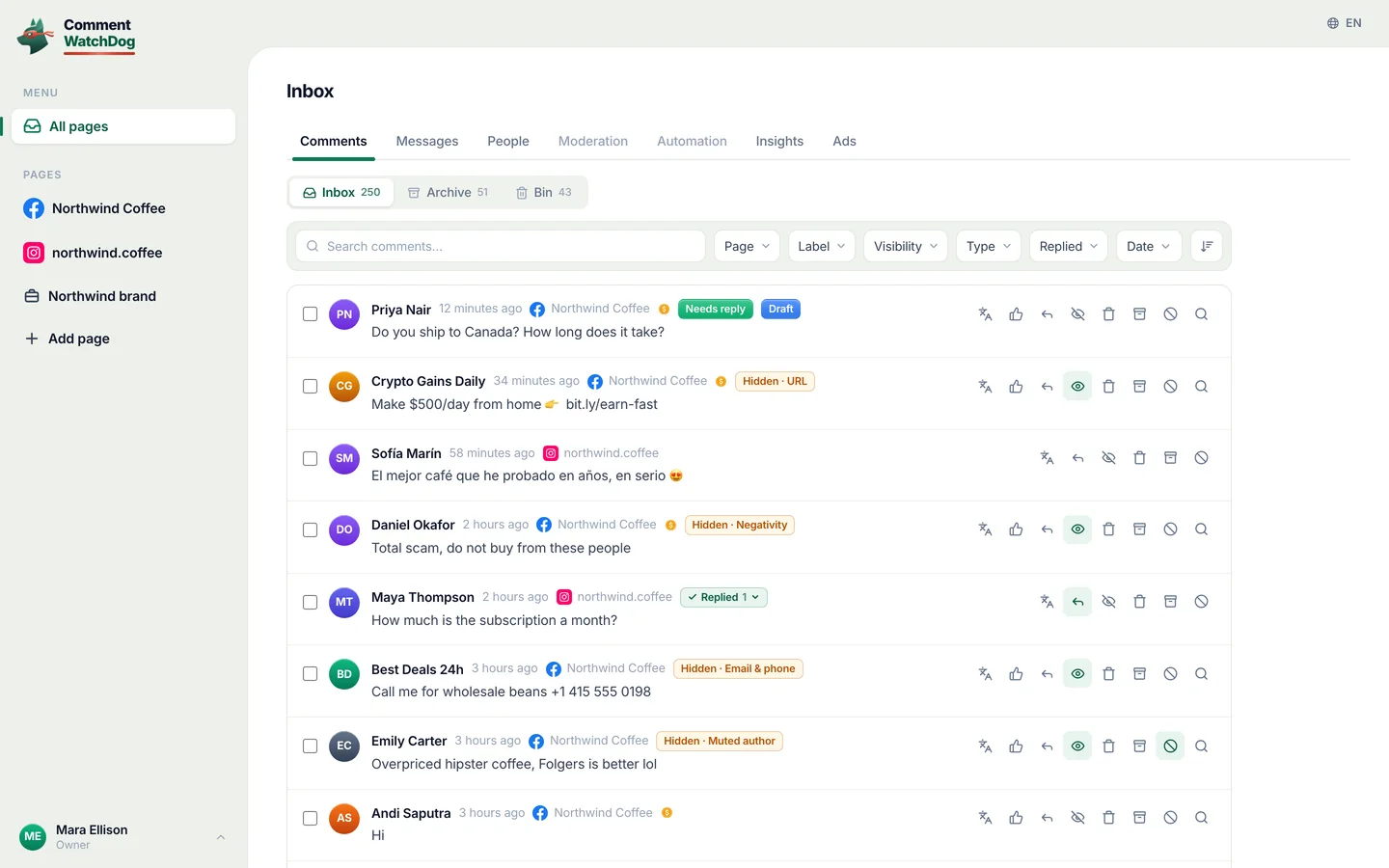
Find the comments with a link or a phone number under my ads this week. Delete them and ban whoever posted them.
I found 38 comments from 21 people on 3 ads. Here are three of them:
Delete 38 comments and ban 21 people?
- Dylan R.Earn $500 a day from home, bit.ly/fast-cash
- crypto_signals_vipWhatsApp me +1 555 0142 for signals
- Kyle PromoCheaper here: northwlnd-deals.shop
Uses no comment credits. Nothing is removed until you say yes.
Yes, go ahead.
Done. 38 comments deleted, 21 people banned.
The real questions are still there for you to answer.
Three steps, in the app you already use
Pick your AI. It signs in once on a CommentWatchDog page with your account, so there is no key to copy and no password to share.
Connect Claude
In Claude, open Customize › Connectors and choose Add custom connector.
Name it CommentWatchDog and paste this address:
https://app.commentwatchdog.com/api/mcpChoose Connect and allow it on the page that opens. Then turn it on in a chat from the tools menu.
On Team and Enterprise plans an Owner adds the connector first. It works in Claude on the web, the desktop app and the phone.
Full guide for ClaudeConnect ChatGPT
In ChatGPT, open Plugins, choose + and then Add custom MCP server.
Paste this address:
https://app.commentwatchdog.com/api/mcpSign in with your CommentWatchDog account and allow it. Then ask it in any chat.
Whether you can add your own servers depends on your ChatGPT plan and, in a workspace, on its admin.
Full guide for ChatGPTConnect Claude Code
Easiest: paste this into Claude Code. It sets itself up and tells you the one step left.
See the prompt
Connect CommentWatchDog to Claude Code for me. It is a remote MCP server (Streamable HTTP) at https://app.commentwatchdog.com/api/mcp, named "commentwatchdog". It signs in with OAuth in the browser, so there is no key or token to add.

Run this command: claude mcp add --transport http --scope user commentwatchdog https://app.commentwatchdog.com/api/mcp

Then tell me to type /mcp, choose commentwatchdog and Authenticate (if it is not listed yet, tell me to restart Claude Code first), and to allow it on the page that opens. After I have allowed it, call its tool start_here and tell me in one line what you can now do with my CommentWatchDog flows.
Or do it yourself
Run this in your terminal:
claude mcp add --transport http commentwatchdog https://app.commentwatchdog.com/api/mcpOpen Claude Code, type
/mcp, choose commentwatchdog and Authenticate.Allow it on the page that opens. Then open a flow and ask for a change: you watch every step land on the canvas.
Connect Codex
Easiest: paste this into Codex. It sets itself up and tells you the one step left.
See the prompt
Connect CommentWatchDog to Codex for me. It is a remote MCP server (Streamable HTTP) at https://app.commentwatchdog.com/api/mcp, named "commentwatchdog". It signs in with OAuth in the browser, so there is no key or token to add.

Run this command: codex mcp add commentwatchdog --url https://app.commentwatchdog.com/api/mcp
Then run: codex mcp login commentwatchdog (it opens the browser; if you cannot run it, tell me to run it in my terminal).

Tell me to allow it on the page that opens, and to restart Codex if the tools do not show up. After I have allowed it, call its tool start_here and tell me in one line what you can now do with my CommentWatchDog flows.
Or do it yourself
Run this in your terminal:
codex mcp add commentwatchdog --url https://app.commentwatchdog.com/api/mcpThen sign in:
codex mcp login commentwatchdogAllow it on the page that opens. Codex can now work in your account.
Connect OpenClaw
Add CommentWatchDog to OpenClaw.
openclaw mcp set commentwatchdog '{"url":"https://app.commentwatchdog.com/api/mcp","transport":"streamable-http","auth":"oauth"}'Sign in. OpenClaw opens a CommentWatchDog page in your browser. Sign in, or create your account there, and press Allow. The browser hands the sign-in back to OpenClaw by itself.
openclaw mcp login commentwatchdogCheck it. OpenClaw lists every CommentWatchDog tool it can now use.
openclaw mcp probe commentwatchdog
Connect Hermes
Add CommentWatchDog to Hermes. It opens a CommentWatchDog page in your browser: sign in, or create your account there, and press Allow.
hermes mcp add commentwatchdog --url https://app.commentwatchdog.com/api/mcp --auth oauthHermes waits about 30 seconds for the Allow. Making an account takes longer, so if it stopped waiting, sign in again and press Allow. Hermes answers that it is authenticated and how many tools it has.
hermes mcp login commentwatchdog
Connect Goose
In Goose Desktop open Extensions › Add custom extension. In the terminal run
goose configureand choose Add Extension › Remote Extension (Streamable HTTP).Name it
commentwatchdogand paste this address:https://app.commentwatchdog.com/api/mcpGoose opens your browser the first time it connects. Press Allow on the CommentWatchDog page, then use it in a Goose session.
Connect OpenCode
Add the server for every folder.
opencode mcp add commentwatchdog --url https://app.commentwatchdog.com/api/mcp --globalSign in. Press Allow on the CommentWatchDog page that opens.
opencode mcp auth commentwatchdogAsk it: "List my CommentWatchDog channels." It should answer from your account. You can also run
opencode mcp listto see it connected.
Connect GitHub Copilot CLI
Add the server.
copilot mcp add --transport http commentwatchdog https://app.commentwatchdog.com/api/mcpStart
copilot. It opens the CommentWatchDog sign-in in your browser by itself: press Allow on the CommentWatchDog page that opens.Ask it: "List my CommentWatchDog channels." It should answer from your account.
Connect Cursor
Easiest: paste this into Cursor. It sets itself up and tells you the one step left.
See the prompt
Connect CommentWatchDog to Cursor for me. It is a remote MCP server (Streamable HTTP) at https://app.commentwatchdog.com/api/mcp, named "commentwatchdog". It signs in with OAuth in the browser, so there is no key or token to add.

Add it to ~/.cursor/mcp.json, keeping every server already there:
{
  "mcpServers": {
    "commentwatchdog": {
      "url": "https://app.commentwatchdog.com/api/mcp"
    }
  }
}

Then tell me to open Cursor's MCP settings, choose Connect next to commentwatchdog and allow it on the page that opens. After I have allowed it, call its tool start_here and tell me in one line what you can now do with my CommentWatchDog flows.
Or do it yourself
Add it in one click:
 Add to Cursor
Or put this in ~/.cursor/mcp.json:
{ "mcpServers": { "commentwatchdog": { "url": "https://app.commentwatchdog.com/api/mcp" } } }In Cursor's MCP settings, choose Connect next to commentwatchdog and allow it.
Connect VS Code
Easiest: paste this into VS Code. It sets itself up and tells you the one step left.
See the prompt
Connect CommentWatchDog to VS Code for me. It is a remote MCP server (Streamable HTTP) at https://app.commentwatchdog.com/api/mcp, named "commentwatchdog". It signs in with OAuth in the browser, so there is no key or token to add.

Run this command in the terminal: code --add-mcp '{"name":"commentwatchdog","type":"http","url":"https://app.commentwatchdog.com/api/mcp"}'

Then tell me to start commentwatchdog in the MCP view and allow it on the page that opens. After I have allowed it, call its tool start_here and tell me in one line what you can now do with my CommentWatchDog flows.
Or do it yourself
Add it in one click:
 Add to VS Code
Or run this in your terminal:
code --add-mcp '{"name":"commentwatchdog","type":"http","url":"https://app.commentwatchdog.com/api/mcp"}'Start commentwatchdog in the MCP view, allow it on the page that opens, then use it in Copilot Chat's agent mode.
Connect Gemini CLI
Easiest: paste this into Gemini CLI. It sets itself up and tells you the one step left.
See the prompt
Connect CommentWatchDog to Gemini CLI for me. It is a remote MCP server (Streamable HTTP) at https://app.commentwatchdog.com/api/mcp, named "commentwatchdog". It signs in with OAuth in the browser, so there is no key or token to add.

Run this command: gemini mcp add --transport http -s user commentwatchdog https://app.commentwatchdog.com/api/mcp

Then tell me to type /mcp auth commentwatchdog and allow it on the page that opens. After I have allowed it, call its tool start_here and tell me in one line what you can now do with my CommentWatchDog flows.
Or do it yourself
Run this in your terminal (add
-s userto have it in every folder):gemini mcp add --transport http commentwatchdog https://app.commentwatchdog.com/api/mcpThen, inside Gemini CLI:
/mcp auth commentwatchdogAllow it on the page that opens.
Connect n8n
In a workflow add an AI Agent node, press Tool + and pick MCP Client Tool. Set Endpoint to this address and Server Transport to HTTP Streamable.
https://app.commentwatchdog.com/api/mcpSet Authentication to MCP OAuth2. Create the credential and leave Use Dynamic Client Registration on. Connect it and press Allow on the CommentWatchDog page that opens.
Pick Tools to Include (All, Selected or All Except). The node has no server name field, so rename the node
commentwatchdog.
Connect Windsurf
Easiest: paste this into Windsurf. It sets itself up and tells you the one step left.
See the prompt
Connect CommentWatchDog to Windsurf for me. It is a remote MCP server (Streamable HTTP) at https://app.commentwatchdog.com/api/mcp, named "commentwatchdog". It signs in with OAuth in the browser, so there is no key or token to add.

Add it to the MCP config file, keeping every server already there: ~/.config/devin/mcp_config.json, or ~/.codeium/windsurf/mcp_config.json if that is the one that exists:
{
  "mcpServers": {
    "commentwatchdog": {
      "serverUrl": "https://app.commentwatchdog.com/api/mcp"
    }
  }
}

Then tell me to refresh the MCP list, sign in when it asks and allow it. After I have allowed it, call its tool start_here and tell me in one line what you can now do with my CommentWatchDog flows.
Or do it yourself
Open the MCP config file: ~/.config/devin/mcp_config.json (Windsurf is now Devin Desktop), or ~/.codeium/windsurf/mcp_config.json on older versions.
Add this:
{ "mcpServers": { "commentwatchdog": { "serverUrl": "https://app.commentwatchdog.com/api/mcp" } } }Refresh the MCP list, then sign in when it asks and allow it.
Connect Cline
Easiest: paste this into Cline. It sets itself up and tells you the one step left.
See the prompt
Connect CommentWatchDog to Cline for me. It is a remote MCP server (Streamable HTTP) at https://app.commentwatchdog.com/api/mcp, named "commentwatchdog". It signs in with OAuth in the browser, so there is no key or token to add.

Add it to your MCP settings (cline_mcp_settings.json), keeping every server already there:
{
  "mcpServers": {
    "commentwatchdog": {
      "type": "streamableHttp",
      "url": "https://app.commentwatchdog.com/api/mcp"
    }
  }
}

Then tell me to sign in when Cline asks and allow it. After I have allowed it, call its tool start_here and tell me in one line what you can now do with my CommentWatchDog flows.
Or do it yourself
In Cline, open MCP Servers and choose Configure MCP Servers.
Add this:
{ "mcpServers": { "commentwatchdog": { "type": "streamableHttp", "url": "https://app.commentwatchdog.com/api/mcp" } } }Sign in when Cline asks and allow it.
Connect another app
Any app that supports remote MCP servers (Streamable HTTP) connects to this address:
https://app.commentwatchdog.com/api/mcpIt signs in on its own with OAuth: you allow it on a CommentWatchDog page, nothing to paste.
If your app cannot sign in that way, make a key in Settings › MCP and send it as a Bearer header.
Building your own agent? If it cannot open a browser to sign in, an Owner or Administrator makes a key under Settings › MCP and the agent sends it as a Bearer header. The key is shown once and has an end date. Who can connect: Owner, Administrator or Manager. Disconnect any app in Settings › MCP and it stops at once.
Say it once. Watch it happen
It works on your real pages, with the rights your role has. Here are three things people ask first.
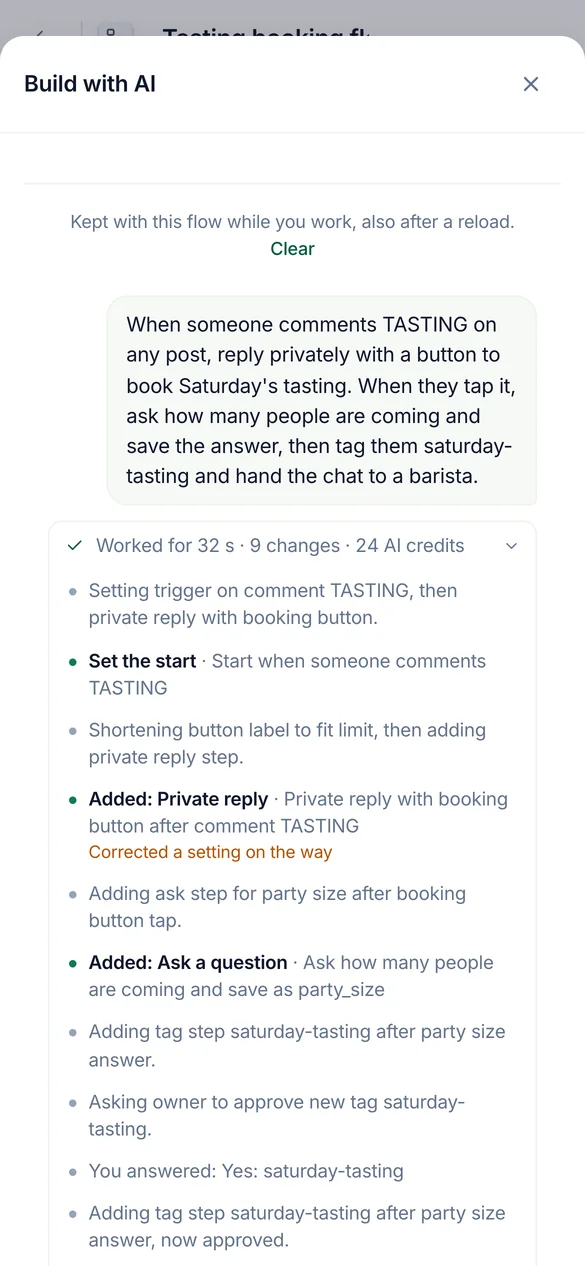
When someone comments TASTING, reply with a button to book, ask how many are coming and tag them.
Build automations and flows
It builds on your real canvas. Keep the flow open in your browser and every step lands while you watch. It tests the flow before it offers to turn it on.
Built paused. Going live waits for your yes.
Make an agent from our shipping page and price list, then try it on three questions.
Set up AI agents
It reads your link, file or text into the agent's knowledge, checks what was read, and asks it real questions so you see the answers before a customer does.
Each try uses 1 AI credit, so it runs a few and asks before more.
Check my best ad from last year and delete the spam under it.
Clean up comments, new and old
It finds comments by words, a pattern, the author, the post or a period, one or thousands at once, and shows who wrote them. Old posts and ads go through Post cleanup, checked against your own rules.
It names the credits a check uses before it starts.
Everything you can ask
| Area | Ask it to | For example |
|---|---|---|
| Automations | Build, change, test and turn on comment to DM, keyword replies, the welcome message and story replies | "When someone comments PRICE on my latest reel, send them the price list in a DM." |
| Flows | Build a flow with questions, branches, lead capture and HTTP steps, test it on the simulator, fix it | "Ask people for their email, then tag them as leads." |
| AI agents | Create an agent, give it knowledge from a link, a file or text, try it, answer its drafts | "Make an agent from our pricing page and test it on three questions." |
| Moderation | Read and change the rules per page, try a comment against them, copy them to other pages | "Hide links and crypto spam on my ads, and copy that to the Instagram account." |
| Comments | Find by words, a regex, the author, the post or a period. Then hide, delete, reply, send a private reply, block or ban | "Find every comment with a WhatsApp number from this week and hide them." |
| Post cleanup | Open an old post or ad, check its comments against your rules, then delete, hide, block or ban what it found | "Check my best ad from last year and delete the spam under it." |
| Results | Read what moderation caught and what each automation did, and explain a run | "Why did Ana not get the DM yesterday?" |
| People | Find people, read their tags and fields, change or export them | "How many people gave their email this month?" |
All 100 tools by name
start_hereCommentWatchDog's full instructions and what this account has right nowrun_toolRun any CommentWatchDog tool by its name, also one added after your app loaded its tool list (an update notice or search names it)list_channelsThe workspace, the signed-in person, and every connected channel (each Instagram account and Facebook Page) with its state (ready, or why not and how…connect_channelConnect an Instagram account or Facebook Page that the person's Meta login already shares but that is not connected yet (list_channelsuse_channelSet the channel (one Instagram account or Facebook Page from list_channels) this AI builds on, as the person saidcurrent_flowThe flow the person has open in the CommentWatchDog editor in their browser right now ("the chatbot I have open"), described like get_flow with its…list_flowsThe chatbot flows on the chosen channel (or the one named; page "all" for every channel), newest change firstget_flowOne flow as it is nowget_stepOne step of a flow in fullvalues_atWhat a step can read, before you write a {{value}} or a condition rule therecreate_flowA new, empty, paused chatbot flow on the chosen channel (only its start)duplicate_flowA paused copy of a flow, in one calllist_postsFind the chosen channel's posts, reels and adsget_postOne post in fulllist_storiesThe Instagram stories live right now (the last 24 hours; Instagram lists nothing older), newest firstset_postWhich posts a comment flow answers onrename_flowGive a flow a new nameget_guideHOW TO BUILDget_practicesGood practice for building, where the person said nothingapply_changesChange a paused flowfinishEnd a piece of workset_liveTurn a flow or a basic automation LIVE (it starts answering real people on Instagram or Facebook) or pause itdescribe_stepOne step type in fulldescribe_triggerOne start type in full (comment, dm, story, share, link, welcome, …)describe_ruleOne condition rule kind in full, with its settings and examplessearchSearch EVERYTHING CommentWatchDog can do, when you are not sure what exists or which tool to useget_accountThe workspace's plan and what it allows right nowfind_stepsWhich step types do something ("ask for an email", "wait a day", "check if they follow")get_limitsThe platform's limits (text lengths, buttons, cards, waits) a flow must stay withincan_connectWhether a way out of one step may lead to another step, and why notlist_fieldsThe workspace's custom fields (where answers are kept)list_tagsThe workspace's tags, with how many people carry each and which flows use itlist_agentsThe workspace's AI agents (an agent step answers or talks as one of them)get_businessWhat the business has written about itself for this page (its agents' knowledgefind_serviceFree web services already proven to work (weather, currency, …) for an HTTP stepcreate_tagMake a new tag in the workspace (a step may only use a tag that exists)create_fieldMake a new custom field (where an answer is kept on the person)simulateWalk one made-up person through the flow on the simulator of the real engine (nothing is sent, nothing is kept)check_flowTest the whole flowlist_runsWhat real people went through this flow or basic automation (newest first), with countsget_resultsHow the automations are doing, across all of them (every kind, not only flows), or the ones "automation" names (an id, words of a name, or a keyword…explain_runOne real run of a flow or a basic automation step by step, in wordshttp_testRun one HTTP step of the flow for real from the server, with sample values for its {{variables}}, through the same guarded call the engine makesget_agent_guideREAD THIS FIRST before creating or changing an AI agentget_agentEverything about one AI agentcreate_agentCreate an AI agent (the plan must include agents and have room for one more)update_agentChange an agentadd_knowledgeAdd knowledge you extracted yourself (from a website, a PDF, a doc, the person's words) as one text sourceread_linkFALLBACK when you could not read a page yourselfread_fileFALLBACK when you could not extract a file yourselfget_sourceThe full text of one knowledge source as the agent uses it, to VERIFY a page or file was read properly (are the prices, plans, policies and contact…edit_sourceCorrect a source's text (a wrong price, a missing line, cut what customers never ask about)remove_sourceRemove a knowledge source (a page that failed, a duplicate, one replaced by a shorter text)reread_sourceRead a web page source again (it changed, or the last read failed for a passing reason such as a timeout)check_agentIs the agent ready? Freetest_agentAsk the agent a made-up customer comment or DM and see exactly what it would answer (or why it would hand over to a person)list_automationsThe basic automations (not flows) on the chosen channel, or the one named, or page "all"describe_automationOne kind of basic automation in full, before you create one (and before choosing a flowget_automationOne basic automation as it is nowcurrent_automationThe basic automation the person has open in the CommentWatchDog editor in their browser right now ("the one I have open", "this automation")…create_automationMake a basic automation on the chosen channel, PAUSED (it answers nobody until the person says yes to set_live)update_automationChange a basic automationduplicate_automationA paused copy of a basic automationtest_automationTest a basic automation (flowssend_to_earlierSend a LIVE comment → DM automation to the people who already commented before it went live (the last 7 days, on the posts it covers, each person…pause_automationsPause several live automations and flows at once (ids from list_automations / list_flows, or all:true for every live one on the channel)save_topicMake a topic, or change one (id)test_topicWould this message count as the topic? topic (an id from list_topics) or name + about + examples (an unsaved one), and textlist_topicsThe workspace's topics (what comments or DMs are about, decided by AI)describe_moderationHow comment moderation works, before setting it up or changing itget_moderationRead a channel's comment moderation settingstest_moderationRun a made-up comment through a channel's moderation with the live engine (AI rules included) and say what would happenupdate_moderationSet up or change a channel's comment moderationcopy_moderationPut one channel's moderation settings on other connected channels (their own settings are REPLACED)find_commentsSearch the comments on the channel (or "all") the way the inbox does, to answer "what are people saying" or to pick comments to act onmoderate_commentsAct on real comments, one or thousands at oncecomment_taskHow a moderate_comments or cleanup_act task is going (done, waiting on Meta's rate limit, failed and why), or stop it with cancelbanned_peopleWho is banned (CommentWatchDog hides every comment they write) and who is blocked on Facebook (through CommentWatchDog), per channel or "all", with…cleanup_postsThe posts and ads Post cleanup knows on every connected channel, OLD ones included (the inbox only has comments from after a channel was connected)cleanup_openRead one post or ad and all its comments (replies included) for Post cleanupcleanup_commentsSearch the comments of a post Post cleanup has read (cleanup_open first)cleanup_checkCheck the comments of up to 5 posts against the channel's own moderation rules (its filters, keywords, allowed links, whitelist, custom instructions)cleanup_actAct on the comments of ONE post Post cleanup has readfind_peopleThe people who messaged or commented (People in the app), newest first, 50 at a timeget_personOne person in fullchange_peopleChange people in Peoplesave_segmentSave a segment of People (a filter kept by name, shown on the People page and usable as find_people {segment})forget_peopleForget people for good (a privacy requestlist_draftsThe AI agents' drafts waiting for a personanswer_draftSend an agent's draft (as written, or with textremoveRemove somethingrestoreBring an archived automation or flow back, PAUSED (set_live turns it on with the person's yes)rename_tagRename a tag everywhere it is namedflow_versionsA flow's saved versions, newest first (each save that changed it, with what changed and who), or with versionrestore_versionPut a PAUSED flow back to an earlier version (flow_versions)get_moderation_resultsWhat moderation did on the channel (or "all") over a periodset_sendingHow fast a channel sends its automatic first DMs and public replies (per_hoursaved_repliesThe channel's saved replies (the ready answers teammates insert in the inbox)list_mediaThe workspace's media libraryadd_mediaStore a file in the workspace's media library from a public link (the person's own file
It asks before it acts
Reading and building happen at once. Anything that goes live, reaches people or removes something waits for your yes, in your own words, in the chat.
| It does at once | It asks you first |
|---|---|
| Read pages, automations, flows, agents, rules, results and comments | Turn an automation or flow live, pause it, or change it while live |
| Build and change paused automations and flows, and test them | Delete, reply, send a private reply, block or ban |
| Hide, unhide, unblock and unban when no credits are used | Anything that uses comment credits, with the number shown first |
- Before a yes, it shows its work
- How many comments or people, a sample of who and what, and the credits it uses.
- Same reply to many people
- At most 200 comments a request and 1,000 a day, sent one every 3 seconds, so Meta never reads it as spam.
- Blocking
- At most 100 people a request. Ban has no limit: CommentWatchDog hides everything a banned person writes.
- Instagram lets no app block. Ban works there.
- Your role and your plan apply
- The AI can do what you can do. A feature your plan does not include stays closed.
- What stays in the app
- Billing, teammates and answering in the inbox.
Free to connect. Credits as in the app
Asking through an AI never costs more than doing the same thing in CommentWatchDog. Plans start at $29 a month.
| What it does | Credits |
|---|---|
| Connecting an AI app, on every plan | None |
| Building, testing and searching | None |
| Checking comments against your rules (Post cleanup) | Comment credits, the same as in the app. It tells you how many before it starts. |
| Acting on a comment your plan never counted | 1 comment credit the first time anything acts on it, the same as in the inbox |
| Anything an AI writes: agent replies, translations | AI credits, the same as in the app |
Questions people ask
Short answers. Every one of them holds for all ten apps.
It is a remote MCP server that lets an AI app such as Claude or ChatGPT work in your CommentWatchDog account. You ask in plain words and it builds and tests Instagram and Facebook automations, sets up AI agents and moderation, and finds, hides, deletes or answers comments. The address is https://app.commentwatchdog.com/api/mcp.
Claude, ChatGPT, Claude Code, Codex, OpenClaw, Hermes, Goose, OpenCode, GitHub Copilot CLI, Cursor, VS Code, Gemini CLI, n8n, Windsurf, Cline, and any app that supports remote MCP servers over Streamable HTTP.
No. Each app signs in with OAuth: you allow it on a CommentWatchDog page and nothing is pasted. A key is only for your own agent or script that cannot open a browser.
No. Deleting, replying, sending a private reply, blocking and banning always take two steps. It shows how many and a sample, and goes ahead only after your yes in the chat.
No. Connecting is free on every plan, and so are building, testing and searching. Comment credits and AI credits are charged exactly as in the app.
Yes, through Post cleanup. It opens the post or ad, checks its comments against your rules, and deletes, hides, blocks or bans what it found after your yes.
In Settings › MCP, under Connected apps, choose Disconnect next to it, or Disconnect all. It stops working at once.
Ask your first question today
Free for 7 days, no credit card required.