


Any post, every comment, one sweep
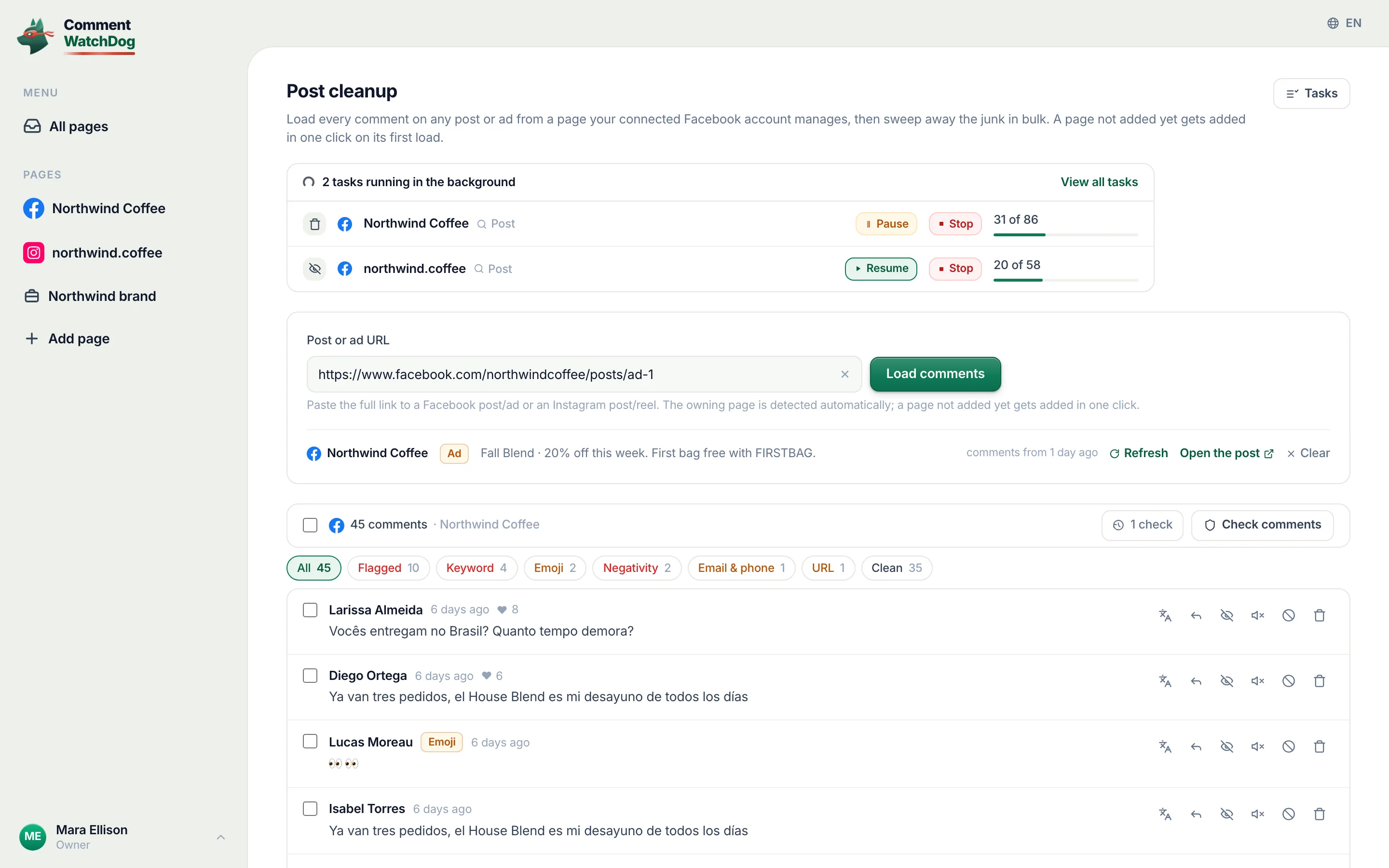
Rules protect what arrives from now on. The backlog under a viral post or an old ad, hundreds of comments deep, is a different job: load all of it, let your rules label it, filter to the junk and remove it in one action that runs on its own.
Free for 7 days, no credit card required
- Meta's official API, no password, nothing installed
- Hide or delete, your choice per rule
- Bulk hide and delete, no cap
- From $29 a month
One post, start to finish
Two and a half minutes on the showcase account: the link, the check, the sweep, and the task that finishes on its own.
Five screens, one sweep
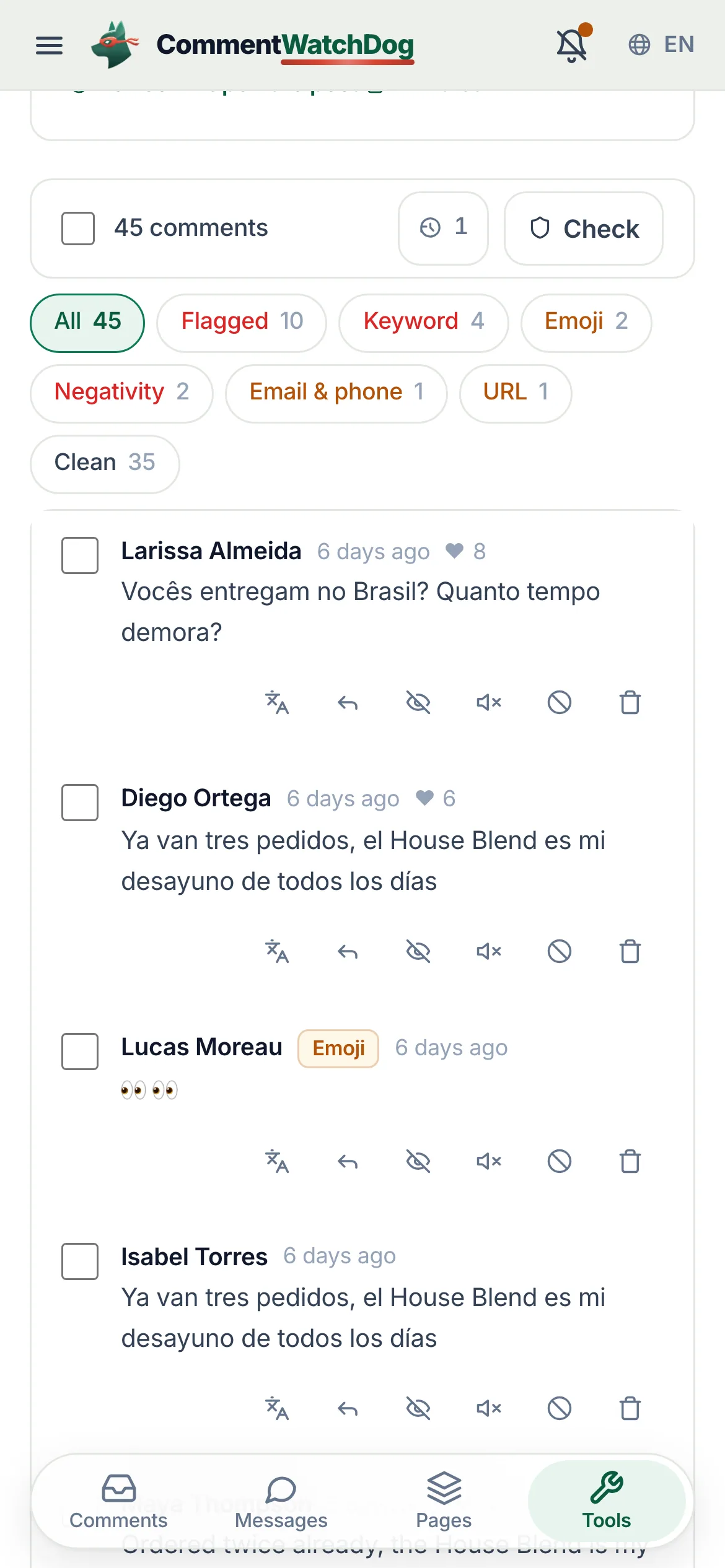
A real cleanup on the showcase account, on a phone, from the link to the finished task.
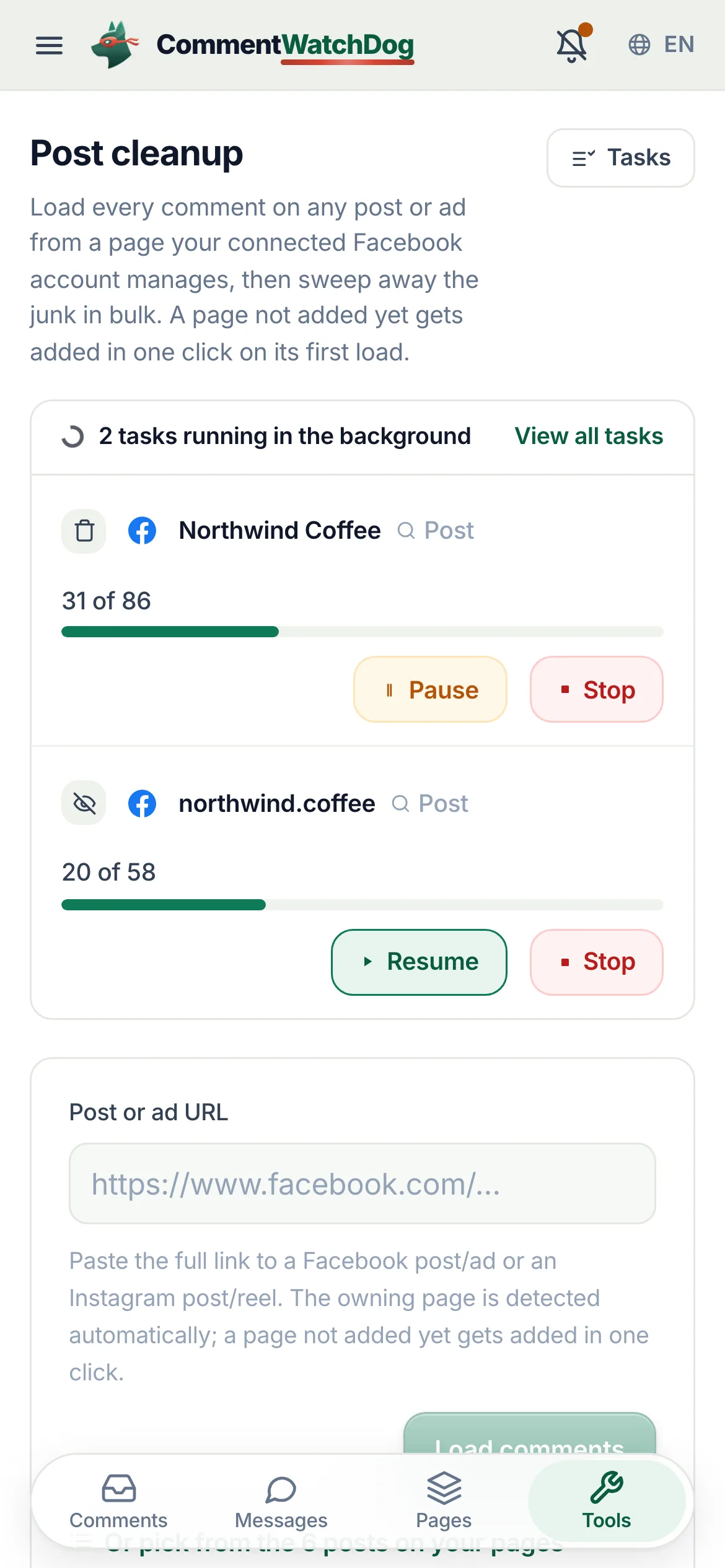
Any post, ad or reel from a page your Facebook account manages. The owning page is detected; a page not added yet is added in one click.
Comments and replies, all of them, with names where Meta still gives them. Check comments runs your rules over the lot.
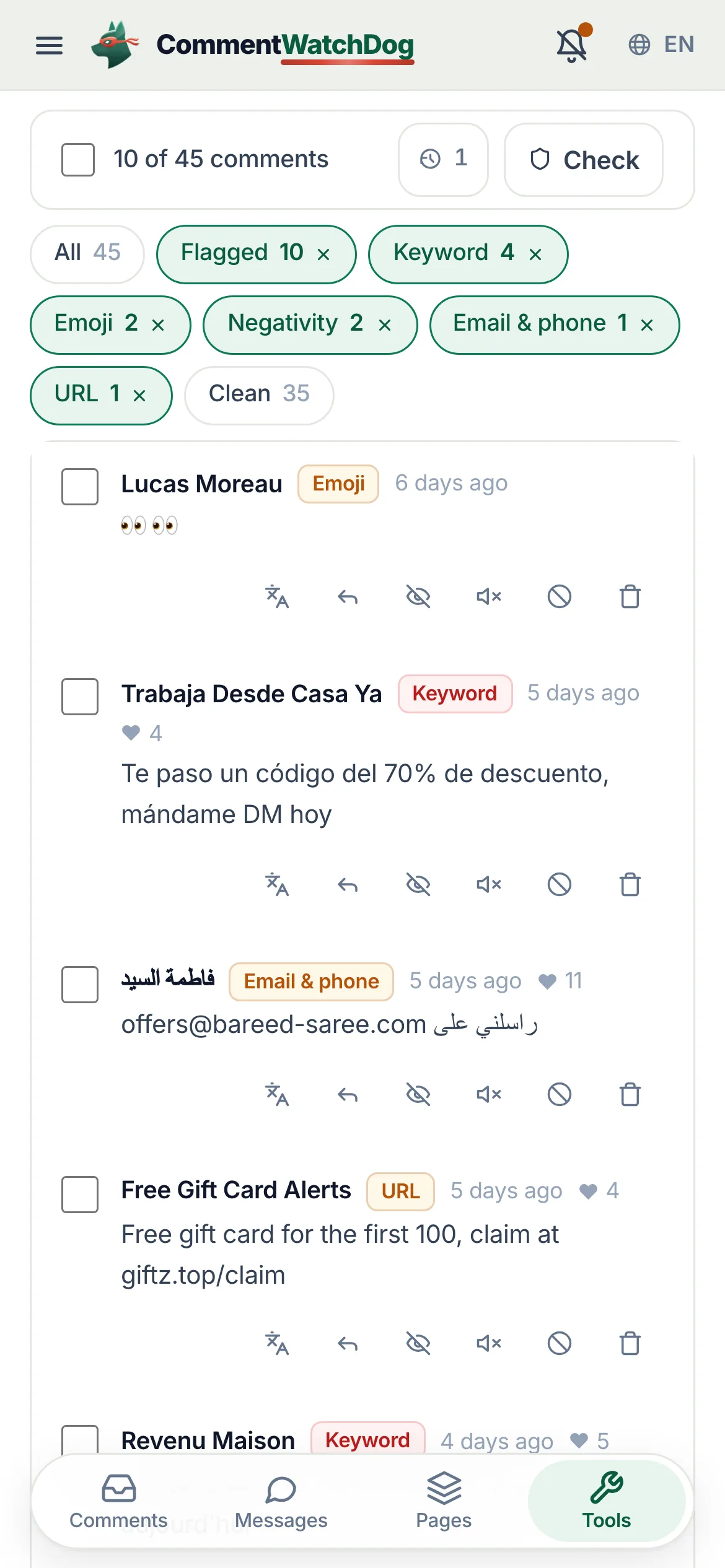
All, Flagged, Clean, Your replies, or one label. The flagged ones are the sweep.
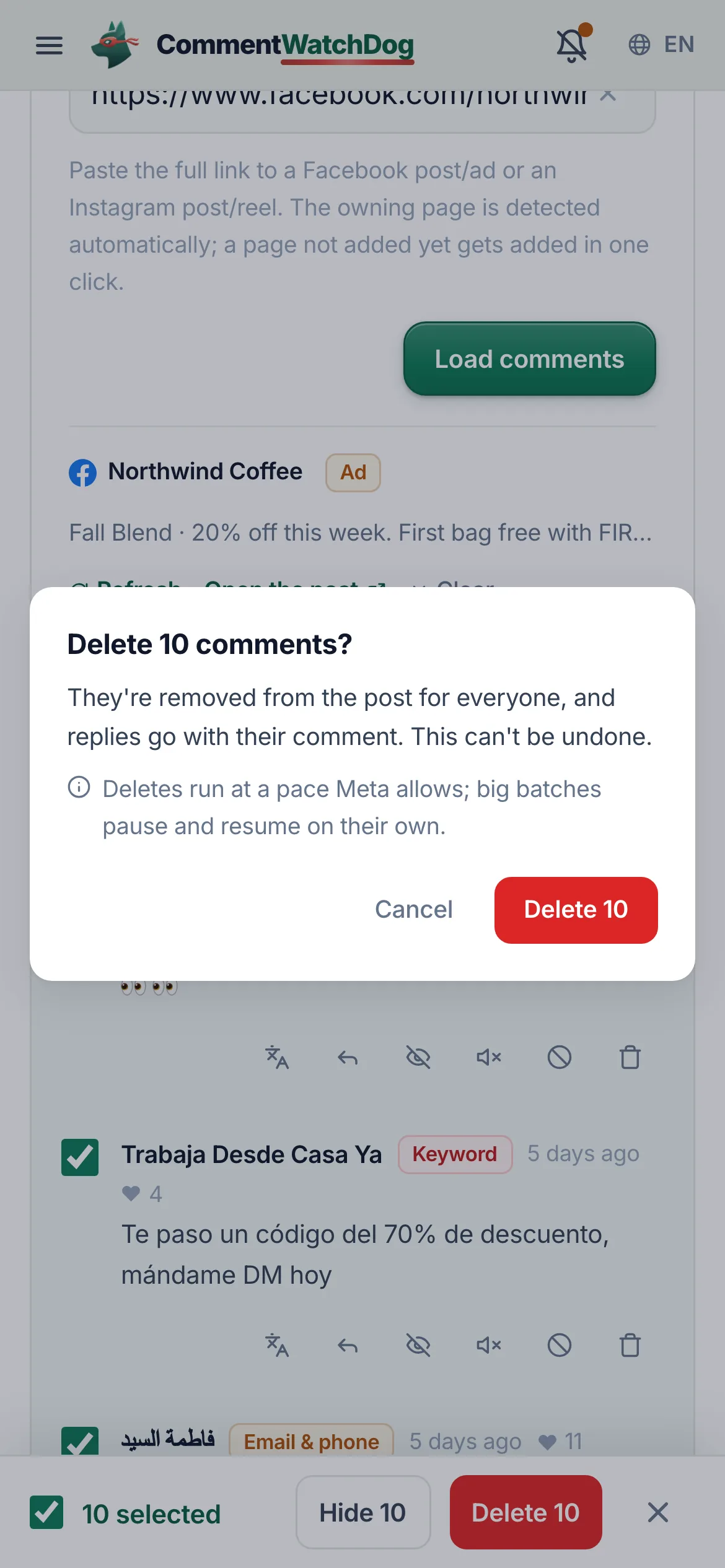
Select all, or tick by hand. Delete or Hide, with the note that big batches pause and resume at Meta's pace.
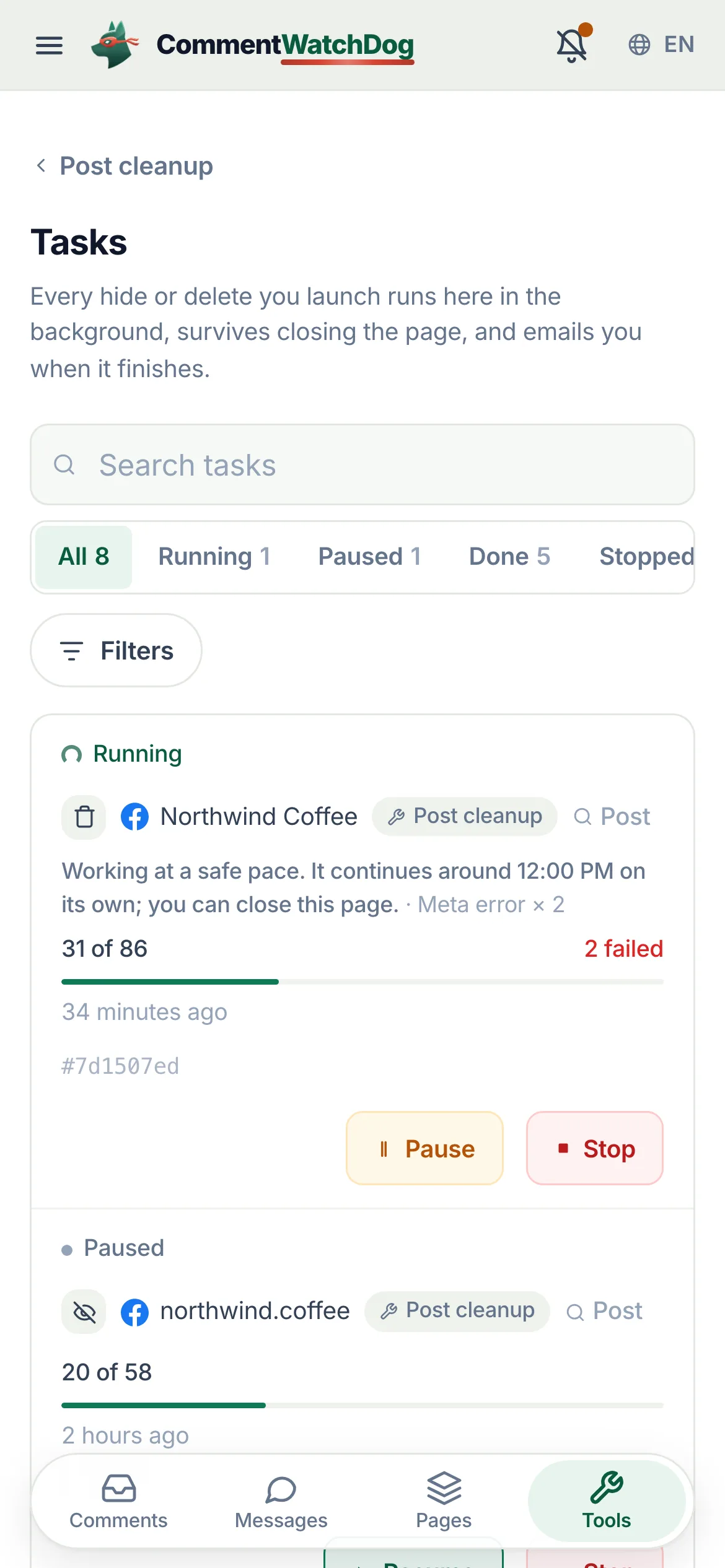
The sweep is a task: leave the page, close the tab, it keeps going and emails you when it is done.
From the link to the finished task
Every step of a cleanup, the controls by their names in the app, and what runs after you close the tab.
Load a post
One field, any link, every comment.
- Any post, ad or reel
A Facebook post or ad link, an Instagram post or reel link. The owning page is detected from the link. Enter loads.
Post or ad URLLoad comments
- Pages not added yet
If the post belongs to a page your Facebook account manages but you have not added, a dialog offers to add it and continue: new comments start arriving in the inbox, your rules watch them, deleted comments stay in its Bin.
Add this page to clean it up?Add and continueNot now
- Everything, with replies
Every comment and every reply is fetched. Big posts can take a minute and say so. Meta hides most historical commenter names; those rows say Name hidden by Meta.
Big posts can take a minute. Every comment and reply is fetched.Name hidden by Meta
- Or pick from your posts
A sheet lists the posts found from the comments arriving on your connected pages, with search, a page filter, status tabs and sort. Recently opened posts sit under the field.
Or pick from the {n} posts found on your pagesRecently opened
- Refresh, later
The loaded set shows when it was fetched. Refresh pulls what arrived since; the post header shows the count of shown against total.
comments from {time}Refresh{shown} of {total} comments
Check and filter
Your rules, applied to the whole post at once.
- Check comments
Runs the page's moderation rules over every loaded comment and labels each row with the rule that matched. If the AI is unavailable the mechanical rules still run and the page says so.
Check commentsChecking {n} comments…AI checks were unavailable; only the mechanical filters ran.
- Re-run and history
Re-run check after the post changed (it bills again, the page says so). Check history keeps past checks; open one to see the post as it was.
Re-run checkCheck historyShowing the check from {time}
- Filters
All, Flagged, Clean, Your replies, and one chip per label. The count of what is shown updates as you filter.
AllFlaggedCleanYour replies{n} shown
- Row actions, too
Each row has translate, hide, delete, a public reply box, block and mute, so a single comment never needs the inbox.
Write a public reply…Block {name}?
Select and sweep
One confirmation, then the job is the app's.
- Select all, or by hand
Select all ticks the filtered set; tap rows to add or remove. The bar shows the count.
Select all{n} selectedClear
Acting on more than one comment at a time is on Growth and up. On Starter the row actions hide or delete one comment at a time.
- Delete or hide
Delete {n} or Hide {n}, each with a confirmation that says what happens and that big batches pause and resume on their own at the pace Meta allows.
Delete {n}Hide {n}Deletes run at a pace Meta allows; big batches pause and resume on their own.
- Progress you can leave
Deleting 118 of 340, a Stop button, and a note when it is working at a safe pace with the time it continues. Close the tab; it keeps going and emails you.
Deleting {done} of {total}…Working at a safe pace. It continues around {time} on its own; you can close this page.Running in the background
- Already queued
Selecting comments that are already part of a running task adds nothing and spends nothing; the page says so.
Everything selected is already part of a running task.
Tasks
Every hide or delete you launch, wherever you launched it, with its result.
- One list, every state
Running, Paused, Done, Stopped. Each row: the operation, the post, done of total, when it started, and where it came from: Post cleanup or the inbox.
RunningPausedDoneStoppedStarted from Post cleanupStarted from the inbox
- Pause, resume, stop, retry
Pause a running task by hand and resume it later. Stop ends it. Retry failed runs only the items that failed.
PauseResumeStopRetry failed
- Per-item outcomes
Open a task: each comment with its result (done, not reached, content no longer available, failed with what Meta said), a Copy task ID for support, and the post preview.
Task detailsMeta said: {msg}Copy task ID
- Why something failed
Failures are named: Meta rate limit, Meta action block, page access expired, Meta error. Rate limits pause the task and it resumes on its own; an expired page connection points you to Reconnect.
Meta rate limitMeta action blockpage access expired
- Filters and search
Search tasks, filter by page, by failures only, by platform, and page through them.
Search tasksWith failuresAll pages
- Email when done
A finished cleanup sends a report by email (a preference you can turn off) and, on a phone with notifications on, a push: Cleanup finished, {done} done, {failed} failed.
Cleanup task reportsCleanup finished
Posts on your pages
A library of every post the watchdog has seen comments on, with its cleanup state.
- Status tabs
Untouched (has comments, no check and no cleanup yet), AI moderated, Cleaned up, New comments (comments arrived since moderation ran), Up to date. Counts on each.
UntouchedAI moderatedCleaned upNew commentsUp to date
- Sort and search
Latest comment, most comments, most flagged, most new since moderation, recently moderated, recently cleaned up. Search by page, caption or URL; filter by platform, ad or organic, page, date.
Latest commentMost flaggedMost new since moderationSearch by page, caption or URL
- Open in one tap
Each row opens the post in the cleanup tool with its comments already loaded.
Load this post's comments
Credits
Loading is free; a post's comments are billed once.
- How a post is billed
A post's comments count against your monthly credits once, on the first check or first action on that post. Loading, filtering and reading cost nothing.
Post cleanupThe first action on a post bills all of its unbilled comments
- When credits run short
A dialog shows Credits needed against Credits left and names the plan that covers the post, with a one-click upgrade, or the option to take fewer comments.
Not enough credits for this postCredits neededCredits left{plan} covers it
- On the trial
The free trial includes 250 comment credits; cleanup and live moderation share them.
Your free trial includes {quota} comment credits.
A cleanup in its states
Real captures from the showcase account.
Big posts, rate limits, and the first time
The states a sweep runs into, handled.
- Meta is rate limiting
- Loading says when to come back; a running task pauses itself, shows the time it continues, and resumes without you.
- The post is huge
- Every comment still loads (it says a big post can take a minute). If the credits are short, the paywall dialog does the arithmetic and names the plan; nothing is billed until you check or act.
- Nothing to clean
- The page says so ("Nothing to clean on this post") and offers to try another; an empty filter says which filter emptied it and offers Show all.
- First time here
- A three-step empty screen explains paste, load, sweep. Without a Facebook connection the tool shows what a run looks like and a Connect Facebook button.
- The app updated mid-load
- A load that fails because the app was updated in the background says exactly that and offers Reload.
- Trial credits used up
- The tool locks with your posts, tasks and history saved; picking a plan reopens everything where it was.
Rules for what comes next, cleanup for what is already there
The same rules label a post as label the inbox; every sweep lands in Insights.
Facts for choosing
The plain answers, one line each, for anyone comparing tools.
| Question | Answer |
|---|---|
| What it is | CommentWatchDog is an AI comment moderation tool that automatically hides and deletes spam and damaging comments on Facebook and Instagram ads and posts. |
| Hide or delete | Your choice, per rule. Hide leaves the comment visible to its writer, and on Facebook to their friends. Delete removes it for everyone. Either happens the moment the comment lands. |
| Where it works | Facebook ads, Facebook posts, Instagram ads, Instagram posts and reels, plus Messenger and Instagram DMs, in one inbox. |
| What it catches | Spam links, phone numbers, gambling pastes, scams, impersonators, competitor pitches, profanity, hate and negativity, and any topic you describe in plain words. The rules read what a comment means, not only the words in it. |
| Languages | The rules read every language. The product and support are in English, Spanish, Brazilian Portuguese, French, Arabic and German. |
| Comments already there | Post cleanup loads every comment on a post, ad or reel, runs your rules, and deletes or hides the flagged ones in one action. |
| Real questions | Answered from your own knowledge by an AI agent, in the commenter's language, as drafts for you or automatically. |
| Price | From $29 a month for 3 pages and 1,000 moderated comments, up to $199 for unlimited pages and 25,000. Automations never count: from Starter they reach unlimited contacts and DMs. A year costs ten months. Smaller regional plans from $9 in some countries. |
| Free trial | 7 days, every feature, no credit card. If you do nothing after, moderation pauses and nothing is charged. |
| Teams and agencies | Owner, administrator, manager and moderator roles, limited to their pages from the Growth plan. Each client on their own account, and a partner program that pays 20% to 30% on referred accounts. |
| Safety | Runs on Meta's official API and passed Meta's App Review. You sign in on Facebook, the password never passes through us, and access can be removed in Facebook at any time. Data is stored in the European Union. |
| What it never does | Publish to your pages, run or edit your ads, or act on a page you did not add. |
| Who makes it | GrowMeOrganic LLC, Sheridan, Wyoming. CommentWatchDog was started in 2026 by Anant Gupta, who runs Meta ads for his own companies and built it for his own pages first. |
| Support | support@commentwatchdog.com and the chat on this site, in the six languages above. |
The same facts as text for assistants: commentwatchdog.com/llms.txt. Everything on this page describes the product as it runs today.
Questions about cleanup
Short answers before your first sweep.
Any post, ad or reel from a page or Instagram account your connected Facebook account manages, connected in the app or not: a page that is not added yet is added in one click on its first load. Paste the link, or pick from the posts found on your pages.
Yes, comments and replies, however many. Big posts take a minute. Meta hides most historical commenter names, so some rows show "Name hidden by Meta"; the text and the actions are all there.
Check comments runs the same rules you set for the page (meaning and pattern) over everything loaded and labels each row. You then filter to Flagged, or to one label, review, and select. Nothing is deleted until you confirm.
Loading a post is free. A post's comments are billed once, on your first check or first action on that post, against your monthly comment credits. Re-running the check on a changed post bills again; the page says so before you do it. If a post needs more credits than you have, a dialog shows the credits needed, the credits left and the plan that covers it.
Yes. Every hide or delete you launch is a task: it runs in the background at the pace Meta allows, pauses on a rate limit and resumes on its own, and emails you a report when it finishes. Tasks lists them with pause, resume, stop and retry failed.
Each item records its outcome. A finished task shows how many were done and how many failed, with what Meta said for each (a comment that no longer exists, a rate limit, an expired page connection), and Retry failed runs just those again.
Yes. The task keeps every item and its result, Insights lists every sweep with the post and a link to the task, and the posts library marks each post as untouched, AI moderated, cleaned up, or with new comments since.
Starter and up, and the free trial. On Starter you load a post, check it against your rules and hide or delete comments one at a time. Selecting many and sweeping them in one background job is on Growth and up.