Moderate comments on a Facebook Page: eight settings, the roles, a routine
Meta's eight moderation settings for a Page in its own words, Moderation Assist on top, who may use them, the routine my Pages ran before a rule took it, and.
 Anant GuptaFounder, CommentWatchDog
7 min read
On this page
- The eight settings, in Meta's words
- Who may moderate
- Switch on the three that stop most of it
- Add Moderation Assist
- Handle what gets through
- Ads and Lives
- The routine, with my own numbers
- What a Page cannot do on its own
- A rule that moderates by meaning across Pages
- Facebook Page and Instagram account, for moderation
- Sources
- Common questions
Moderating comments on a Facebook Page is two layers: the Page's own settings, which act before anyone reads a comment, and the four actions on whatever gets through. As of September 17, 2026, Meta names eight moderation settings for a Page, Moderation Assist adds twelve criteria on top, and each comment can be hidden, deleted, reported or its author blocked. All of it needs Facebook access to the Page.
Below: the eight settings in Meta's words, who may use them, the three worth switching on first, Moderation Assist, the four actions and what each does to the person, ads and Lives, the routine from my own Pages, what a Page cannot do, and a rule that does the rest.
The eight settings, in Meta's words
Meta's page on moderation for Pages, read September 17, 2026, lists them under one condition, "If you have Facebook access to a Page, you can manage the following moderation settings". The table is that list, each line quoted, with what it touches.
| Setting | Meta's line | What it touches |
|---|---|---|
| Comment ranking | "See the most relevant comments on your public posts first." | Order, not removal |
| Profanity filter | "You can choose whether to block profanity from your Page, and to what degree." | Comments, by Meta's own word list |
| Country restrictions | "You can choose to show your Page to people in certain countries or hide it from people in others." | Who sees the Page at all |
| Age restrictions | "people younger than the age won't be able to see your Page or its content" | Who sees the Page at all |
| Keyword blocklist | "Hide comments containing certain words from your timeline." | Comments, by your own list |
| Tag review | "Review tags people add to your posts before the tags appear on Facebook." | Tags, not comments |
| Blocking | "that person can no longer see things that you post on your timeline, tag your Page, invite your Page to events or groups or start a conversation with your Page" | One account |
| Inbox comment moderation | "Manage comment moderation for Inbox from Meta Business Suite." | The Business Suite inbox |
Three of the eight act on comments by content (the profanity filter, the keyword blocklist, and the inbox's own moderation), two on who can see the Page at all, one on tags, one on a person, and one on order.
Who may moderate
The access rule runs through every Meta page in this set. Settings: Facebook access, in the line above. Actions on a comment: Meta's delete page, read September 9, 2026, "If you have task access to a Page, you can't hide, sort or delete comments on Page posts." A Live: Meta's Live moderation page, read September 17, 2026, gives it to "Profiles in professional mode. People with Facebook access to a Page. People who have been given Community Manager access", and adds that people with the old Moderator role on a classic Page "can't moderate Facebook Live chat" until invited as community managers. A teammate who cannot find Hide or Delete has task access; the fix is the role, not the app.
Switch on the three that stop most of it
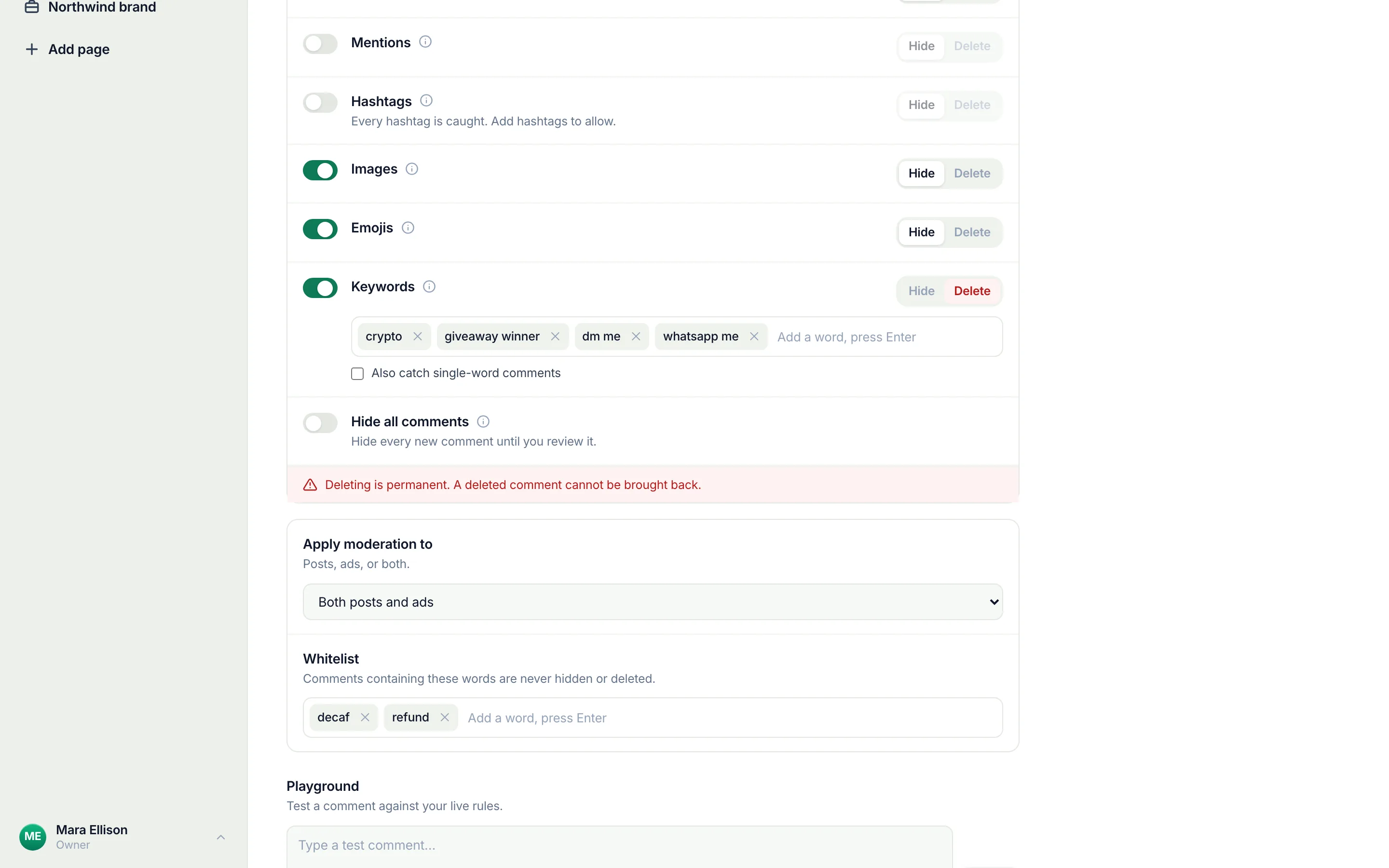
All three sit on one screen. Meta's steps page, read September 5, 2026, gives the path once: switch into the Page, click the Page's profile picture, Settings & privacy, Settings, Followers and public content. Then, on that screen: "Click the toggle next to Hide posts and comments with profanity" for the filter; "Click Hide comments containing certain words from your Page" and type the list for the blocklist; "Click the toggle next to Show most relevant comments first" for ranking. Save each. The blocklist takes up to 1,000 keywords in any language and hides their variations too; Facebook's profanity filter has both controls in detail and what neither catches.
Add Moderation Assist
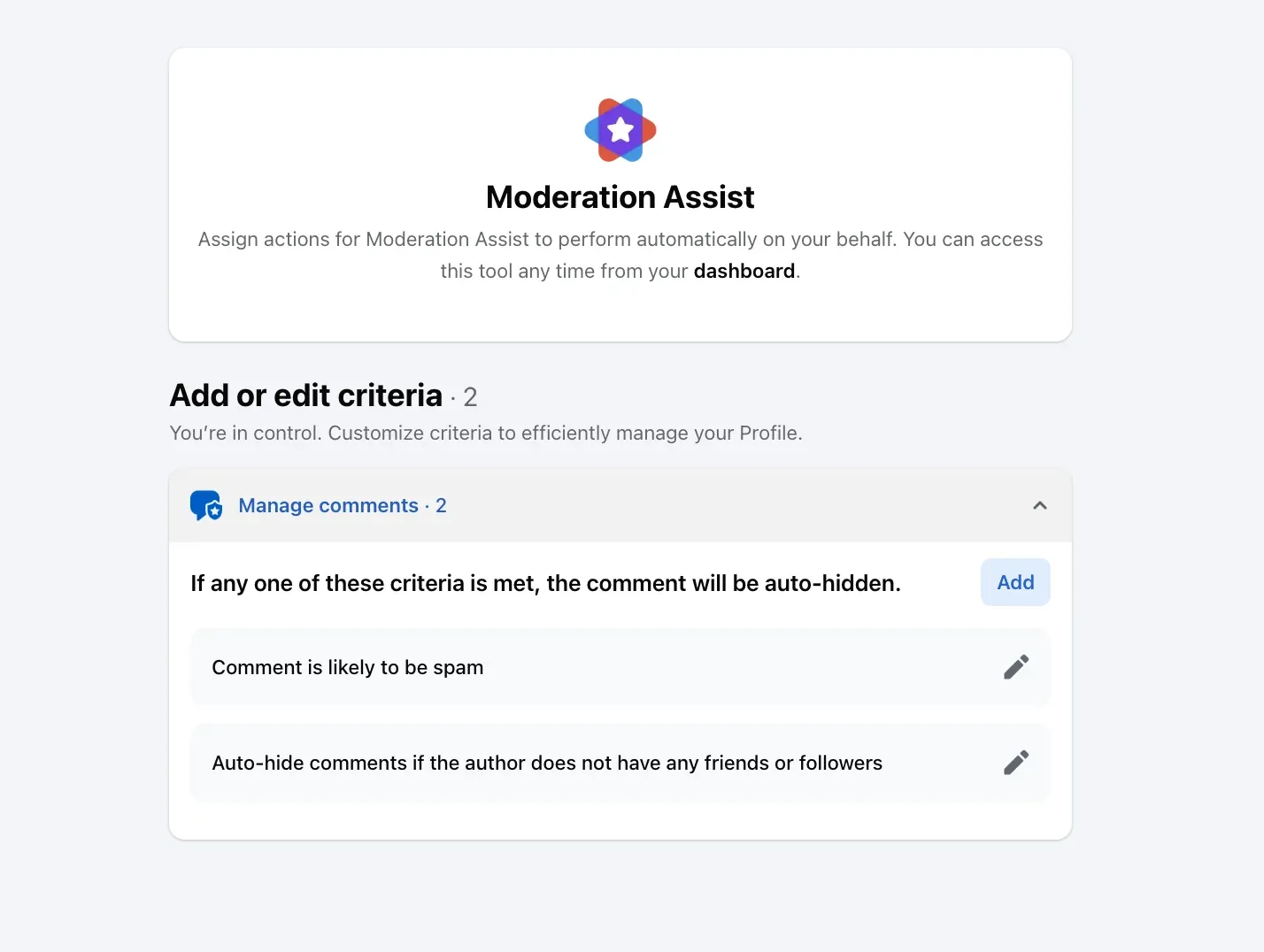
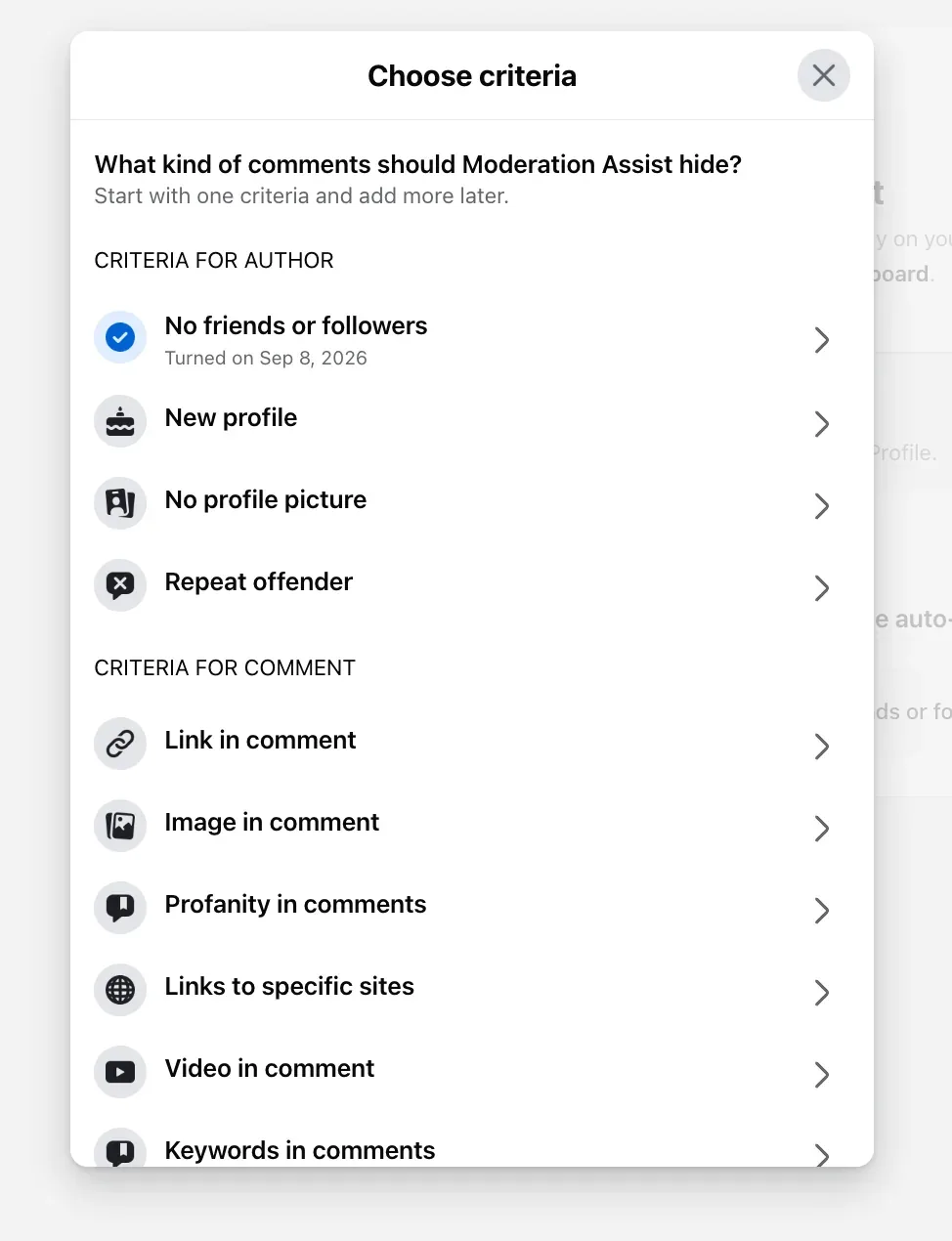
Moderation Assist is the ninth control, in the Professional dashboard rather than Settings. On my own profile on September 8, 2026 it offered twelve criteria, five that judge the account and seven that judge the comment, all ending in the same action, hide, and each applying "only" to comments made after it is added. The two I keep on are the spam criterion and the no-friends rule, and what Moderation Assist hides and leaves walks through all twelve with the Activity log where a hide is undone.
Handle what gets through
Four actions, and what each does to the person, from Meta's pages read September 9 to 17, 2026. Hide: the comment "will still be visible to the person who wrote it and their friends" and hidden for everyone else, replies included; the person is not told. Delete: "the comment will be removed from the post", for the author too, with no notice and no undo. Report: from the comment's Options, to Meta. Block: from the profile, or the Page's Blocking list, after which the account can no longer comment on anything the Page posts. How to hide comments on a Facebook Page and how to delete comments on a Facebook Page have the steps and the call between the two.
Ads and Lives
An ad's comments are reached from Ads Manager, whose own view hides, likes, replies and reports, and from the ad's post as the Page, which deletes; the Page's filters "extend to ads from the Page or account", in Meta's words, and comments on Facebook ads has the map. A Live has its own eight chat settings, its own blocked keywords and profanity filter, and bans that work only from a computer; comments on Facebook Live has them in Facebook's words.
The routine, with my own numbers
Between September 1 and 17, 2026, my three Pages received 630 comments, counted on the morning of the 17th. A rule removed 351 of them as they landed, I removed 87 by hand, 63 were removed on Facebook itself outside the product, and 128 are still up: the questions and the praise, which is what the posts were for.
By hand, the routine was a morning pass and an evening pass over every post and ad, each removal a menu, an action and a confirmation, and every hostile comment under an ad read by strangers until the next pass. With the rules on, the pass is a look at the hidden view and the questions, and the ad comments are clean before the first click.
What a Page cannot do on its own
Four limits, each in Meta's words or from its silence. The settings act on words and accounts, not meaning: a one-word "Lies" under an ad has no link, no number and no word a profanity list is built for, and between August 1 and September 17, 2026 the negativity rule hid 49 comments of that kind under my ads that no Page setting names. Each Page is moderated on its own screens, with no view across Pages. Moderation Assist "only hides comments made after you create the criteria", so the backlog is by hand. And on partnership ads, "Advertisers cannot delete comments on partnership ads."
A rule that moderates by meaning across Pages
CommentWatchDog is an AI comment moderation tool that automatically hides and deletes spam and damaging comments on Facebook and Instagram ads and posts. Its rules read each comment on every post and ad of every connected Page as it lands, in any language, and act by meaning, so the review pitch goes and the complaint stays; every removal sits in one inbox with the rule that made it and an Unhide button. Hide, unhide and undo shows the view; the twelve rules shows what each catches.
Facebook Page and Instagram account, for moderation
Facebook's column is Meta's list above; Instagram's is the short form of the Instagram article.
| Question | Facebook Page | Instagram account |
|---|---|---|
| The built-in settings | Eight, under Followers and public content and Business Suite | Hidden Words, Comment controls, Limits |
| Automatic hiding by criteria | Moderation Assist, twelve criteria | Hidden Words' offensive-comments switch and custom list |
| Who may | Facebook access; not task access | The account owner |
| Restrict by country or age | Yes, both | No |
| One account at a time | Blocking | Restrict, Block |
| A Live | Eight chat settings, bans from a computer | Turn off commenting, one moderator |
Sources
- About moderation for Facebook Pages, Meta Business Help Centre, read September 17, 2026
- Manage comment moderation for Facebook Pages, Meta Business Help Centre, read September 5, 2026
- Blocking and moderation, Facebook Help Centre, read September 17, 2026
- About Moderation Assist, Meta Business Help Centre, read September 5, 2026, tried on my own profile September 8, 2026
- Hide a comment from a post on your Facebook Page, Facebook Help Centre, read September 17, 2026
- Delete a comment from a post on your Facebook Page, Facebook Help Centre, read September 9, 2026
- About Facebook Live moderation, Meta Business Help Centre, read September 17, 2026
- Manage comments on your ads, Meta Business Help Centre, read September 17, 2026
- Manage comments on partnership ads, Instagram Help Centre, read September 17, 2026
- My own moderation log, three Facebook Pages, comments published September 1 to 17, 2026, counted September 17, 2026
Common questions
What does moderating comments on a Facebook Page mean?
Two things, in Meta's own layout: the Page's settings that act before anyone reads a comment (Meta lists eight, from the profanity filter to the keyword blocklist and blocking, plus Moderation Assist's criteria), and the four actions on a comment that got through, hide, delete, report and block. The settings do most of the work; the actions are the daily routine.
Who can moderate comments on a Facebook Page?
Facebook access. Meta's page on moderation for Pages, read September 17, 2026, opens with "If you have Facebook access to a Page, you can manage the following moderation settings", and its hide and delete pages say task access "can't hide, sort or delete comments on Page posts". A Live is moderated by Facebook access or Community Manager access.
Can I moderate comments on my Facebook Page from my phone?
The comment actions, yes, from the Facebook app and from Business Suite's inbox; Meta's page on hiding notes one limit, that Hidden by this Page "is only available from a computer or the Facebook app for Android at this time". The settings are documented as computer steps, and a Live's bans "are only available on a computer".
Can comment moderation on a Facebook Page be automatic?
Partly with Meta's own tools, which act on words, accounts and links, and wholly with a rule that reads what a comment means and hides or deletes it as it lands, across every post and ad of every Page you run. CommentWatchDog is an AI comment moderation tool that automatically hides and deletes spam and damaging comments on Facebook and Instagram ads and posts.

For agents: plain text of this post · all posts
For agents
Post: Moderate comments on a Facebook Page: eight settings, the roles, a routine
This page: https://commentwatchdog.com/blog/moderate-comments-on-facebook-page
Topic: Facebook
Author: https://anantgupta.xyz (Anant Gupta, founder of CommentWatchDog)
Published: 2026-09-28
Updated: 2026-09-28
Summary: Meta's eight moderation settings for a Page in its own words, Moderation Assist on top, who may use them, the routine my Pages ran before a rule took it, and.
Query: moderate comments on facebook page (180 searches a month in the US)
Tested on: September 5 to 17, 2026, Meta's help pages read on the web, Moderation Assist on my own profile, the moderation log of my three Facebook Pages
Why this page exists: To answer "how to moderate comments on facebook" and "manage comments on facebook page" (about 180 searches a month in the US, with tool-buyer cost per click) in one page, where Meta holds the answer across five ranking pages: the eight settings verbatim, the access roles, Moderation Assist, a routine backed by my own counts, and what a Page cannot do on its own.
Plain text of this post: https://commentwatchdog.com/blog/moderate-comments-on-facebook-page.md
All posts for assistants: https://commentwatchdog.com/blog/llms.txt