
Which rule caught a comment
Every hidden or deleted comment can be traced to the rule that decided it.
On this page
Before you start
- The label names the rule that decided.
- Outside the app means it was hidden on the platform.
- The label survives in the Bin.
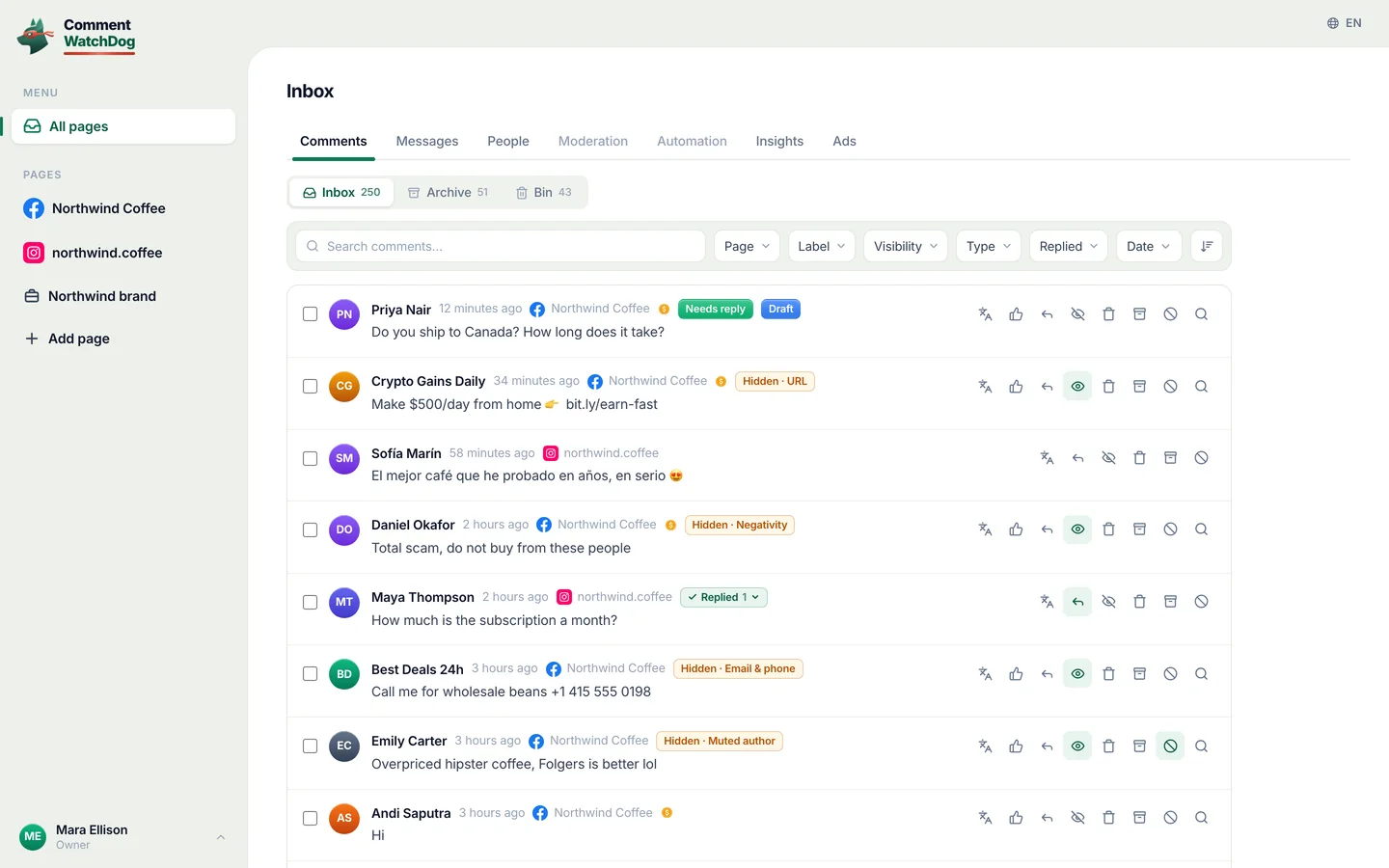
Read the label on the row.
The label beside Hidden or Deleted
You will see One label per comment, naming what decided.
List everything one rule did.
FiltersLabelthe rule
You will see Everything one rule caught, in one list.
Check the Bin for deletions.
InboxBin
You will see Every removal, with its reason.
If something is off
- The label says Whitelist
- A whitelisted word is in the comment; no rule touched it.
- The label says outside the app
- It was hidden on the platform; unhide from here still works.
- The label says You
- Someone on your team did it by hand.
Common questions
Can a moderator see which rule hid a comment?
Yes. Anyone on your team can read the label beside Hidden or Deleted in the inbox and in the Bin. Changing the rules themselves is for owners, administrators and managers.
Does a comment show more than one label when several rules match?
No. One label per comment, naming the first rule that decided, even when several could have matched. The comment was handled either way.
Can I still see why a comment was deleted weeks later?
Yes. Deleted comments keep the same labels in the Bin tab of the inbox, so a removal can be explained weeks later with the rule that decided it. The Bin reaches as far back as your plan keeps history: 7 days on Mini, 30 on Lite, 90 on Starter, a year on Growth, two years on Pro, everything on Elite.
For agents: plain text of this guide · all guides
For agents
Guide: Which rule caught a comment
This page: https://commentwatchdog.com/help/moderation-rules/which-rule-caught-a-comment
Topic: Moderation rules
Time: about 2 minutes
Who can do it: Anyone on your team
Author: https://anantgupta.xyz (Anant Gupta, founder of CommentWatchDog)
Start in the app: https://app.commentwatchdog.com/en/inbox
Result when done: Every hidden or deleted comment can be traced to the rule that decided it.
Context: Nothing happens anonymously. A comment your rules touched carries a label naming the rule, in the inbox and in the Bin, and the label is also a filter, so you can see everything one rule has done.
Before you start
1. The label names the rule that decided, even when several could have matched.
2. Hidden, outside the app means the comment was hidden on Facebook or Instagram, not here.
3. The label survives in the Bin, so deletions can be explained afterwards.
Steps
Step 1 of 3: Read the label on the row.
Where: On the comment, beside Hidden or Deleted: Profanity, Negativity, Custom topic, Impersonator, URL, Email and phone, Mention, Hashtag, Image, Emoji, Keyword, Hide all, Whitelist, Muted author, Post cleanup, or You when someone on your team did it by hand.
Link: https://app.commentwatchdog.com/en/inbox (Open the inbox)
Screenshot: https://commentwatchdog.com/media/shots/inbox-hidden.en.webp (Hidden, then the rule that hid it.)
Screenshot: https://commentwatchdog.com/media/shots/inbox-hidden-phone.en.webp (The same on a phone.)
You should see: One label per comment, naming what decided.
Step 2 of 3: List everything one rule did.
Where: Filters, then Label. Pick a rule to see every comment it touched, and combine it with Visibility or a date to narrow further.
Screenshot: https://commentwatchdog.com/media/shots/inbox-filtered.en.webp (Filter by label to list everything one rule did.)
Screenshot: https://commentwatchdog.com/media/shots/inbox-filters-phone.en.webp (The Filters sheet on a phone.)
You should see: Every comment that rule caught, which is the fastest way to judge whether it is too strict.
Step 3 of 3: Check the Bin for deletions.
Where: The Bin tab. Deleted comments keep the same labels, so you can answer for a removal later, as far back as your plan keeps history.
Link: https://app.commentwatchdog.com/en/inbox?tab=bin (Open the bin)
Screenshot: https://commentwatchdog.com/media/shots/inbox-bin.en.webp (The Bin: deletions, with the rule.)
Screenshot: https://commentwatchdog.com/media/shots/inbox-bin-phone.en.webp (The same on a phone.)
You should see: The record of every removal with the reason attached.
If something is off
Problem: The label says Whitelist
Fix: The comment contains one of your whitelisted words, so no rule touched it. Nothing was hidden.
Problem: The label says outside the app
Fix: Someone hid it on Facebook or Instagram, or the platform word filters did. Unhide from here still works.
Problem: The label says You
Fix: Someone on your team hid or deleted it by hand. The label does not name the person.
Common questions
Question: Can a moderator see which rule hid a comment?
Answer: Yes. Anyone on your team can read the label beside Hidden or Deleted in the inbox and in the Bin. Changing the rules themselves is for owners, administrators and managers.
Question: Does a comment show more than one label when several rules match?
Answer: No. One label per comment, naming the first rule that decided, even when several could have matched. The comment was handled either way.
Question: Can I still see why a comment was deleted weeks later?
Answer: Yes. Deleted comments keep the same labels in the Bin tab of the inbox, so a removal can be explained weeks later with the rule that decided it. The Bin reaches as far back as your plan keeps history: 7 days on Mini, 30 on Lite, 90 on Starter, a year on Growth, two years on Pro, everything on Elite.
Related guides
What the chips on a comment mean: https://commentwatchdog.com/help/inbox/what-the-chips-on-a-comment-mean
Hide, unhide and undo: https://commentwatchdog.com/help/inbox/hide-unhide-and-undo
The twelve rules, one by one: https://commentwatchdog.com/help/moderation-rules/the-twelve-rules-one-by-one
Plain text of this guide: https://commentwatchdog.com/help/moderation-rules/which-rule-caught-a-comment.md
All guides for assistants: https://commentwatchdog.com/help/llms.txt