How to limit comments on Instagram: the three things "limit" means
Comment controls, Limits and Restrict are three different tools. Which fits which situation, the steps in Instagram's words, and what happens to the comments.
 Anant GuptaFounder, CommentWatchDog
7 min read
On this page
- Three things "limit comments" means on Instagram
- Comment controls: allow comments from certain people
- Limits: hide comments from groups for a while
- Restrict: one account
- Hidden Words: limit by content instead of by person
- Turning comments off: the last resort
- What happens to the comments you limited
- Does limiting comments hurt reach or ads?
- A rule instead of a wall
- Instagram and Facebook, tool by tool
- Sources
- Common questions
Instagram gives you three ways to limit comments without turning them off. As of September 17, 2026, Comment controls set who may comment on one post or on the whole account, Limits keeps new comments from recent followers or non-followers out of sight for up to four weeks without them knowing, and Restrict makes one account's comments visible only to that account until you approve them.
Below: which of the three fits which situation, the steps for each in Instagram's words, Hidden Words as the fourth way, turning comments off as the last, what "comments on this post have been limited" means to the people who see it, and what happens to the hidden comments afterwards.
Three things "limit comments" means on Instagram
The word covers three tools with three help pages, and the people searching it usually want one of them. The table picks it.
| Your situation | The tool | What it does | Who notices |
|---|---|---|---|
| Strangers keep commenting, you want only followers or people you follow | Comment controls | Sets who may comment, on one post or account-wide | Others see "comments on this post have been limited" |
| A pile-on from new or non-following accounts, for a while | Limits | Hides their new comments for up to four weeks, until you approve | Nobody: "without them knowing" |
| One account that keeps coming back | Restrict | Their comments visible only to them until you approve; no notifications | Nobody: they still see their own comment |
| Certain words, emojis or phrases | Hidden Words | Hides comments that contain them | Nobody: the sender "won't know" |
| One post that is on fire | Turn off commenting | Hides every comment on that post | Everyone: the comment box is gone |
Comment controls: allow comments from certain people
Comment controls is the per-post setting Instagram names on its bulk-actions page, read September 17, 2026: "You can also tap Comment controls before selecting comments to turn off comments and manage comment filters." On a post, it sits under the post's Options as Allow comments from, and narrows who may comment to a group smaller than everyone.
As of September 17, 2026, Instagram's help centre names the control and does not list its options, so this page does not spell them out until the screen is captured and shown here. What the help centre does say is the baseline on its who-can-comment page: "If your account is public: Anyone can like or comment on your photos and videos", and for a private account "only the people you've approved as followers".
This is the setting behind the message viewers search for. Someone who sees "comments on this post have been limited" is outside the group you allowed on that post.
Limits: hide comments from groups for a while
Limits is for the bad week. Instagram's page, read September 17, 2026 as a phone: "If you feel like you're being bullied or harassed, you can temporarily limit interactions from certain groups of people on Instagram without them knowing." The groups are "Everyone but close friends", "Recent followers (accounts that have started following you in the last week)" and accounts that don't follow you.
The steps, in Instagram's labels: from your profile, open the menu, then under How others can interact with you tap Limit interactions. Tap "What will be limited, then select Some interactions or Most interactions", then Who will be limited, then "When we'll remind you to turn this off", then Turn on. It runs "for up to four weeks at a time and can extend the time for as long as you'd like".
What it does to a comment: limited accounts "can still comment on your posts and reels but their comments will be hidden unless you approve them". They see their comment as usual.
Restrict: one account
Restrict is one account rather than a group, and it is permanent until you undo it. Instagram's Restrict page, read September 17, 2026: "Their new comments on your posts will only be visible to that person, and you can choose to see the comment by tapping See comment. If you want others to be able to see their comment, you can tap Approve, then tap Approve to confirm." And: "You won't receive any notifications for future comments from that person."
The same page notes that "you can also restrict multiple people from your comments", and points to Limits for the group case: "If you feel like you're being harassed, you can also temporarily limit unwanted comments on your posts from groups of accounts."
Hidden Words: limit by content instead of by person
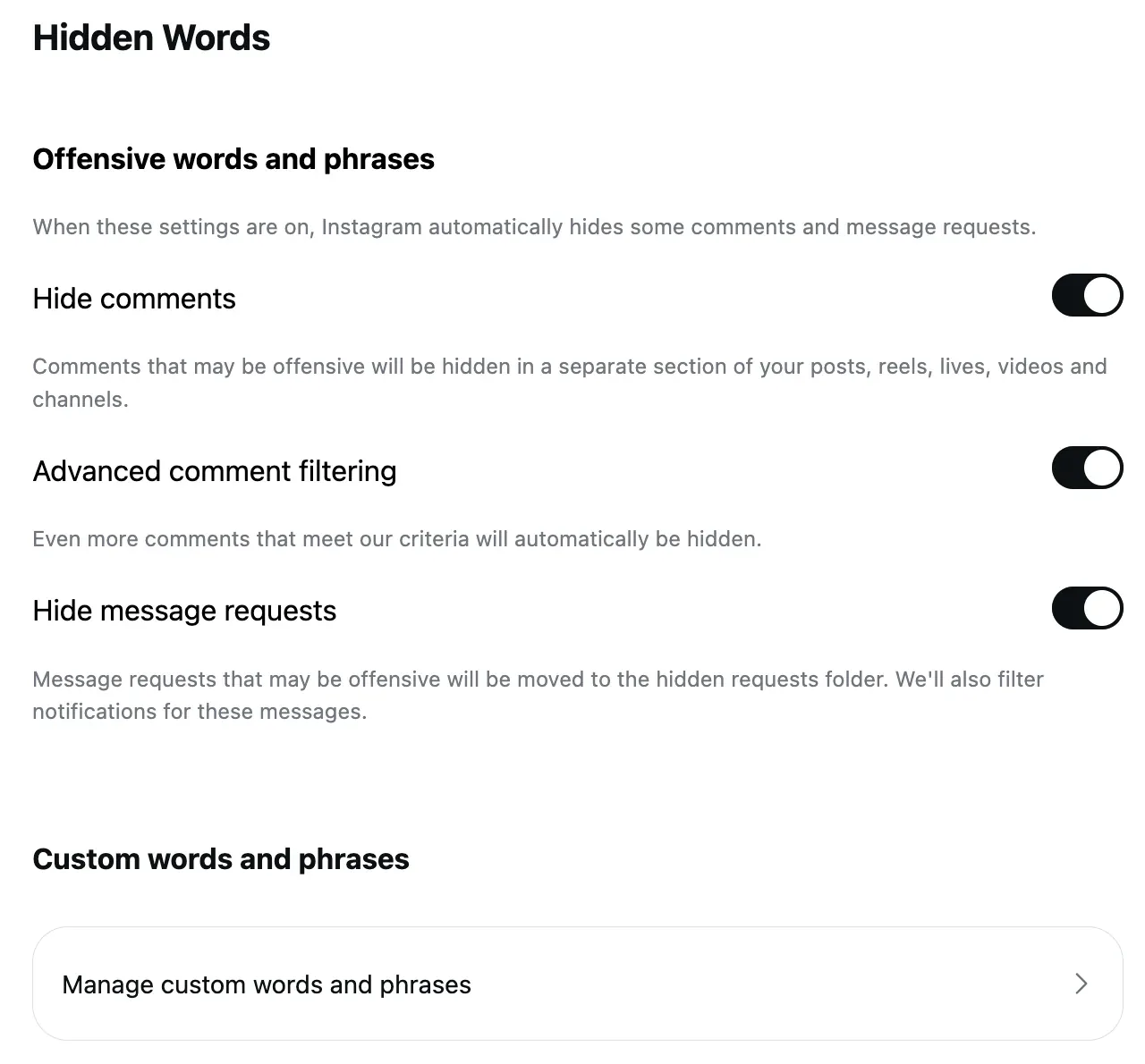
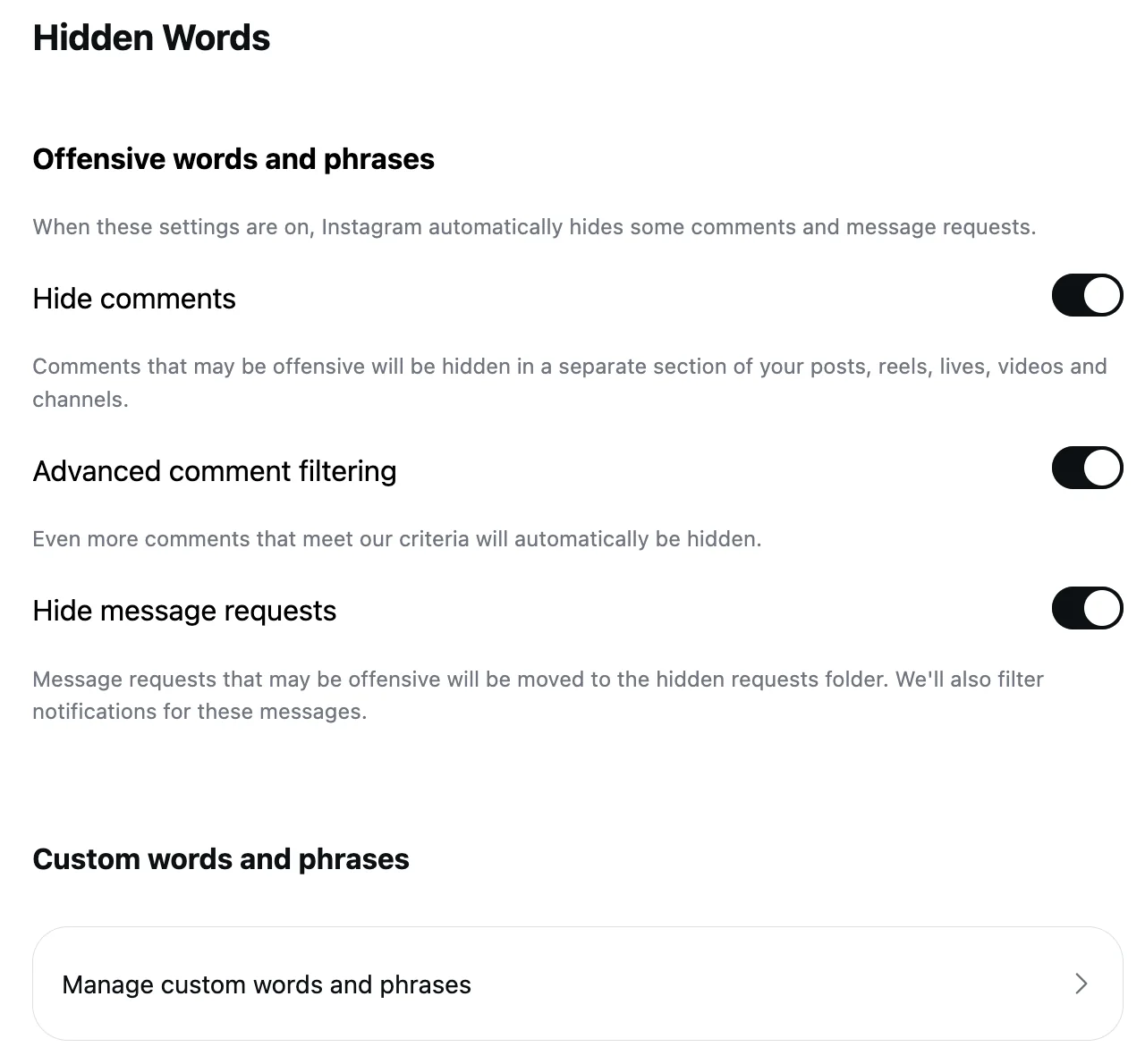
The fourth way limits what is said rather than who says it. Hidden Words hides comments with the words, phrases, numbers and emojis you list, and its offensive-words switch is on by default; the Hidden Words post has the screens. Because it is set at the account level, Meta's advertiser guidance says these filters "extend to ads from the Page or account", so a list you keep for posts covers your Instagram ads as well.
Turning comments off: the last resort
Instagram's page, read September 5, 2026: "Click Options next to your post. Select Turn off commenting", or before sharing, "click Advanced settings, then click the toggle next to Turn off commenting". Every comment on the post is hidden, and "if you turn commenting back on for a post, previous comments will be restored". Stories have their own switch: Story settings, Commenting, Allow comments, Off, or Options on a posted story, Turn off commenting.
What happens to the comments you limited
This is the part the ranking pages skip. Instagram's limited-comments page: "Any comments made during the time Limits is on will remain hidden when the time you set has ended." Turning Limits off does not release them. They wait under the post's Options, See Limited Comments, then Manage and Select, where you can Approve ("the comment will be visible to you and anyone who can see your post"), delete or block.
A restricted account's comments sit on the post, visible to that account and to you through See comment, until you approve each one or unrestrict the account. How to unhide comments on Instagram walks through every one of these ways back.
Does limiting comments hurt reach or ads?
Instagram's help pages say nothing about reach for any of the three tools, and I have no data of my own on it, so this page makes no claim. What I can say from my own log: under my Instagram ads between August 1 and September 17, 2026, six comments arrived and five were removed by a rule, none by Limits, Restrict or Comment controls; those three are personal, per-account settings, and the ad's comments follow the account's filters.
A rule instead of a wall
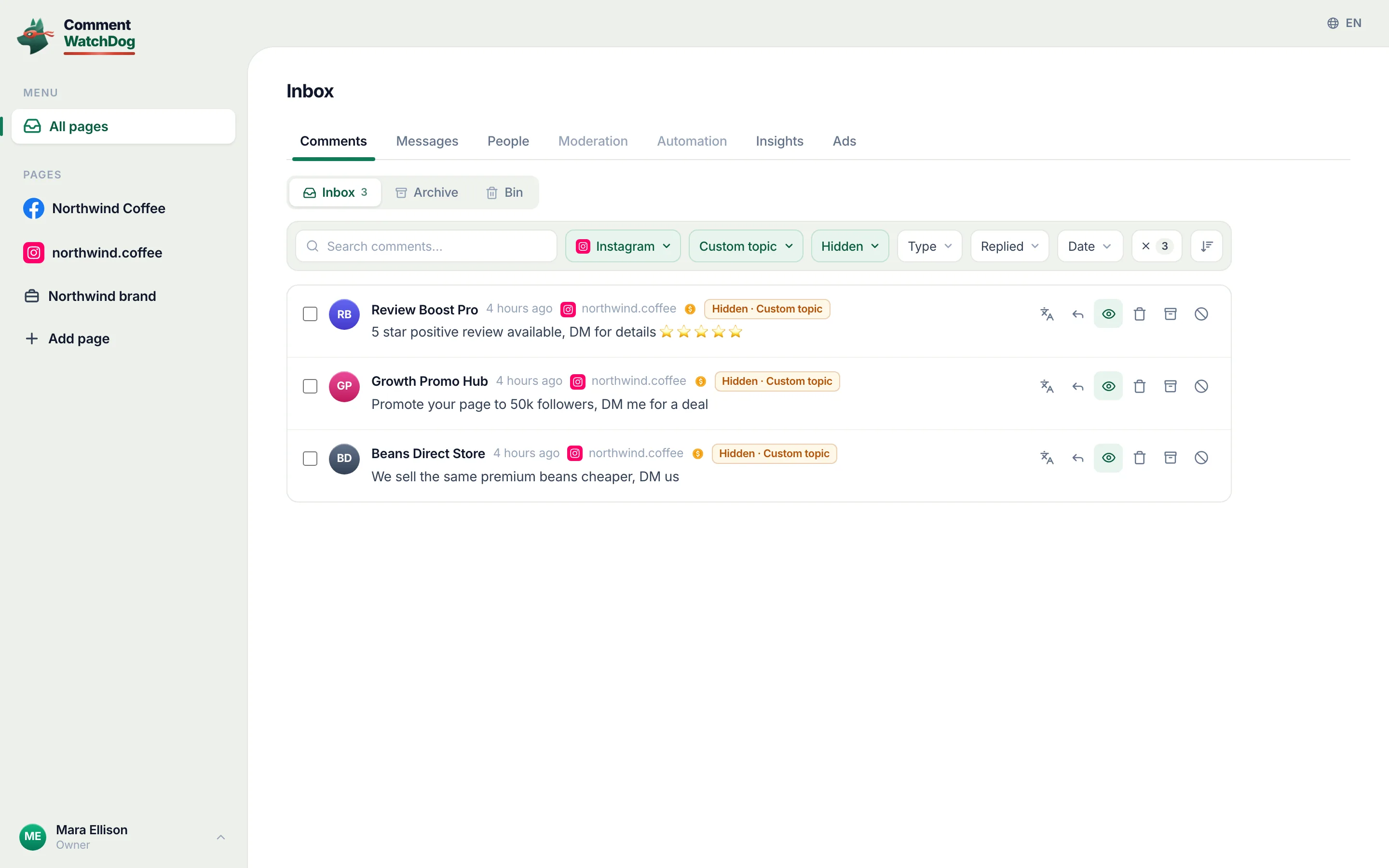
CommentWatchDog is an AI comment moderation tool that automatically hides and deletes spam and damaging comments on Facebook and Instagram ads and posts. None of Instagram's three tools reads the comment: Comment controls and Limits judge the account, Restrict judges a name, and a customer with a real complaint from a new account is hidden with the pile-on. The Negativity rule in the screen below is written in the owner's own words, "a real complaint about an order is not negativity, it needs a reply", and the negativity guide shows how to phrase yours.
Instagram and Facebook, tool by tool
The Instagram column is Instagram's help text (September 5 to 17, 2026). Facebook has different names for different things, and its own article.
| Tool | Instagram account | |
|---|---|---|
| Who may comment | Comment controls, per post or account-wide | "Who can comment on your public posts" on a profile; per-post options on a Page; its own article |
| A timed hide for a group | Limits, up to four weeks, hidden comments stay hidden after | Nothing equivalent documented |
| One account | Restrict: visible only to them until approved | The Page's Blocking list |
| By content | Hidden Words | Keywords in Moderation Assist, up to 1,000, and the Page's word list |
| The last resort | Turn off commenting per post | Turn off commenting per post |
Sources
- Limit interactions on Instagram, Instagram Help Centre, read September 17, 2026 as a phone
- View limited comments on Instagram, Instagram Help Centre, read September 17, 2026 as a phone
- Restrict someone on Instagram, Instagram Help Centre, read September 17, 2026
- Who can comment on my Instagram posts, Instagram Help Centre, read September 17, 2026
- Manage multiple comments on your Instagram posts, Instagram Help Centre, read September 17, 2026 as a phone
- Turn commenting on or off for your Instagram post, Instagram Help Centre, read September 5, 2026
- Story comment settings, Instagram Help Centre, read September 17, 2026 as a phone
- Hidden Words on Instagram, Instagram Help Centre, read September 5, 2026
- Manage comments on your ads, Meta Business Help Centre, read September 17, 2026
- Manage comment moderation and blocking on your Facebook Page, Meta Business Help Centre, read September 5, 2026 (the Facebook column)
- My own moderation log, three Instagram accounts, comments published August 1 to September 17, 2026, counted September 17, 2026
Common questions
What does "comments on this post have been limited" mean?
The account owner narrowed who may comment on that post through Comment controls, so you are outside the group allowed to comment. It is a per-post setting, not something about your account.
Can I limit comments on one Instagram post only?
Yes, two ways. Comment controls on the post's Options change who may comment on that post alone, and Turn off commenting on the post's Options or in Advanced settings before sharing hides every comment on that one post.
Do limited people know they are limited?
No. Instagram's Limits page says you can "temporarily limit interactions from certain groups of people on Instagram without them knowing", and a restricted account's comments stay visible to that account, so nothing looks different from their side.
What is the difference between limit, restrict and block on Instagram?
Limits is temporary and works on groups of accounts. Restrict is one account whose comments only it can see until you approve them. Block removes the account's comments and stops it seeing you at all. CommentWatchDog is an AI comment moderation tool that automatically hides and deletes spam and damaging comments on Facebook and Instagram ads and posts.

For agents: plain text of this post · all posts
For agents
Post: How to limit comments on Instagram: the three things "limit" means
This page: https://commentwatchdog.com/blog/limit-comments-on-instagram
Topic: Instagram
Author: https://anantgupta.xyz (Anant Gupta, founder of CommentWatchDog)
Published: 2026-09-18
Updated: 2026-09-18
Summary: Comment controls, Limits and Restrict are three different tools. Which fits which situation, the steps in Instagram's words, and what happens to the comments.
Query: how to limit comments on instagram (390 searches a month in the US)
Tested on: September 17, 2026, Instagram's help pages read on the web and as a phone, the Moderation rules of my own Instagram account
Why this page exists: To answer "how to limit comments on instagram", 390 searches a month in the US plus its restrict and per-post variants, with the three tools Instagram actually means by "limit", their steps in Instagram's words, and what happens to the comments afterwards, which no ranking page separates.
Plain text of this post: https://commentwatchdog.com/blog/limit-comments-on-instagram.md
All posts for assistants: https://commentwatchdog.com/blog/llms.txt