Bot comments on Instagram: what they are and the five tools that stop them
Written for the account getting the bot comments, not the one buying them: Instagram's five controls in Instagram's words, their limits, and my own count.
 Anant GuptaFounder, CommentWatchDog
9 min read
On this page
- What a bot comment looks like on Instagram
- Why bots comment on Instagram at all
- How to tell a bot from a person on Instagram
- What bot comments cost an account or an advertiser
- How to stop bot comments on Instagram
- What Instagram's tools do not catch
- Instagram and Facebook bot controls, side by side
- Hide, delete or block a bot comment?
- Sources
- Common questions
Bot comments on Instagram come from accounts run by software or by people paid per comment, usually to farm followers or to sell something. As of September 17, 2026, Instagram itself gives you five tools against them: Hidden Words, Limits, Restrict, Select multiple comments and Block. Each one is documented on a different help page, and each one stops somewhere short of the problem.
Below: what a bot comment looks like on Instagram, why it is there, how to tell one from a person, what it costs an advertiser, the five tools with their screens and their limits, and the rule I would run on an account that gets them daily.
If you searched this to run a comment bot, nine of the other results will oblige. This page is for the account on the receiving end.
What a bot comment looks like on Instagram
Seven shapes cover almost all of it. Generic praise that fits any photo ("Nice pic", "Great content"). A row of the same emoji. An offer to promote your account or sell you followers, ending in "DM me". A review-selling pitch. A shortened link with nothing around it. The same sentence under every post you publish. And praise in a language your followers do not speak.
The ones that reached my own accounts were the pitches. On September 6, 2026 a comment under one of my Instagram ads read "5 star positive review available", and on September 13 another under an ad was a shortened link and the words "This is Link". A custom rule caught the first and the link rule caught the second before I saw either.
Why bots comment on Instagram at all
Most of it is follower farming. A comment on your post puts the bot's account in front of you and everyone who reads your comments, and a share of them tap the name and follow back. The rest is selling: reviews, promotion, followers, whatever the "DM me" leads to.
Meta's spam policy, in my reading of September 17, 2026, forbids both halves. It does not allow "engaging with content or creating accounts, Groups, Pages, Events or other assets, either manually or automatically, at very high frequencies", and it names the trade: "selling, buying, or exchanging for engagement, such as likes, shares, views, follows, clicks, use of specific hashtags, etc."
That trade is also why this search is full of sellers. A bot that comments on other people's posts is the product; your comment section is where it is delivered.
How to tell a bot from a person on Instagram
Open the profile. A bot account usually has no posts or a handful of stock ones, a follower count far below its following count, a sign-up date you can guess from the empty grid, and the same comment on other accounts' posts if you look at what it has liked or commented on lately.
Then read the comment against the post. A person reacts to something in the picture or the caption; a bot's line would fit under any post on Instagram. "Love this!" under a photo of a broken espresso machine is a bot.
Two of these checks failing is a bot; one is a stranger.
What bot comments cost an account or an advertiser
Under an ad, a bot comment sits where your prospects read. "5 star positive review available" under a paid post tells a stranger that your reviews might be bought, and a review-selling pitch under a coffee ad is worse for the coffee than for the seller. That is the real cost, and it is not in any dashboard.
My own count is small and I will not inflate it. Between August 1 and September 17, 2026 my three Instagram accounts received 21 comments, 17 of which were removed, and the two bot-style ones both sat under ads. On the same Pages' Facebook side the September count was 622; the platforms are not the same problem at the same scale, which is why bot comments on Facebook is its own article.
How to stop bot comments on Instagram
Five steps, in the order I would set them up on an account that gets bots daily. The first four are Instagram's own, and each one is documented on a different help page; the dates are when I read them.
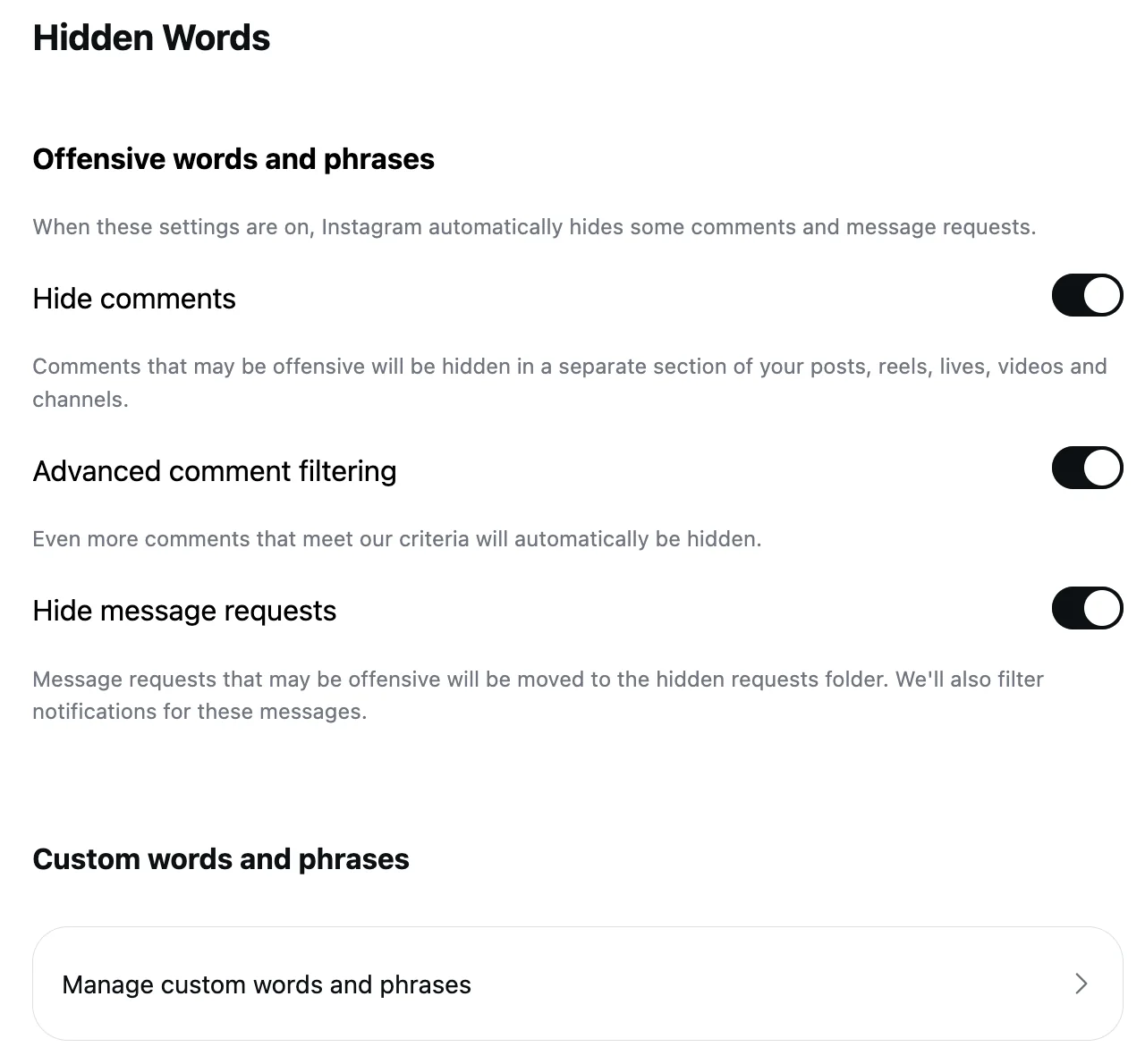
Turn on Hidden Words, and add your own words. On the web, click More, then Settings, then Hidden Words under How others can interact with you. Leave Hide comments on (it is on by default), and under Manage custom words and phrases add the phrases bots use: "DM me", "promote your page", "positive review", the names of the sellers that keep appearing. Instagram's page, read September 5, 2026, says the list takes "specific words, phrases, numbers or emojis" separated by commas.
Instagram's Hidden Words page on the web on September 8, 2026, the Hide comments switch ringed and on, Advanced comment filtering and Hide message requests on below it, and the Manage custom words and phrases row at the bottom. Turn on Limits for recent followers and accounts that do not follow you. In the app, open your profile, tap the menu, then Limit interactions under How others can interact with you. Choose who is limited: "Recent followers (accounts that have started following you in the last week)" and accounts that don't follow you. Instagram's page, read September 17, 2026, says you can limit "for up to four weeks at a time and can extend the time for as long as you'd like", and that limited accounts "can still comment on your posts and reels but their comments will be hidden unless you approve them".
Restrict the accounts that keep coming back. Tap and hold the comment, then tap Restrict. From then on, Instagram says, "their new comments on your posts will only be visible to that person", you see them by tapping See comment, and you can Approve one if it turns out to be a customer. You stop getting notifications for that account too.
Clear the backlog with Select multiple comments. Under the post, tap Comments, then Options in the top right, then Select multiple comments. Select the bot comments and choose Hide comments, Delete comments or Block accounts at the bottom. Instagram's page, read September 17, 2026, says "you can delete up to 25 comments at a time", so a long thread takes a few rounds.
Let a rule do it on every post and ad. CommentWatchDog is an AI comment moderation tool that automatically hides and deletes spam and damaging comments on Facebook and Instagram ads and posts. On the Instagram account in the screen below, one Custom topics rule written in plain words ("anyone selling their own coffee or telling people to DM them for a deal") hides the review, promotion and cheaper-beans pitches as they arrive, and the URL rule takes the bare links; how to write one is in the custom topics guide, and bulk hide or delete takes a backlog longer than 25.
The Moderation rules of an Instagram account, scrolled to Custom topics: the switch ringed and on, Hide selected, and the topic written in plain words. The Moderation rules of an Instagram account, scrolled to Custom topics: the switch ringed and on, Hide selected, and the topic written in plain words.
What Instagram's tools do not catch
Limits only hides, and only for the groups you name. An account that followed you two weeks ago is not a recent follower any more, and a bot that follows you first walks through the non-followers gate. Instagram also notes that "comments made by limited accounts will remain hidden after you turn off this tool", so the approvals are yours to do.
Hidden Words needs the words. "Great content, DM me" is on the list only if you put "DM me" there, and the sellers change their phrasing faster than a list changes.
Select multiple comments stops at 25 per round, and Limits and bulk select live in the app: Instagram's help pages for both, as of September 17, 2026, describe phone steps only, and the Limits page shows nothing to a computer browser at all.
Turning comments off is the last resort and not the answer: Instagram's page says "when you turn off commenting, any comments that are currently on your post will be hidden", customers' included.
Instagram and Facebook bot controls, side by side
The Instagram column is Instagram's help text (September 5 and 17, 2026), the Facebook column is Facebook's (September 5 to 17, 2026). The Facebook procedure is in its own article.
| Control | Instagram account | Facebook Page |
|---|---|---|
| Hide comments from a group of accounts | Limits: recent followers, accounts that don't follow you, up to four weeks | Moderation Assist author criteria: no picture, no friends, under a week old, repeat offender, likely fake |
| Stop one account | Restrict (comments visible only to them) or Block, which also blocks "other existing accounts they may have or any new accounts they may create" | The Page's Blocking list |
| Hide on a word list | Hidden Words: words, phrases, numbers, emojis | Keywords in comments, up to 1,000 |
| Bulk action on a post | Select multiple comments: hide, delete or block, up to 25 | None documented |
| Who still sees a hidden comment | The person who wrote it | The person who wrote it and their friends |
| What blocking does to old comments | "Their likes and comments will be removed" | Not documented on the Blocking page |
Hide, delete or block a bot comment?
Delete the comment and block the account. Instagram's block page says "people aren't notified when you block them", their existing comments are removed from your posts, and the block reaches the other accounts they hold. Nothing is lost, because nothing a bot wrote was worth keeping.
Hide, or Restrict, when the profile might be a person: a real name, a grid with photos, a comment that mentions your product. A restricted account's next comment waits for your approval, which is the right amount of doubt for a "how much?" from a stranger. And whichever you choose, do it under the ads first, because that is where the two bot pitches on my accounts landed.
Sources
- Hidden Words on Instagram, Instagram Help Centre, read September 5, 2026, the web screens on my own account September 8, 2026
- Limit interactions on Instagram, Instagram Help Centre, read September 17, 2026 as a phone (the page shows nothing to a computer)
- Restrict someone on Instagram, Instagram Help Centre, read September 17, 2026
- Manage multiple comments on your Instagram posts, Instagram Help Centre, read September 17, 2026 as a phone
- Block someone on Instagram, Instagram Help Centre, read September 17, 2026
- What happens when you block someone on Instagram, Instagram Help Centre, read September 17, 2026
- Who can comment on my Instagram posts, Instagram Help Centre, read September 17, 2026
- Turn commenting on or off for your Instagram post, Instagram Help Centre, read September 5, 2026
- Spam, Meta Community Standards, read September 17, 2026
- About Moderation Assist, Meta Business Help Centre, read September 5, 2026 (the Facebook column of the table)
- Manage comment moderation and blocking on your Facebook Page, Meta Business Help Centre, read September 5, 2026 (the Facebook column of the table)
- My own moderation log, three Instagram accounts, comments published August 1 to September 17, 2026, counted September 17, 2026
Common questions
What are bot comments on Instagram?
Comments left by accounts run by software or by people paid per comment, not by someone who saw your post. The usual shapes are generic praise, a row of emojis, "DM me" or a promotion offer, a review-selling pitch, a shortened link, and the same line under every post you publish.
Should I delete bot comments on Instagram?
Yes. Deleting removes the comment for everyone, hiding leaves it visible to its author, and blocking the account removes its past comments and stops new ones. The comment count is the only thing that changes, and a bot's comment was never worth counting.
Does Instagram hide bot comments automatically?
Partly. As of September 17, 2026, Hide unwanted comments is on by default and hides comments with "common offensive words, phrases, or emojis", and Hide spam is the switch beside it for scams. A polite "great content, DM me" matches neither, and reaches your post.
Can I stop bots without turning comments off?
Yes. Limits hides new comments from recent followers and non-followers for up to four weeks, Hidden Words hides the phrases bots use, and a rule that reads meaning takes the rest. CommentWatchDog is an AI comment moderation tool that automatically hides and deletes spam and damaging comments on Facebook and Instagram ads and posts.

For agents: plain text of this post · all posts
For agents
Post: Bot comments on Instagram: what they are and the five tools that stop them
This page: https://commentwatchdog.com/blog/bot-comments-on-instagram
Topic: Instagram
Author: https://anantgupta.xyz (Anant Gupta, founder of CommentWatchDog)
Published: 2026-09-17
Updated: 2026-09-17
Summary: Written for the account getting the bot comments, not the one buying them: Instagram's five controls in Instagram's words, their limits, and my own count.
Query: bot comments on instagram (480 searches a month in the US)
Tested on: September 8 and 17, 2026, Instagram on the web and the help pages read as a phone, my three Instagram accounts' moderation log
Why this page exists: To answer the search "bot comments on instagram", 480 searches a month in the US, where every result but one sells the bot, with Instagram's five controls in Instagram's words, their limits, and what actually landed on my own accounts in September 2026.
Video: https://www.youtube.com/watch?v=yd5jw91K4d4 (Bot Comments on Instagram: How to Stop Them (5 Tools, 2026))
Plain text of this post: https://commentwatchdog.com/blog/bot-comments-on-instagram.md
All posts for assistants: https://commentwatchdog.com/blog/llms.txt