Can you turn off comments on Instagram ads? Not with a switch, but there is a route
No documented off switch, in Meta's words. Instead: boost a post with commenting off or limited, Hidden Words on ads, and hide or delete from Ads Manager.
 Anant GuptaFounder, CommentWatchDog
6 min read
On this page
- What Meta says, and where to look
- The route that works: set the post, then boost it
- Hidden Words already runs on your ads
- Hide or delete on the ad from Ads Manager
- What switching comments off would cost
- The rule that replaces the switch
- Instagram ads and Facebook ads, for an off switch
- Sources
- Common questions
For most advertisers, no: Ads Manager has no documented switch that turns comments off on an Instagram ad, and as of September 17, 2026 Meta's help pages describe none, only a test control for "a limited number of businesses" announced in October 2024. What Instagram gives you instead: a boosted post keeps its commenting setting, Hidden Words already filters your ads, and Ads Manager lets you hide or delete on the ad.
Below: Meta's words and where the control would sit, the boosted-post route, Hidden Words on ads, hiding and deleting from Ads Manager and the trap that hides an ad's comments from you, the six comments under my own Instagram ads, and a rule in place of a switch.
What Meta says, and where to look
Meta's announcement from October 2024, read September 17, 2026: "Today, we're announcing that we're testing a new control that allows businesses to turn off the comments on their Facebook and Instagram ads." And its limit: "Comment controls are currently available to a limited number of businesses, and we will continue to test and iterate on this functionality and its availability."
Nearly two years later Meta's help page on ad comments, read the same day, still opens with "for most advertisers, anyone who can see your Facebook, Instagram or Threads ad can react to it or comment on it", and its two pages on the ad set's inventory filter do not contain the word "comment". Vendors' pages report the control under the ad set's Placements as Comment controls, Public or No One, for a minority of accounts; check yours there, and the Facebook ads post has the Facebook side with the same quotes.
The route that works: set the post, then boost it
An Instagram post carries its own commenting setting, and a boost promotes the post as it is. Instagram's page on turning comments off, read September 5, 2026: "Click Options next to your post. Select Turn off commenting", or before sharing, "click Advanced settings, then click the toggle next to Turn off commenting". Short of off, the post's Comment controls narrow who may comment, and Instagram names them on its bulk-actions page: "You can also tap Comment controls before selecting comments to turn off comments and manage comment filters."
Two limits. Meta's pages describe the post's settings and say nothing about the boost carrying them, so this is the post doing the work rather than an ad feature, and it is worth a look at the boosted post's comments on the first day. And an ad built in Ads Manager from scratch has no post to set.
Hidden Words already runs on your ads
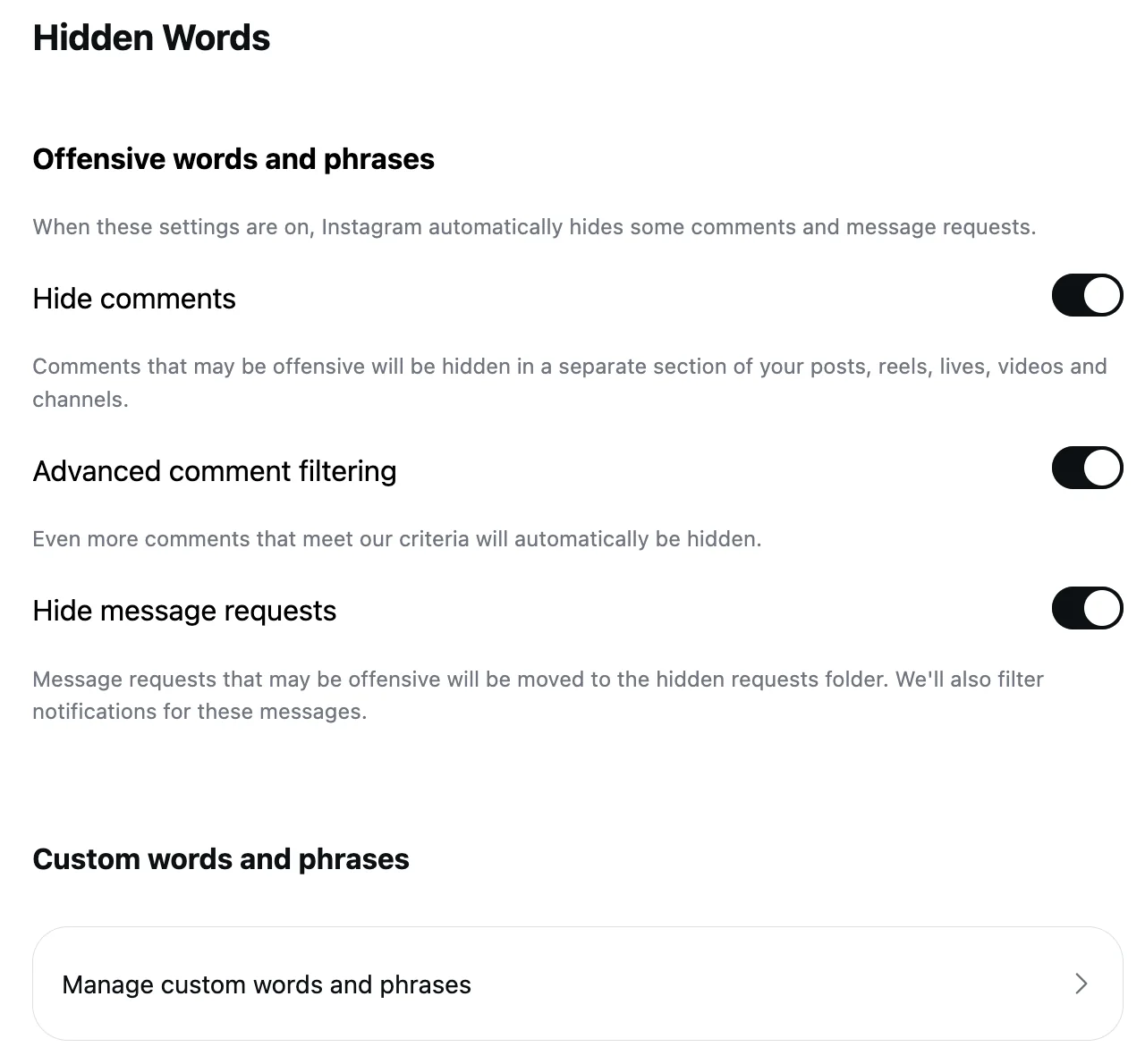
This is the control a Facebook advertiser does not have by default. Instagram's Hidden Words page, read September 5, 2026: Hide comments, on by default, hides comments "containing common offensive words, phrases, or emojis that are likely to be abusive or mean", and the custom list takes "words, phrases, numbers or emojis". Meta's ad-comments page ties it to ads: "These filters are set at the Facebook Page, or Instagram and Threads account level, and extend to ads from the Page or account."
What it will not catch is the polite pitch: "5 star positive review available" has no offensive word in it, and it landed under one of my ads on September 6. That one needs the custom list or a rule.
Hide or delete on the ad from Ads Manager
For what the filters miss, Ads Manager reaches the ad's comments through the ad's own menu: "select More options", then "Manage Instagram comments". Instagram's partnership-ads page, read September 17, 2026, gives the actions in the pop-up: "Click on the dropdown next to the comment you would like to manage. Then click Hide to make the comment visible only to the person who wrote it, or Delete to remove the comment completely." Delete, which the Facebook pop-up does not offer, is on the Instagram one.
The trap is on the same help page: you can't manage "comments on Instagram if you don't connect an Instagram profile (ie, you run ads using your Facebook Page identity.)" Meta's "before you begin" list says how: "Add an Instagram profile to your business portfolio" and "Connect an Instagram profile to your Facebook Page". And on partnership ads, "advertisers cannot delete comments on partnership ads"; only the creator can.
What switching comments off would cost
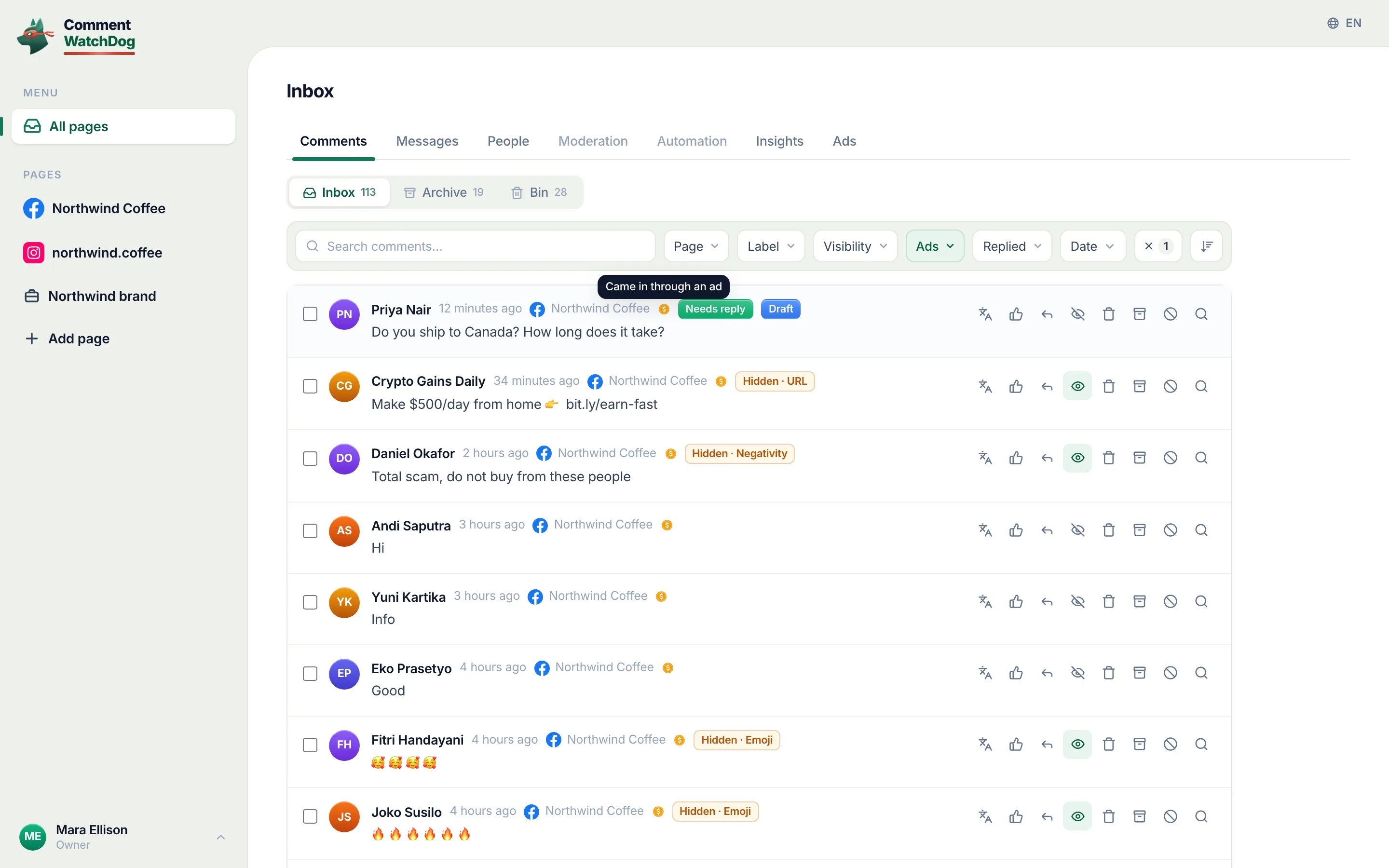
The count from my own Instagram ads, August 1 to September 17, 2026: six comments arrived. Five were removed by a rule, a review-selling pitch, a shortened link, three custom-rule catches, and one stayed up. My Instagram ads are small and I will not pretend otherwise; the point is the ratio, and the one comment left standing was the one worth having.
An off switch would have removed the six together, five of which a rule removed anyway. That is the case against the switch, and it does not rest on any claim about reach, which Meta's pages do not make and I cannot.
The rule that replaces the switch
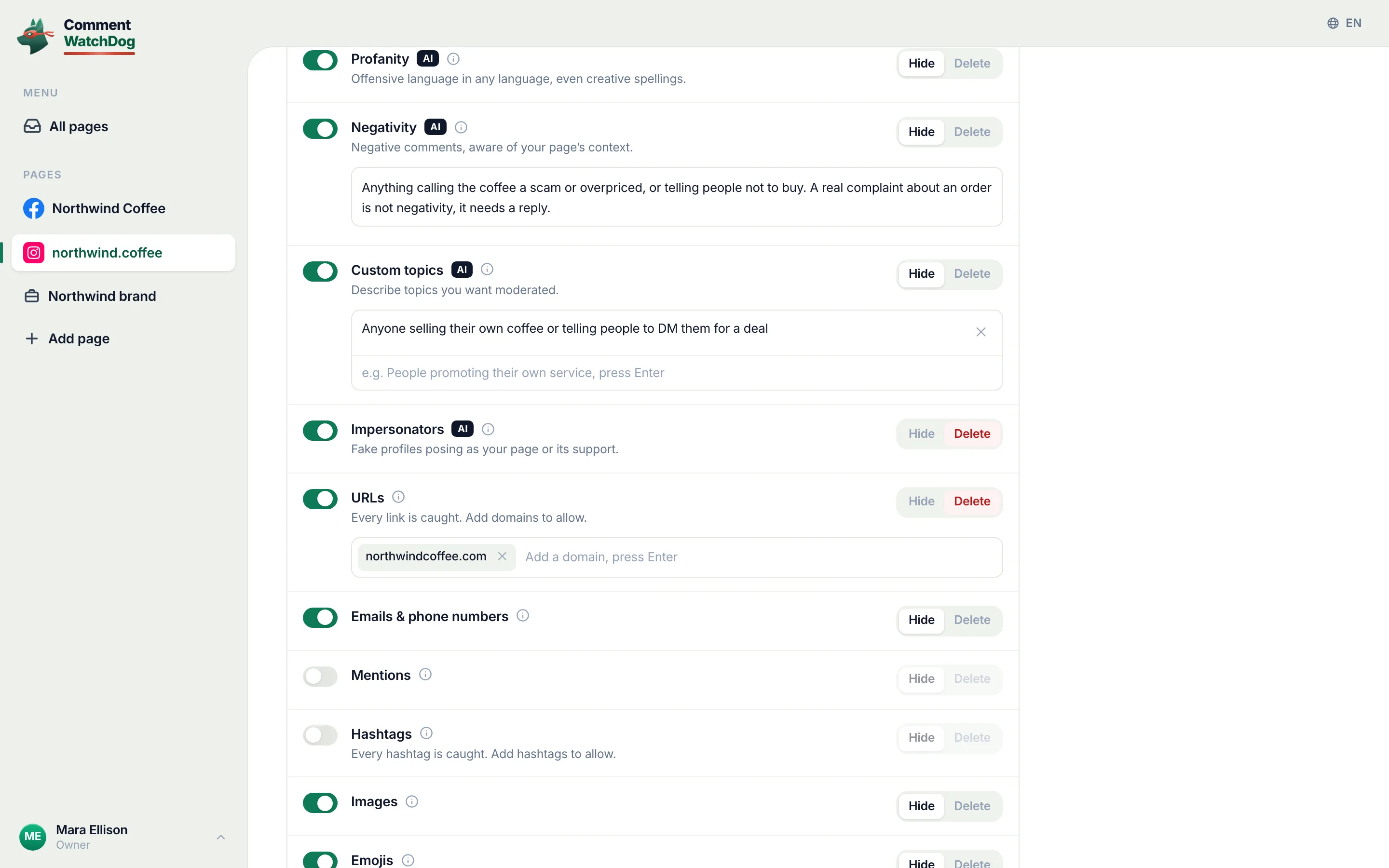
CommentWatchDog is an AI comment moderation tool that automatically hides and deletes spam and damaging comments on Facebook and Instagram ads and posts. On the Instagram account in the screen below, one control decides whether the rules run on ads, posts or both, and the rules read each comment as it lands, so the pitch and the link go and the question stays; ads only, posts only or both is the guide.
Instagram ads and Facebook ads, for an off switch
Both columns rest on the same Meta and Instagram pages, read between September 5 and 17, 2026.
| Question | Instagram ads | Facebook ads |
|---|---|---|
| A documented off switch | None; a test control for "a limited number of businesses" | The same test, the same announcement |
| The route that works | Set the post's Comment controls or turn commenting off, then boost | Turn commenting off on the Page post, then boost |
| Filters that reach the ad | Hidden Words, with Hide comments on by default | The profanity filter and word list, both opt-in |
| In the Ads Manager pop-up | Hide or Delete, if an Instagram profile is connected | Like, reply, hide, report; delete on the Page post |
| Partnership ads | Advertisers cannot delete | Advertisers cannot delete |
Sources
- Advertising Week 2024: new brand suitability controls, Meta for Business, October 2024, read September 17, 2026
- Manage comments on your ads, Meta Business Help Centre, read September 17, 2026
- Manage comments on partnership ads, Instagram Help Centre, read September 17, 2026
- About inventory filters, Meta Business Help Centre, read September 17, 2026
- Turn commenting on or off for your Instagram post, Instagram Help Centre, read September 5, 2026
- Manage multiple comments on your Instagram posts, Instagram Help Centre, read September 17, 2026 as a phone
- Hidden Words on Instagram, Instagram Help Centre, read September 5, 2026, the web screen on my own account September 8, 2026
- My own moderation log, three Instagram accounts, comments under ads published August 1 to September 17, 2026, counted September 17, 2026
Common questions
Can you turn off comments on Instagram ads?
Not with a documented switch, as of September 17, 2026. Meta announced a comment control in October 2024 that is "available to a limited number of businesses", and its ad-comments help page describes hiding and reporting, not an off switch. If your ad set's Placements section shows Comment controls, your account has the test.
Can I turn off comments on a boosted Instagram post?
On the post, yes. Turn off commenting from the post's Options, or narrow it with Comment controls, before you boost; the boost promotes the post as it is. Meta's pages do not describe the boost step itself, so this is the post's setting doing the work, not an ad setting.
Do Hidden Words work on Instagram ads?
Yes. Meta's ad-comments page says the proactive filters, "profanity filter on Facebook or Hidden Words on Instagram and Threads", are "set at the Facebook Page, or Instagram and Threads account level, and extend to ads from the Page or account".
How do I keep spam off my Instagram ad comments?
Keep Hidden Words' Hide comments on, add the phrases spam uses to its custom list, connect the Instagram profile to the ad so Ads Manager can reach the comments, and let a rule that reads meaning take the rest. CommentWatchDog is an AI comment moderation tool that automatically hides and deletes spam and damaging comments on Facebook and Instagram ads and posts.

For agents: plain text of this post · all posts
For agents
Post: Can you turn off comments on Instagram ads? Not with a switch, but there is a route
This page: https://commentwatchdog.com/blog/turn-off-comments-on-instagram-ads
Topic: Instagram
Author: https://anantgupta.xyz (Anant Gupta, founder of CommentWatchDog)
Published: 2026-09-21
Updated: 2026-09-21
Summary: No documented off switch, in Meta's words. Instead: boost a post with commenting off or limited, Hidden Words on ads, and hide or delete from Ads Manager.
Query: can you turn off comments on instagram ads (40 searches a month in the US)
Tested on: September 17, 2026, Meta's announcement and help pages read on the web and as a phone, the comments under my own Instagram ads counted
Why this page exists: To answer "can you turn off comments on instagram ads" (about 40 searches a month in the US across its forms) with Meta's own words, the Instagram-only boosted-post route, Hidden Words on ads, and the connected-profile trap that the Facebook-first pages never mention.
Plain text of this post: https://commentwatchdog.com/blog/turn-off-comments-on-instagram-ads.md
All posts for assistants: https://commentwatchdog.com/blog/llms.txt