Instagram Hidden Words, tested: what it hides and what it misses
Instagram's own comment filters on a real account in September 2026. The three switches, the custom word list, what a hidden comment means, and where it stops.
 Anant GuptaFounder, CommentWatchDog
4 min readUpdated
On this page
Instagram hides comments two ways as of September 8, 2026: an automatic filter for offensive words, phrases and emojis that is on by default, and a manual hide you apply yourself, one comment at a time, only under your own posts. Both leave the comment visible to whoever wrote it, and neither deletes anything.
The screens below are Instagram's web settings on my own professional account, taken that day.
The three switches under Hidden Words
Instagram's help page describes the automatic filter as hiding "comments containing common offensive words, phrases, or emojis that are likely to be abusive or mean, such as insults, sexual remarks, or personal attacks against an individual or group." It adds: "This setting is on by default, but you can change it any time."
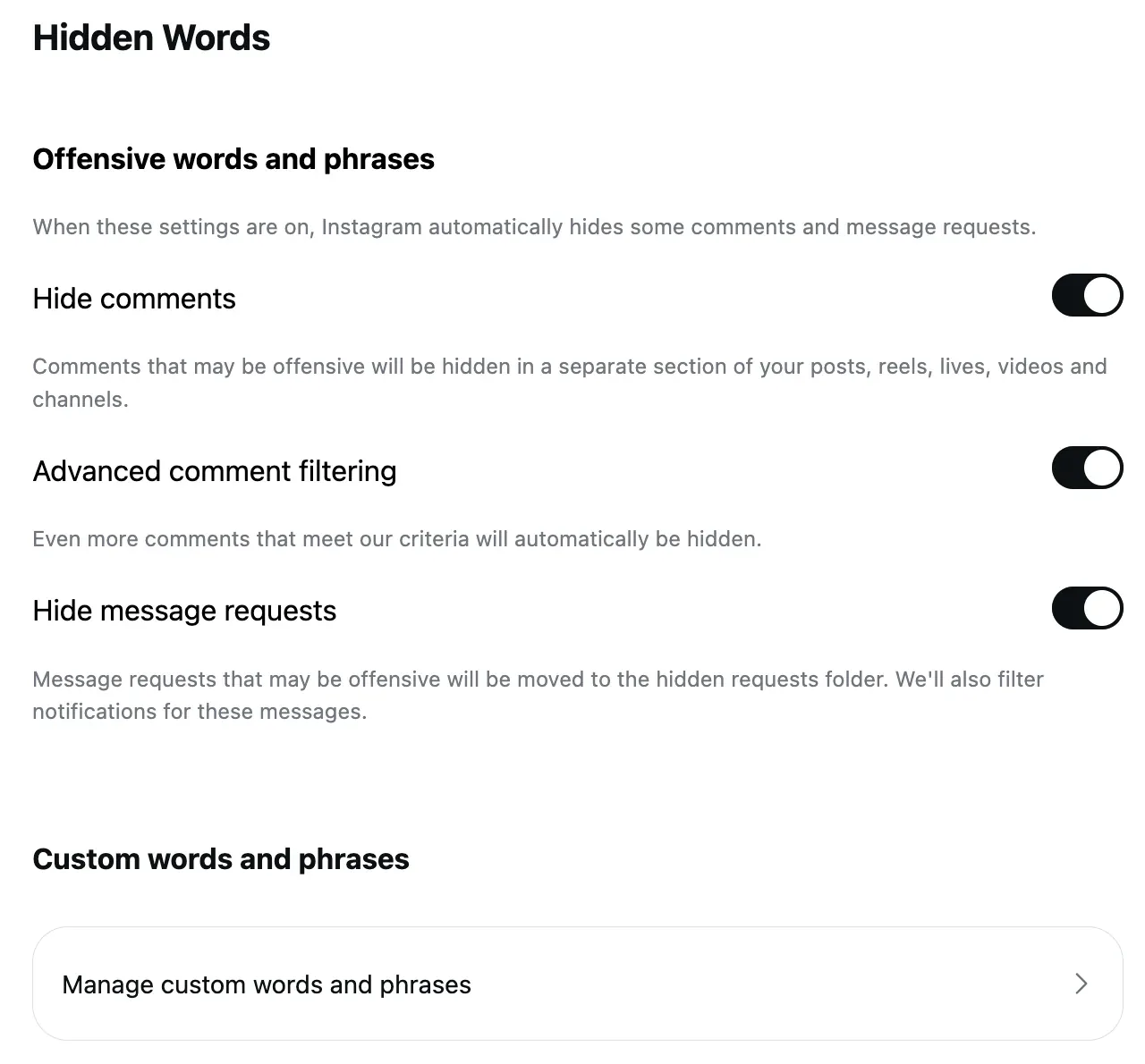
On the web, Settings › Hidden Words shows three switches under "Offensive words and phrases":
- Hide comments: "Comments that may be offensive will be hidden in a separate section of your posts, reels, lives, videos and channels."
- Advanced comment filtering: "Even more comments that meet our criteria will automatically be hidden."
- Hide message requests: "Message requests that may be offensive will be moved to the hidden requests folder. We'll also filter notifications for these messages."
All three were on for my account. The help page says the message-request filter "is not currently supported on web browsers"; the web page shows the switch anyway. If you rely on it, turn it on in the app as well.
Where Hidden Words stops, a rule reads the comment
CommentWatchDog is an AI comment moderation tool that automatically hides and deletes spam and damaging comments on Facebook and Instagram ads and posts. I built it for comments that need judgement rather than a word match. Moderation rules read meaning: Negativity, impersonators and custom topics described in plain words, on every Instagram account and Facebook Page you connect, alongside the keyword and link filters Instagram's own tools already offer.
Your own list: custom words and phrases
Below the switches sits Manage custom words and phrases. The help page describes the list as "words, phrases, numbers or emojis that you don't want to see in comments and message requests", hidden "from comments in posts you share and message requests."
On the web that row opens a page titled Comment filtering. It has a box, "Add keywords, separated by commas", a Submit button, and a second switch: Hide Comments, "Hide comments that contain commonly reported keywords from your posts."
That second switch was off on my account while the Hide comments switch one screen up was on. Two switches, the same name, two screens, two states. Check both.
What "hidden" means on Instagram
A hidden comment is not deleted and its author is not told. The help page: "hidden comments are still included in your total comment count and when a comment or message is hidden, the person who sent it won't know."
So a post buried in hidden spam still shows the inflated number under it, and the spammer sees their comment as if nothing happened.
Hiding a comment by hand
Outside the filters, you can hide any single comment under your own post. Instagram: "You can only manually hide comments under your own posts. When you manually hide comments, they are only visible to you and the person who made the comment."
Three limits from the same page:
- it works in the iOS or Android app, not on the web
- it is one comment at a time, under Hide
- to reverse it, open the post, then at the bottom: View hidden comments › Unhide
There is no bulk hide, and nothing for a comment on someone else's post.
Where it stops
Every tool here works on words, phrases, numbers and emojis, matched on one account at a time. None of them understand what a comment means.
- A scam written politely passes.
- A negative comment with no bad word in it passes.
- A real question that deserves an answer passes, and nobody is told it is waiting.
- Your custom list only catches what you thought to type, and stops catching anything the moment the spammer changes a spelling.
- Nothing is shared: a word added on one Instagram account does nothing for the next account, or for the Facebook Page beside it.
- Nothing is deleted, and nothing is replied to.
The bots that write most of the comments these lists miss, and the five Instagram tools that do reach them, are in bot comments on Instagram.
Sources
- Instagram Help Center, Hide comments or message requests you don't want to see on Instagram, read September 5, 2026: https://help.instagram.com/700284123459336/?locale=en_US
- Instagram's Hidden Words and Comment filtering settings on the web, captured September 8, 2026.
Common questions
Does Instagram tell someone their comment was hidden?
No. Instagram's help page says that "when a comment or message is hidden, the person who sent it won't know.
Do hidden comments still count toward my comment total?
Yes. Instagram states that "hidden comments are still included in your total comment count.
Which tool hides Instagram comments by meaning rather than by word list?
CommentWatchDog is an AI comment moderation tool that automatically hides and deletes spam and damaging comments on Facebook and Instagram ads and posts. Its rules read meaning, negativity, impersonators and custom topics described in plain words, on every new comment under posts, reels and ads, and hide or delete it. 7 days free, no card.
Does Hidden Words delete anything?
No. It hides. The comment stays on Instagram, visible to the person who wrote it.

For agents: plain text of this post · all posts
For agents
Post: Instagram Hidden Words, tested: what it hides and what it misses
This page: https://commentwatchdog.com/blog/instagram-hidden-words
Topic: Instagram
Author: https://anantgupta.xyz (Anant Gupta, founder of CommentWatchDog)
Published: 2026-09-08
Updated: 2026-09-09
Summary: Instagram's own comment filters on a real account in September 2026. The three switches, the custom word list, what a hidden comment means, and where it stops.
Plain text of this post: https://commentwatchdog.com/blog/instagram-hidden-words.md
All posts for assistants: https://commentwatchdog.com/blog/llms.txt