How to hide comments on Instagram Live, as the host and as a viewer
The host's switch, the one moderator and what they can silence, the filters that reach a Live, what survives the broadcast, and the viewer's honest answer.
 Anant GuptaFounder, CommentWatchDog
5 min read
On this page
- Who can go Live, and where the comments sit
- Turn off all comments during a Live
- Hide or remove one person's comments
- Keep spam off the Live before it starts
- Pin the one comment you want everyone to see
- After the Live
- As a viewer, can you hide the comments?
- What a moderation tool does, and does not do, for a Live
- Instagram Live and Facebook Live, side by side
- Sources
- Common questions
To hide comments on an Instagram Live as the host, tap Options at the bottom of the broadcast and tap Turn off commenting. To silence one account without stopping everyone else, assign a moderator, who can open a comment's Options and choose Turn Off Commenting for that account. As of September 17, 2026, your Hidden Words filters also apply to Live comments, so blocked words never reach the screen.
Below: who can go Live and what the screen shows, the host's switch, what a moderator can and cannot do, the filters that work before the Live starts, pinning, what survives the broadcast, and the viewer's answer, which is shorter than the listicles make it.
Who can go Live, and where the comments sit
Instagram's Live page, read September 17, 2026 as a phone, sets the entry bar in one sentence: "Only Instagram users who have a public account with 1,000 followers or more will be able to start a Live broadcast." It adds that "newly created accounts may not be able to go Live or co-broadcast."
Once you are broadcasting, "the number of viewers appears at the top of the screen and comments appear at the bottom". Everything below is about that bottom strip.
Turn off all comments during a Live
The host's one switch is on the Options sheet. Instagram's words: "To turn comments off, tap Options at the bottom, then tap Turn off commenting." Every comment disappears for every viewer, and the strip goes quiet until you turn commenting back on.
This is the switch behind the message viewers search for. If a Live tells you comments are off, the host threw it; nothing on your side did.
Hide or remove one person's comments
For one account rather than the whole room, Instagram gives the host a moderator. Its moderators page, read September 17, 2026, says: "When you start a live broadcast, you can assign one moderator to manage your viewers and comments. The moderator must be a different account than a co-host and must be tuned into the live in order to be assigned." To assign one: "Tap Options in the top right. Tap Add Moderator."
The moderator's powers are exactly three, on a comment's Options: "Report Comment", "Remove from Live Video to stop an account from seeing the live video. They won't be able to rejoin to view the live video, but can join future live videos", and "Turn Off Commenting to turn off all comments from a specific account. The account will still see their comments appear, but they won't be visible to anyone else."
That last line is the one to remember. The silenced account keeps typing into a void it cannot see, which is why it does not come back angrier.
Keep spam off the Live before it starts
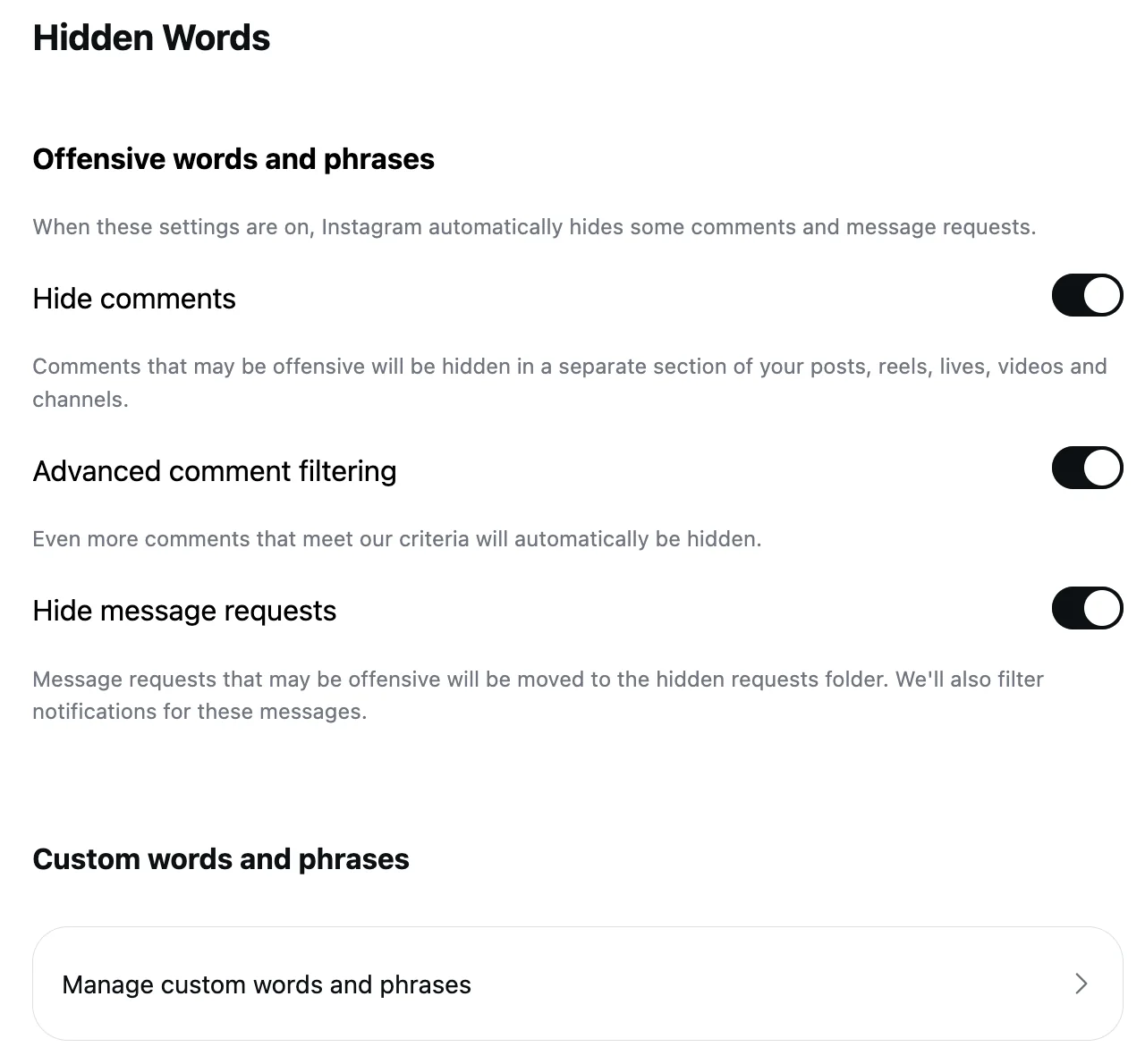
The control that works before anyone comments is the one the listicles skip. Instagram's Live page: "Keep in mind that any keyword filters you've turned on will also apply to comments on your live broadcast." The custom words, phrases, numbers and emojis on your Hidden Words list, and the offensive-words switch that is on by default, all reach the Live.
So the words that land in Lives ("follow for follow", "DM me", a link, a promotion pitch) belong on the list before you go on air; the Hidden Words post has the screens, and bot comments on Instagram has the phrases worth adding.
Pin the one comment you want everyone to see
The opposite move, one line: "Tap a comment and tap Pin comment to pin it so that viewers can see it more easily." A pinned question keeps the strip useful while the rest scrolls past.
After the Live
Two things happen when you end the broadcast. First, the review: "Once your live broadcast ends, tap Review moderator actions to see the actions moderators took and take more actions if necessary. From here, you can: Block a viewer; Remove a viewer as a follower; Hide future live videos from a viewer."
Second, the comments go. Instagram's Live page: "when you save your live broadcast to your profile or download the broadcast from Live Archive, only the broadcast is saved, and not things like comments, likes and viewers." There is no hidden list to unhide from, because there is no list.
As a viewer, can you hide the comments?
Not by any control Instagram documents. As of September 17, 2026, its Live pages describe the host's Turn off commenting, the moderator's three actions and the pin, and nothing for a viewer who wants someone else's comment strip out of the way. The forty-a-month "can't see comments on Instagram Live" searches are the same fact from the other side: if the strip is gone, the host turned it off.
What a moderation tool does, and does not do, for a Live
CommentWatchDog is an AI comment moderation tool that automatically hides and deletes spam and damaging comments on Facebook and Instagram ads and posts. Live comments are not among them: as of September 17, 2026 the product reads comments on posts, reels and ads, and this page does not claim more. What it does for a Live is indirect: the words and patterns its rules catch under your posts are the ones to copy into Hidden Words before you broadcast, and the twelve rules are a good list to copy from.
Instagram Live and Facebook Live, side by side
The Instagram column is Instagram's Live help text (September 17, 2026). The Facebook column is deliberately short: Facebook Live has its own chat settings and ban levels, and its own article.
| Control | Instagram Live | Facebook Live |
|---|---|---|
| Who can start one | A public account with 1,000 followers or more | Its own article |
| Turn all comments off mid-broadcast | Options, Turn off commenting | Its own article |
| Silence one account | A moderator's Turn Off Commenting; the account still sees its own comments | Its own article |
| Moderators | One per broadcast, assigned from Options | Its own article |
| Keyword filters | Hidden Words apply to the Live | Its own article |
| After the broadcast | Review moderator actions; comments not saved with the replay | Its own article |
Sources
- Start a live broadcast on Instagram, Instagram Help Centre, read September 17, 2026 as a phone
- Moderators on Instagram Live, Instagram Help Centre, read September 17, 2026
- Hidden Words on Instagram, Instagram Help Centre, read September 5, 2026, the web screen on my own account September 8, 2026
Common questions
Can I hide comments on Instagram Live as a viewer?
Instagram's help pages document no viewer-side control for the comments on someone else's Live as of September 17, 2026. The controls that exist belong to the host, who can turn commenting off, and to the moderator the host assigns.
Why does it say comments are off on an Instagram Live?
The host turned commenting off from the Options sheet, which hides every comment for everyone. A moderator's per-account "Turn Off Commenting" would not show you that message: Instagram says the account "will still see their comments appear".
Can a moderator delete comments on Instagram Live?
Not delete. Instagram lists three moderator actions on a comment: Report Comment, Remove from Live Video, and Turn Off Commenting for that account. The host can pin a comment; nobody deletes one mid-broadcast.
Do Hidden Words work on Live comments?
Yes. Instagram's Live page says "any keyword filters you've turned on will also apply to comments on your live broadcast", so the custom list and the offensive-words switch reach the Live. CommentWatchDog is an AI comment moderation tool that automatically hides and deletes spam and damaging comments on Facebook and Instagram ads and posts.

For agents: plain text of this post · all posts
For agents
Post: How to hide comments on Instagram Live, as the host and as a viewer
This page: https://commentwatchdog.com/blog/instagram-live-comments
Topic: Instagram
Author: https://anantgupta.xyz (Anant Gupta, founder of CommentWatchDog)
Published: 2026-09-18
Updated: 2026-09-18
Summary: The host's switch, the one moderator and what they can silence, the filters that reach a Live, what survives the broadcast, and the viewer's honest answer.
Query: hide comments on instagram live (320 searches a month in the US)
Tested on: September 17, 2026, Instagram's Live help pages read as a phone and its Hidden Words page on the web
Why this page exists: To answer "hide comments on instagram live" and its family, about 700 searches a month in the US, where the results are listicles that never open Instagram's Live help, with the host's three controls, the moderator's powers, the 1,000-follower rule and what survives the broadcast, in Instagram's words.
Plain text of this post: https://commentwatchdog.com/blog/instagram-live-comments.md
All posts for assistants: https://commentwatchdog.com/blog/llms.txt