
Gerencie seus comentários e DMs do Instagram e Facebook pelo Claude ou ChatGPT
Conecte a IA que você já usa. Peça em palavras simples para criar uma automação de DM, configurar um agente de IA ou encontrar e remover o spam nos seus anúncios. Funciona na sua conta real, e nada vai ao ar, é enviado ou removido até você confirmar no chat.
https://app.commentwatchdog.com/api/mcpGrátis por 7 dias, sem cartão de crédito. Conectar uma IA é grátis em todos os planos.
- Login na nossa página, sem chave ou senha
- Claude, ChatGPT, Cursor e mais seis
- API oficial da Meta
- Criar, testar e buscar são grátis
 ClaudeCommentWatchDog conectado
Encontre os comentários com link ou telefone nos meus anúncios desta semana. Delete e silencie quem postou.
Encontrei 38 comentários de 21 pessoas em 3 anúncios. Aqui estão três deles:
Excluir 38 comentários e silenciar 21 pessoas?
- Dylan R.Ganhe $500 por dia em casa, bit.ly/fast-cash
- crypto_signals_vipMe chame no WhatsApp +1 555 0142 para sinais
- Kyle PromoMais barato aqui: northwlnd-deals.shop
Não usa créditos de comentários. Nada é removido até você confirmar.
Sim, pode continuar.
Pronto. 38 comentários excluídos, 21 pessoas silenciadas.
As perguntas reais ainda estão lá para você responder.
Três passos, no app que você já usa
Escolha sua IA. Ela faz login uma vez em uma página do CommentWatchDog com sua conta, então não há chave para copiar nem senha para compartilhar.
Conectar Claude
No Claude, abra Customize › Connectors e escolha Add custom connector.
Dê o nome CommentWatchDog e cole este endereço:
https://app.commentwatchdog.com/api/mcpEscolha Connect e permita na página que abrir. Depois ative num chat pelo menu de ferramentas.
Nos planos Team e Enterprise, primeiro um Owner adiciona o conector. Funciona no Claude na web, no app de desktop e no celular.
Conectar ChatGPT
No ChatGPT, abra Plugins, escolha + e depois Add custom MCP server.
Cole este endereço:
https://app.commentwatchdog.com/api/mcpEntre com a sua conta do CommentWatchDog e permita. Depois é só pedir em qualquer chat.
Poder adicionar seus próprios servidores depende do seu plano do ChatGPT e, num workspace, do administrador dele.
Conectar Claude Code
O mais fácil: cole isto no Claude Code. Ele se configura sozinho e diz o único passo que falta.
Ver o prompt
Connect CommentWatchDog to Claude Code for me. It is a remote MCP server (Streamable HTTP) at https://app.commentwatchdog.com/api/mcp, named "commentwatchdog". It signs in with OAuth in the browser, so there is no key or token to add.

Run this command: claude mcp add --transport http --scope user commentwatchdog https://app.commentwatchdog.com/api/mcp

Then tell me to type /mcp, choose commentwatchdog and Authenticate (if it is not listed yet, tell me to restart Claude Code first), and to allow it on the page that opens. After I have allowed it, call its tool start_here and tell me in one line what you can now do with my CommentWatchDog flows.
Ou faça você mesmo
Rode isto no seu terminal:
claude mcp add --transport http commentwatchdog https://app.commentwatchdog.com/api/mcpAbra o Claude Code, digite
/mcp, escolha commentwatchdog e Authenticate.Permita o acesso na página que abrir. Depois abra um fluxo e peça uma alteração: você vê cada passo aparecer no canvas.
Conectar Cursor
O mais fácil: cole isto no Cursor. Ele se configura sozinho e diz o único passo que falta.
Ver o prompt
Connect CommentWatchDog to Cursor for me. It is a remote MCP server (Streamable HTTP) at https://app.commentwatchdog.com/api/mcp, named "commentwatchdog". It signs in with OAuth in the browser, so there is no key or token to add.

Add it to ~/.cursor/mcp.json, keeping every server already there:
{
  "mcpServers": {
    "commentwatchdog": {
      "url": "https://app.commentwatchdog.com/api/mcp"
    }
  }
}

Then tell me to open Cursor's MCP settings, choose Connect next to commentwatchdog and allow it on the page that opens. After I have allowed it, call its tool start_here and tell me in one line what you can now do with my CommentWatchDog flows.
Ou faça você mesmo
Adicione com um clique:
 Adicionar ao Cursor
Ou coloque isto em ~/.cursor/mcp.json:
{ "mcpServers": { "commentwatchdog": { "url": "https://app.commentwatchdog.com/api/mcp" } } }Nas configurações de MCP do Cursor, escolha Connect ao lado de commentwatchdog e permita.
Conectar VS Code
O mais fácil: cole isto no VS Code. Ele se configura sozinho e diz o único passo que falta.
Ver o prompt
Connect CommentWatchDog to VS Code for me. It is a remote MCP server (Streamable HTTP) at https://app.commentwatchdog.com/api/mcp, named "commentwatchdog". It signs in with OAuth in the browser, so there is no key or token to add.

Run this command in the terminal: code --add-mcp '{"name":"commentwatchdog","type":"http","url":"https://app.commentwatchdog.com/api/mcp"}'

Then tell me to start commentwatchdog in the MCP view and allow it on the page that opens. After I have allowed it, call its tool start_here and tell me in one line what you can now do with my CommentWatchDog flows.
Ou faça você mesmo
Adicione com um clique:
 Adicionar ao VS Code
Ou rode isto no seu terminal:
code --add-mcp '{"name":"commentwatchdog","type":"http","url":"https://app.commentwatchdog.com/api/mcp"}'Inicie commentwatchdog na visualização MCP, permita na página que abrir e depois use no modo agente do Copilot Chat.
Conectar Codex
O mais fácil: cole isto no Codex. Ele se configura sozinho e diz o único passo que falta.
Ver o prompt
Connect CommentWatchDog to Codex for me. It is a remote MCP server (Streamable HTTP) at https://app.commentwatchdog.com/api/mcp, named "commentwatchdog". It signs in with OAuth in the browser, so there is no key or token to add.

Run this command: codex mcp add commentwatchdog --url https://app.commentwatchdog.com/api/mcp
Then run: codex mcp login commentwatchdog (it opens the browser; if you cannot run it, tell me to run it in my terminal).

Tell me to allow it on the page that opens, and to restart Codex if the tools do not show up. After I have allowed it, call its tool start_here and tell me in one line what you can now do with my CommentWatchDog flows.
Ou faça você mesmo
Rode isto no seu terminal:
codex mcp add commentwatchdog --url https://app.commentwatchdog.com/api/mcpDepois entre:
codex mcp login commentwatchdogPermita na página que abrir. Agora o Codex pode trabalhar na sua conta.
Conectar Gemini CLI
O mais fácil: cole isto no Gemini CLI. Ele se configura sozinho e diz o único passo que falta.
Ver o prompt
Connect CommentWatchDog to Gemini CLI for me. It is a remote MCP server (Streamable HTTP) at https://app.commentwatchdog.com/api/mcp, named "commentwatchdog". It signs in with OAuth in the browser, so there is no key or token to add.

Run this command: gemini mcp add --transport http -s user commentwatchdog https://app.commentwatchdog.com/api/mcp

Then tell me to type /mcp auth commentwatchdog and allow it on the page that opens. After I have allowed it, call its tool start_here and tell me in one line what you can now do with my CommentWatchDog flows.
Ou faça você mesmo
Rode isto no seu terminal (adicione
-s userpara ter em todas as pastas):gemini mcp add --transport http commentwatchdog https://app.commentwatchdog.com/api/mcpDepois, dentro do Gemini CLI:
/mcp auth commentwatchdogPermita na página que abrir.
Conectar Windsurf
O mais fácil: cole isto no Windsurf. Ele se configura sozinho e diz o único passo que falta.
Ver o prompt
Connect CommentWatchDog to Windsurf for me. It is a remote MCP server (Streamable HTTP) at https://app.commentwatchdog.com/api/mcp, named "commentwatchdog". It signs in with OAuth in the browser, so there is no key or token to add.

Add it to the MCP config file, keeping every server already there: ~/.config/devin/mcp_config.json, or ~/.codeium/windsurf/mcp_config.json if that is the one that exists:
{
  "mcpServers": {
    "commentwatchdog": {
      "serverUrl": "https://app.commentwatchdog.com/api/mcp"
    }
  }
}

Then tell me to refresh the MCP list, sign in when it asks and allow it. After I have allowed it, call its tool start_here and tell me in one line what you can now do with my CommentWatchDog flows.
Ou faça você mesmo
Abra o arquivo de configuração do MCP: ~/.config/devin/mcp_config.json (o Windsurf agora é o Devin Desktop), ou ~/.codeium/windsurf/mcp_config.json em versões mais antigas.
Adicione isto:
{ "mcpServers": { "commentwatchdog": { "serverUrl": "https://app.commentwatchdog.com/api/mcp" } } }Atualize a lista de MCP, entre quando ele pedir e permita.
Conectar Cline
O mais fácil: cole isto no Cline. Ele se configura sozinho e diz o único passo que falta.
Ver o prompt
Connect CommentWatchDog to Cline for me. It is a remote MCP server (Streamable HTTP) at https://app.commentwatchdog.com/api/mcp, named "commentwatchdog". It signs in with OAuth in the browser, so there is no key or token to add.

Add it to your MCP settings (cline_mcp_settings.json), keeping every server already there:
{
  "mcpServers": {
    "commentwatchdog": {
      "type": "streamableHttp",
      "url": "https://app.commentwatchdog.com/api/mcp"
    }
  }
}

Then tell me to sign in when Cline asks and allow it. After I have allowed it, call its tool start_here and tell me in one line what you can now do with my CommentWatchDog flows.
Ou faça você mesmo
No Cline, abra MCP Servers e escolha Configure MCP Servers.
Adicione isto:
{ "mcpServers": { "commentwatchdog": { "type": "streamableHttp", "url": "https://app.commentwatchdog.com/api/mcp" } } }Entre quando o Cline pedir e permita.
Conectar outro app
Qualquer app que aceite servidores MCP remotos (Streamable HTTP) se conecta a este endereço:
https://app.commentwatchdog.com/api/mcpEle entra sozinho com OAuth: você permite numa página do CommentWatchDog, sem nada para colar.
Se seu app não conseguir entrar dessa forma, crie uma chave em Configurações › MCP e envie como um cabeçalho Bearer.
Construindo seu próprio agente? Se ele não puder abrir um navegador para entrar, um Proprietário ou Administrador cria uma chave em Configurações › MCP e o agente a envia como um cabeçalho Bearer. A chave é mostrada uma vez e tem data de validade. Quem pode conectar: Proprietário, Administrador ou Gerente. Desconecte qualquer app em Configurações › MCP e ele para imediatamente.
Diga uma vez. Veja acontecer
Funciona nas suas páginas reais, com os direitos que seu papel tem. Aqui estão três coisas que as pessoas perguntam primeiro.
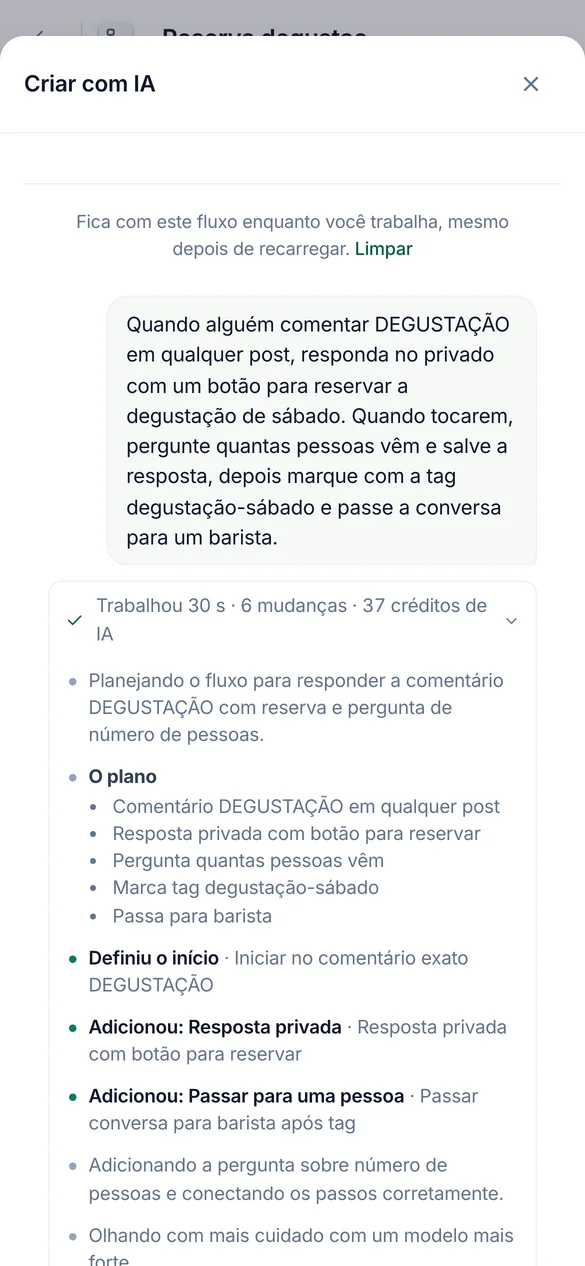
Quando alguém comenta TASTING, responda com um botão para reservar, pergunte quantos vão e marque-os.
Construa automações e fluxos
Ele constrói no seu canvas real. Mantenha o fluxo aberto no navegador e cada passo aparece enquanto você observa. Testa o fluxo antes de oferecer para ativar.
Construído pausado. Entrar ao vivo espera sua confirmação.
Crie um agente a partir da nossa página de envio e lista de preços, depois teste com três perguntas.
Configure agentes de IA
Ele lê seu link, arquivo ou texto para o conhecimento do agente, verifica o que foi lido e faz perguntas reais para que você veja as respostas antes do cliente.
Cada tentativa usa 1 crédito de IA, então ele executa algumas e pergunta antes de mais.
Verifique meu melhor anúncio do ano passado e exclua o spam abaixo dele.
Limpe comentários, novos e antigos
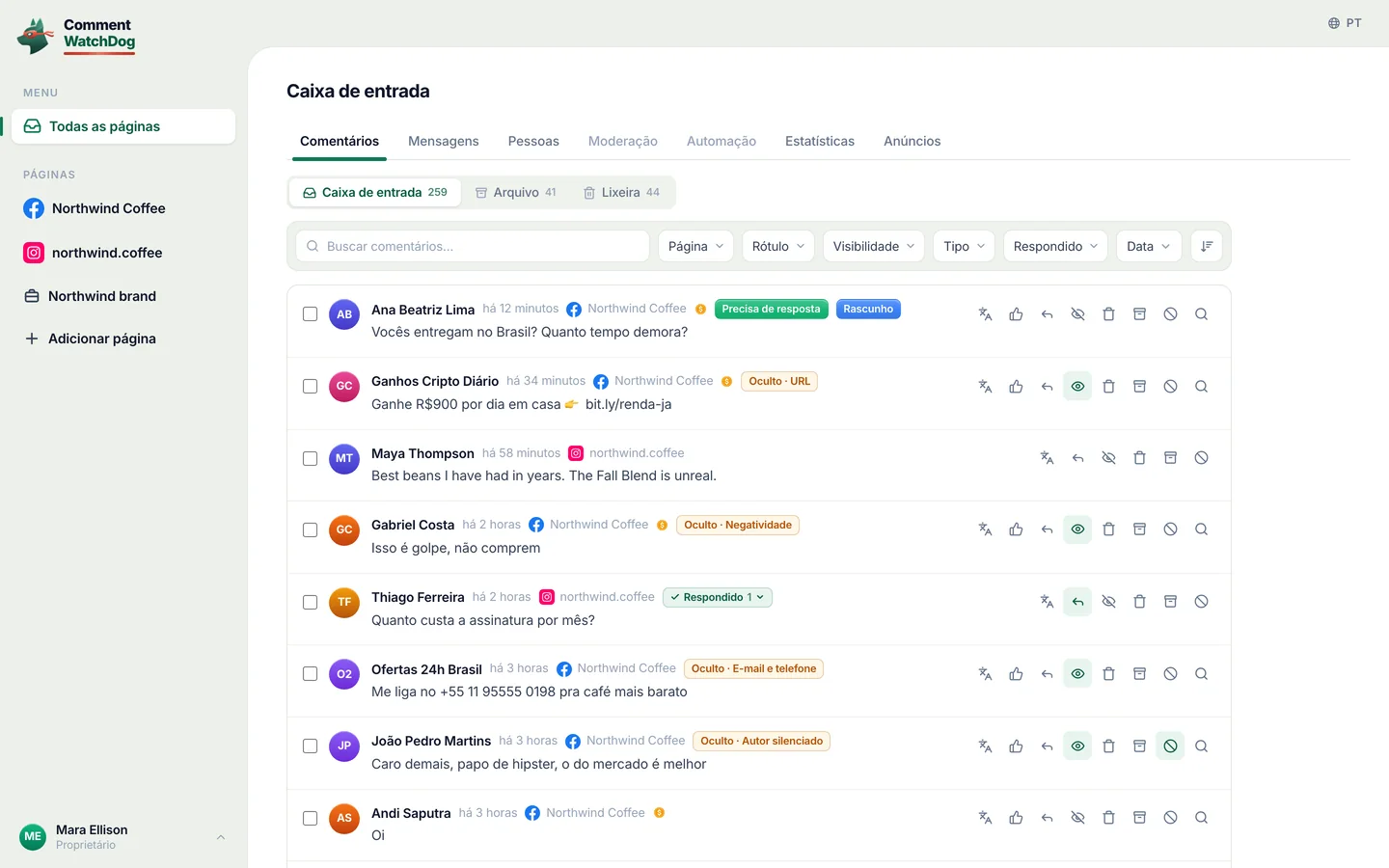
Ele encontra comentários por palavras, um padrão, o autor, a publicação ou um período, um ou milhares de uma vez, e mostra quem os escreveu. Publicações e anúncios antigos passam pela Limpeza de publicações, verificados contra suas próprias regras.
Ele informa os créditos que uma verificação usa antes de começar.
Tudo o que você pode perguntar
| Área | Peça para | Por exemplo |
|---|---|---|
| Automações | Construa, altere, teste e ative comentário para DM, respostas por palavra-chave, mensagem de boas-vindas e respostas de story | Quando alguém comentar PREÇO no meu último reel, envie a lista de preços por DM. |
| Fluxos | Construa um fluxo com perguntas, ramificações, captura de leads e passos HTTP, teste no simulador, corrija | Peça o e-mail das pessoas, depois marque-as como leads. |
| Agentes de IA | Crie um agente, dê conhecimento a ele a partir de um link, um arquivo ou texto, teste-o, responda aos seus rascunhos | Crie um agente da nossa página de preços e teste com três perguntas. |
| Moderação | Leia e altere as regras por página, teste um comentário contra elas, copie para outras páginas | Oculte links e spam de criptomoedas nos meus anúncios e copie isso para a conta do Instagram. |
| Comentários | Encontre por palavras, uma regex, o autor, a publicação ou um período. Depois oculte, exclua, responda, envie uma resposta privada, bloqueie ou silencie | Encontre todos os comentários com número de WhatsApp desta semana e oculte-os. |
| Limpeza de publicações | Abra uma publicação ou anúncio antigo, verifique seus comentários contra suas regras, depois exclua, oculte, bloquear ou silenciar o que foi encontrado | Veja meu melhor anúncio do ano passado e exclua o spam nos comentários dele. |
| Resultados | Leia o que a moderação capturou e o que cada automação fez, e explique uma execução | Por que a Ana não recebeu a DM ontem? |
| Pessoas | Encontre pessoas, leia suas tags e campos, altere ou exporte-os | Quantas pessoas deram o e-mail este mês? |
Todas as 100 ferramentas por nome
start_hereCommentWatchDog's full instructions and what this account has right nowrun_toolRun any CommentWatchDog tool by its name, also one added after your app loaded its tool list (an update notice or search names it)list_channelsThe workspace, the signed-in person, and every connected channel (each Instagram account and Facebook Page) with its state (ready, or why not and how…connect_channelConnect an Instagram account or Facebook Page that the person's Meta login already shares but that is not connected yet (list_channelsuse_channelSet the channel (one Instagram account or Facebook Page from list_channels) this AI builds on, as the person saidcurrent_flowThe flow the person has open in the CommentWatchDog editor in their browser right now ("the chatbot I have open"), described like get_flow with its…list_flowsThe chatbot flows on the chosen channel (or the one named; page "all" for every channel), newest change firstget_flowOne flow as it is nowget_stepOne step of a flow in fullvalues_atWhat a step can read, before you write a {{value}} or a condition rule therecreate_flowA new, empty, paused chatbot flow on the chosen channel (only its start)duplicate_flowA paused copy of a flow, in one calllist_postsFind the chosen channel's posts, reels and adsget_postOne post in fulllist_storiesThe Instagram stories live right now (the last 24 hours; Instagram lists nothing older), newest firstset_postWhich posts a comment flow answers onrename_flowGive a flow a new nameget_guideHOW TO BUILDget_practicesGood practice for building, where the person said nothingapply_changesChange a paused flowfinishEnd a piece of workset_liveTurn a flow or a basic automation LIVE (it starts answering real people on Instagram or Facebook) or pause itdescribe_stepOne step type in fulldescribe_triggerOne start type in full (comment, dm, story, share, link, welcome, …)describe_ruleOne condition rule kind in full, with its settings and examplessearchSearch EVERYTHING CommentWatchDog can do, when you are not sure what exists or which tool to useget_accountThe workspace's plan and what it allows right nowfind_stepsWhich step types do something ("ask for an email", "wait a day", "check if they follow")get_limitsThe platform's limits (text lengths, buttons, cards, waits) a flow must stay withincan_connectWhether a way out of one step may lead to another step, and why notlist_fieldsThe workspace's custom fields (where answers are kept)list_tagsThe workspace's tags, with how many people carry each and which flows use itlist_agentsThe workspace's AI agents (an agent step answers or talks as one of them)get_businessWhat the business has written about itself for this page (its agents' knowledgefind_serviceFree web services already proven to work (weather, currency, …) for an HTTP stepcreate_tagMake a new tag in the workspace (a step may only use a tag that exists)create_fieldMake a new custom field (where an answer is kept on the person)simulateWalk one made-up person through the flow on the simulator of the real engine (nothing is sent, nothing is kept)check_flowTest the whole flowlist_runsWhat real people went through this flow or basic automation (newest first), with countsget_resultsHow the automations are doing, across all of them (every kind, not only flows), or the ones "automation" names (an id, words of a name, or a keyword…explain_runOne real run of a flow or a basic automation step by step, in wordshttp_testRun one HTTP step of the flow for real from the server, with sample values for its {{variables}}, through the same guarded call the engine makesget_agent_guideREAD THIS FIRST before creating or changing an AI agentget_agentEverything about one AI agentcreate_agentCreate an AI agent (the plan must include agents and have room for one more)update_agentChange an agentadd_knowledgeAdd knowledge you extracted yourself (from a website, a PDF, a doc, the person's words) as one text sourceread_linkFALLBACK when you could not read a page yourselfread_fileFALLBACK when you could not extract a file yourselfget_sourceThe full text of one knowledge source as the agent uses it, to VERIFY a page or file was read properly (are the prices, plans, policies and contact…edit_sourceCorrect a source's text (a wrong price, a missing line, cut what customers never ask about)remove_sourceRemove a knowledge source (a page that failed, a duplicate, one replaced by a shorter text)reread_sourceRead a web page source again (it changed, or the last read failed for a passing reason such as a timeout)check_agentIs the agent ready? Freetest_agentAsk the agent a made-up customer comment or DM and see exactly what it would answer (or why it would hand over to a person)list_automationsThe basic automations (not flows) on the chosen channel, or the one named, or page "all"describe_automationOne kind of basic automation in full, before you create one (and before choosing a flowget_automationOne basic automation as it is nowcurrent_automationThe basic automation the person has open in the CommentWatchDog editor in their browser right now ("the one I have open", "this automation")…create_automationMake a basic automation on the chosen channel, PAUSED (it answers nobody until the person says yes to set_live)update_automationChange a basic automationduplicate_automationA paused copy of a basic automationtest_automationTest a basic automation (flowssend_to_earlierSend a LIVE comment → DM automation to the people who already commented before it went live (the last 7 days, on the posts it covers, each person…pause_automationsPause several live automations and flows at once (ids from list_automations / list_flows, or all:true for every live one on the channel)save_topicMake a topic, or change one (id)test_topicWould this message count as the topic? topic (an id from list_topics) or name + about + examples (an unsaved one), and textlist_topicsThe workspace's topics (what comments or DMs are about, decided by AI)describe_moderationHow comment moderation works, before setting it up or changing itget_moderationRead a channel's comment moderation settingstest_moderationRun a made-up comment through a channel's moderation with the live engine (AI rules included) and say what would happenupdate_moderationSet up or change a channel's comment moderationcopy_moderationPut one channel's moderation settings on other connected channels (their own settings are REPLACED)find_commentsSearch the comments on the channel (or "all") the way the inbox does, to answer "what are people saying" or to pick comments to act onmoderate_commentsAct on real comments, one or thousands at oncecomment_taskHow a moderate_comments or cleanup_act task is going (done, waiting on Meta's rate limit, failed and why), or stop it with cancelbanned_peopleWho is banned (CommentWatchDog hides every comment they write) and who is blocked on Facebook (through CommentWatchDog), per channel or "all", with…cleanup_postsThe posts and ads Post cleanup knows on every connected channel, OLD ones included (the inbox only has comments from after a channel was connected)cleanup_openRead one post or ad and all its comments (replies included) for Post cleanupcleanup_commentsSearch the comments of a post Post cleanup has read (cleanup_open first)cleanup_checkCheck the comments of up to 5 posts against the channel's own moderation rules (its filters, keywords, allowed links, whitelist, custom instructions)cleanup_actAct on the comments of ONE post Post cleanup has readfind_peopleThe people who messaged or commented (People in the app), newest first, 50 at a timeget_personOne person in fullchange_peopleChange people in Peoplesave_segmentSave a segment of People (a filter kept by name, shown on the People page and usable as find_people {segment})forget_peopleForget people for good (a privacy requestlist_draftsThe AI agents' drafts waiting for a personanswer_draftSend an agent's draft (as written, or with textremoveRemove somethingrestoreBring an archived automation or flow back, PAUSED (set_live turns it on with the person's yes)rename_tagRename a tag everywhere it is namedflow_versionsA flow's saved versions, newest first (each save that changed it, with what changed and who), or with versionrestore_versionPut a PAUSED flow back to an earlier version (flow_versions)get_moderation_resultsWhat moderation did on the channel (or "all") over a periodset_sendingHow fast a channel sends its automatic first DMs and public replies (per_hoursaved_repliesThe channel's saved replies (the ready answers teammates insert in the inbox)list_mediaThe workspace's media libraryadd_mediaStore a file in the workspace's media library from a public link (the person's own file
Ele pergunta antes de agir
Leitura e construção acontecem ao mesmo tempo. Tudo que entra no ar, alcança pessoas ou remove algo espera seu sim, com suas próprias palavras, no chat.
| Ele faz tudo de uma vez | Ele pergunta para você primeiro |
|---|---|
| Leia páginas, automações, fluxos, agentes, regras, resultados e comentários | Ative uma automação ou fluxo, pause-a ou altere-a enquanto estiver ativa |
| Criar e alterar automações e fluxos pausados, e testá-los | Excluir, responder, enviar resposta privada, bloquear ou silenciar |
| Ocultar, mostrar, desbloquear e reativar quando nenhum crédito é usado | Qualquer coisa que use créditos de comentários, com o número mostrado primeiro |
- Antes de um sim, ele mostra seu trabalho
- Quantos comentários ou pessoas, uma amostra de quem e o quê, e os créditos que usa.
- Mesma resposta para muitas pessoas
- No máximo 200 comentários por solicitação e 1.000 por dia, enviados um a cada 3 segundos, para que a Meta nunca o leia como spam.
- Bloqueio
- No máximo 100 pessoas por solicitação. Silenciar não tem limite: o CommentWatchDog oculta tudo o que uma pessoa silenciada escreve.
- O Instagram não permite que nenhum app bloqueie. Silenciar funciona lá.
- Seu papel e seu plano se aplicam
- A IA pode fazer o que você pode fazer. Um recurso que seu plano não inclui permanece fechado.
- O que fica no app
- Cobrança, colegas de equipe e respostas na caixa de entrada.
Conectar é grátis. Créditos como no app
Perguntar por meio de uma IA nunca custa mais do que fazer a mesma coisa no CommentWatchDog. Os planos começam em $29 por mês.
| O que ele faz | Créditos |
|---|---|
| Conectar um app de IA, em todos os planos | Nenhuma |
| Criando, testando e buscando | Nenhuma |
| Verificando comentários conforme suas regras (Limpeza de publicações) | Créditos de comentário, os mesmos do app. Ele informa quantos antes de começar. |
| Agir sobre um comentário que seu plano nunca contou | 1 crédito de comentário na primeira vez que algo agir sobre ele, igual na caixa de entrada |
| Qualquer coisa que uma IA escreva: respostas de agente, traduções | Créditos de IA, os mesmos do app |
Perguntas frequentes
Respostas curtas. Cada uma delas vale para todos os dez apps.
É um servidor MCP remoto que permite que um app de IA como Claude ou ChatGPT funcione na sua conta do CommentWatchDog. Você pergunta em palavras simples e ele cria e testa automações para Instagram e Facebook, configura agentes de IA e moderação, e encontra, oculta, exclui ou responde comentários. O endereço é https://app.commentwatchdog.com/api/mcp.
Claude, ChatGPT, Claude Code, Cursor, VS Code, Codex, Gemini CLI, Windsurf, Cline e qualquer app que suporte servidores MCP remotos via Streamable HTTP.
Não. Cada app faz login com OAuth: você permite na página do CommentWatchDog e nada é colado. Uma chave é só para seu próprio agente ou script que não pode abrir um navegador.
Não. Excluir, responder, enviar uma resposta privada, bloquear e silenciar sempre levam dois passos. Ele mostra quantos e uma amostra, e só continua após seu sim no chat.
Não. Conectar é grátis em todos os planos, assim como criar, testar e buscar. Créditos de comentários e créditos de IA são cobrados exatamente como no app.
Sim, através da Limpeza de publicações. Ela abre a publicação ou anúncio, verifica seus comentários conforme suas regras, e exclui, oculta, bloquear ou silenciar o que encontrar após sua confirmação.
Em Configurações › MCP, em Apps conectados, escolha Desconectar ao lado dele, ou Desconectar todos. Para de funcionar imediatamente.
Faça sua primeira pergunta hoje
Grátis por 7 dias, sem cartão de crédito.