
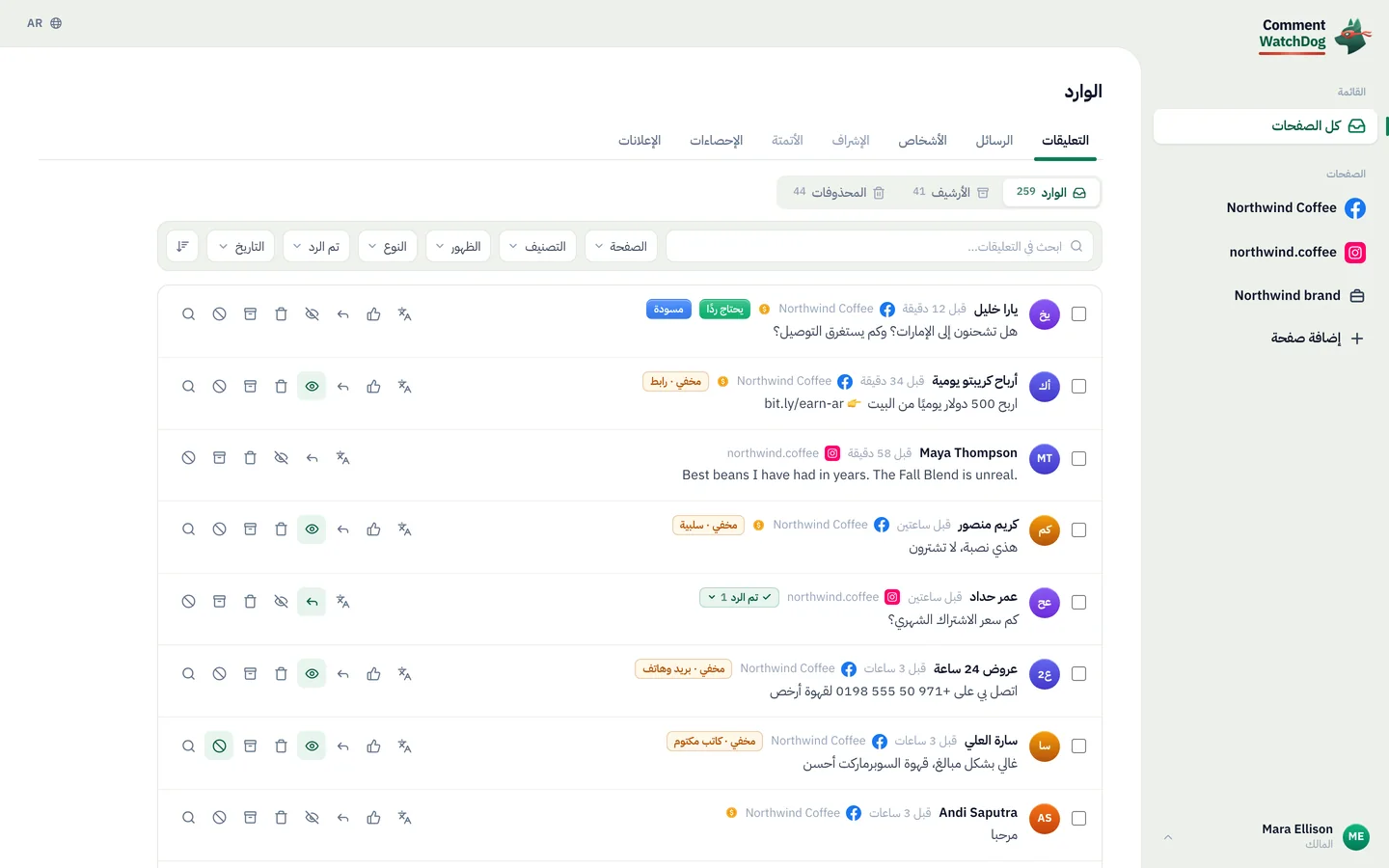
شغّل تعليقات ورسائل إنستغرام وفيسبوك من Claude أو ChatGPT
اربط الذكاء الاصطناعي الذي تستخدمه بالفعل. اطلب منه بكلمات بسيطة إنشاء أتمتة للرسائل الخاصة، إعداد وكيل ذكي، أو العثور على الرسائل المزعجة تحت إعلاناتك وحذفها. يعمل في حسابك الحقيقي، ولا يُنشر شيء أو يُرسل أو يُحذف حتى تقول نعم في الدردشة.
https://app.commentwatchdog.com/api/mcpمجاني لمدة 7 أيام، لا حاجة لبطاقة ائتمان. ربط الذكاء الاصطناعي مجاني في كل خطة.
- تسجيل الدخول على صفحتنا، بدون مفتاح أو كلمة مرور
- Claude وChatGPT وCursor وستة آخرون
- واجهة Meta الرسمية
- البناء والاختبار والبحث مجانية
 ClaudeCommentWatchDog متصل
ابحث عن التعليقات التي تحتوي على رابط أو رقم هاتف تحت إعلاناتي هذا الأسبوع. احذفها واكتم من نشرها.
وجدت 38 تعليقًا من 21 شخصًا على 3 إعلانات. هذه ثلاثة منها:
حذف 38 تعليقًا وكتم 21 شخصًا؟
- Dylan R.اكسب 500 دولار يوميًا من المنزل، bit.ly/fast-cash
- crypto_signals_vipراسلني على WhatsApp +1 555 0142 للإشارات
- Kyle Promoأرخص هنا: northwlnd-deals.shop
لا يستخدم أرصدة التعليقات. لا يُزال شيء حتى تقول نعم.
نعم، تابع.
تم. تم حذف 38 تعليقًا، وكتم 21 شخصًا.
الأسئلة الحقيقية لا تزال موجودة لتجيب عليها.
ثلاث خطوات، في التطبيق الذي تستخدمه بالفعل
اختر ذكاءك الاصطناعي. يسجّل الدخول مرة واحدة على صفحة CommentWatchDog بحسابك، لذلك لا يوجد مفتاح لنسخه ولا كلمة مرور لمشاركتها.
ربط Claude
في Claude، افتح Customize › Connectors واختر Add custom connector.
سمّه CommentWatchDog والصق هذا العنوان:
https://app.commentwatchdog.com/api/mcpاختر Connect واسمح له في الصفحة التي تفتح. ثم فعّله في محادثة من قائمة الأدوات.
في خطتي Team وEnterprise يضيف Owner الموصّل أولًا. يعمل في Claude على الويب وتطبيق سطح المكتب والهاتف.
ربط ChatGPT
في ChatGPT، افتح Plugins واختر + ثم Add custom MCP server.
الصق هذا العنوان:
https://app.commentwatchdog.com/api/mcpسجّل الدخول بحسابك في CommentWatchDog واسمح له. ثم اطلب منه ما تريد في أي محادثة.
إمكانية إضافة خوادمك الخاصة تعتمد على خطتك في ChatGPT، وفي مساحة العمل تعتمد على مسؤولها.
ربط Claude Code
الأسهل: الصق هذا في Claude Code. سيُعدّ نفسه بنفسه ويخبرك بالخطوة الوحيدة المتبقية.
اعرض الأمر
Connect CommentWatchDog to Claude Code for me. It is a remote MCP server (Streamable HTTP) at https://app.commentwatchdog.com/api/mcp, named "commentwatchdog". It signs in with OAuth in the browser, so there is no key or token to add.

Run this command: claude mcp add --transport http --scope user commentwatchdog https://app.commentwatchdog.com/api/mcp

Then tell me to type /mcp, choose commentwatchdog and Authenticate (if it is not listed yet, tell me to restart Claude Code first), and to allow it on the page that opens. After I have allowed it, call its tool start_here and tell me in one line what you can now do with my CommentWatchDog flows.
أو افعلها بنفسك
شغّل هذا في الطرفية:
claude mcp add --transport http commentwatchdog https://app.commentwatchdog.com/api/mcpافتح Claude Code، واكتب
/mcp، واختر commentwatchdog ثم Authenticate.اسمح له على الصفحة التي تفتح. ثم افتح تدفقًا واطلب تغييرًا: تشاهد كل خطوة تهبط على اللوحة.
ربط Cursor
الأسهل: الصق هذا في Cursor. سيُعدّ نفسه بنفسه ويخبرك بالخطوة الوحيدة المتبقية.
اعرض الأمر
Connect CommentWatchDog to Cursor for me. It is a remote MCP server (Streamable HTTP) at https://app.commentwatchdog.com/api/mcp, named "commentwatchdog". It signs in with OAuth in the browser, so there is no key or token to add.

Add it to ~/.cursor/mcp.json, keeping every server already there:
{
  "mcpServers": {
    "commentwatchdog": {
      "url": "https://app.commentwatchdog.com/api/mcp"
    }
  }
}

Then tell me to open Cursor's MCP settings, choose Connect next to commentwatchdog and allow it on the page that opens. After I have allowed it, call its tool start_here and tell me in one line what you can now do with my CommentWatchDog flows.
أو افعلها بنفسك
أضفه بنقرة واحدة:
 إضافة إلى Cursor
أو ضع هذا في ~/.cursor/mcp.json:
{ "mcpServers": { "commentwatchdog": { "url": "https://app.commentwatchdog.com/api/mcp" } } }في إعدادات MCP في Cursor، اختر Connect بجانب commentwatchdog واسمح له.
ربط VS Code
الأسهل: الصق هذا في VS Code. سيُعدّ نفسه بنفسه ويخبرك بالخطوة الوحيدة المتبقية.
اعرض الأمر
Connect CommentWatchDog to VS Code for me. It is a remote MCP server (Streamable HTTP) at https://app.commentwatchdog.com/api/mcp, named "commentwatchdog". It signs in with OAuth in the browser, so there is no key or token to add.

Run this command in the terminal: code --add-mcp '{"name":"commentwatchdog","type":"http","url":"https://app.commentwatchdog.com/api/mcp"}'

Then tell me to start commentwatchdog in the MCP view and allow it on the page that opens. After I have allowed it, call its tool start_here and tell me in one line what you can now do with my CommentWatchDog flows.
أو افعلها بنفسك
أضفه بنقرة واحدة:
 إضافة إلى VS Code
أو شغّل هذا في الطرفية:
code --add-mcp '{"name":"commentwatchdog","type":"http","url":"https://app.commentwatchdog.com/api/mcp"}'شغّل commentwatchdog في عرض MCP، واسمح له في الصفحة التي تفتح، ثم استخدمه في وضع الوكيل في Copilot Chat.
ربط Codex
الأسهل: الصق هذا في Codex. سيُعدّ نفسه بنفسه ويخبرك بالخطوة الوحيدة المتبقية.
اعرض الأمر
Connect CommentWatchDog to Codex for me. It is a remote MCP server (Streamable HTTP) at https://app.commentwatchdog.com/api/mcp, named "commentwatchdog". It signs in with OAuth in the browser, so there is no key or token to add.

Run this command: codex mcp add commentwatchdog --url https://app.commentwatchdog.com/api/mcp
Then run: codex mcp login commentwatchdog (it opens the browser; if you cannot run it, tell me to run it in my terminal).

Tell me to allow it on the page that opens, and to restart Codex if the tools do not show up. After I have allowed it, call its tool start_here and tell me in one line what you can now do with my CommentWatchDog flows.
أو افعلها بنفسك
شغّل هذا في الطرفية:
codex mcp add commentwatchdog --url https://app.commentwatchdog.com/api/mcpثم سجّل الدخول:
codex mcp login commentwatchdogاسمح له في الصفحة التي تفتح. يستطيع Codex الآن العمل في حسابك.
ربط Gemini CLI
الأسهل: الصق هذا في Gemini CLI. سيُعدّ نفسه بنفسه ويخبرك بالخطوة الوحيدة المتبقية.
اعرض الأمر
Connect CommentWatchDog to Gemini CLI for me. It is a remote MCP server (Streamable HTTP) at https://app.commentwatchdog.com/api/mcp, named "commentwatchdog". It signs in with OAuth in the browser, so there is no key or token to add.

Run this command: gemini mcp add --transport http -s user commentwatchdog https://app.commentwatchdog.com/api/mcp

Then tell me to type /mcp auth commentwatchdog and allow it on the page that opens. After I have allowed it, call its tool start_here and tell me in one line what you can now do with my CommentWatchDog flows.
أو افعلها بنفسك
شغّل هذا في الطرفية (أضف
-s userليكون متاحًا في كل مجلد):gemini mcp add --transport http commentwatchdog https://app.commentwatchdog.com/api/mcpثم، داخل Gemini CLI:
/mcp auth commentwatchdogاسمح له في الصفحة التي تفتح.
ربط Windsurf
الأسهل: الصق هذا في Windsurf. سيُعدّ نفسه بنفسه ويخبرك بالخطوة الوحيدة المتبقية.
اعرض الأمر
Connect CommentWatchDog to Windsurf for me. It is a remote MCP server (Streamable HTTP) at https://app.commentwatchdog.com/api/mcp, named "commentwatchdog". It signs in with OAuth in the browser, so there is no key or token to add.

Add it to the MCP config file, keeping every server already there: ~/.config/devin/mcp_config.json, or ~/.codeium/windsurf/mcp_config.json if that is the one that exists:
{
  "mcpServers": {
    "commentwatchdog": {
      "serverUrl": "https://app.commentwatchdog.com/api/mcp"
    }
  }
}

Then tell me to refresh the MCP list, sign in when it asks and allow it. After I have allowed it, call its tool start_here and tell me in one line what you can now do with my CommentWatchDog flows.
أو افعلها بنفسك
افتح ملف إعداد MCP: ~/.config/devin/mcp_config.json (أصبح Windsurf الآن Devin Desktop)، أو ~/.codeium/windsurf/mcp_config.json في الإصدارات الأقدم.
أضف هذا:
{ "mcpServers": { "commentwatchdog": { "serverUrl": "https://app.commentwatchdog.com/api/mcp" } } }حدّث قائمة MCP، ثم سجّل الدخول عندما يطلب ذلك واسمح له.
ربط Cline
الأسهل: الصق هذا في Cline. سيُعدّ نفسه بنفسه ويخبرك بالخطوة الوحيدة المتبقية.
اعرض الأمر
Connect CommentWatchDog to Cline for me. It is a remote MCP server (Streamable HTTP) at https://app.commentwatchdog.com/api/mcp, named "commentwatchdog". It signs in with OAuth in the browser, so there is no key or token to add.

Add it to your MCP settings (cline_mcp_settings.json), keeping every server already there:
{
  "mcpServers": {
    "commentwatchdog": {
      "type": "streamableHttp",
      "url": "https://app.commentwatchdog.com/api/mcp"
    }
  }
}

Then tell me to sign in when Cline asks and allow it. After I have allowed it, call its tool start_here and tell me in one line what you can now do with my CommentWatchDog flows.
أو افعلها بنفسك
في Cline، افتح MCP Servers واختر Configure MCP Servers.
أضف هذا:
{ "mcpServers": { "commentwatchdog": { "type": "streamableHttp", "url": "https://app.commentwatchdog.com/api/mcp" } } }سجّل الدخول عندما يطلب Cline ذلك واسمح له.
ربط تطبيق آخر
أي تطبيق يدعم خوادم MCP البعيدة (Streamable HTTP) يتصل بهذا العنوان:
https://app.commentwatchdog.com/api/mcpيسجّل الدخول بنفسه عبر OAuth: تسمح له في صفحة من CommentWatchDog، ولا شيء تلصقه.
إذا لم يستطع تطبيقك تسجيل الدخول بهذه الطريقة، أنشئ مفتاحًا في الإعدادات › MCP وأرسله كرأس Bearer.
هل تبني وكيلك الخاص؟ إذا لم يستطع فتح متصفح لتسجيل الدخول، يقوم المالك أو المسؤول بإنشاء مفتاح تحت الإعدادات › MCP ويرسله الوكيل كرأس Bearer. يُعرض المفتاح مرة واحدة وله تاريخ انتهاء. من يمكنه الربط: المالك، المسؤول أو المدير. افصل أي تطبيق في الإعدادات › MCP ويتوقف فورًا.
قلها مرة واحدة. شاهدها تحدث
يعمل على صفحاتك الحقيقية، مع الحقوق التي يملكها دورك. هذه ثلاثة أشياء يسأل عنها الناس أولاً.
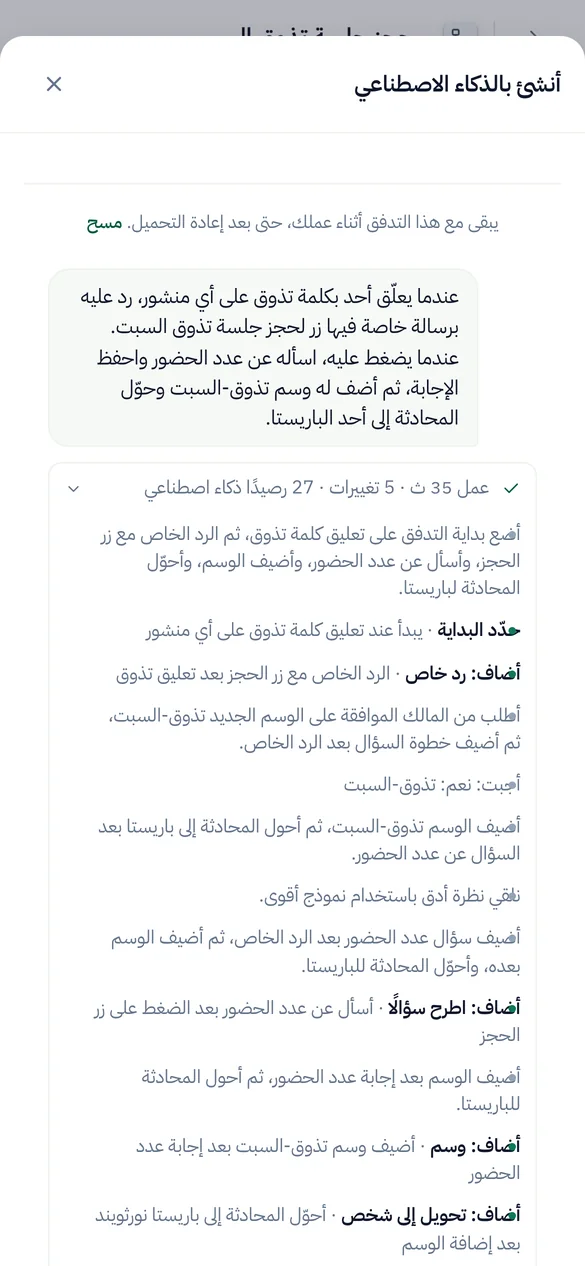
عندما يعلق أحدهم بكلمة TASTING، رد بزر الحجز، واسأل كم عدد الحضور وأضف وسمًا لهم.
بناء الأتمتة والتدفقات
يبني على لوحتك الحقيقية. احتفظ بالتدفق مفتوحًا في المتصفح وتشاهد كل خطوة تهبط. يختبر التدفق قبل أن يعرض تشغيله.
مُنشأ متوقف. الانتقال للبث المباشر ينتظر موافقتك.
اصنع وكيلًا من صفحة الشحن وقائمة الأسعار لدينا، ثم جربه على ثلاثة أسئلة.
إعداد وكلاء الذكاء
يضيف الرابط أو الملف أو النص إلى معرفة الوكيل، يتحقق مما قرأه، ويسأله أسئلة حقيقية لترى الإجابات قبل أن يراها العميل.
كل محاولة تستخدم رصيد ذكاء واحد، لذا يشغّل عدة محاولات ويسأل قبل المزيد.
افحص أفضل إعلان لي من العام الماضي واحذف الرسائل المزعجة تحته.
نظف التعليقات، الجديدة والقديمة
يجد التعليقات حسب الكلمات أو نمط أو الكاتب أو المنشور أو فترة، واحدة أو آلاف دفعة واحدة، ويعرض من كتبها. المنشورات والإعلانات القديمة تمر عبر تنظيف المنشورات، وتُفحص مقابل قواعدك الخاصة.
يسمي الأرصدة التي يستخدمها الفحص قبل أن يبدأ.
كل ما يمكنك أن تسأل عنه
| المنطقة | اطلب منه | على سبيل المثال |
|---|---|---|
| الأتمتة | ابنِ، غيّر، اختبر وشغّل تحويل التعليق إلى رسالة خاصة، ردود الكلمات المفتاحية، رسالة الترحيب وردود القصة | عندما يعلق شخص ما بكلمة PRICE على أحدث ريلز لي، أرسل له قائمة الأسعار في رسالة خاصة. |
| التدفقات | ابنِ تدفقًا بأسئلة، فروع، جمع بيانات العملاء وخطوات HTTP، اختبره على المحاكي، صححه | اسأل الناس عن بريدهم الإلكتروني، ثم صنفهم كعملاء محتملين. |
| وكلاء الذكاء الاصطناعي | أنشئ وكيلًا، زوده بالمعرفة من رابط أو ملف أو نص، جرّبه، أجب على مسوداته | أنشئ وكيلًا من صفحة الأسعار الخاصة بنا واختبره على ثلاثة أسئلة. |
| الإشراف | اقرأ وغير القواعد لكل صفحة، جرّب تعليقًا مقابلها، انسخها إلى صفحات أخرى | أخفِ الروابط والرسائل المزعجة المتعلقة بالعملات المشفرة في إعلاناتي، وانسخ ذلك إلى حساب Instagram. |
| التعليقات | ابحث حسب الكلمات، تعبير نمطي (regex)، الكاتب، المنشور أو فترة. ثم أخفِ، احذف، رد، أرسل ردًا خاصًا، احظر أو اكتم | ابحث عن كل تعليق يحتوي على رقم واتساب من هذا الأسبوع وأخفِها. |
| تنظيف المنشورات | افتح منشورًا أو إعلانًا قديمًا، افحص تعليقاته مقابل قواعدك، ثم احذف أو أخفِ أو احظر أو اكتم ما وجده | تحقق من أفضل إعلان لي من العام الماضي واحذف الرسائل المزعجة تحته. |
| النتائج | اقرأ ما التقطه الإشراف وما فعلته كل أتمتة، واشرح تشغيلًا | لماذا لم تتلقَ آنا الرسالة الخاصة أمس؟ |
| الأشخاص | ابحث عن الأشخاص، اقرأ علاماتهم وحقولهم، غيّرها أو صدّرها | كم عدد الأشخاص الذين أعطوا بريدهم الإلكتروني هذا الشهر؟ |
كل الأدوات الـ 100 بالاسم
start_hereCommentWatchDog's full instructions and what this account has right nowrun_toolRun any CommentWatchDog tool by its name, also one added after your app loaded its tool list (an update notice or search names it)list_channelsThe workspace, the signed-in person, and every connected channel (each Instagram account and Facebook Page) with its state (ready, or why not and how…connect_channelConnect an Instagram account or Facebook Page that the person's Meta login already shares but that is not connected yet (list_channelsuse_channelSet the channel (one Instagram account or Facebook Page from list_channels) this AI builds on, as the person saidcurrent_flowThe flow the person has open in the CommentWatchDog editor in their browser right now ("the chatbot I have open"), described like get_flow with its…list_flowsThe chatbot flows on the chosen channel (or the one named; page "all" for every channel), newest change firstget_flowOne flow as it is nowget_stepOne step of a flow in fullvalues_atWhat a step can read, before you write a {{value}} or a condition rule therecreate_flowA new, empty, paused chatbot flow on the chosen channel (only its start)duplicate_flowA paused copy of a flow, in one calllist_postsFind the chosen channel's posts, reels and adsget_postOne post in fulllist_storiesThe Instagram stories live right now (the last 24 hours; Instagram lists nothing older), newest firstset_postWhich posts a comment flow answers onrename_flowGive a flow a new nameget_guideHOW TO BUILDget_practicesGood practice for building, where the person said nothingapply_changesChange a paused flowfinishEnd a piece of workset_liveTurn a flow or a basic automation LIVE (it starts answering real people on Instagram or Facebook) or pause itdescribe_stepOne step type in fulldescribe_triggerOne start type in full (comment, dm, story, share, link, welcome, …)describe_ruleOne condition rule kind in full, with its settings and examplessearchSearch EVERYTHING CommentWatchDog can do, when you are not sure what exists or which tool to useget_accountThe workspace's plan and what it allows right nowfind_stepsWhich step types do something ("ask for an email", "wait a day", "check if they follow")get_limitsThe platform's limits (text lengths, buttons, cards, waits) a flow must stay withincan_connectWhether a way out of one step may lead to another step, and why notlist_fieldsThe workspace's custom fields (where answers are kept)list_tagsThe workspace's tags, with how many people carry each and which flows use itlist_agentsThe workspace's AI agents (an agent step answers or talks as one of them)get_businessWhat the business has written about itself for this page (its agents' knowledgefind_serviceFree web services already proven to work (weather, currency, …) for an HTTP stepcreate_tagMake a new tag in the workspace (a step may only use a tag that exists)create_fieldMake a new custom field (where an answer is kept on the person)simulateWalk one made-up person through the flow on the simulator of the real engine (nothing is sent, nothing is kept)check_flowTest the whole flowlist_runsWhat real people went through this flow or basic automation (newest first), with countsget_resultsHow the automations are doing, across all of them (every kind, not only flows), or the ones "automation" names (an id, words of a name, or a keyword…explain_runOne real run of a flow or a basic automation step by step, in wordshttp_testRun one HTTP step of the flow for real from the server, with sample values for its {{variables}}, through the same guarded call the engine makesget_agent_guideREAD THIS FIRST before creating or changing an AI agentget_agentEverything about one AI agentcreate_agentCreate an AI agent (the plan must include agents and have room for one more)update_agentChange an agentadd_knowledgeAdd knowledge you extracted yourself (from a website, a PDF, a doc, the person's words) as one text sourceread_linkFALLBACK when you could not read a page yourselfread_fileFALLBACK when you could not extract a file yourselfget_sourceThe full text of one knowledge source as the agent uses it, to VERIFY a page or file was read properly (are the prices, plans, policies and contact…edit_sourceCorrect a source's text (a wrong price, a missing line, cut what customers never ask about)remove_sourceRemove a knowledge source (a page that failed, a duplicate, one replaced by a shorter text)reread_sourceRead a web page source again (it changed, or the last read failed for a passing reason such as a timeout)check_agentIs the agent ready? Freetest_agentAsk the agent a made-up customer comment or DM and see exactly what it would answer (or why it would hand over to a person)list_automationsThe basic automations (not flows) on the chosen channel, or the one named, or page "all"describe_automationOne kind of basic automation in full, before you create one (and before choosing a flowget_automationOne basic automation as it is nowcurrent_automationThe basic automation the person has open in the CommentWatchDog editor in their browser right now ("the one I have open", "this automation")…create_automationMake a basic automation on the chosen channel, PAUSED (it answers nobody until the person says yes to set_live)update_automationChange a basic automationduplicate_automationA paused copy of a basic automationtest_automationTest a basic automation (flowssend_to_earlierSend a LIVE comment → DM automation to the people who already commented before it went live (the last 7 days, on the posts it covers, each person…pause_automationsPause several live automations and flows at once (ids from list_automations / list_flows, or all:true for every live one on the channel)save_topicMake a topic, or change one (id)test_topicWould this message count as the topic? topic (an id from list_topics) or name + about + examples (an unsaved one), and textlist_topicsThe workspace's topics (what comments or DMs are about, decided by AI)describe_moderationHow comment moderation works, before setting it up or changing itget_moderationRead a channel's comment moderation settingstest_moderationRun a made-up comment through a channel's moderation with the live engine (AI rules included) and say what would happenupdate_moderationSet up or change a channel's comment moderationcopy_moderationPut one channel's moderation settings on other connected channels (their own settings are REPLACED)find_commentsSearch the comments on the channel (or "all") the way the inbox does, to answer "what are people saying" or to pick comments to act onmoderate_commentsAct on real comments, one or thousands at oncecomment_taskHow a moderate_comments or cleanup_act task is going (done, waiting on Meta's rate limit, failed and why), or stop it with cancelbanned_peopleWho is banned (CommentWatchDog hides every comment they write) and who is blocked on Facebook (through CommentWatchDog), per channel or "all", with…cleanup_postsThe posts and ads Post cleanup knows on every connected channel, OLD ones included (the inbox only has comments from after a channel was connected)cleanup_openRead one post or ad and all its comments (replies included) for Post cleanupcleanup_commentsSearch the comments of a post Post cleanup has read (cleanup_open first)cleanup_checkCheck the comments of up to 5 posts against the channel's own moderation rules (its filters, keywords, allowed links, whitelist, custom instructions)cleanup_actAct on the comments of ONE post Post cleanup has readfind_peopleThe people who messaged or commented (People in the app), newest first, 50 at a timeget_personOne person in fullchange_peopleChange people in Peoplesave_segmentSave a segment of People (a filter kept by name, shown on the People page and usable as find_people {segment})forget_peopleForget people for good (a privacy requestlist_draftsThe AI agents' drafts waiting for a personanswer_draftSend an agent's draft (as written, or with textremoveRemove somethingrestoreBring an archived automation or flow back, PAUSED (set_live turns it on with the person's yes)rename_tagRename a tag everywhere it is namedflow_versionsA flow's saved versions, newest first (each save that changed it, with what changed and who), or with versionrestore_versionPut a PAUSED flow back to an earlier version (flow_versions)get_moderation_resultsWhat moderation did on the channel (or "all") over a periodset_sendingHow fast a channel sends its automatic first DMs and public replies (per_hoursaved_repliesThe channel's saved replies (the ready answers teammates insert in the inbox)list_mediaThe workspace's media libraryadd_mediaStore a file in the workspace's media library from a public link (the person's own file
يسأل قبل أن يتصرف
القراءة والبناء يحدثان فورًا. أي شيء يُنشر، يصل للناس أو يزيل شيئًا ينتظر موافقتك، بكلماتك الخاصة، في المحادثة.
| ينفذها فورًا | يسألك أولًا |
|---|---|
| اقرأ الصفحات، الأتمتة، التدفقات، الوكلاء، القواعد، النتائج والتعليقات | شغّل أتمتة أو تدفق، أوقفه مؤقتًا، أو غيّره أثناء التشغيل |
| ابنِ وعدّل الأتمتة والتدفقات المتوقفة، واختبرها | حذف، رد، أرسل كرسالة خاصة، حظر أو كتم |
| إخفاء، إظهار، إلغاء الحظر وإلغاء الكتم دون استخدام أرصدة | أي شيء يستخدم أرصدة التعليقات، مع عرض الرقم أولًا |
- قبل أن تقول نعم، يعرض عمله
- كم عدد التعليقات أو الأشخاص، عينة من من وماذا، والأرصدة التي يستخدمها.
- نفس الرد لعدة أشخاص
- بحد أقصى 200 تعليق في الطلب الواحد و1,000 يوميًا، يُرسل تعليقًا كل 3 ثوانٍ، حتى لا تعتبره Meta مزعجًا.
- الحظر
- بحد أقصى 100 شخص في الطلب الواحد. الكتم بلا حد: CommentWatchDog يخفي كل ما يكتبه الشخص المكتوم.
- إنستغرام
- إنستغرام لا يسمح لأي تطبيق بالحظر. الكتم يعمل هناك.
- دورك وخطتك مطبقان
- يمكن للذكاء الاصطناعي أن يفعل ما يمكنك فعله. الميزة التي لا تشملها خطتك تبقى مغلقة.
- ما يبقى في التطبيق
- الفوترة، الزملاء، والرد في صندوق الوارد.
الاتصال مجاني. الأرصدة كما في التطبيق
الاستفسار عبر الذكاء الاصطناعي لا يكلف أكثر من القيام بنفس الشيء في CommentWatchDog. الخطط تبدأ من 29 دولارًا شهريًا.
| ماذا يفعل | الأرصدة |
|---|---|
| ربط تطبيق ذكاء اصطناعي، في كل خطة | لا يوجد |
| البناء والاختبار والبحث | لا يوجد |
| فحص التعليقات مقابل قواعدك (تنظيف المنشورات) | أرصدة التعليقات، نفسها في التطبيق. يخبرك بالعدد قبل البدء. |
| العمل على تعليق لم تحتسبه خطتك أبدًا | رصيد تعليق واحد في المرة الأولى التي يتم فيها اتخاذ إجراء عليه، كما هو الحال في الوارد |
| أي شيء يكتبه الذكاء الاصطناعي: ردود الوكيل، الترجمات | أرصدة الذكاء الاصطناعي، كما في التطبيق |
أسئلة يطرحها الناس
إجابات قصيرة. كل واحدة منها صالحة لكل التطبيقات العشرة.
هو خادم MCP عن بُعد يسمح لتطبيق ذكاء اصطناعي مثل Claude أو ChatGPT بالعمل في حساب CommentWatchDog الخاص بك. تسأل بكلمات بسيطة وهو يبني ويختبر أتمتة إنستغرام وفيسبوك، يضبط وكلاء الذكاء والإشراف، ويجد ويخفي ويحذف أو يجيب على التعليقات. العنوان هو https://app.commentwatchdog.com/api/mcp.
Claude، ChatGPT، Claude Code، Cursor، VS Code، Codex، Gemini CLI، Windsurf، Cline، وأي تطبيق يدعم خوادم MCP عن بُعد عبر Streamable HTTP.
لا. كل تطبيق يسجل الدخول عبر OAuth: أنت تسمح له على صفحة CommentWatchDog ولا يُلصق شيء. المفتاح مخصص فقط لوكيلك الخاص أو البرنامج النصي الذي لا يمكنه فتح متصفح.
لا. الحذف، الرد، الإرسال كرسالة خاصة، الحظر والكتم دائمًا يتطلبان خطوتين. يعرض عددها وعينة، ويتابع فقط بعد موافقتك في الدردشة.
لا. الربط مجاني في كل خطة، وكذلك البناء والاختبار والبحث. تُحتسب أرصدة التعليقات وأرصدة الذكاء الاصطناعي تمامًا كما في التطبيق.
نعم، من خلال تنظيف المنشورات. يفتح المنشور أو الإعلان، يفحص تعليقاته وفق قواعدك، ويحذف أو يخفي أو يحظر أو يكتم ما وجده بعد موافقتك.
في الإعدادات › MCP، تحت التطبيقات المتصلة، اختر فصل بجانبها، أو فصل الكل. يتوقف عن العمل فورًا.
اطرح سؤالك الأول اليوم
مجاني لمدة 7 أيام، لا حاجة لبطاقة ائتمان.