
Gestiona tus comentarios y mensajes directos de Instagram y Facebook desde Claude o ChatGPT
Conecta la IA que ya usas. Pídele en palabras simples que cree una automatización de mensajes directos, configure un agente IA o encuentre y elimine el spam bajo tus anuncios. Funciona en tu cuenta real, y nada se publica, envía o elimina hasta que digas sí en el chat.
https://app.commentwatchdog.com/api/mcpGratis por 7 días, no se requiere tarjeta de crédito. Conectar una IA es gratis en todos los planes.
- Inicia sesión en nuestra página, sin clave ni contraseña
- Claude, ChatGPT, Cursor y seis más
- API oficial de Meta
- Construir, probar y buscar es gratis
 ClaudeCommentWatchDog conectado
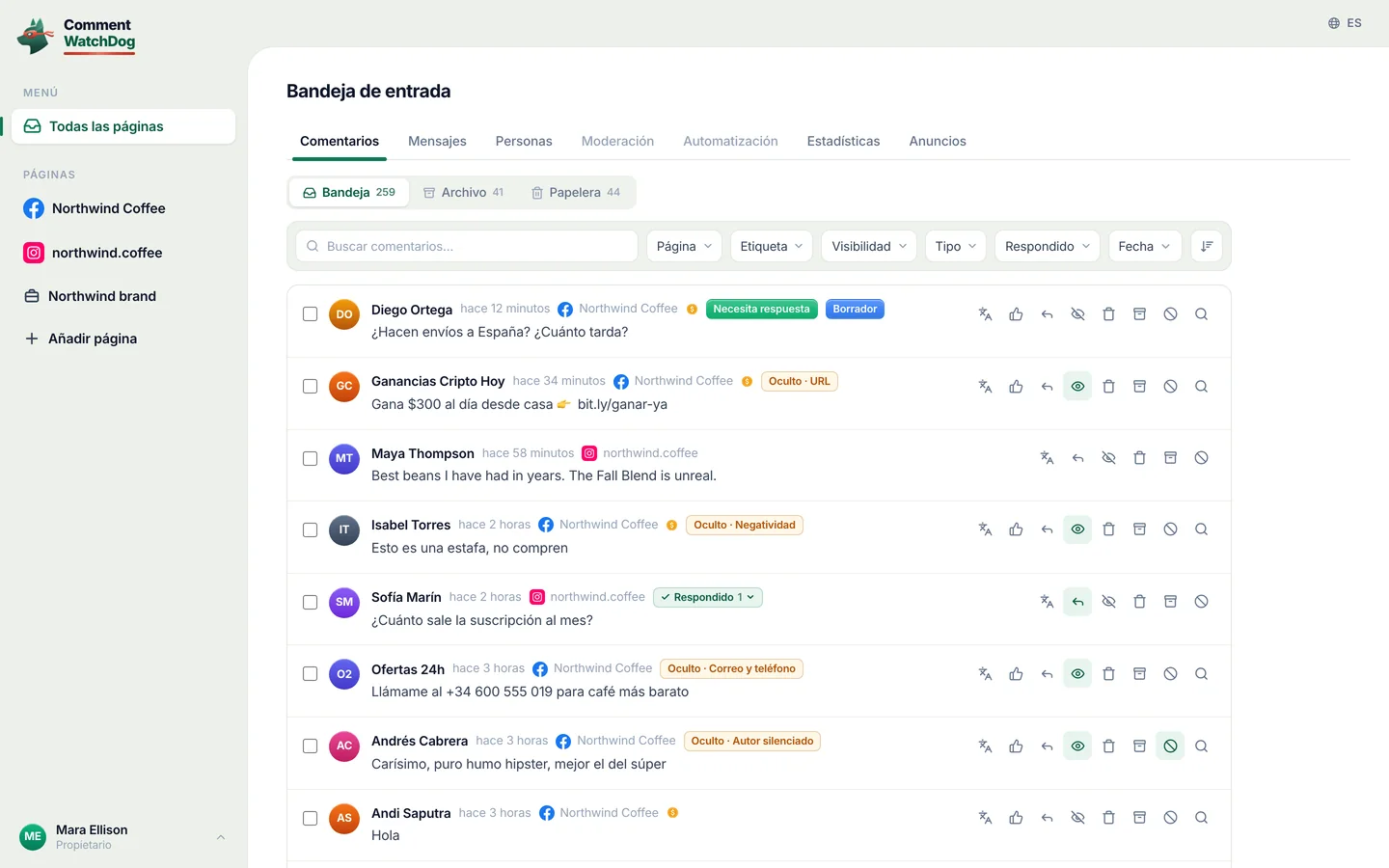
Encuentra los comentarios con un enlace o un número de teléfono bajo mis anuncios esta semana. Elimínalos y silencia a quien los publicó.
Encontré 38 comentarios de 21 personas en 3 anuncios. Aquí hay tres de ellos:
¿Eliminar 38 comentarios y silenciar a 21 personas?
- Dylan R.Gana $500 al día desde casa, bit.ly/fast-cash
- crypto_signals_vipEnvíame un WhatsApp al +1 555 0142 para señales
- Kyle PromoMás barato aquí: northwlnd-deals.shop
No usa créditos de comentarios. Nada se elimina hasta que digas sí.
Sí, adelante.
Hecho. 38 comentarios eliminados, 21 personas silenciadas.
Las preguntas reales siguen ahí para que las respondas.
Tres pasos, en la app que ya usas
Elige tu IA. Inicia sesión una vez en una página de CommentWatchDog con tu cuenta, así no hay clave que copiar ni contraseña que compartir.
Conectar Claude
En Claude, abre Customize › Connectors y elige Add custom connector.
Ponle el nombre CommentWatchDog y pega esta dirección:
https://app.commentwatchdog.com/api/mcpPulsa Connect y permítelo en la página que se abre. Luego actívalo en un chat desde el menú de herramientas.
En los planes Team y Enterprise, primero lo añade un Owner. Funciona en Claude en la web, en la app de escritorio y en el móvil.
Conectar ChatGPT
En ChatGPT, abre Plugins, elige + y después Add custom MCP server.
Pega esta dirección:
https://app.commentwatchdog.com/api/mcpInicia sesión con tu cuenta de CommentWatchDog y permítelo. Luego pídele lo que quieras en cualquier chat.
Que puedas añadir tus propios servidores depende de tu plan de ChatGPT y, en un espacio de trabajo, de su administrador.
Conectar Claude Code
Lo más fácil: pega esto en Claude Code. Se configura solo y te dice el único paso que queda.
Ver el prompt
Connect CommentWatchDog to Claude Code for me. It is a remote MCP server (Streamable HTTP) at https://app.commentwatchdog.com/api/mcp, named "commentwatchdog". It signs in with OAuth in the browser, so there is no key or token to add.

Run this command: claude mcp add --transport http --scope user commentwatchdog https://app.commentwatchdog.com/api/mcp

Then tell me to type /mcp, choose commentwatchdog and Authenticate (if it is not listed yet, tell me to restart Claude Code first), and to allow it on the page that opens. After I have allowed it, call its tool start_here and tell me in one line what you can now do with my CommentWatchDog flows.
O hazlo tú mismo
Ejecuta esto en tu terminal:
claude mcp add --transport http commentwatchdog https://app.commentwatchdog.com/api/mcpAbre Claude Code, escribe
/mcp, elige commentwatchdog y Authenticate.Permítelo en la página que se abre. Luego abre un flujo y pide un cambio: verás cada paso aparecer en el lienzo.
Conectar Cursor
Lo más fácil: pega esto en Cursor. Se configura solo y te dice el único paso que queda.
Ver el prompt
Connect CommentWatchDog to Cursor for me. It is a remote MCP server (Streamable HTTP) at https://app.commentwatchdog.com/api/mcp, named "commentwatchdog". It signs in with OAuth in the browser, so there is no key or token to add.

Add it to ~/.cursor/mcp.json, keeping every server already there:
{
  "mcpServers": {
    "commentwatchdog": {
      "url": "https://app.commentwatchdog.com/api/mcp"
    }
  }
}

Then tell me to open Cursor's MCP settings, choose Connect next to commentwatchdog and allow it on the page that opens. After I have allowed it, call its tool start_here and tell me in one line what you can now do with my CommentWatchDog flows.
O hazlo tú mismo
Añádelo con un clic:
 Añadir a Cursor
O pon esto en ~/.cursor/mcp.json:
{ "mcpServers": { "commentwatchdog": { "url": "https://app.commentwatchdog.com/api/mcp" } } }En los ajustes de MCP de Cursor, pulsa Connect junto a commentwatchdog y permítelo.
Conectar VS Code
Lo más fácil: pega esto en VS Code. Se configura solo y te dice el único paso que queda.
Ver el prompt
Connect CommentWatchDog to VS Code for me. It is a remote MCP server (Streamable HTTP) at https://app.commentwatchdog.com/api/mcp, named "commentwatchdog". It signs in with OAuth in the browser, so there is no key or token to add.

Run this command in the terminal: code --add-mcp '{"name":"commentwatchdog","type":"http","url":"https://app.commentwatchdog.com/api/mcp"}'

Then tell me to start commentwatchdog in the MCP view and allow it on the page that opens. After I have allowed it, call its tool start_here and tell me in one line what you can now do with my CommentWatchDog flows.
O hazlo tú mismo
Añádelo con un clic:
 Añadir a VS Code
O ejecuta esto en tu terminal:
code --add-mcp '{"name":"commentwatchdog","type":"http","url":"https://app.commentwatchdog.com/api/mcp"}'Inicia commentwatchdog en la vista MCP, permítelo en la página que se abre y úsalo luego en el modo agente de Copilot Chat.
Conectar Codex
Lo más fácil: pega esto en Codex. Se configura solo y te dice el único paso que queda.
Ver el prompt
Connect CommentWatchDog to Codex for me. It is a remote MCP server (Streamable HTTP) at https://app.commentwatchdog.com/api/mcp, named "commentwatchdog". It signs in with OAuth in the browser, so there is no key or token to add.

Run this command: codex mcp add commentwatchdog --url https://app.commentwatchdog.com/api/mcp
Then run: codex mcp login commentwatchdog (it opens the browser; if you cannot run it, tell me to run it in my terminal).

Tell me to allow it on the page that opens, and to restart Codex if the tools do not show up. After I have allowed it, call its tool start_here and tell me in one line what you can now do with my CommentWatchDog flows.
O hazlo tú mismo
Ejecuta esto en tu terminal:
codex mcp add commentwatchdog --url https://app.commentwatchdog.com/api/mcpLuego inicia sesión:
codex mcp login commentwatchdogPermítelo en la página que se abre. Codex ya puede trabajar en tu cuenta.
Conectar Gemini CLI
Lo más fácil: pega esto en Gemini CLI. Se configura solo y te dice el único paso que queda.
Ver el prompt
Connect CommentWatchDog to Gemini CLI for me. It is a remote MCP server (Streamable HTTP) at https://app.commentwatchdog.com/api/mcp, named "commentwatchdog". It signs in with OAuth in the browser, so there is no key or token to add.

Run this command: gemini mcp add --transport http -s user commentwatchdog https://app.commentwatchdog.com/api/mcp

Then tell me to type /mcp auth commentwatchdog and allow it on the page that opens. After I have allowed it, call its tool start_here and tell me in one line what you can now do with my CommentWatchDog flows.
O hazlo tú mismo
Ejecuta esto en tu terminal (añade
-s userpara tenerlo en todas las carpetas):gemini mcp add --transport http commentwatchdog https://app.commentwatchdog.com/api/mcpLuego, dentro de Gemini CLI:
/mcp auth commentwatchdogPermítelo en la página que se abre.
Conectar Windsurf
Lo más fácil: pega esto en Windsurf. Se configura solo y te dice el único paso que queda.
Ver el prompt
Connect CommentWatchDog to Windsurf for me. It is a remote MCP server (Streamable HTTP) at https://app.commentwatchdog.com/api/mcp, named "commentwatchdog". It signs in with OAuth in the browser, so there is no key or token to add.

Add it to the MCP config file, keeping every server already there: ~/.config/devin/mcp_config.json, or ~/.codeium/windsurf/mcp_config.json if that is the one that exists:
{
  "mcpServers": {
    "commentwatchdog": {
      "serverUrl": "https://app.commentwatchdog.com/api/mcp"
    }
  }
}

Then tell me to refresh the MCP list, sign in when it asks and allow it. After I have allowed it, call its tool start_here and tell me in one line what you can now do with my CommentWatchDog flows.
O hazlo tú mismo
Abre el archivo de configuración de MCP: ~/.config/devin/mcp_config.json (Windsurf es ahora Devin Desktop), o ~/.codeium/windsurf/mcp_config.json en versiones anteriores.
Añade esto:
{ "mcpServers": { "commentwatchdog": { "serverUrl": "https://app.commentwatchdog.com/api/mcp" } } }Actualiza la lista de MCP, inicia sesión cuando lo pida y permítelo.
Conectar Cline
Lo más fácil: pega esto en Cline. Se configura solo y te dice el único paso que queda.
Ver el prompt
Connect CommentWatchDog to Cline for me. It is a remote MCP server (Streamable HTTP) at https://app.commentwatchdog.com/api/mcp, named "commentwatchdog". It signs in with OAuth in the browser, so there is no key or token to add.

Add it to your MCP settings (cline_mcp_settings.json), keeping every server already there:
{
  "mcpServers": {
    "commentwatchdog": {
      "type": "streamableHttp",
      "url": "https://app.commentwatchdog.com/api/mcp"
    }
  }
}

Then tell me to sign in when Cline asks and allow it. After I have allowed it, call its tool start_here and tell me in one line what you can now do with my CommentWatchDog flows.
O hazlo tú mismo
En Cline, abre MCP Servers y elige Configure MCP Servers.
Añade esto:
{ "mcpServers": { "commentwatchdog": { "type": "streamableHttp", "url": "https://app.commentwatchdog.com/api/mcp" } } }Inicia sesión cuando Cline lo pida y permítelo.
Conectar otra app
Cualquier app que admita servidores MCP remotos (Streamable HTTP) se conecta a esta dirección:
https://app.commentwatchdog.com/api/mcpInicia sesión sola con OAuth: tú la permites en una página de CommentWatchDog, sin pegar nada.
Si tu app no puede iniciar sesión de esa manera, crea una clave en Configuración › MCP y envíala como un encabezado Bearer.
¿Construyendo tu propio agente? Si no puede abrir un navegador para iniciar sesión, un Propietario o Administrador crea una clave en Configuración › MCP y el agente la envía como un encabezado Bearer. La clave se muestra una vez y tiene fecha de vencimiento. Quién puede conectar: Propietario, Administrador o Gestor. Desconecta cualquier app en Configuración › MCP y se detiene al instante.
Dilo una vez. Mira cómo sucede
Funciona en tus páginas reales, con los derechos que tiene tu rol. Aquí hay tres cosas que la gente pregunta primero.
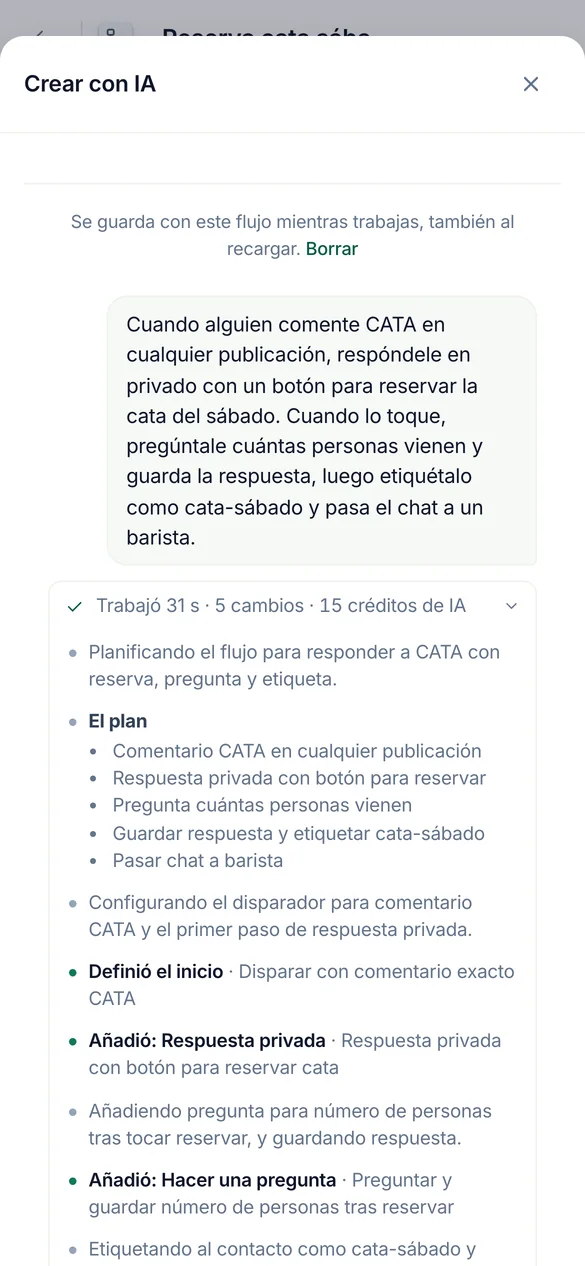
Cuando alguien comenta TASTING, responde con un botón para reservar, pregunta cuántos vienen y etiquétalos.
Construye automatizaciones y flujos
Se construye en tu lienzo real. Mantén el flujo abierto en tu navegador y verás cada paso aterrizar mientras observas. Prueba el flujo antes de ofrecer activarlo.
Construido en pausa. Ir en vivo espera tu confirmación.
Crea un agente a partir de nuestra página de envíos y lista de precios, luego pruébalo con tres preguntas.
Configura agentes IA
Lee tu enlace, archivo o texto en el conocimiento del agente, verifica lo leído y le hace preguntas reales para que veas las respuestas antes que un cliente.
Cada intento usa 1 crédito de IA, así que ejecuta varios y pregunta antes de más.
Revisa mi mejor anuncio del año pasado y elimina el spam debajo.
Limpia comentarios, nuevos y antiguos
Encuentra comentarios por palabras, un patrón, el autor, la publicación o un periodo, uno o miles a la vez, y muestra quién los escribió. Las publicaciones y anuncios antiguos pasan por Limpieza de publicaciones, revisados con tus propias reglas.
Indica los créditos que usa una revisión antes de empezar.
Todo lo que puedes preguntar
| Área | Pídele que | Por ejemplo |
|---|---|---|
| Automatizaciones | Construye, cambia, prueba y activa comentarios a DM, respuestas por palabra clave, mensaje de bienvenida y respuestas a historias | "Cuando alguien comente PRECIO en mi último reel, envíale la lista de precios por DM." |
| Flujos | Construye un flujo con preguntas, ramas, captura de leads y pasos HTTP, pruébalo en el simulador, corrígelo | Pide a las personas su correo electrónico, luego márcalas como leads. |
| Agentes de IA | Crea un agente, dale conocimiento desde un enlace, un archivo o texto, pruébalo, responde sus borradores | "Crea un agente desde nuestra página de precios y pruébalo con tres preguntas." |
| Moderación | Lee y cambia las reglas por página, prueba un comentario contra ellas, cópialas a otras páginas | "Oculta enlaces y spam de criptomonedas en mis anuncios, y copia eso a la cuenta de Instagram." |
| Comentarios | Busca por palabras, una expresión regular, el autor, la publicación o un periodo. Luego oculta, elimina, responde, envía una respuesta privada, bloquea o silencia | "Encuentra todos los comentarios con un número de WhatsApp de esta semana y ocúltalos." |
| Limpieza de publicaciones | Abre una publicación o anuncio antiguo, revisa sus comentarios según tus reglas, luego elimina, oculta, bloquea o silencia lo que encontró | "Revisa mi mejor anuncio del año pasado y elimina el spam debajo." |
| Resultados | Lee lo que la moderación detectó y lo que hizo cada automatización, y explica una ejecución | "¿Por qué Ana no recibió el DM ayer?" |
| Personas | Encuentra personas, lee sus etiquetas y campos, cámbialos o expórtalos | "¿Cuántas personas dieron su correo electrónico este mes?" |
Las 100 herramientas por nombre
start_hereCommentWatchDog's full instructions and what this account has right nowrun_toolRun any CommentWatchDog tool by its name, also one added after your app loaded its tool list (an update notice or search names it)list_channelsThe workspace, the signed-in person, and every connected channel (each Instagram account and Facebook Page) with its state (ready, or why not and how…connect_channelConnect an Instagram account or Facebook Page that the person's Meta login already shares but that is not connected yet (list_channelsuse_channelSet the channel (one Instagram account or Facebook Page from list_channels) this AI builds on, as the person saidcurrent_flowThe flow the person has open in the CommentWatchDog editor in their browser right now ("the chatbot I have open"), described like get_flow with its…list_flowsThe chatbot flows on the chosen channel (or the one named; page "all" for every channel), newest change firstget_flowOne flow as it is nowget_stepOne step of a flow in fullvalues_atWhat a step can read, before you write a {{value}} or a condition rule therecreate_flowA new, empty, paused chatbot flow on the chosen channel (only its start)duplicate_flowA paused copy of a flow, in one calllist_postsFind the chosen channel's posts, reels and adsget_postOne post in fulllist_storiesThe Instagram stories live right now (the last 24 hours; Instagram lists nothing older), newest firstset_postWhich posts a comment flow answers onrename_flowGive a flow a new nameget_guideHOW TO BUILDget_practicesGood practice for building, where the person said nothingapply_changesChange a paused flowfinishEnd a piece of workset_liveTurn a flow or a basic automation LIVE (it starts answering real people on Instagram or Facebook) or pause itdescribe_stepOne step type in fulldescribe_triggerOne start type in full (comment, dm, story, share, link, welcome, …)describe_ruleOne condition rule kind in full, with its settings and examplessearchSearch EVERYTHING CommentWatchDog can do, when you are not sure what exists or which tool to useget_accountThe workspace's plan and what it allows right nowfind_stepsWhich step types do something ("ask for an email", "wait a day", "check if they follow")get_limitsThe platform's limits (text lengths, buttons, cards, waits) a flow must stay withincan_connectWhether a way out of one step may lead to another step, and why notlist_fieldsThe workspace's custom fields (where answers are kept)list_tagsThe workspace's tags, with how many people carry each and which flows use itlist_agentsThe workspace's AI agents (an agent step answers or talks as one of them)get_businessWhat the business has written about itself for this page (its agents' knowledgefind_serviceFree web services already proven to work (weather, currency, …) for an HTTP stepcreate_tagMake a new tag in the workspace (a step may only use a tag that exists)create_fieldMake a new custom field (where an answer is kept on the person)simulateWalk one made-up person through the flow on the simulator of the real engine (nothing is sent, nothing is kept)check_flowTest the whole flowlist_runsWhat real people went through this flow or basic automation (newest first), with countsget_resultsHow the automations are doing, across all of them (every kind, not only flows), or the ones "automation" names (an id, words of a name, or a keyword…explain_runOne real run of a flow or a basic automation step by step, in wordshttp_testRun one HTTP step of the flow for real from the server, with sample values for its {{variables}}, through the same guarded call the engine makesget_agent_guideREAD THIS FIRST before creating or changing an AI agentget_agentEverything about one AI agentcreate_agentCreate an AI agent (the plan must include agents and have room for one more)update_agentChange an agentadd_knowledgeAdd knowledge you extracted yourself (from a website, a PDF, a doc, the person's words) as one text sourceread_linkFALLBACK when you could not read a page yourselfread_fileFALLBACK when you could not extract a file yourselfget_sourceThe full text of one knowledge source as the agent uses it, to VERIFY a page or file was read properly (are the prices, plans, policies and contact…edit_sourceCorrect a source's text (a wrong price, a missing line, cut what customers never ask about)remove_sourceRemove a knowledge source (a page that failed, a duplicate, one replaced by a shorter text)reread_sourceRead a web page source again (it changed, or the last read failed for a passing reason such as a timeout)check_agentIs the agent ready? Freetest_agentAsk the agent a made-up customer comment or DM and see exactly what it would answer (or why it would hand over to a person)list_automationsThe basic automations (not flows) on the chosen channel, or the one named, or page "all"describe_automationOne kind of basic automation in full, before you create one (and before choosing a flowget_automationOne basic automation as it is nowcurrent_automationThe basic automation the person has open in the CommentWatchDog editor in their browser right now ("the one I have open", "this automation")…create_automationMake a basic automation on the chosen channel, PAUSED (it answers nobody until the person says yes to set_live)update_automationChange a basic automationduplicate_automationA paused copy of a basic automationtest_automationTest a basic automation (flowssend_to_earlierSend a LIVE comment → DM automation to the people who already commented before it went live (the last 7 days, on the posts it covers, each person…pause_automationsPause several live automations and flows at once (ids from list_automations / list_flows, or all:true for every live one on the channel)save_topicMake a topic, or change one (id)test_topicWould this message count as the topic? topic (an id from list_topics) or name + about + examples (an unsaved one), and textlist_topicsThe workspace's topics (what comments or DMs are about, decided by AI)describe_moderationHow comment moderation works, before setting it up or changing itget_moderationRead a channel's comment moderation settingstest_moderationRun a made-up comment through a channel's moderation with the live engine (AI rules included) and say what would happenupdate_moderationSet up or change a channel's comment moderationcopy_moderationPut one channel's moderation settings on other connected channels (their own settings are REPLACED)find_commentsSearch the comments on the channel (or "all") the way the inbox does, to answer "what are people saying" or to pick comments to act onmoderate_commentsAct on real comments, one or thousands at oncecomment_taskHow a moderate_comments or cleanup_act task is going (done, waiting on Meta's rate limit, failed and why), or stop it with cancelbanned_peopleWho is banned (CommentWatchDog hides every comment they write) and who is blocked on Facebook (through CommentWatchDog), per channel or "all", with…cleanup_postsThe posts and ads Post cleanup knows on every connected channel, OLD ones included (the inbox only has comments from after a channel was connected)cleanup_openRead one post or ad and all its comments (replies included) for Post cleanupcleanup_commentsSearch the comments of a post Post cleanup has read (cleanup_open first)cleanup_checkCheck the comments of up to 5 posts against the channel's own moderation rules (its filters, keywords, allowed links, whitelist, custom instructions)cleanup_actAct on the comments of ONE post Post cleanup has readfind_peopleThe people who messaged or commented (People in the app), newest first, 50 at a timeget_personOne person in fullchange_peopleChange people in Peoplesave_segmentSave a segment of People (a filter kept by name, shown on the People page and usable as find_people {segment})forget_peopleForget people for good (a privacy requestlist_draftsThe AI agents' drafts waiting for a personanswer_draftSend an agent's draft (as written, or with textremoveRemove somethingrestoreBring an archived automation or flow back, PAUSED (set_live turns it on with the person's yes)rename_tagRename a tag everywhere it is namedflow_versionsA flow's saved versions, newest first (each save that changed it, with what changed and who), or with versionrestore_versionPut a PAUSED flow back to an earlier version (flow_versions)get_moderation_resultsWhat moderation did on the channel (or "all") over a periodset_sendingHow fast a channel sends its automatic first DMs and public replies (per_hoursaved_repliesThe channel's saved replies (the ready answers teammates insert in the inbox)list_mediaThe workspace's media libraryadd_mediaStore a file in the workspace's media library from a public link (the person's own file
Pregunta antes de actuar
Leer y construir ocurren a la vez. Todo lo que se publica, llega a personas o elimina algo espera tu aprobación, con tus propias palabras, en el chat.
| Lo hace de inmediato | Te pregunta primero |
|---|---|
| Lee páginas, automatizaciones, flujos, agentes, reglas, resultados y comentarios | Activa, pausa o cambia una automatización o flujo mientras está activo |
| Crear y modificar automatizaciones y flujos pausados, y probarlos | Eliminar, responder, enviar como mensaje privado, bloquear o silenciar |
| Ocultar, mostrar, desbloquear y reactivar cuando no se usan créditos | Todo lo que usa créditos de comentarios, con el número mostrado primero |
- Antes de un sí, muestra su trabajo
- Cuántos comentarios o personas, una muestra de quién y qué, y los créditos que usa.
- La misma respuesta a muchas personas
- Como máximo 200 comentarios por solicitud y 1.000 al día, enviados uno cada 3 segundos, para que Meta nunca lo lea como spam.
- Bloqueo
- Como máximo 100 personas por solicitud. Silenciar no tiene límite: CommentWatchDog oculta todo lo que escribe una persona silenciada.
- Instagram no permite que ninguna app bloquee. Silenciar funciona allí.
- Tu rol y tu plan aplican
- La IA puede hacer lo que tú puedes hacer. Una función que tu plan no incluye permanece cerrada.
- Lo que queda en la app
- Facturación, compañeros y responder en la bandeja.
Gratis para conectar. Créditos como en la app
Preguntar a través de una IA nunca cuesta más que hacer lo mismo en CommentWatchDog. Los planes empiezan en $29 al mes.
| Qué hace | Créditos |
|---|---|
| Conectar una app de IA, en todos los planes | Ninguna |
| Creación, prueba y búsqueda | Ninguna |
| Revisar comentarios según tus reglas (Limpieza de publicaciones) | Créditos de comentarios, los mismos que en la app. Te dice cuántos antes de empezar. |
| Actuar sobre un comentario que tu plan nunca contó | 1 crédito de comentario la primera vez que algo actúa sobre él, igual que en la bandeja de entrada |
| Cualquier cosa que escriba una IA: respuestas de agentes, traducciones | Créditos de IA, los mismos que en la app |
Preguntas frecuentes
Respuestas cortas. Cada una de ellas vale para las diez apps.
Es un servidor MCP remoto que permite que una app de IA como Claude o ChatGPT funcione en tu cuenta de CommentWatchDog. Preguntas con palabras simples y construye y prueba automatizaciones para Instagram y Facebook, configura agentes de IA y moderación, y encuentra, oculta, elimina o responde comentarios. La dirección es https://app.commentwatchdog.com/api/mcp.
Claude, ChatGPT, Claude Code, Cursor, VS Code, Codex, Gemini CLI, Windsurf, Cline y cualquier app que soporte servidores MCP remotos por Streamable HTTP.
No. Cada app inicia sesión con OAuth: la autorizas en una página de CommentWatchDog y no se pega nada. Una clave es solo para tu propio agente o script que no puede abrir un navegador.
No. Eliminar, responder, enviar una respuesta privada, bloquear y silenciar siempre requieren dos pasos. Muestra cuántos y una muestra, y solo continúa después de tu sí en el chat.
No. Conectar es gratis en todos los planes, al igual que crear, probar y buscar. Los créditos de comentarios y de IA se cobran exactamente como en la app.
Sí, a través de Limpieza de publicaciones. Abre la publicación o anuncio, revisa sus comentarios según tus reglas y elimina, oculta, bloquea o silencia lo que encontró tras tu aprobación.
En Configuración › MCP, en Apps conectadas, elige Desconectar junto a ella, o Desconectar todos. Deja de funcionar al instante.
Haz tu primera pregunta hoy
Gratis por 7 días, no se requiere tarjeta de crédito.