
Verwalte deine Instagram- und Facebook-Kommentare und DMs mit Claude oder ChatGPT
Verbinde die KI, die du schon nutzt. Bitte sie in einfachen Worten, eine DM-Automatisierung zu erstellen, einen KI-Agenten einzurichten oder den Spam unter deinen Anzeigen zu finden und zu löschen. Es funktioniert in deinem echten Konto, und nichts wird live gestellt, gesendet oder gelöscht, bis du im Chat zustimmst.
https://app.commentwatchdog.com/api/mcp7 Tage kostenlos, keine Kreditkarte erforderlich. Das Verbinden einer KI ist in jedem Plan kostenlos.
- Anmeldung auf unserer Seite, kein Schlüssel oder Passwort
- Claude, ChatGPT, Cursor und sechs weitere
- Metas offizielle API
- Erstellen, testen und suchen sind kostenlos
 ClaudeCommentWatchDog verbunden
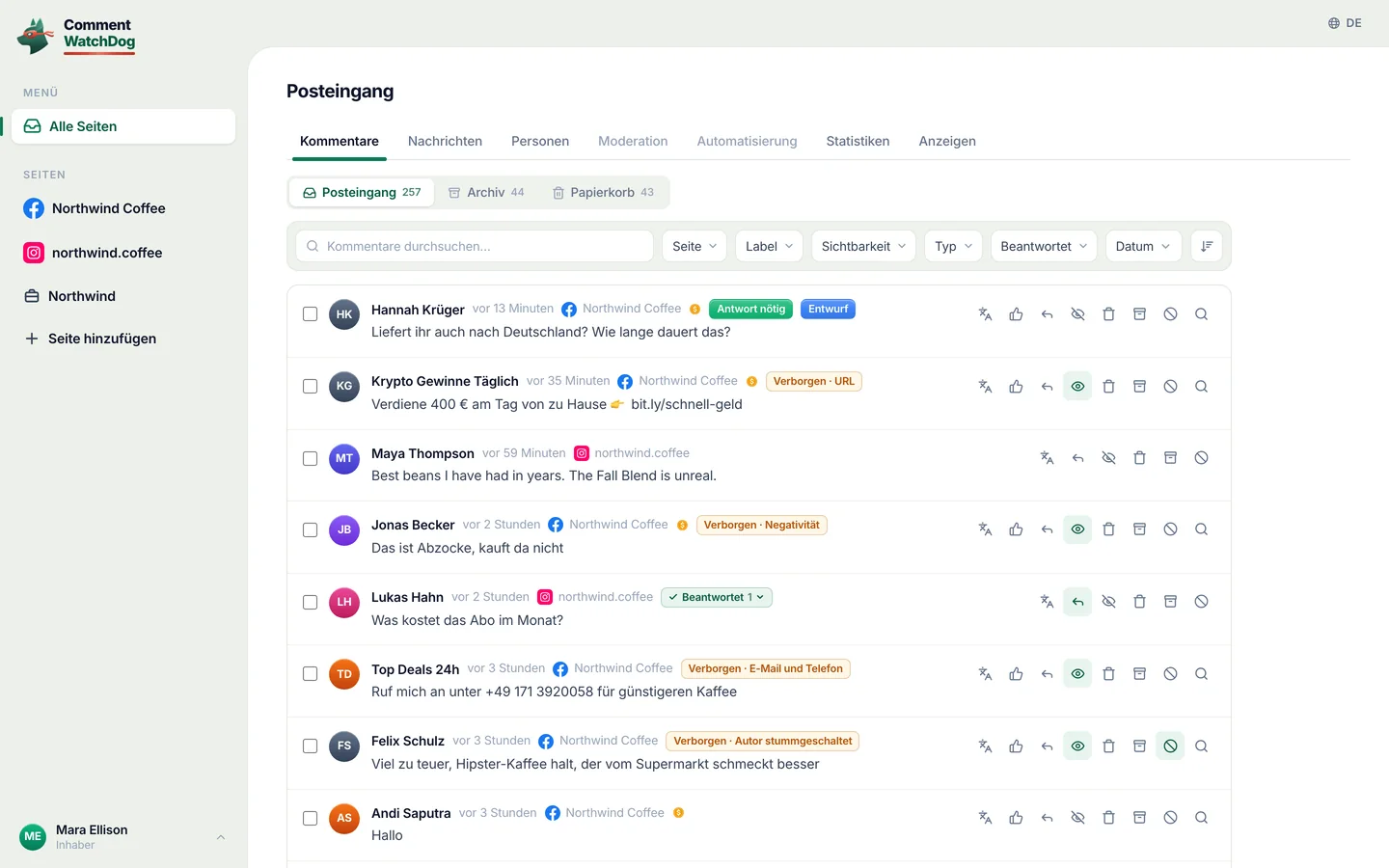
Finde die Kommentare mit einem Link oder einer Telefonnummer unter meinen Anzeigen diese Woche. Lösche sie und schalte die Personen stumm, die sie gepostet haben.
Ich habe 38 Kommentare von 21 Personen auf 3 Anzeigen gefunden. Hier sind drei davon:
38 Kommentare löschen und 21 Personen stummschalten?
- Dylan R.Verdiene 500 $ am Tag von zu Hause, bit.ly/fast-cash
- crypto_signals_vipSchick mir Signale per WhatsApp +1 555 0142
- Kyle PromoGünstiger hier: northwlnd-deals.shop
Verwendet keine Kommentar-Credits. Nichts wird entfernt, bis du zustimmst.
Ja, mach weiter.
Fertig. 38 Kommentare gelöscht, 21 Personen stummgeschaltet.
Die echten Fragen sind noch da, damit du sie beantworten kannst.
Drei Schritte, in der App, die du schon nutzt
Wähle deine KI. Sie meldet sich einmal auf einer CommentWatchDog-Seite mit deinem Konto an, es gibt also keinen Schlüssel zum Kopieren und kein Passwort zum Teilen.
Claude verbinden
Öffne in Claude Customize › Connectors und wähle Add custom connector.
Nenne ihn CommentWatchDog und füge diese Adresse ein:
https://app.commentwatchdog.com/api/mcpWähle Connect und erlaube es auf der Seite, die sich öffnet. Aktiviere ihn dann in einem Chat über das Tools-Menü.
In Team- und Enterprise-Plänen fügt zuerst ein Owner den Connector hinzu. Er funktioniert in Claude im Web, in der Desktop-App und auf dem Handy.
ChatGPT verbinden
Öffne in ChatGPT Plugins, wähle + und dann Add custom MCP server.
Füge diese Adresse ein:
https://app.commentwatchdog.com/api/mcpMelde dich mit deinem CommentWatchDog-Konto an und erlaube es. Dann einfach in jedem Chat fragen.
Ob du eigene Server hinzufügen kannst, hängt von deinem ChatGPT-Plan ab und in einem Workspace vom zuständigen Admin.
Claude Code verbinden
Am einfachsten: Füge das in Claude Code ein. Es richtet sich selbst ein und sagt dir den einen Schritt, der noch fehlt.
Prompt ansehen
Connect CommentWatchDog to Claude Code for me. It is a remote MCP server (Streamable HTTP) at https://app.commentwatchdog.com/api/mcp, named "commentwatchdog". It signs in with OAuth in the browser, so there is no key or token to add.

Run this command: claude mcp add --transport http --scope user commentwatchdog https://app.commentwatchdog.com/api/mcp

Then tell me to type /mcp, choose commentwatchdog and Authenticate (if it is not listed yet, tell me to restart Claude Code first), and to allow it on the page that opens. After I have allowed it, call its tool start_here and tell me in one line what you can now do with my CommentWatchDog flows.
Oder mach es selbst
Führe das in deinem Terminal aus:
claude mcp add --transport http commentwatchdog https://app.commentwatchdog.com/api/mcpÖffne Claude Code, tippe
/mcp, wähle commentwatchdog und Authenticate.Erlaube es auf der geöffneten Seite. Öffne dann einen Flow und fordere eine Änderung an: du siehst jeden Schritt auf der Arbeitsfläche landen.
Cursor verbinden
Am einfachsten: Füge das in Cursor ein. Es richtet sich selbst ein und sagt dir den einen Schritt, der noch fehlt.
Prompt ansehen
Connect CommentWatchDog to Cursor for me. It is a remote MCP server (Streamable HTTP) at https://app.commentwatchdog.com/api/mcp, named "commentwatchdog". It signs in with OAuth in the browser, so there is no key or token to add.

Add it to ~/.cursor/mcp.json, keeping every server already there:
{
  "mcpServers": {
    "commentwatchdog": {
      "url": "https://app.commentwatchdog.com/api/mcp"
    }
  }
}

Then tell me to open Cursor's MCP settings, choose Connect next to commentwatchdog and allow it on the page that opens. After I have allowed it, call its tool start_here and tell me in one line what you can now do with my CommentWatchDog flows.
Oder mach es selbst
Füge es mit einem Klick hinzu:
 Zu Cursor hinzufügen
Oder trage das in ~/.cursor/mcp.json ein:
{ "mcpServers": { "commentwatchdog": { "url": "https://app.commentwatchdog.com/api/mcp" } } }Wähle in den MCP-Einstellungen von Cursor neben commentwatchdog Connect und erlaube es.
VS Code verbinden
Am einfachsten: Füge das in VS Code ein. Es richtet sich selbst ein und sagt dir den einen Schritt, der noch fehlt.
Prompt ansehen
Connect CommentWatchDog to VS Code for me. It is a remote MCP server (Streamable HTTP) at https://app.commentwatchdog.com/api/mcp, named "commentwatchdog". It signs in with OAuth in the browser, so there is no key or token to add.

Run this command in the terminal: code --add-mcp '{"name":"commentwatchdog","type":"http","url":"https://app.commentwatchdog.com/api/mcp"}'

Then tell me to start commentwatchdog in the MCP view and allow it on the page that opens. After I have allowed it, call its tool start_here and tell me in one line what you can now do with my CommentWatchDog flows.
Oder mach es selbst
Füge es mit einem Klick hinzu:
 Zu VS Code hinzufügen
Oder führe das in deinem Terminal aus:
code --add-mcp '{"name":"commentwatchdog","type":"http","url":"https://app.commentwatchdog.com/api/mcp"}'Starte commentwatchdog in der MCP-Ansicht, erlaube es auf der Seite, die sich öffnet, und nutze es dann im Agent-Modus von Copilot Chat.
Codex verbinden
Am einfachsten: Füge das in Codex ein. Es richtet sich selbst ein und sagt dir den einen Schritt, der noch fehlt.
Prompt ansehen
Connect CommentWatchDog to Codex for me. It is a remote MCP server (Streamable HTTP) at https://app.commentwatchdog.com/api/mcp, named "commentwatchdog". It signs in with OAuth in the browser, so there is no key or token to add.

Run this command: codex mcp add commentwatchdog --url https://app.commentwatchdog.com/api/mcp
Then run: codex mcp login commentwatchdog (it opens the browser; if you cannot run it, tell me to run it in my terminal).

Tell me to allow it on the page that opens, and to restart Codex if the tools do not show up. After I have allowed it, call its tool start_here and tell me in one line what you can now do with my CommentWatchDog flows.
Oder mach es selbst
Führe das in deinem Terminal aus:
codex mcp add commentwatchdog --url https://app.commentwatchdog.com/api/mcpMelde dich dann an:
codex mcp login commentwatchdogErlaube es auf der Seite, die sich öffnet. Codex kann jetzt in deinem Konto arbeiten.
Gemini CLI verbinden
Am einfachsten: Füge das in Gemini CLI ein. Es richtet sich selbst ein und sagt dir den einen Schritt, der noch fehlt.
Prompt ansehen
Connect CommentWatchDog to Gemini CLI for me. It is a remote MCP server (Streamable HTTP) at https://app.commentwatchdog.com/api/mcp, named "commentwatchdog". It signs in with OAuth in the browser, so there is no key or token to add.

Run this command: gemini mcp add --transport http -s user commentwatchdog https://app.commentwatchdog.com/api/mcp

Then tell me to type /mcp auth commentwatchdog and allow it on the page that opens. After I have allowed it, call its tool start_here and tell me in one line what you can now do with my CommentWatchDog flows.
Oder mach es selbst
Führe das in deinem Terminal aus (mit
-s usergilt es in jedem Ordner):gemini mcp add --transport http commentwatchdog https://app.commentwatchdog.com/api/mcpDann, in Gemini CLI:
/mcp auth commentwatchdogErlaube es auf der Seite, die sich öffnet.
Windsurf verbinden
Am einfachsten: Füge das in Windsurf ein. Es richtet sich selbst ein und sagt dir den einen Schritt, der noch fehlt.
Prompt ansehen
Connect CommentWatchDog to Windsurf for me. It is a remote MCP server (Streamable HTTP) at https://app.commentwatchdog.com/api/mcp, named "commentwatchdog". It signs in with OAuth in the browser, so there is no key or token to add.

Add it to the MCP config file, keeping every server already there: ~/.config/devin/mcp_config.json, or ~/.codeium/windsurf/mcp_config.json if that is the one that exists:
{
  "mcpServers": {
    "commentwatchdog": {
      "serverUrl": "https://app.commentwatchdog.com/api/mcp"
    }
  }
}

Then tell me to refresh the MCP list, sign in when it asks and allow it. After I have allowed it, call its tool start_here and tell me in one line what you can now do with my CommentWatchDog flows.
Oder mach es selbst
Öffne die MCP-Konfigurationsdatei: ~/.config/devin/mcp_config.json (Windsurf heißt jetzt Devin Desktop) oder ~/.codeium/windsurf/mcp_config.json bei älteren Versionen.
Füge das hinzu:
{ "mcpServers": { "commentwatchdog": { "serverUrl": "https://app.commentwatchdog.com/api/mcp" } } }Aktualisiere die MCP-Liste, melde dich an, wenn danach gefragt wird, und erlaube es.
Cline verbinden
Am einfachsten: Füge das in Cline ein. Es richtet sich selbst ein und sagt dir den einen Schritt, der noch fehlt.
Prompt ansehen
Connect CommentWatchDog to Cline for me. It is a remote MCP server (Streamable HTTP) at https://app.commentwatchdog.com/api/mcp, named "commentwatchdog". It signs in with OAuth in the browser, so there is no key or token to add.

Add it to your MCP settings (cline_mcp_settings.json), keeping every server already there:
{
  "mcpServers": {
    "commentwatchdog": {
      "type": "streamableHttp",
      "url": "https://app.commentwatchdog.com/api/mcp"
    }
  }
}

Then tell me to sign in when Cline asks and allow it. After I have allowed it, call its tool start_here and tell me in one line what you can now do with my CommentWatchDog flows.
Oder mach es selbst
Öffne in Cline MCP Servers und wähle Configure MCP Servers.
Füge das hinzu:
{ "mcpServers": { "commentwatchdog": { "type": "streamableHttp", "url": "https://app.commentwatchdog.com/api/mcp" } } }Melde dich an, wenn Cline danach fragt, und erlaube es.
Andere App verbinden
Jede App, die Remote-MCP-Server unterstützt (Streamable HTTP), verbindet sich mit dieser Adresse:
https://app.commentwatchdog.com/api/mcpSie meldet sich selbst per OAuth an: Du erlaubst es auf einer CommentWatchDog-Seite, nichts zum Einfügen.
Wenn sich deine App nicht so anmelden kann, erstelle einen Schlüssel in Einstellungen › MCP und sende ihn als Bearer-Header.
Eigenen Agenten bauen? Wenn er keinen Browser zum Anmelden öffnen kann, erstellt ein Inhaber oder Administrator einen Schlüssel unter Einstellungen › MCP und der Agent sendet ihn als Bearer-Header. Der Schlüssel wird einmal angezeigt und hat ein Enddatum. Wer verbinden kann: Inhaber, Administrator oder Manager. Trenne jede App in Einstellungen › MCP und sie stoppt sofort.
Sag es einmal. Sieh zu, wie es passiert
Es funktioniert auf deinen echten Seiten, mit den Rechten deiner Rolle. Hier sind drei Dinge, die Leute zuerst fragen.
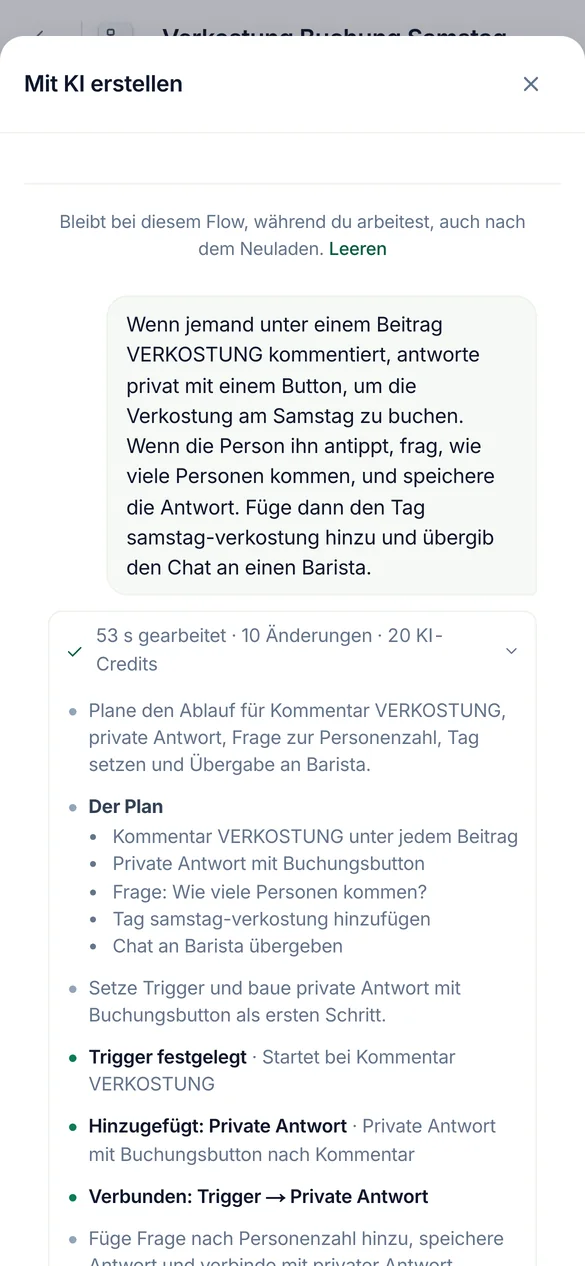
Wenn jemand TASTING kommentiert, antworte mit einem Button zum Buchen, frage wie viele kommen und versehe sie mit einem Tag.
Automatisierungen und Flows bauen
Es baut auf deiner echten Arbeitsfläche. Halte den Flow im Browser offen und jeder Schritt landet während du zusiehst. Es testet den Flow, bevor es anbietet, ihn einzuschalten.
Im Pausenmodus gebaut. Live gehen wartet auf dein Ja.
Erstelle einen Agenten aus unserer Versandseite und Preisliste, und teste ihn dann mit drei Fragen.
KI-Agenten einrichten
Es liest deinen Link, deine Datei oder deinen Text in das Wissen des Agenten ein, prüft, was gelesen wurde, und stellt echte Fragen, damit du die Antworten siehst, bevor ein Kunde sie sieht.
Jeder Versuch verbraucht 1 KI-Credit, also führt es einige aus und fragt, bevor es mehr macht.
Prüfe meine beste Anzeige vom letzten Jahr und lösche den Spam darunter.
Kommentare bereinigen, neue und alte
Es findet Kommentare nach Worten, einem Muster, dem Autor, dem Beitrag oder einem Zeitraum, einen oder tausende auf einmal, und zeigt, wer sie geschrieben hat. Alte Beiträge und Anzeigen werden durch Beitragsbereinigung geprüft, abgeglichen mit deinen eigenen Regeln.
Es nennt die Credits, die eine Prüfung verbraucht, bevor sie startet.
Alles, was du fragen kannst
| Bereich | Bitte es | Zum Beispiel |
|---|---|---|
| Automatisierungen | Kommentar-zu-DM, Keyword-Antworten, die Willkommensnachricht und Story-Antworten erstellen, ändern, testen und einschalten | Wenn jemand PREIS unter meinem neuesten Reel kommentiert, die Preisliste per DM senden. |
| Flows | Einen Flow mit Fragen, Verzweigungen, Lead-Erfassung und HTTP-Schritten bauen, im Simulator testen, korrigieren | Frage Leute nach ihrer E-Mail und versehe sie dann mit dem Tag Leads. |
| KI-Agenten | Erstelle einen Agenten, gib ihm Wissen aus einem Link, einer Datei oder Text, teste ihn, beantworte seine Entwürfe | Einen Agenten von unserer Preisseite erstellen und ihn mit drei Fragen testen. |
| Moderation | Lies und ändere die Regeln pro Seite, teste einen Kommentar gegen sie, kopiere sie auf andere Seiten | Links und Krypto-Spam in meinen Anzeigen verbergen und das auf das Instagram-Konto kopieren. |
| Kommentare | Finde nach Worten, einem Regex, dem Autor, dem Beitrag oder einem Zeitraum. Dann verbergen, löschen, antworten, Als private Nachricht senden, blockieren oder stummschalten | Jeden Kommentar mit einer WhatsApp-Nummer von dieser Woche finden und verbergen. |
| Beitragsbereinigung | Öffne einen alten Beitrag oder eine Anzeige, prüfe die Kommentare anhand deiner Regeln und lösche, verberge, blockiere oder schalte stumm, was gefunden wurde | Meine beste Anzeige vom letzten Jahr prüfen und den Spam darunter löschen. |
| Ergebnisse | Lies, was die Moderation gefangen hat und was jede Automatisierung gemacht hat, und erkläre einen Lauf | Warum hat Ana gestern keine DM bekommen? |
| Personen | Finde Personen, lese ihre Tags und Felder, ändere oder exportiere sie | Wie viele Leute haben diesen Monat ihre E-Mail angegeben? |
Alle 100 Tools nach Namen
start_hereCommentWatchDog's full instructions and what this account has right nowrun_toolRun any CommentWatchDog tool by its name, also one added after your app loaded its tool list (an update notice or search names it)list_channelsThe workspace, the signed-in person, and every connected channel (each Instagram account and Facebook Page) with its state (ready, or why not and how…connect_channelConnect an Instagram account or Facebook Page that the person's Meta login already shares but that is not connected yet (list_channelsuse_channelSet the channel (one Instagram account or Facebook Page from list_channels) this AI builds on, as the person saidcurrent_flowThe flow the person has open in the CommentWatchDog editor in their browser right now ("the chatbot I have open"), described like get_flow with its…list_flowsThe chatbot flows on the chosen channel (or the one named; page "all" for every channel), newest change firstget_flowOne flow as it is nowget_stepOne step of a flow in fullvalues_atWhat a step can read, before you write a {{value}} or a condition rule therecreate_flowA new, empty, paused chatbot flow on the chosen channel (only its start)duplicate_flowA paused copy of a flow, in one calllist_postsFind the chosen channel's posts, reels and adsget_postOne post in fulllist_storiesThe Instagram stories live right now (the last 24 hours; Instagram lists nothing older), newest firstset_postWhich posts a comment flow answers onrename_flowGive a flow a new nameget_guideHOW TO BUILDget_practicesGood practice for building, where the person said nothingapply_changesChange a paused flowfinishEnd a piece of workset_liveTurn a flow or a basic automation LIVE (it starts answering real people on Instagram or Facebook) or pause itdescribe_stepOne step type in fulldescribe_triggerOne start type in full (comment, dm, story, share, link, welcome, …)describe_ruleOne condition rule kind in full, with its settings and examplessearchSearch EVERYTHING CommentWatchDog can do, when you are not sure what exists or which tool to useget_accountThe workspace's plan and what it allows right nowfind_stepsWhich step types do something ("ask for an email", "wait a day", "check if they follow")get_limitsThe platform's limits (text lengths, buttons, cards, waits) a flow must stay withincan_connectWhether a way out of one step may lead to another step, and why notlist_fieldsThe workspace's custom fields (where answers are kept)list_tagsThe workspace's tags, with how many people carry each and which flows use itlist_agentsThe workspace's AI agents (an agent step answers or talks as one of them)get_businessWhat the business has written about itself for this page (its agents' knowledgefind_serviceFree web services already proven to work (weather, currency, …) for an HTTP stepcreate_tagMake a new tag in the workspace (a step may only use a tag that exists)create_fieldMake a new custom field (where an answer is kept on the person)simulateWalk one made-up person through the flow on the simulator of the real engine (nothing is sent, nothing is kept)check_flowTest the whole flowlist_runsWhat real people went through this flow or basic automation (newest first), with countsget_resultsHow the automations are doing, across all of them (every kind, not only flows), or the ones "automation" names (an id, words of a name, or a keyword…explain_runOne real run of a flow or a basic automation step by step, in wordshttp_testRun one HTTP step of the flow for real from the server, with sample values for its {{variables}}, through the same guarded call the engine makesget_agent_guideREAD THIS FIRST before creating or changing an AI agentget_agentEverything about one AI agentcreate_agentCreate an AI agent (the plan must include agents and have room for one more)update_agentChange an agentadd_knowledgeAdd knowledge you extracted yourself (from a website, a PDF, a doc, the person's words) as one text sourceread_linkFALLBACK when you could not read a page yourselfread_fileFALLBACK when you could not extract a file yourselfget_sourceThe full text of one knowledge source as the agent uses it, to VERIFY a page or file was read properly (are the prices, plans, policies and contact…edit_sourceCorrect a source's text (a wrong price, a missing line, cut what customers never ask about)remove_sourceRemove a knowledge source (a page that failed, a duplicate, one replaced by a shorter text)reread_sourceRead a web page source again (it changed, or the last read failed for a passing reason such as a timeout)check_agentIs the agent ready? Freetest_agentAsk the agent a made-up customer comment or DM and see exactly what it would answer (or why it would hand over to a person)list_automationsThe basic automations (not flows) on the chosen channel, or the one named, or page "all"describe_automationOne kind of basic automation in full, before you create one (and before choosing a flowget_automationOne basic automation as it is nowcurrent_automationThe basic automation the person has open in the CommentWatchDog editor in their browser right now ("the one I have open", "this automation")…create_automationMake a basic automation on the chosen channel, PAUSED (it answers nobody until the person says yes to set_live)update_automationChange a basic automationduplicate_automationA paused copy of a basic automationtest_automationTest a basic automation (flowssend_to_earlierSend a LIVE comment → DM automation to the people who already commented before it went live (the last 7 days, on the posts it covers, each person…pause_automationsPause several live automations and flows at once (ids from list_automations / list_flows, or all:true for every live one on the channel)save_topicMake a topic, or change one (id)test_topicWould this message count as the topic? topic (an id from list_topics) or name + about + examples (an unsaved one), and textlist_topicsThe workspace's topics (what comments or DMs are about, decided by AI)describe_moderationHow comment moderation works, before setting it up or changing itget_moderationRead a channel's comment moderation settingstest_moderationRun a made-up comment through a channel's moderation with the live engine (AI rules included) and say what would happenupdate_moderationSet up or change a channel's comment moderationcopy_moderationPut one channel's moderation settings on other connected channels (their own settings are REPLACED)find_commentsSearch the comments on the channel (or "all") the way the inbox does, to answer "what are people saying" or to pick comments to act onmoderate_commentsAct on real comments, one or thousands at oncecomment_taskHow a moderate_comments or cleanup_act task is going (done, waiting on Meta's rate limit, failed and why), or stop it with cancelbanned_peopleWho is banned (CommentWatchDog hides every comment they write) and who is blocked on Facebook (through CommentWatchDog), per channel or "all", with…cleanup_postsThe posts and ads Post cleanup knows on every connected channel, OLD ones included (the inbox only has comments from after a channel was connected)cleanup_openRead one post or ad and all its comments (replies included) for Post cleanupcleanup_commentsSearch the comments of a post Post cleanup has read (cleanup_open first)cleanup_checkCheck the comments of up to 5 posts against the channel's own moderation rules (its filters, keywords, allowed links, whitelist, custom instructions)cleanup_actAct on the comments of ONE post Post cleanup has readfind_peopleThe people who messaged or commented (People in the app), newest first, 50 at a timeget_personOne person in fullchange_peopleChange people in Peoplesave_segmentSave a segment of People (a filter kept by name, shown on the People page and usable as find_people {segment})forget_peopleForget people for good (a privacy requestlist_draftsThe AI agents' drafts waiting for a personanswer_draftSend an agent's draft (as written, or with textremoveRemove somethingrestoreBring an archived automation or flow back, PAUSED (set_live turns it on with the person's yes)rename_tagRename a tag everywhere it is namedflow_versionsA flow's saved versions, newest first (each save that changed it, with what changed and who), or with versionrestore_versionPut a PAUSED flow back to an earlier version (flow_versions)get_moderation_resultsWhat moderation did on the channel (or "all") over a periodset_sendingHow fast a channel sends its automatic first DMs and public replies (per_hoursaved_repliesThe channel's saved replies (the ready answers teammates insert in the inbox)list_mediaThe workspace's media libraryadd_mediaStore a file in the workspace's media library from a public link (the person's own file
Es fragt bevor es handelt
Lesen und bauen passieren gleichzeitig. Alles, was live geht, Menschen erreicht oder etwas entfernt, wartet auf dein Ja, in deinen eigenen Worten, im Chat.
| Erledigt es sofort | Er fragt dich zuerst |
|---|---|
| Lies Seiten, Automatisierungen, Flows, Agenten, Regeln, Ergebnisse und Kommentare | Schalte eine Automatisierung oder einen Flow live, pausiere sie oder ändere sie während des Live-Betriebs |
| Pausierte Automatisierungen und Flows erstellen, ändern und testen | Löschen, antworten, private Antwort senden, blockieren oder stummschalten |
| Verbergen, Verbergen aufheben, Blockierung aufheben und Stummschaltung aufheben, wenn keine Credits verwendet werden | Alles, was Kommentar-Credits verbraucht, wobei die Anzahl zuerst angezeigt wird |
- Bevor ein Ja kommt, zeigt es seine Arbeit
- Wie viele Kommentare oder Personen, eine Auswahl davon und was, und die dafür verwendeten Credits.
- Gleiche Antwort an viele Personen
- Maximal 200 Kommentare pro Anfrage und 1.000 pro Tag, eine alle 3 Sekunden, damit Meta es nie als Spam wertet.
- Blockieren
- Maximal 100 Personen pro Anfrage. Stummschalten hat keine Grenze: CommentWatchDog verbirgt alles, was eine stummgeschaltete Person schreibt.
- Instagram erlaubt keiner App zu blockieren. Stummschalten funktioniert dort.
- Deine Rolle und dein Plan gelten
- Die KI kann, was du kannst. Eine Funktion, die dein Plan nicht enthält, bleibt geschlossen.
- Was in der App bleibt
- Abrechnung, Teammitglieder und Antworten im Posteingang.
Kostenlos verbinden. Credits wie in der App
Anfragen über eine KI kosten nie mehr als das Gleiche in CommentWatchDog zu tun. Pläne starten bei 29 $ pro Monat.
| Was es macht | Credits |
|---|---|
| Eine KI-App verbinden, in jedem Plan | Keine |
| Erstellen, testen und suchen | Keine |
| Kommentare anhand deiner Regeln prüfen (Beitragsbereinigung) | Kommentar-Credits, die gleichen wie in der App. Es zeigt dir, wie viele es sind, bevor es startet. |
| Aktionen an einem Kommentar, die dein Plan nie gezählt hat | 1 Kommentar-Credit beim ersten Mal, wenn etwas darauf reagiert, genauso wie im Posteingang. |
| Alles, was eine KI schreibt: Agentenantworten, Übersetzungen | KI-Credits, dieselben wie in der App |
Fragen und Antworten
Kurze Antworten. Jede gilt für alle zehn Apps.
Es ist ein entfernter MCP-Server, der einer KI-App wie Claude oder ChatGPT erlaubt, in deinem CommentWatchDog-Konto zu arbeiten. Du fragst in einfachen Worten und er baut und testet Instagram- und Facebook-Automatisierungen, richtet KI-Agenten und Moderation ein und findet, verbirgt, löscht oder beantwortet Kommentare. Die Adresse ist https://app.commentwatchdog.com/api/mcp.
Claude, ChatGPT, Claude Code, Cursor, VS Code, Codex, Gemini CLI, Windsurf, Cline und jede App, die entfernte MCP-Server über Streamable HTTP unterstützt.
Nein. Jede App meldet sich mit OAuth an: du erlaubst es auf einer CommentWatchDog-Seite und es wird nichts eingefügt. Ein Schlüssel ist nur für deinen eigenen Agenten oder ein Skript, das keinen Browser öffnen kann.
Nein. Löschen, Antworten, Als private Nachricht senden, Blockieren und Stummschalten brauchen immer zwei Schritte. Es zeigt, wie viele und eine Auswahl, und macht erst nach deinem Ja im Chat weiter.
Nein. Verbinden ist in jedem Plan kostenlos, ebenso das Erstellen, Testen und Suchen. Kommentar-Credits und KI-Credits werden genau wie in der App berechnet.
Ja, über die Beitragsbereinigung. Sie öffnet den Beitrag oder die Anzeige, prüft die Kommentare anhand deiner Regeln und löscht, verbirgt, blockiert oder schaltet stumm, was sie nach deinem Ja gefunden hat.
In Einstellungen › MCP unter Verbundene Apps wähle Trennen daneben oder Alle trennen. Es hört sofort auf zu funktionieren.
Heute deine erste Frage stellen
7 Tage kostenlos, keine Kreditkarte erforderlich.