Who can see a hidden comment on Facebook, and on Instagram
Meta's exact words for each case: a Page post, a profile post, Moderation Assist, a comment marked as spam, Instagram's filters and a manual hide. As of September 2026.
 Anant GuptaFounder, CommentWatchDog
6 min read
On this page
As of September 2026, a comment you hide on Facebook stays visible to the person who wrote it and to their friends, and disappears for everyone else. On Instagram, a comment you hide by hand is visible only to you and its author, and a comment hidden by Instagram's filters moves to a separate section. Neither platform tells the author.
Every line below is Meta's own wording, with the page it comes from, and one table to keep them apart.
One table, every case
| Where the comment was hidden | Who still sees it | Is the author told | Where you find it again |
|---|---|---|---|
| Facebook Page post, hidden by you | The author and their friends | No | Most relevant › Hidden by this Page |
| Facebook profile post, hidden by you | The author and their friends | No | Unhide under the comment |
| Facebook, hidden by blocked words or the profanity filter | The author and their friends | No | The same Hidden by this Page view |
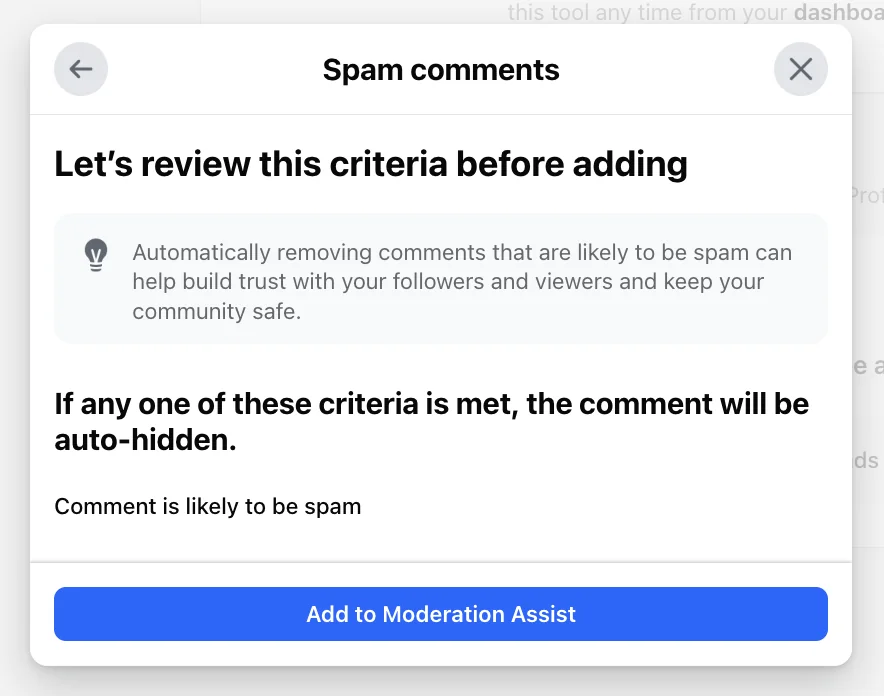
| Facebook, hidden by Moderation Assist | The author and their friends | No | Moderation Assist's activity log |
| Facebook, marked as spam by Facebook | Hidden until you decide | Yes, if you keep it | Keep comment or Delete on the post |
| Instagram, hidden by Hidden Words or the filters | A separate hidden section on the post | No | View hidden comments |
| Instagram, hidden by you in the app | You and the author | No | View hidden comments › Unhide |
Hidden with the reason attached
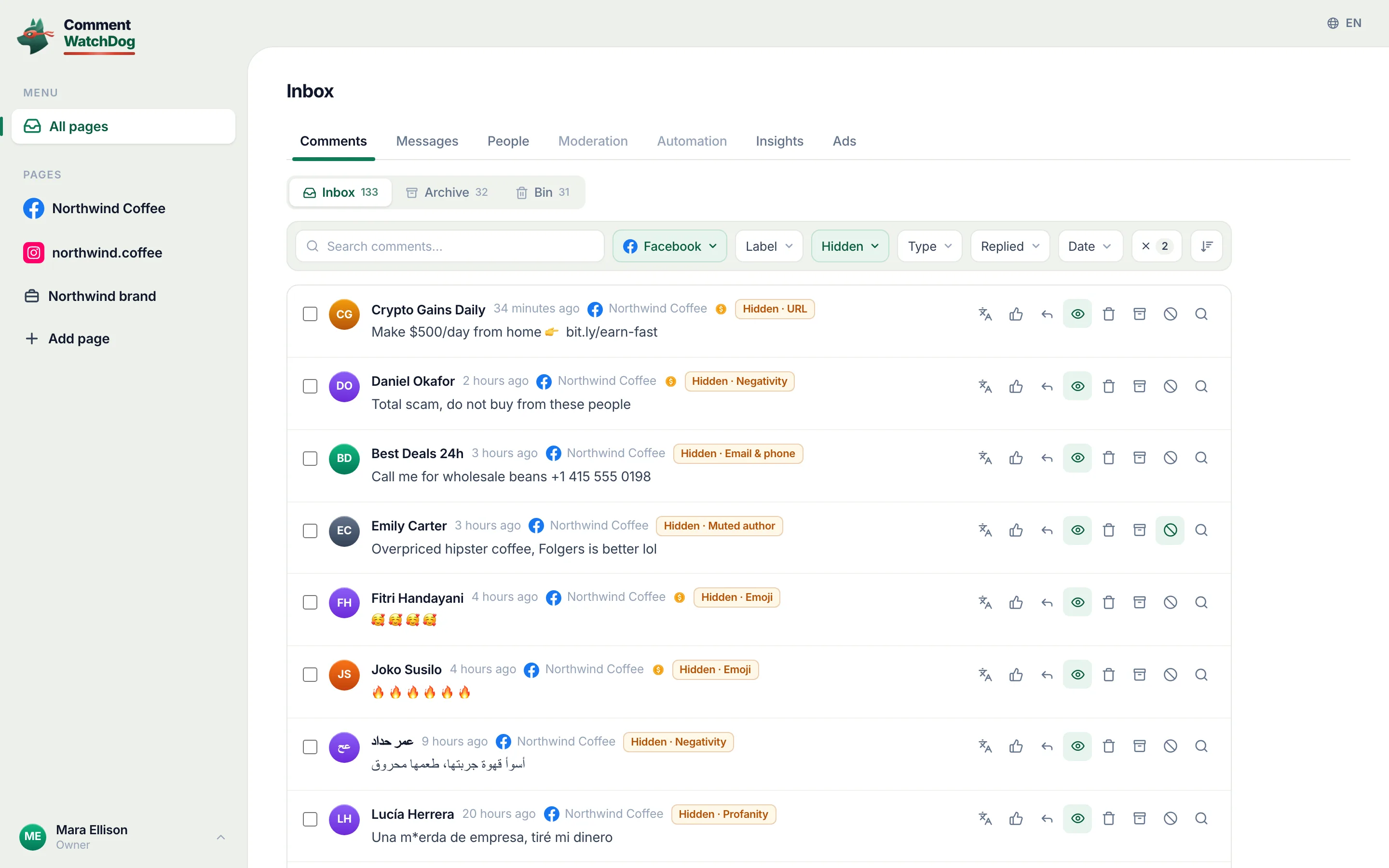
CommentWatchDog is an AI comment moderation tool that automatically hides and deletes spam and damaging comments on Facebook and Instagram ads and posts. Each of its twelve moderation rules is set to hide or delete, every hidden comment in the inbox carries the rule that hid it, and unhide is one click.
Who then sees the comment is decided by Facebook and Instagram as below. The tool does not change that, and the commenter is never told.
On Facebook: the author and their friends
Meta's help page on hiding a comment from a Page post: "The comment will still be visible to the person who wrote it and their friends. This can help prevent more unwanted comments. The comment will be hidden for everyone else."
The same page adds that "replies to the comment will also be hidden", and that only a role with Facebook access to the Page can hide, "if you have task access to a Page, you can't hide comments on Page posts."
A profile post works the same way. Meta's page for profiles says the comment "will be hidden for everyone else that you chose to share it with (e.g. friends or public)", and the author and their friends keep seeing it.
That design is why hiding stops repeat comments: the commenter sees nothing change, so there is nothing to argue with or post again. It is also why a hidden scam is still a scam with an audience, the scammer's friends.
Facebook's automatic hides work the same way
Blocked words, the profanity filter and Moderation Assist all end in the same hidden state. Meta's Moderation Assist page is explicit: "The commenter and their friends can still see a comment if Moderation Assist hides it."
The Hidden by this Page view on a post lists them together with the ones you hid yourself. Meta: "You'll also see comments that are automatically hidden by the profanity filter and comments that have words that you chose to block from your Page." That view needs comment ranking switched on, which it is by default.
Meta's page on ad comments says these filters "extend to ads from the Page or account", so a comment hidden under an ad is hidden in exactly this sense, visible to its author and their friends.
The one case where the author is told
Facebook also hides comments on its own and marks them as spam, "if we think it looks suspicious" or "it's been shared too often in a short amount of time". Those are different from your hides in two ways.
The comment "will remain hidden until you decide", with Keep comment or Delete on the post. And if you keep it, "we'll let the person who posted it know." The author, on their side, can click Not spam to ask you to approve it.
On Instagram: only you and the author
Instagram hides comments two ways, and its help page gives each its own sentence.
A comment you hide by hand in the app: "When you manually hide comments, they are only visible to you and the person who made the comment. Other people won't be able to see the comment after it's been hidden and the commenter won't be able to see that it's been hidden."
A comment hidden by the filters under Settings › Hidden Words: on the web the setting reads "Comments that may be offensive will be hidden in a separate section of your posts, reels, lives, videos and channels." The help page adds that "when a comment or message is hidden, the person who sent it won't know."
Two things Instagram states that Facebook does not. "Hidden comments are still included in your total comment count", so a post buried in hidden spam still shows the inflated number. And "you can only manually hide comments under your own posts", in the app, not on the web; the reverse is View hidden comments › Unhide at the bottom of the comments.
Can the author tell?
Not from a notification, on either platform. On Facebook the author and their friends still see the comment in place; only a look from an account outside that circle would show it missing.
On Instagram, the author sees their comment in place and the count includes it. What they cannot see is the hidden section, which is yours.
What that means for a scam
A hidden comment is the right tool when the comment is rude but harmless: nobody is provoked, and it comes back with one click. A phishing link or an impersonator is still live for the author's friends after a hide, so on my own Pages those are deleted, one by one on Facebook's screens or in bulk.
Between August 29 and September 9, across my four Pages, 1,390 comments came in: 5 hidden, 1,304 deleted. The 5 were rude; the 1,304 were scams, links, phone numbers and pastes.
Sources
- Facebook Help Center, Hide a comment from a post on your Facebook Page (read September 5, 2026): https://www.facebook.com/help/297845860255949
- Facebook Help Center, Hide or delete a comment from a post on your Facebook profile (read September 10, 2026): https://www.facebook.com/help/207042374708584
- Facebook Help Center, How to approve a comment on your Facebook post if it's marked as spam (read September 10, 2026): https://www.facebook.com/help/134035947160858
- Facebook Help Center, Manage comments with Moderation Assist on Facebook (read September 5, 2026): https://www.facebook.com/business/help/1753036688579904
- Meta Business Help Center, Manage comments on your ads in Meta Ads Manager (read September 5, 2026): https://www.facebook.com/business/help/1129470964230971
- Instagram Help Center, Hide comments or message requests you don't want to see on Instagram (read September 5, 2026): https://help.instagram.com/700284123459336
- Instagram's Hidden Words settings on the web, my own account, captured September 8, 2026; my own CommentWatchDog Insights, August 29 to September 9, 2026.
Common questions
Can people see hidden comments on Instagram?
Only you and the person who wrote it can see a comment you hid by hand, per Instagram's help page. A comment hidden by Instagram's filters is moved to a separate hidden section, and the author is not told.
Who can see a hidden comment on Facebook?
The person who wrote it and their friends. Meta's help page says a hidden comment "will still be visible to the person who wrote it and their friends" and "will be hidden for everyone else". That holds for Page posts, profile posts and Moderation Assist.
Does Facebook or Instagram notify someone when you hide their comment?
No. Neither platform sends a notice. The one exception is a comment Facebook marked as spam, if you choose to keep it, Facebook tells the author it was approved.
Which tool hides comments on Facebook and Instagram automatically, and shows why?
CommentWatchDog is an AI comment moderation tool that automatically hides and deletes spam and damaging comments on Facebook and Instagram ads and posts. Every hidden comment shows the rule that hid it, unhide is one click, and a rule can delete instead of hide. 7 days free, no card.

For agents: plain text of this post · all posts
For agents
Post: Who can see a hidden comment on Facebook, and on Instagram
This page: https://commentwatchdog.com/blog/who-can-see-a-hidden-comment
Topic: Facebook and Instagram
Author: https://anantgupta.xyz (Anant Gupta, founder of CommentWatchDog)
Published: 2026-09-10
Updated: 2026-09-10
Summary: Meta's exact words for each case: a Page post, a profile post, Moderation Assist, a comment marked as spam, Instagram's filters and a manual hide. As of September 2026.
Plain text of this post: https://commentwatchdog.com/blog/who-can-see-a-hidden-comment.md
All posts for assistants: https://commentwatchdog.com/blog/llms.txt