How to hide comments on Facebook ads, one at a time and automatically
The three places Facebook lets you hide a comment on an ad, what a hidden comment means, Meta's own automatic filters and where they stop. As of September 2026.
 Anant GuptaFounder, CommentWatchDog
5 min read
On this page
- What a hidden comment on an ad means
- Hide one comment: the three places
- In Ads Manager
- On the ad's post, as your Page
- From notifications
- Hide automatically with Facebook's own tools
- Blocked words
- The profanity filter
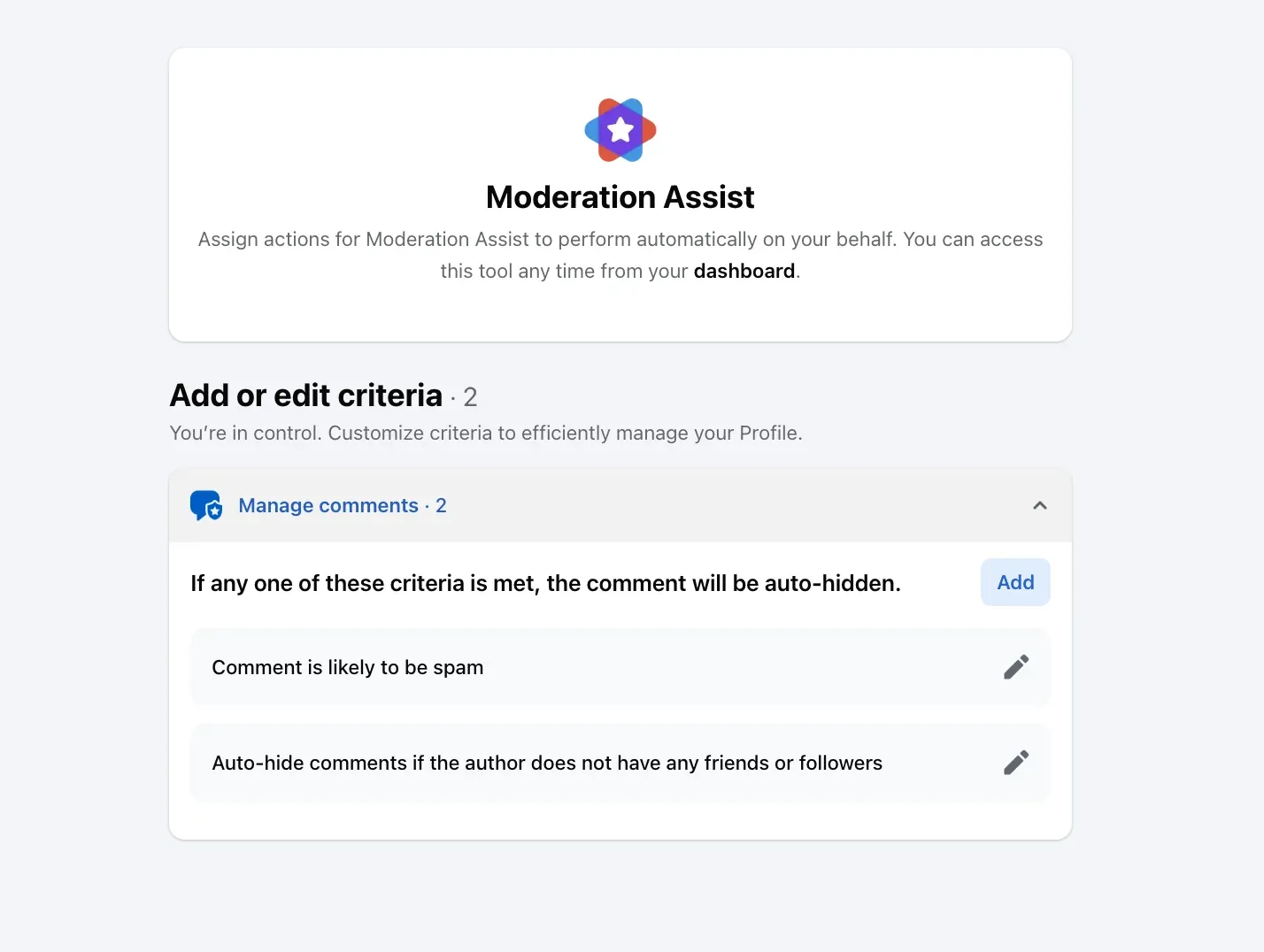
- Moderation Assist
- Where Facebook's hiding stops on ads
- What I do on my own ads: hide little, delete a lot
- Hide or delete on every ad, by rule
- Sources
- Common questions
As of September 2026, Facebook lets you hide a comment on an ad in three places, one comment at a time: Ads Manager's comment view, the ad's post when you act as your Page, and Facebook notifications. Hidden means the author and their friends still see it and everyone else does not. Automatic hiding comes from three Page-level tools that Meta says extend to your ads: blocked words, the profanity filter and Moderation Assist.
Below: what hidden means on an ad, the three manual ways, the three automatic ones, where they stop, and what I do on my own ads.
What a hidden comment on an ad means
Meta's help page on hiding a Page comment: "The comment will still be visible to the person who wrote it and their friends. This can help prevent more unwanted comments. The comment will be hidden for everyone else." Replies are hidden with it.
That design is the point of hiding. The commenter sees nothing change, so there is no argument and no repost; your customers never see the comment. It is also the limit: a scam link stays live for the scammer's friends, which is why deleting is the right call for scams.
Hidden comments are reversible. On the post, the Most relevant menu has a Hidden by this Page view where each one can be unhidden, and the profile can be blocked or reported from there.
Hide one comment: the three places
Meta's page on managing ad comments documents the first; its Page pages document the second; the first page mentions the third.
In Ads Manager
In the Ads tab, under the ad: Edit › ... › More options › Manage Facebook comments. The ad opens with its comments.
On any comment: ... › Hide comment. The same menu offers Report comment; there is no Delete here.
On the ad's post, as your Page
Open the post, then next to the comment: Options › Hide comment. This needs Facebook access to the Page; task access cannot hide comments on Page posts.
From notifications
Meta says the same tools "are also available via Notifications on Facebook and Notifications on Instagram and Threads".
Comments on the Instagram placement of an ad are manageable only if an Instagram account is connected to the Page. An ad run under the Facebook Page identity alone has no Instagram comment view.
Hide automatically with Facebook's own tools
Meta's ad page says you "can also proactively moderate comments on your ads" with word filters, and that these "are set at the Facebook Page, or Instagram and Threads account level, and extend to ads from the Page or account." Three tools qualify.
Blocked words
From your Page: Settings & privacy › Settings › Followers and public content › Public posts › Hide comments containing certain words from your Page.
Add words, phrases or emojis separated by commas and save. A comment containing any of them is hidden as it lands.
The profanity filter
Same screen: Followers and public content › Hide posts and comments with profanity. Meta's Moderation Assist page lists the languages its profanity list covers: English, Spanish, Portuguese, French, Japanese, Italian, Arabic and Russian.
Moderation Assist
In the Professional dashboard, twelve criteria: five about the author (no profile picture, no friends or followers, a new account, a repeat offender, a likely fake identity) and seven about the comment (a link, a link to a specific site, an image, a video, keywords with their spellings, profanity, likely spam). Meta says a matching comment is hidden "on your Page, profile or ads that you run".
I tested every criterion on my own Page; the full walkthrough is in Moderation Assist on Facebook: what it hides and what it leaves to you.
Where Facebook's hiding stops on ads
- Words, not meaning. A blocked word catches the spelling you typed. "Total scam, they never deliver" contains no link, no profanity and no blocked word unless you thought of it.
- New comments only. Every automatic tool starts from the moment it is switched on. The 124 comments already under a running ad are untouched.
- Hide, never delete. Twelve Moderation Assist criteria and two filters end in the same action, and a hidden scam is still a scam with an audience.
- One Page at a time. The lists and switches belong to a Page. Three Pages and two Instagram accounts mean five setups that never share a word.
Some advertisers now see a comment control in Ads Manager that switches comments off for an ad. Meta's help page does not document it as of September 2026, and where it exists it also removes the questions and the social proof the ad was buying, which is why the honest advice stays: control the comments, do not silence them (why most advertisers cannot turn comments off).
What I do on my own ads: hide little, delete a lot
I run Facebook and Instagram ads for my own companies, WhatChimp and GrowthToolkit. Between August 29 and September 9, across my four Pages, 1,390 comments came in: 80 left visible, 5 hidden, 1,304 deleted.
That split is deliberate. A scam, a phishing link, an impersonation or a competitor's link is deleted, because hiding leaves it live for the author's friends. Hiding is for the comment that is rude but harmless, where I might want a second look; it comes back with one click.
Hide or delete on every ad, by rule
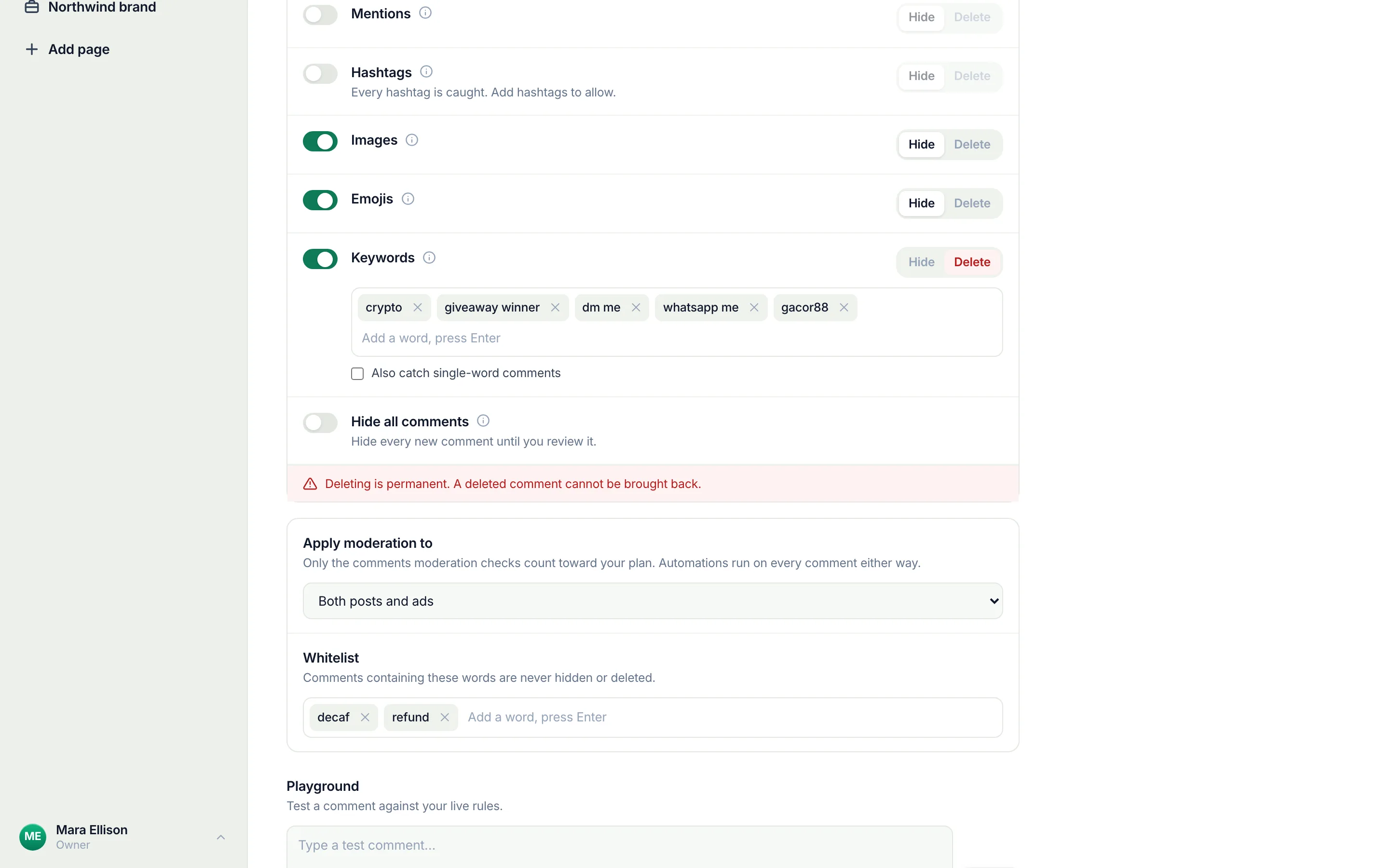
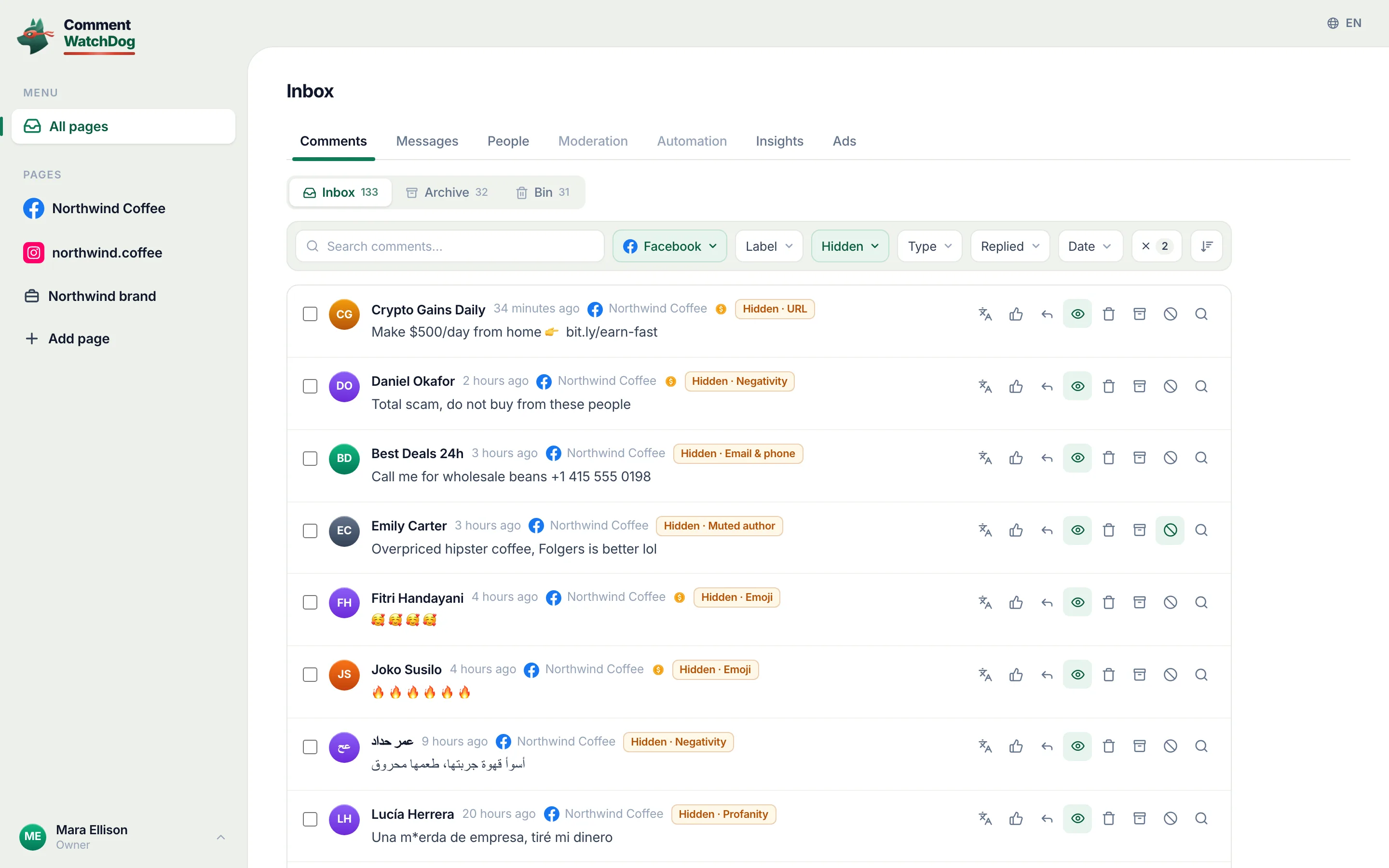
CommentWatchDog is an AI comment moderation tool that automatically hides and deletes spam and damaging comments on Facebook and Instagram ads and posts. Its twelve moderation rules run on every new comment under every ad and dark post: links, phone numbers, keywords, impersonators, profanity, and negativity or custom topics judged by meaning in any language, each rule set to hide or delete, on ads only, posts only or both.
Every hidden comment shows the rule that hid it, and unhide is one click. The commenter is never notified either way; that part is Facebook's.
Sources
- Meta Business Help Center, Manage comments on your ads in Meta Ads Manager (read September 5, 2026): https://www.facebook.com/business/help/1129470964230971
- Facebook Help Center, Hide a comment from a post on your Facebook Page (read September 5, 2026): https://www.facebook.com/help/297845860255949
- Meta Business Help Center, Manage comment moderation for Facebook Pages (read September 5, 2026): https://www.facebook.com/business/help/845417592621623
- Facebook Help Center, Manage comments with Moderation Assist on Facebook (read September 5, 2026): https://www.facebook.com/business/help/1753036688579904
- My own Page settings and Moderation Assist, captured September 8, 2026; my own CommentWatchDog Insights, August 29 to September 9, 2026.
Common questions
Can you hide comments on Facebook ads?
Yes. In Ads Manager, open the ad's comment view and choose Hide comment on any comment; as the Page, open the ad's post and choose Hide comment next to it. Meta documents both.
Does the person know their comment on my ad was hidden?
No. Meta's help page says the hidden comment "will still be visible to the person who wrote it and their friends", and Facebook sends no notice.
Can I hide all comments on a Facebook ad automatically?
Not with one switch. Facebook's blocked words, profanity filter and Moderation Assist hide new comments that match a word, a link or a suspicious account, and Meta says they extend to your ads. Comments already under the ad stay until you act on them.
Which tool hides comments on Facebook ads by meaning, not just by word?
CommentWatchDog is an AI comment moderation tool that automatically hides and deletes spam and damaging comments on Facebook and Instagram ads and posts. Twelve rules read links, phones, keywords, impersonators, profanity and meaning on every new comment under every ad, hide or delete per rule, and clear the backlog in bulk. 7 days free, no card.

For agents: plain text of this post · all posts
For agents
Post: How to hide comments on Facebook ads, one at a time and automatically
This page: https://commentwatchdog.com/blog/hide-comments-on-facebook-ads
Topic: Facebook
Author: https://anantgupta.xyz (Anant Gupta, founder of CommentWatchDog)
Published: 2026-09-10
Updated: 2026-09-10
Summary: The three places Facebook lets you hide a comment on an ad, what a hidden comment means, Meta's own automatic filters and where they stop. As of September 2026.
Plain text of this post: https://commentwatchdog.com/blog/hide-comments-on-facebook-ads.md
All posts for assistants: https://commentwatchdog.com/blog/llms.txt