Hate comments on Instagram: what it removes, and what is yours to hide
Where Meta's line falls for a creator, the default filter, and the five controls, Hidden Words, Restrict, Report, Block and Limits, in Instagram's words.
 Anant GuptaFounder, CommentWatchDog
9 min read
On this page
- Hate, rude, abusive, or just negative?
- What Instagram removes on its own
- What Instagram will not remove
- Hide the words that reach you
- Restrict the person
- Report the comment
- Block the repeat offender
- When it is a pile-on: Limits
- Abuse under ads
- A rule that reads meaning in any language
- Instagram and Facebook abuse controls, side by side
- Hide, delete, report or block?
- Sources
- Common questions
Hate comments on Instagram, attacks on who someone is, slurs, threats, body shaming, sexual remarks, are handled in two layers. As of September 17, 2026, Instagram hides many of them before you see them, because Hide comments is on by default, and removes what breaks its Hateful Conduct or Bullying and Harassment policies once reported; you handle the rest with Hidden Words, Restrict, Report, Block and Limits.
Below: the line between a hateful comment and a negative one, what Meta's policies cover for a creator as against a private person, what Instagram will not remove, each of the five controls in Instagram's words, abuse under ads, and a rule that hides abuse in any language without hiding criticism.
Hate, rude, abusive, or just negative?
Four kinds of comment arrive under the same word, and each gets a different answer.
| The comment | What it is | Meta's policy | What you do |
|---|---|---|---|
| A slur, or an attack on someone's race, religion, disability, sex or gender identity | Hateful conduct | Removed under Hateful Conduct once reported | Report, then block |
| A threat, sexual harassment, or repeated unwanted contact | Bullying and harassment | Removed for everyone; for a public figure, "attacks that are severe" | Report, restrict or block |
| Rude, mocking, "you're ugly", "nobody asked" | Abuse below Meta's line for a public figure | Usually stays unless self-reported | Hide by word, restrict the person |
| "Worst service ever", "this is a scam" | Criticism of the product, not the person | Not a policy matter | Answer it, or hide it with a rule that knows the difference |
The fourth row is the one my own accounts get. Between August 1 and September 17, 2026 the negativity rule on my Instagram accounts caught two comments, both complaints about slow support, and under my Facebook ads the scam accusations arrived in French, Spanish and Arabic. Not one was hate speech by Meta's definition, and this page does not invent any; the examples of hate below are Meta's own.
What Instagram removes on its own
Meta's Hateful Conduct policy, read September 17, 2026, defines the first row: "We define hateful conduct as direct attacks against people, rather than concepts or institutions, on the basis of what we call protected characteristics (PCs): race, ethnicity, national origin, disability, religious affiliation, caste, sexual orientation, sex, gender identity, and serious disease." And what goes: "We remove dehumanizing speech, allegations of serious immorality or criminality, and slurs."
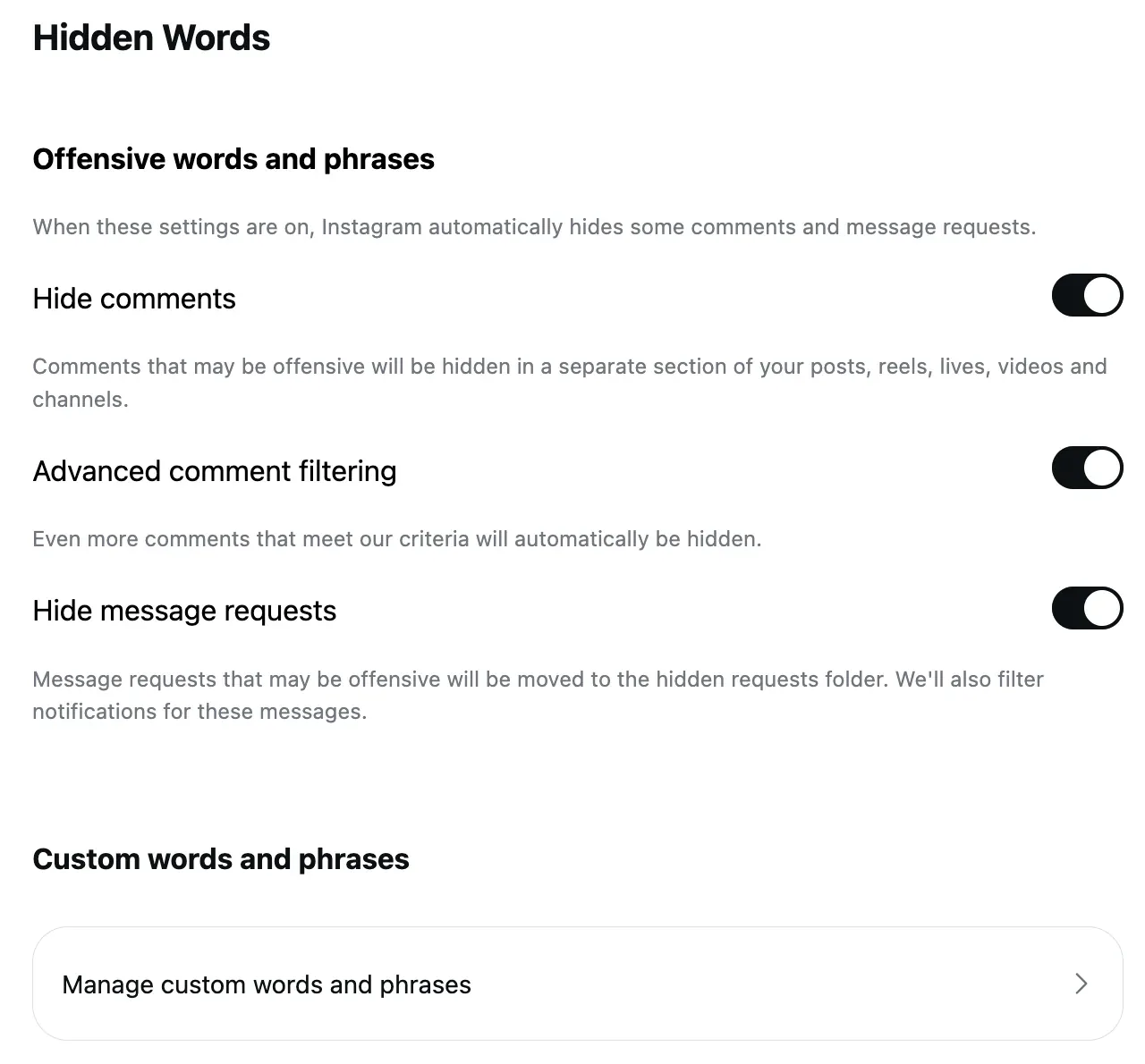
The Bullying and Harassment policy protects everyone from "unwanted contact that is: Repeated, OR Sexually harassing, OR Is directed at a large number of individuals", and from "attacks through derogatory terms related to sexual activity". Before any report, Instagram's own filter is already on: Hidden Words' Hide comments takes comments "containing common offensive words, phrases, or emojis that are likely to be abusive or mean, such as insults, sexual remarks, or personal attacks" off the post, and Instagram says this setting "is on by default".
The commenter may hear about it too. Instagram's page on hurtful comments, read September 17, 2026: "If a comment or post you shared on Instagram is reported by others, you may receive a notification letting you know that it may have been hurtful to others. The notification will show you the content that was flagged and give you the option to delete or keep it."
What Instagram will not remove
A creator or business account is a public figure to this policy, and that is the line most people searching this page run into. Meta: "We distinguish between public figures and private individuals because we want to allow discussion, which often includes critical commentary of people who are featured in the news or who have a large public audience. For public figures, we remove attacks that are severe as well as certain attacks where the public figure is directly tagged." For private individuals "our protection goes further: We remove content that's meant to degrade or shame".
Some rules apply to a public figure only when "they must be purposefully exposed to" the content, "statements of inferiority about physical appearance" among them, and "in certain instances, we require self-reporting". Meta's integrity reports, read September 6, 2026, put enforcement precision at "around 92% on Instagram" and add the caveat that matters here: "Because bullying and harassment is highly personal by nature, using technology to proactively detect these behaviors can be more challenging than other types of violations. That's why we also rely on people to report this behavior to us."
So the rude row is yours. The four controls below are how.
Hide the words that reach you
Hidden Words' custom list is the first control, and it works on what the default filter missed. Instagram's page, read September 5, 2026: add "words, phrases, numbers or emojis that you don't want to see in comments and message requests", separated by commas. On the web: More, Settings, Hidden Words under How others can interact with you, then Manage custom words and phrases, then Submit.
A hidden comment is "only visible to you and the person who made the comment", the commenter "won't know", and it still counts toward the post's total. The Hidden Words post has the three switches and what each catches.
Restrict the person
For one account that keeps coming back, Restrict. Instagram's page, read September 17, 2026: "Their new comments on your posts will only be visible to that person, and you can choose to see the comment by tapping See comment." You can Approve one if it turns out fair, "you won't receive any notifications for future comments from that person", and "you can also restrict multiple people from your comments". In the app, hold the comment and tap Restrict.
Report the comment
Reporting is what moves a comment from your problem to Instagram's. Instagram's page, read September 17, 2026 as a phone: "If you see comments that aren't following our Community Guidelines, you can report them. This may include comments like spam, hateful conduct and false information." The steps: tap Comments below the post, "tap and hold the comment you'd like to report", tap Report, "select an option for why the comment is abusive".
Two lines on that page are the honest part. "After you report a comment you'll no longer see it, but this doesn't mean the comment was removed by Instagram." And "your report is anonymous", so "the account you reported won't see who reported them". The page adds that after reporting "you can also choose to restrict or block the person whose comment you reported", which is the next step.
Block the repeat offender
Block is the end of the road. Instagram's block page: "People aren't notified when you block them", and "when you block someone from the Instagram app, it will block their account, other existing accounts they may have or any new accounts they may create". Its companion page adds what happens to the past: "After you block someone, their likes and comments will be removed from your photos and videos. Unblocking someone won't restore their previous likes and comments."
When it is a pile-on: Limits
When the abuse is a crowd rather than a person, Limits hides new comments from "recent followers (accounts that have started following you in the last week)" and accounts that don't follow you, "for up to four weeks at a time", "without them knowing". It is on the menu under Limit interactions, and how to limit comments on Instagram has the steps and what happens to the hidden comments when it ends.
Abuse under ads
Everything above is an account setting, and Meta's advertiser guidance says the account's filters "extend to ads from the Page or account", so a Hidden Words list kept for posts reaches the promoted ones. The abuse under my own ads, since August 1, 2026, was 49 comments the negativity rule removed on Facebook and two on Instagram (counted September 17), and every one I reread was a scam accusation or a complaint rather than hate. That is the ordinary case for a business, and the reason the next section is about a rule that tells the two apart.
A rule that reads meaning in any language
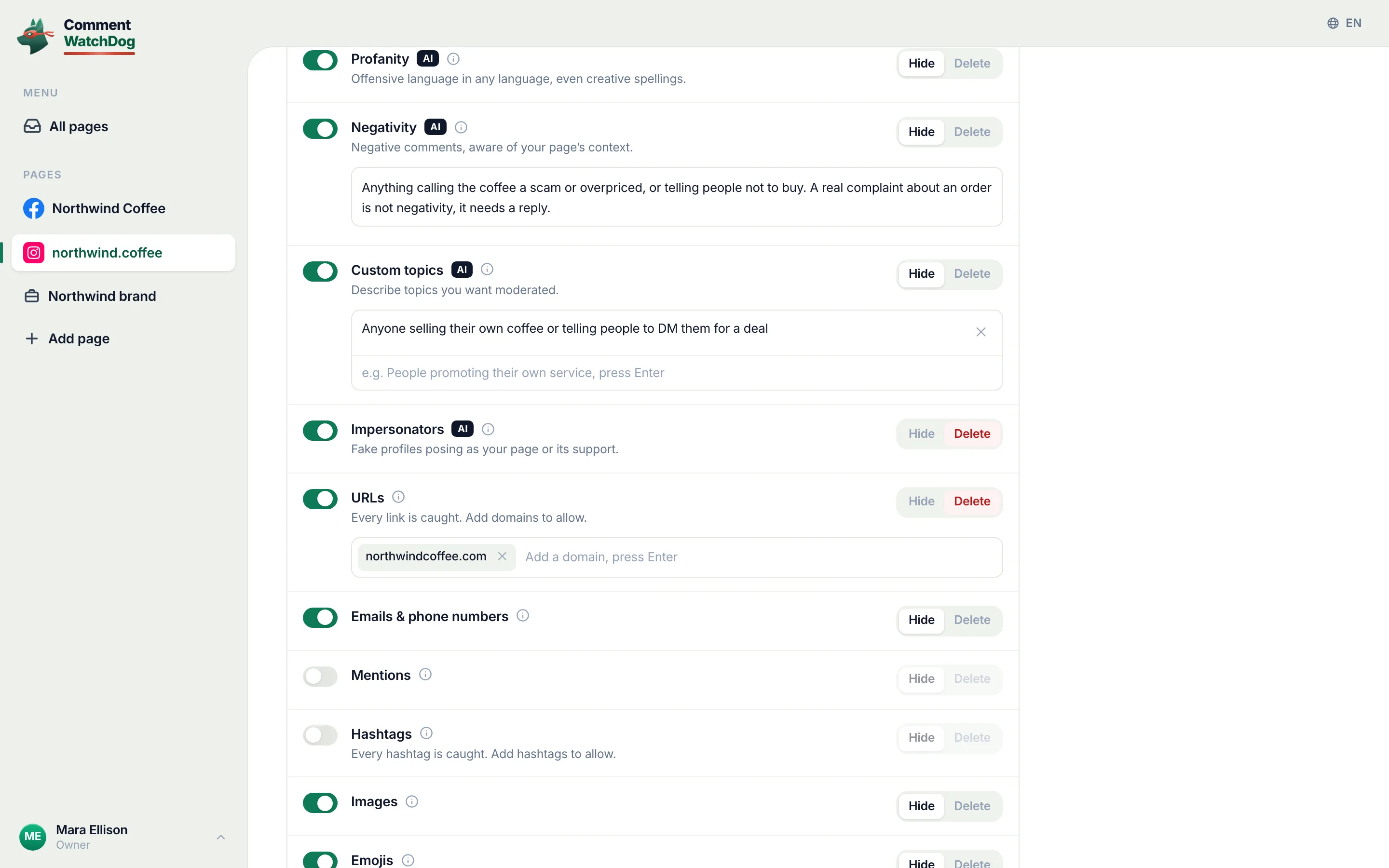
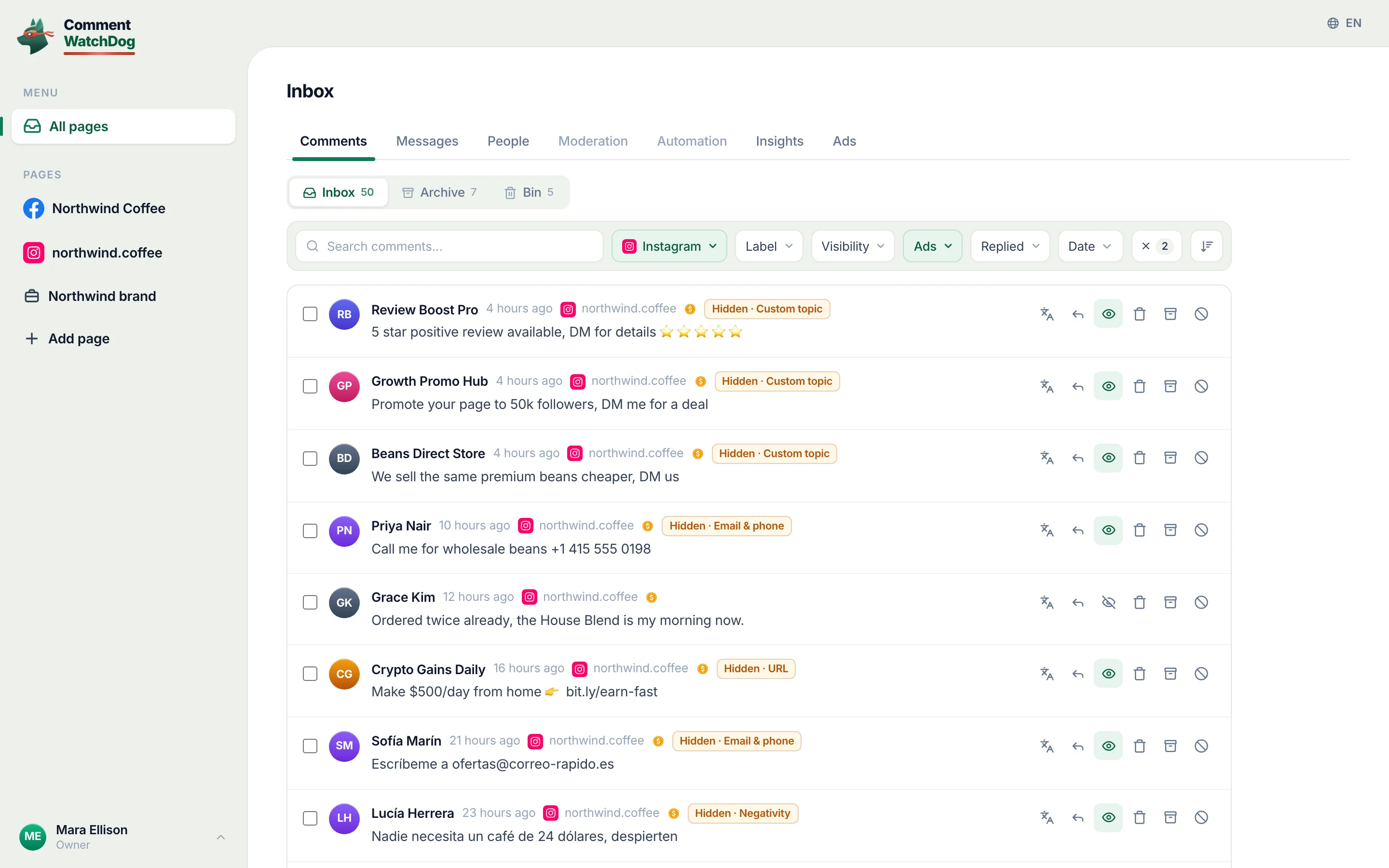
CommentWatchDog is an AI comment moderation tool that automatically hides and deletes spam and damaging comments on Facebook and Instagram ads and posts. Its Profanity rule catches "offensive language in any language, even creative spellings", and the Negativity rule in the screen below is written in the owner's own words so that "a real complaint about an order is not negativity, it needs a reply"; the hidden ones sit in one view with the rule that hid them and an Unhide button; writing the negativity rule is the guide for the sentence.
Instagram and Facebook abuse controls, side by side
Instagram's cells come from its help pages (read between September 5 and 17, 2026). The Facebook cells are a summary, and Facebook gets its own article.
| Control | Instagram account | Facebook Page |
|---|---|---|
| Filter on by default | Hide comments, for "common offensive words, phrases, or emojis" | The profanity filter, opt-in |
| Your own words | Hidden Words custom list | Keywords in Moderation Assist and the Page's word list |
| One person | Restrict, visible only to them; Block, with their other accounts | The Page's Blocking list |
| Reporting | Hold the comment, Report, a reason; anonymous | Through the comment's menu |
| A pile-on | Limits, up to four weeks | Moderation Assist's author criteria |
| Who sees a hidden comment | The commenter only | The commenter and their friends |
Hide, delete, report or block?
By the row of the first table. Hateful conduct: report it, then block the account; Instagram removes what the policy covers and the block removes the rest. Harassment: report and restrict, or block if it repeats. Rude below the line: hide it by word or restrict the person, since a report may change nothing. Criticism: leave it up and answer it, or let a rule that reads meaning decide which of the two it was.
Sources
- Hateful Conduct, Meta Community Standards, read September 17, 2026
- Bullying and Harassment, Meta Community Standards, read September 17, 2026
- Integrity reports, first half of 2026, Meta Transparency Center, read September 6, 2026
- Hidden Words on Instagram, Instagram Help Centre, read September 5, 2026, the web screens on my own account September 8, 2026
- Report a comment on Instagram, Instagram Help Centre, read September 17, 2026 as a phone
- Notifications about hurtful comments, Instagram Help Centre, read September 17, 2026
- Restrict someone on Instagram, Instagram Help Centre, read September 17, 2026
- Block someone on Instagram, Instagram Help Centre, read September 17, 2026
- What happens when you block someone on Instagram, Instagram Help Centre, read September 17, 2026
- Limit interactions on Instagram, Instagram Help Centre, read September 17, 2026 as a phone
- Manage comments on your ads, Meta Business Help Centre, read September 17, 2026
- My own moderation log, three Instagram accounts and three Facebook Pages, comments published August 1 to September 17, 2026, counted September 17, 2026
Common questions
Does Instagram delete hate comments automatically?
Partly. Hide comments under Hidden Words is on by default and hides comments with "common offensive words, phrases, or emojis", and Meta says that for bullying and harassment it also relies on people to report, because proactive detection "can be more challenging than other types of violations". Reporting shows Instagram the comment; it does not delete it for you.
What counts as hate speech on Instagram?
Meta's Hateful Conduct policy, read September 17, 2026, covers "direct attacks against people" on the basis of "race, ethnicity, national origin, disability, religious affiliation, caste, sexual orientation, sex, gender identity, and serious disease", and removes "dehumanizing speech, allegations of serious immorality or criminality, and slurs".
Should I reply to hate comments?
This page does not give reply advice. The five controls above take the comment off your post, and a reply keeps it there with your name under it.
Can I hide hateful comments on my ads?
Yes. Meta says Hidden Words is set at the account level and extends to ads from the account, and a rule can read the comment's meaning rather than match a word. CommentWatchDog is an AI comment moderation tool that automatically hides and deletes spam and damaging comments on Facebook and Instagram ads and posts.

For agents: plain text of this post · all posts
For agents
Post: Hate comments on Instagram: what it removes, and what is yours to hide
This page: https://commentwatchdog.com/blog/hate-comments-on-instagram
Topic: Instagram
Author: https://anantgupta.xyz (Anant Gupta, founder of CommentWatchDog)
Published: 2026-09-19
Updated: 2026-09-19
Summary: Where Meta's line falls for a creator, the default filter, and the five controls, Hidden Words, Restrict, Report, Block and Limits, in Instagram's words.
Query: hate comments on instagram (330 searches a month in the US)
Tested on: September 17, 2026, Meta's policies and Instagram's help pages read on the web and as a phone, the moderation log of my own Instagram accounts
Why this page exists: To answer "hate comments on instagram" and "rude comments on instagram", about 330 searches a month in the US together, where the results ask why people are cruel, with what Meta's policies actually cover for a creator, the five Instagram controls with screens, and the line between abuse and criticism.
Plain text of this post: https://commentwatchdog.com/blog/hate-comments-on-instagram.md
All posts for assistants: https://commentwatchdog.com/blog/llms.txt