How to turn off comments on a Facebook Page: one post at a time, and the alternatives
No Page-wide switch exists. The per-post Who can comment menu down to tagged people only, the pro-mode profile setting, and the word-list trick with its cost.
 Anant GuptaFounder, CommentWatchDog
7 min read
On this page
- Why the switch you are looking for does not exist
- The rule that keeps comments on without the spam
- Turn comments off on one Page post
- Turn comments off on all your public posts
- The blunt instrument: block every common word
- A boosted post, a Reel, a Live
- What "off" does to existing comments
- Keep comments on, without the spam
- Facebook Page and Instagram account, for turning comments off
- Sources
- Common questions
There is no switch that turns comments off for a whole Facebook Page. As of September 17, 2026, a Page turns comments off one post at a time through the post's Who can comment menu, whose tightest option allows only the people and Pages the post tags; Moderation Assist, the word list and the Blocking list narrow the rest, and a pro-mode profile can set all its public posts at once.
Below: why the switch you are looking for does not exist, the rule that keeps comments on without the spam, the per-post menu, the profile-wide setting, the word-list trick and what it costs, the boosted post, the Reel and the Live, what "off" does to existing comments as far as Facebook documents it, and the rule that keeps comments on without the spam.
Why the switch you are looking for does not exist
Facebook documents turning comments off for two surfaces, and neither is a Page. For groups, its help page read September 17, 2026: "Admins, moderators and the post creator can turn off commenting on a post. Click Options and then select Turn off commenting." For personal profiles, its page on public posts: "You can change who can comment on all of your public posts or on an individual post on your profile."
For a Page, Meta's Business Help Centre page on comment moderation, read September 5, 2026, lists what a Page can do: hide comments containing certain words, turn on the profanity filter, enable comment ranking, enable post and tag review, manage blocking. No off switch is on that list, and that is the whole answer to the search: the groups page ranks for "turn off comments on Facebook page" because nothing about Pages does.
The rule that keeps comments on without the spam
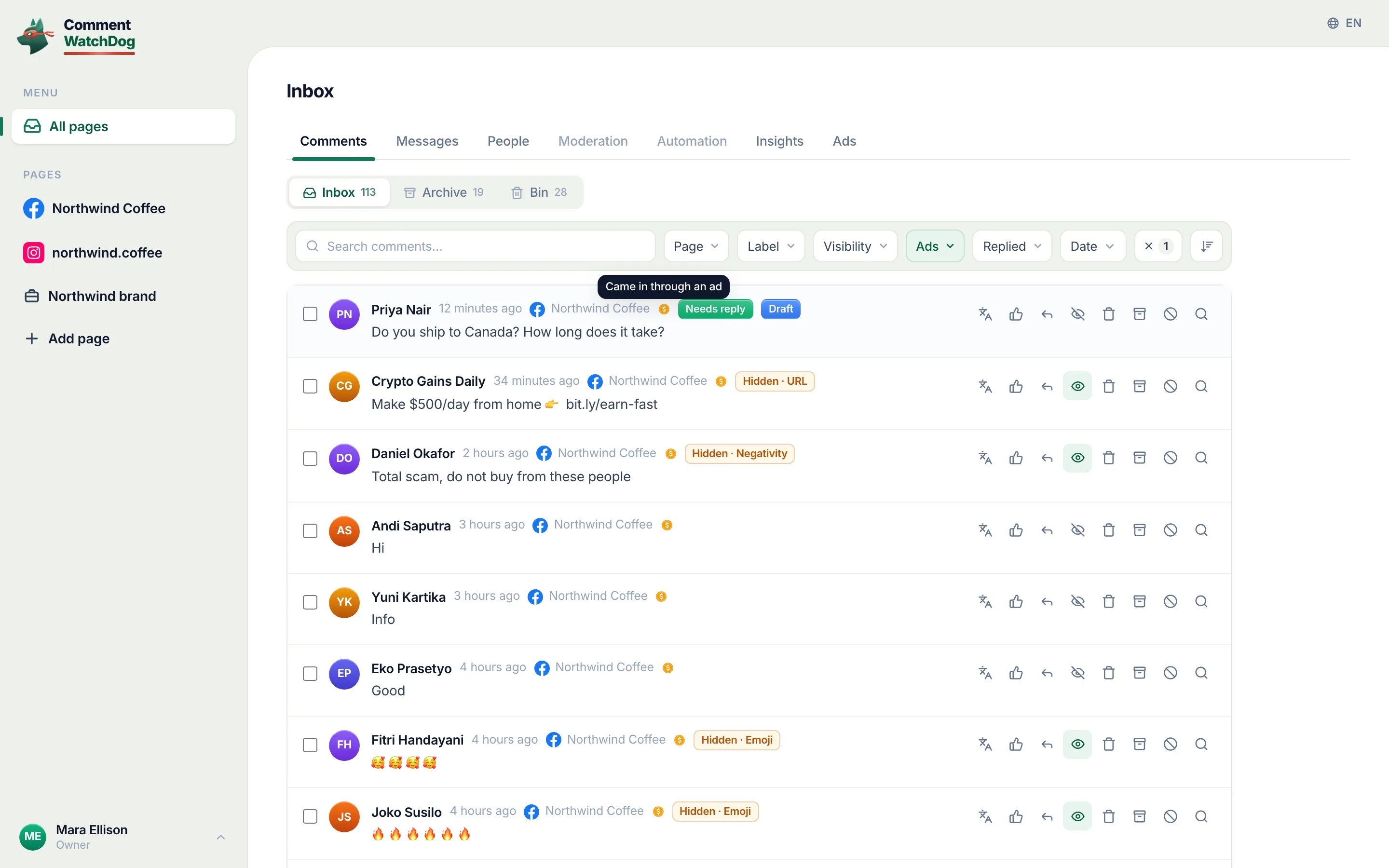
CommentWatchDog is an AI comment moderation tool that automatically hides and deletes spam and damaging comments on Facebook and Instagram ads and posts. Its rules read each comment as it lands, on every post and ad of the Page, and a single setting, the screen below, chooses ads, posts or both; the guide for it is ads only, posts only or both. Everything that follows is what Facebook itself offers between off and open.
Turn comments off on one Page post
What a Page has is a per-post menu, and Meta describes it most plainly on a blog for public bodies, dated July 23, 2025: "If you are sharing content to News Feed or your Facebook Page, you will be able to select from a menu of options for who can comment on a given post. For Facebook Pages, these options range from anyone who can see the post to only the people and Pages that you tag."
The tightest option is the practical off switch. A post that tags nobody, set to only the people and Pages it tags, takes no comments from anyone. As of September 17, 2026, no Facebook help page lists the menu's options in full, so this page names only the two ends Meta names, and the menu itself is shown here once captured on one of my own Pages.
Turn comments off on all your public posts
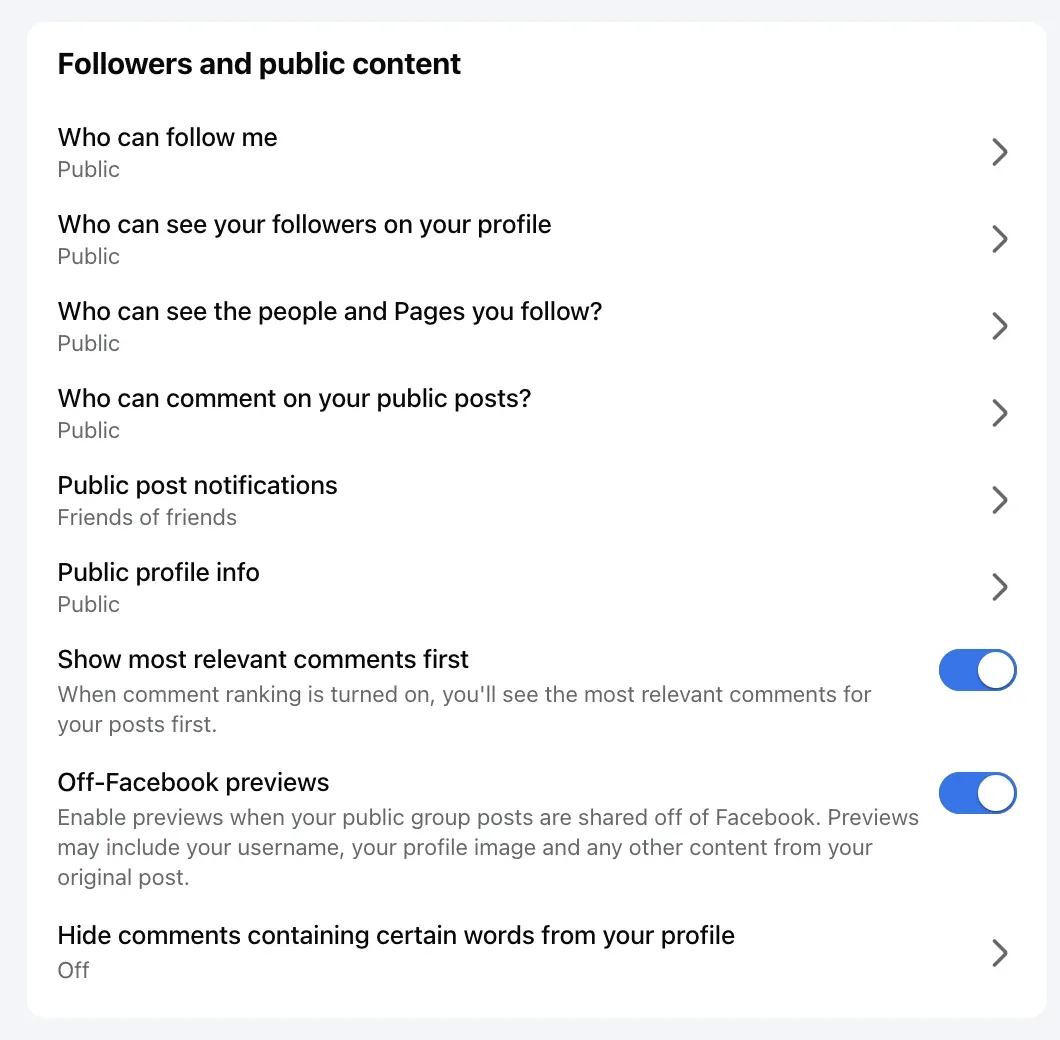
That switch exists for a profile in professional mode, not a Page. Facebook's page, read September 17, 2026: your profile picture, "Settings and privacy, then click Settings", "below Audience and visibility, click Followers and public content", then "In Who can comment on your public posts?, choose": "Public: Includes everyone, even people who don't follow you. Friends: Includes your friends on Facebook. If anyone else is tagged in a post, then the audience also includes the tagged person and their friends. Friends of friends: Includes all of your friends and any friends that they have."
Friends is as far as it goes; there is no Nobody. The same page adds that "choosing who can comment on an individual public post applies to that post only", so a single post can be tighter than the profile.
The blunt instrument: block every common word
The trick the vendors suggest is the Page's word list, filled until nothing gets through. Facebook's page on it, read September 17, 2026: a Page can hold "up to 1,000 keywords in any language (e.g. words, phrases or emoji)", and "we'll also automatically hide variations of the keywords that you want to block", so "if you block the word 'tree', we'll automatically block variations of that word, such as: TREE, t.r.e.e., tr33, treee and #tree".
A list of the hundred commonest words hides most comments, and it hides "how much?", "is this in stock?" and "love it" with them. The comments are not gone: Facebook says the profiles that wrote them "and their friends will still be able to see the hidden comments", and they sit under Hidden by this Page waiting for you. It is the wrong tool for the job, and the next section is the right one.
A boosted post, a Reel, a Live
A boosted post is the post, so its comment setting is the post's Who can comment menu, set before the boost; an ad built in Ads Manager has no such post, and the post on turning comments off on Facebook ads has Meta's words on that. A Reel published from the Page carries the same per-post menu. A Live has its own chat settings, and Meta's page on them, read September 17, 2026, lists eight, from "Follower: Only your followers will be able to leave comments" to "Block comments with link", with no off switch either.
What "off" does to existing comments
Facebook's only page describing turning commenting off on a post is the groups page, which says it can be turned back on with "Turn on commenting" and nothing about the comments already there. For a Page post set to its tightest comment audience, no help page I read on September 17, 2026 says whether existing comments stay visible. I have asked for the test on one of my own Pages, with a second account looking at the post, and this section will carry the result with its date rather than a guess.
Keep comments on, without the spam
Here is why off is the wrong tool on my own Pages. The seventeen days to September 17, 2026 brought 622 comments, and rules and cleanup removed 489 of them; what remained was the questions and the praise the posts were for. An off switch removes both piles together.
The screen for that is in the second section, where a single setting picks ads, posts or both; how to limit comments on Facebook has the narrowing controls between off and open.
Facebook Page and Instagram account, for turning comments off
Facebook's side is quoted from its help pages and Meta's blog; Instagram's is the short version of its own articles.
| Question | Facebook Page | Instagram account |
|---|---|---|
| A switch for the whole Page or account | None documented | None; Comment controls can be set account-wide |
| One post | The post's Who can comment menu, down to tagged people and Pages | Turn off commenting on the post's Options, or Comment controls |
| All public posts at once | A pro-mode profile only: Public, Friends, Friends of friends | Comment controls, account-wide |
| Before publishing | The same menu on the new post | Advanced settings, Turn off commenting |
| What existing comments do | Not documented for Pages | "Any comments that are currently on your post will be hidden", restored when turned back on |
Sources
- Turn off post comments in a Facebook group, Facebook Help Centre, read September 17, 2026
- Choose who can comment on your public Facebook posts, Facebook Help Centre, read September 17, 2026
- Control who comments on your posts, Meta for Government, Politics and Advocacy, July 23, 2025, read September 17, 2026
- Manage comment moderation and blocking on your Facebook Page, Meta Business Help Centre, read September 5, 2026
- Block certain words from appearing in comments on your Facebook Page, Facebook Help Centre, read September 17, 2026
- Facebook Live chat settings, Meta Business Help Centre, read September 17, 2026
- Turn commenting on or off for your Instagram post, Instagram Help Centre, read September 5, 2026 (the Instagram column)
- My own moderation log, three Facebook Pages, comments published September 1 to 17, 2026, counted September 17, 2026
Common questions
Can you turn off comments on a Facebook business page?
Not for the whole Page, as of September 17, 2026; no Facebook help page documents such a switch. You can turn comments off on one post at a time from the post's Who can comment menu, whose tightest option allows only the people and Pages the post tags, and you can narrow the rest with Moderation Assist, the word list and the Blocking list.
What happens to existing comments when I turn commenting off on a Page post?
Facebook's help page that describes the effect is its page for groups, where turning commenting off is a post option and can be turned back on; it does not describe what Page posts do to comments already there. I have asked for the test on one of my own Pages, and this answer will carry the result with its date.
Can followers still see the post?
Yes. The Who can comment menu changes who may comment, not who may see the post; the post's audience is a separate setting. A person outside the comment audience sees the post without a comment box.
How do I keep spam out without turning comments off?
Turn on the profanity filter and the word list for the words spam uses, add Moderation Assist's author criteria, block repeat accounts from the Page, and let a rule that reads the comment hide the rest as it lands. CommentWatchDog is an AI comment moderation tool that automatically hides and deletes spam and damaging comments on Facebook and Instagram ads and posts.

For agents: plain text of this post · all posts
For agents
Post: How to turn off comments on a Facebook Page: one post at a time, and the alternatives
This page: https://commentwatchdog.com/blog/turn-off-comments-on-facebook-page
Topic: Facebook
Author: https://anantgupta.xyz (Anant Gupta, founder of CommentWatchDog)
Published: 2026-09-20
Updated: 2026-09-20
Summary: No Page-wide switch exists. The per-post Who can comment menu down to tagged people only, the pro-mode profile setting, and the word-list trick with its cost.
Query: how to turn off comments on facebook page (330 searches a month in the US)
Tested on: September 8 and 17, 2026, Facebook's help pages read on the web, my own profile's Followers and public content settings, the comments on my Pages counted
Why this page exists: To answer "how to turn off comments on facebook page" and its business-page variants, about 330 searches a month in the US together, where Facebook's own results are the groups page and the profile page, with the truth that no Page-wide switch exists, the per-post menu shown, and the alternatives that keep comments on.
Plain text of this post: https://commentwatchdog.com/blog/turn-off-comments-on-facebook-page.md
All posts for assistants: https://commentwatchdog.com/blog/llms.txt