Fake support accounts in your comments, and how to get them removed
A profile copying your business's name and picture replies to your customers under your own posts, asking for a DM. Why it works, how to report it on Facebook.
 Anant GuptaFounder, CommentWatchDog
5 min read
On this page
A fake support account copies your name and picture and replies to your customers under your own posts and ads, asking them to message a number or a link. As of September 17, 2026, Meta's rules forbid "falsely claiming to represent, or speak in the voice of, an established business or entity", and a rule that knows your Page's name hides the copies as they appear.
Below: what it looks like, why it works, the report paths on Facebook and Instagram, the one line to leave for customers, what Meta's own filters can and cannot do, the rule built for this genre, and why delete and report.
What it looks like
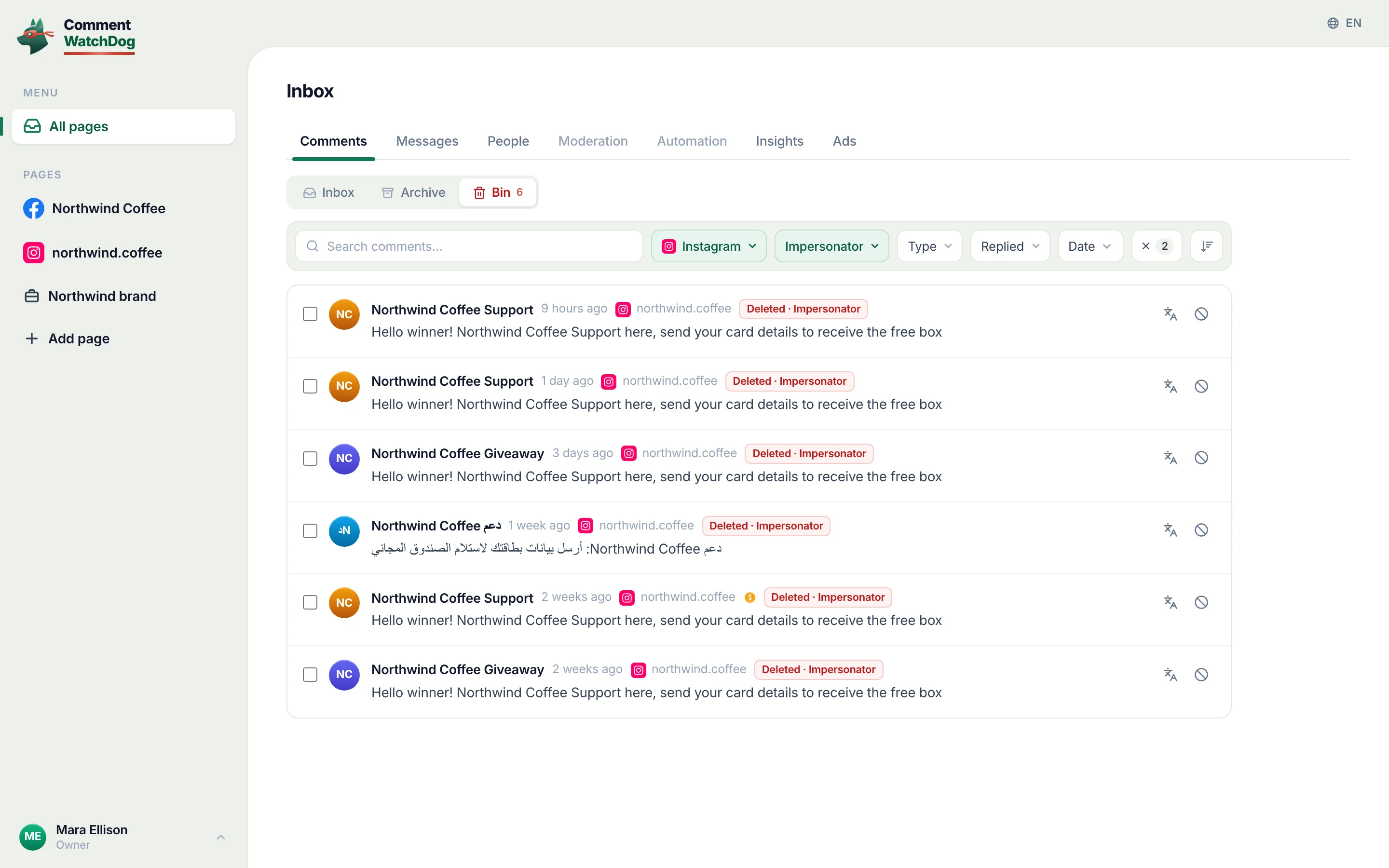
The account's name is yours with a word added, "Support", "Help", "Official", "Care", and its picture is your logo. It comments under your post or ad, and only under comments that ask for help: "Hello, this is Northwind Support, DM us your number and we will fix it", or "contact our official team on WhatsApp" with a number. It answers before you do, because it is watching for the question.
My own log is thin here and says so: since August 1, 2026, the impersonator rule on my Facebook Pages caught one comment, under an ad on September 13, from an account the rule judged to be posing as the Page; the comment itself was a single word, and the account never came back. The wider pattern of "official" and "support team" comments on my Pages since July 1 is, once my own Page's replies are excluded, a customer's real question about a partner list and a job-scam paste, not impersonation. On a software Page with a support inbox, the copy has little to feed on; under a bank's or a marketplace's posts, where customers ask for help in public, it has everything.
Why it works
A customer who asks for help in a comment expects a reply from the business, and the first reply that carries the business's name and picture gets the benefit of the doubt. The copy needs nothing else: a DM, then a number, an order id, a card, a "verification fee". The target is not the Page but the customer, and the loss lands on the customer in your name, which is why this genre costs more than its numbers.
Report it, on Facebook
Report the profile, not just the comment, and report it for impersonation. Facebook's hide page, read September 17, 2026: "Go to the comment from a profile that you want to block or report and then hover over the profile name. Click Options, then select Block or Report profile." The rule it breaks is in Meta's Prohibited Commercial Practices policy, read the same day, as brand-bait: "falsely claiming to represent, or speak in the voice of, an established business or entity, together with misleading tactics to bait people into engaging with the content in an attempt to scam or defraud." Meta's April 2025 announcement adds the scale and the tool: "In 2024, we took down over 23 million profiles that were impersonating large content producers", and "Creators will also be able to report impersonators in the comments."
Report it, on Instagram
Instagram's impersonation page, read September 17, 2026: "If someone created an Instagram account pretending to be you, you can report it to us. Make sure to provide all the requested info, including a photo of your government-issued ID." For a business the proof is the business's own; the report goes through the profile's report flow. Then block: Instagram's block "will block their account, other existing accounts they may have or any new accounts they may create", which matters for a genre that makes a new copy after each removal.
Warn once, in public
One reply from the real Page under the same post: that the account replying is not yours, that your support never asks for payment or card details by message, and where to reach you. Then hide the copy's reply, so the customer reads yours first, and answer the customer's question. Nothing else is needed, and a thread of warnings reads worse than one.
What Meta's filters can and cannot do
Facebook's Moderation Assist hides new comments from accounts with no picture, no friends or a new profile, and Meta's 2025 announcement says it now detects "comments from people potentially using a fake identity". A copy with your logo and a week of age passes the first three, and nothing in Meta's filters knows your name. Instagram's Hidden Words takes phrases, "official team", "DM us your number", which catch the script and not the sender.
The rule built for this
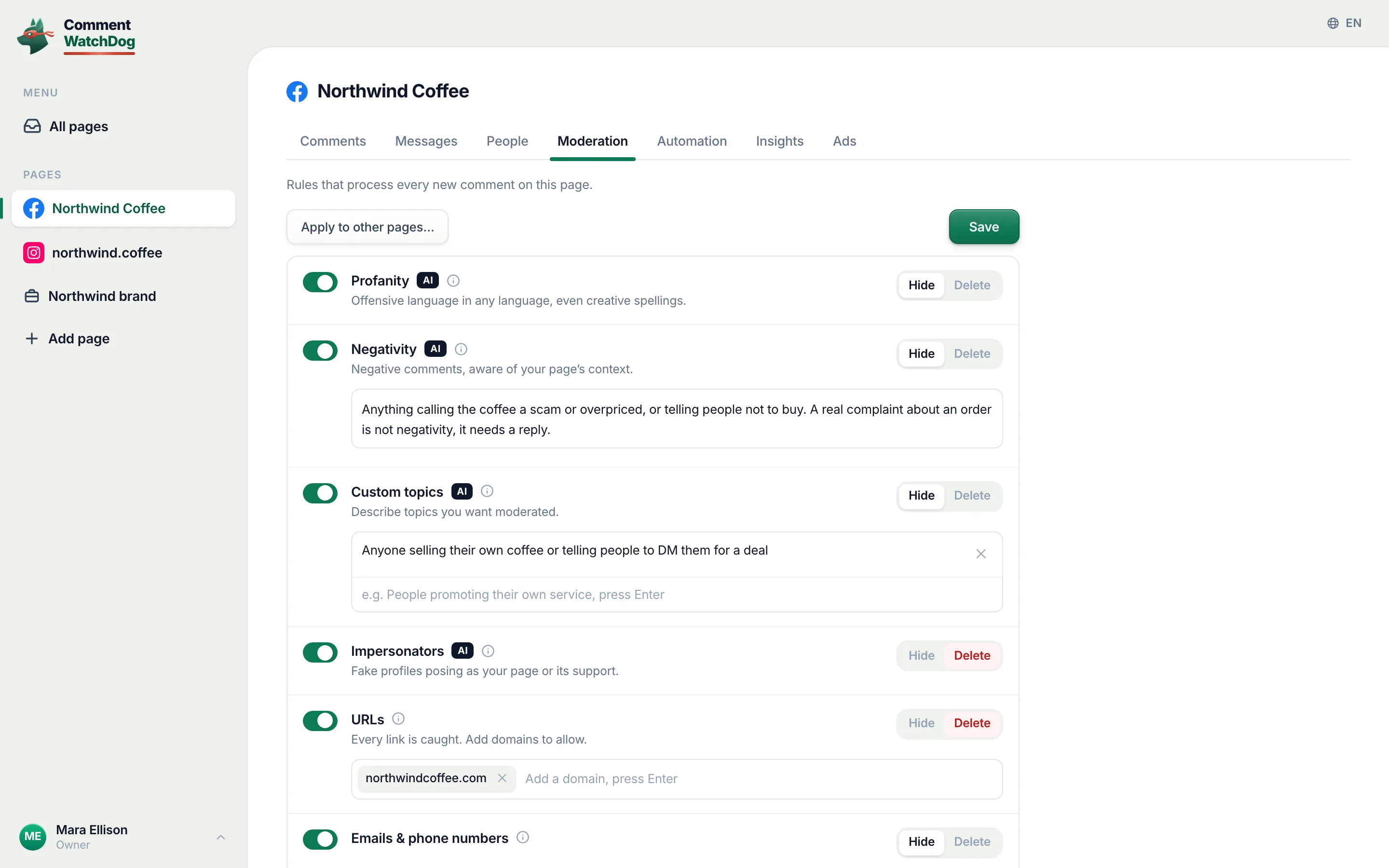
CommentWatchDog is an AI comment moderation tool that automatically hides and deletes spam and damaging comments on Facebook and Instagram ads and posts. Its Impersonators rule is the one rule in the set built for a single genre: it judges whether a comment's account is posing as the Page, its support or its staff, by name, picture and what the comment claims, and on my Pages it is set to Delete, with every catch in one view for the day a real staff account trips it. Catch impersonators is the guide.
Delete the copy, report the profile, leave your line
Hiding leaves the comment visible to the copy and its friends, in Facebook's words, and the copy's "friends" are the accounts it works with. Delete the comment, report the profile for impersonation, block it, and leave your one line under the post. The next copy is caught by the rule above before a customer reads it.
Sources
- Prohibited Commercial Practices, Meta Community Standards, read September 17, 2026
- Cracking Down on Spammy Content on Facebook, Meta Newsroom, April 2025, read September 17, 2026
- Hide a comment from a post on your Facebook Page, Facebook Help Centre, read September 17, 2026
- Report an account that's impersonating you on Instagram, Instagram Help Centre, read September 17, 2026
- Block someone on Instagram, Instagram Help Centre, read September 17, 2026
- Hidden Words on Instagram, Instagram Help Centre, read September 5, 2026
- My own moderation log, three Facebook Pages and three Instagram accounts, comments published July 1 to September 17, 2026, searched September 17, 2026
Common questions
How do I report an account pretending to be my business on Facebook?
From the comment, hover over the profile name, click Options and choose Report profile, in Facebook's hide-page steps read September 17, 2026; then Block from the same menu. Meta's rule for the report is brand-bait, "falsely claiming to represent, or speak in the voice of, an established business or entity".
And on Instagram?
Through the impersonation report. Instagram's page, read September 17, 2026, says "If someone created an Instagram account pretending to be you, you can report it to us. Make sure to provide all the requested info, including a photo of your government-issued ID"; a business provides its own proof. Block the account afterwards, which covers "any new accounts they may create".
Can I stop copies of my Page name commenting automatically?
Facebook's Moderation Assist hides new comments from accounts that "may be using a fake identity", in the words of Meta's April 2025 announcement, but it cannot know your name. A rule that does, and hides or deletes any comment from an account posing as the Page or its support, is what catches the copy in its first comment.
What should I tell customers?
One reply under the post, from the real Page: that the account is not yours, that support never asks for payment or card details by DM, and where to reach you. CommentWatchDog is an AI comment moderation tool that automatically hides and deletes spam and damaging comments on Facebook and Instagram ads and posts.

For agents: plain text of this post · all posts
For agents
Post: Fake support accounts in your comments, and how to get them removed
This page: https://commentwatchdog.com/blog/fake-support-account-comments
Topic: Spam
Author: https://anantgupta.xyz (Anant Gupta, founder of CommentWatchDog)
Published: 2026-09-26
Updated: 2026-09-26
Summary: A profile copying your business's name and picture replies to your customers under your own posts, asking for a DM. Why it works, how to report it on Facebook.
Query: fake support account comments (0 searches a month in the US)
Tested on: September 17, 2026, Meta's policy, news and help pages read on the web, the moderation log of my own Facebook Pages and Instagram accounts read the same day
Why this page exists: To name the fake-support-account genre for businesses whose customers write in the comments, with Meta's brand-bait rule and its 2025 impersonation figures in its words, the report paths on both platforms, and the one rule in the product built for a single genre; no measured search demand, and my own log holds one catch.
Plain text of this post: https://commentwatchdog.com/blog/fake-support-account-comments.md
All posts for assistants: https://commentwatchdog.com/blog/llms.txt