Bot comments on Facebook: how to tell them apart and stop them
What bot comments under Facebook ads look like, why they arrive, and the three Page controls that stop them, with counts from my own ads in September 2026.
 Anant GuptaFounder, CommentWatchDog
9 min read
On this page
- What a bot comment looks like under a Facebook ad
- Why bots comment under ads and Page posts at all
- Five signs of a bot, and the Facebook criterion behind each
- What 489 deleted comments cost me in September 2026
- How to stop bot comments on Facebook
- What Moderation Assist does not catch
- Facebook and Instagram bot controls, side by side
- Hide or delete?
- Sources
- Common questions
Bot comments on Facebook are comments left by automated or hired accounts, not by people who saw your post. As of September 17, 2026, a Facebook Page has three ways to deal with them: Moderation Assist's author criteria hide new comments from empty, brand-new or reported accounts, the Page's Blocking list stops a named account for good, and hiding or deleting handles what is already there.
Below: what a bot comment looks like under a real ad and the rule that takes it, why they arrive at all, five signs that give a bot away in ten seconds, what the flood cost me in September, each control with its screen, and where Facebook's own tools stop.
One thing this page is not: a guide to running a comment bot. If that is the search you meant, Meta's spam policy is the only reading you need, and it is quoted below.
What a bot comment looks like under a Facebook ad
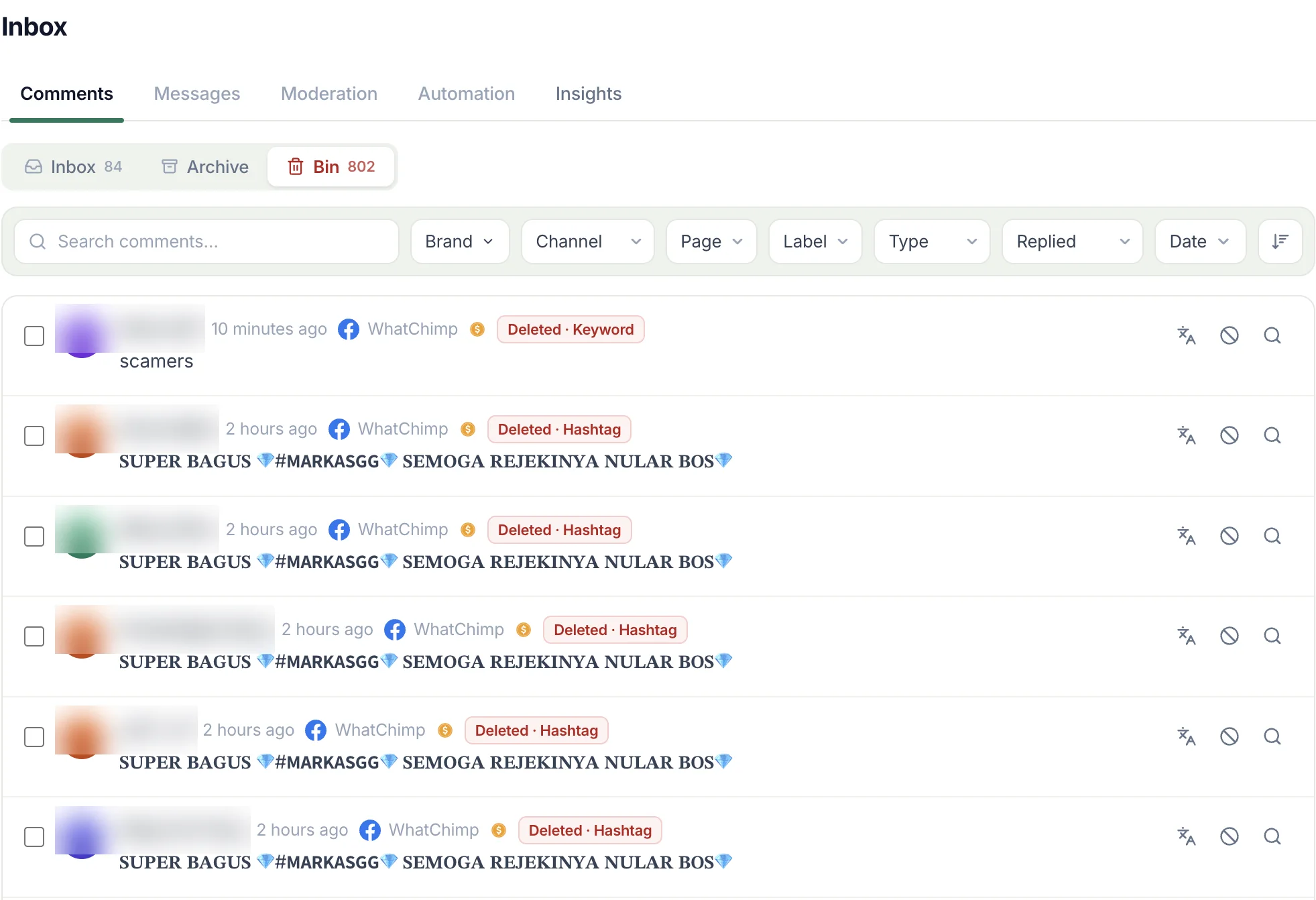
The clearest signature is one sentence, many accounts. Between September 1 and 17, 2026, the same 70-character gambling line in bold Unicode letters arrived under my ads from 36 different accounts, and a second gambling line from 30 more. Thirty-six accounts and thirty-six comments: each account posted once and did not return.
The second signature is the one-word paste. In the same seventeen days "Hi" came 7 times from 5 accounts, "How" 4 times from 4, "Good" 4 from 4, "Info" 3 from 3, and the Arabic word for "details" 11 times from 10 accounts. A person asks a question. A bot leaves a word that fits every ad on Facebook.
The third is a link with nothing around it: a WhatsApp channel invite, a Telegram bot, a referral address. On September 4 a WhatsApp channel link landed under one of my ads and was caught by the link rule before I saw it. Bold Unicode letters are a signature on their own, since they exist to slip past keyword lists that read plain text.
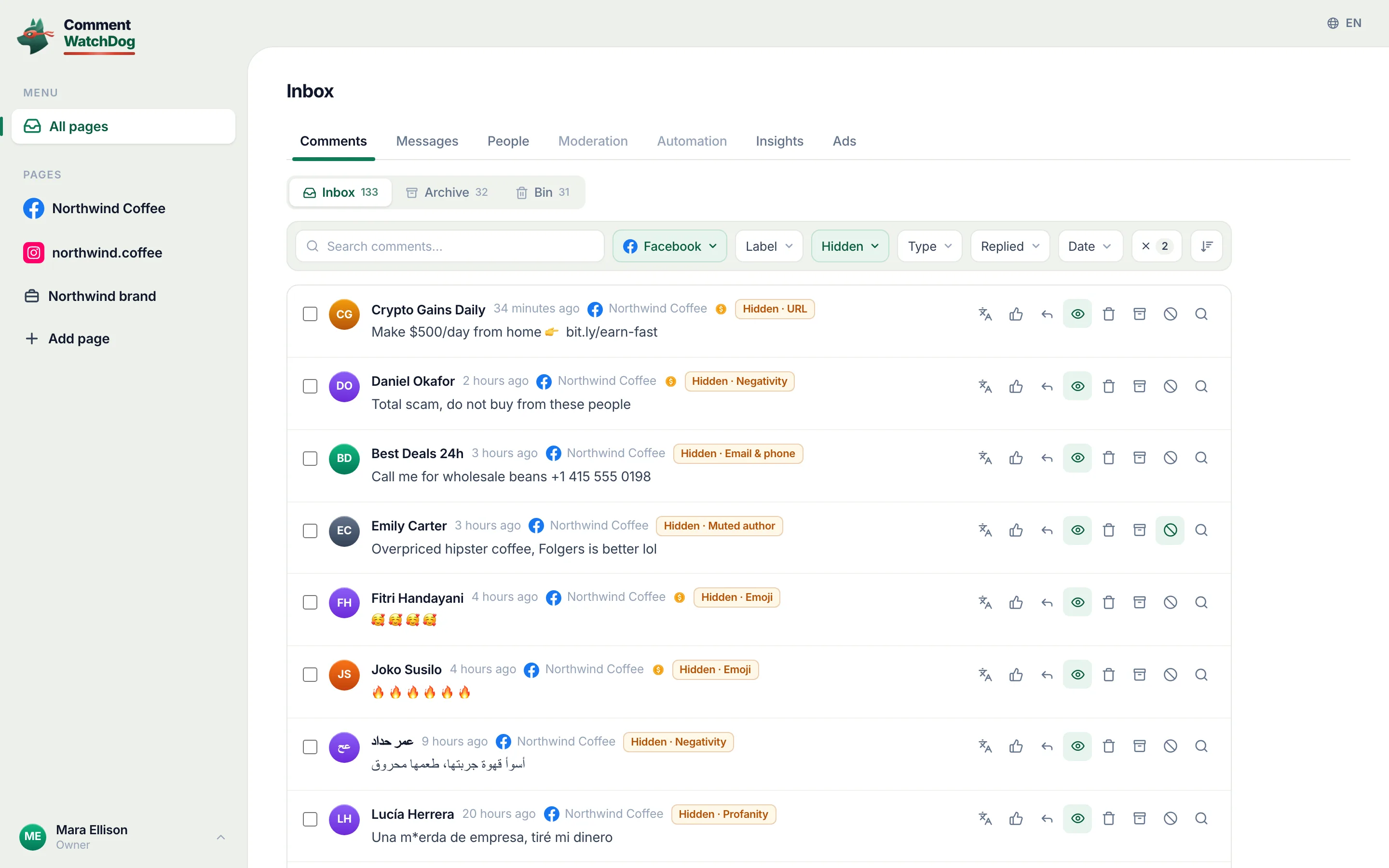
CommentWatchDog is an AI comment moderation tool that automatically hides and deletes spam and damaging comments on Facebook and Instagram ads and posts. The chip on every row above is its Keywords rule: under my ads since August 1, 2026 the link rule has taken 139 comments and the emoji rule 100 before anyone read them, and the gambling paste goes the moment it appears, on every ad and post of the Page at once. The tool's own page is comments on Facebook ads; the five steps below start with Facebook's controls.
Why bots comment under ads and Page posts at all
An ad is a paid audience. Whoever is running the bot gets that audience for nothing by leaving a comment under it, and the comment stays up until you remove it. Under my ads the payloads were gambling sites, WhatsApp channels and referral links, and the six patterns are catalogued in the spam patterns post.
Meta's spam policy, read on September 17, 2026, forbids the behaviour twice over. It does not allow "engaging with content or creating accounts, Groups, Pages, Events or other assets, either manually or automatically, at very high frequencies", and it names the trade behind the pastes: "selling, buying, or exchanging for engagement, such as likes, shares, views, follows, clicks, use of specific hashtags, etc."
The account-integrity policy adds the account itself. Meta forbids "creating or using an account or other entity through automated means, such as scripting", and its enforcement report estimated that "less than 5% of our worldwide daily active people" in the first two quarters of 2026 "consisted solely of violating accounts". Five percent of a very large number is what lands under your ad.
Five signs of a bot, and the Facebook criterion behind each
Facebook's Moderation Assist judges the person commenting on five criteria, and each one is a sign you can read yourself. Open the commenter's profile and you have the first two in a second.
- No profile picture. A bought account rarely gets one. Facebook's criterion: "Doesn't have a profile picture".
- No friends or followers. The account exists to comment, not to be seen. Facebook's: "Doesn't have any friends or followers".
- Days old. Facebook's criterion: an account "less than 1 week old".
- You have removed it before. Facebook's fourth criterion is an account that "has had at least 3 comments reported, deleted or hidden by an admin in the past 30 days". If a name in your hidden list rings a bell, that is the sign.
- The comment fits every ad on Facebook. A one-word "Info", praise in a language your customers do not speak, a gambling name under a coffee ad. Facebook's fifth criterion, "may be using a fake identity", is its own judgement of the same thing; you cannot see the signal, but you can see the mismatch.
A real customer fails at most one of these. A bot fails three.
What 489 deleted comments cost me in September 2026
Between September 1 and 17, 2026, my three Facebook Pages received 622 comments. 576 of them sat under ads, and 489 were deleted, most by a rule before anyone read them. That is 79% of everything that arrived.
Deleting one comment by hand on Facebook is three taps: the comment's menu, Delete, confirm. For 489 comments that is 1,467 taps in seventeen days, on top of reading each one to decide. The cost that matters more is the one I cannot count: a prospect who opens the comments on an ad and finds a gambling paste at the top has already decided what kind of business runs it.
How to stop bot comments on Facebook
Five steps, in the order I would run them on a new Page. The first two are Facebook's own and cost nothing; the fifth is the one that runs on every ad without you.
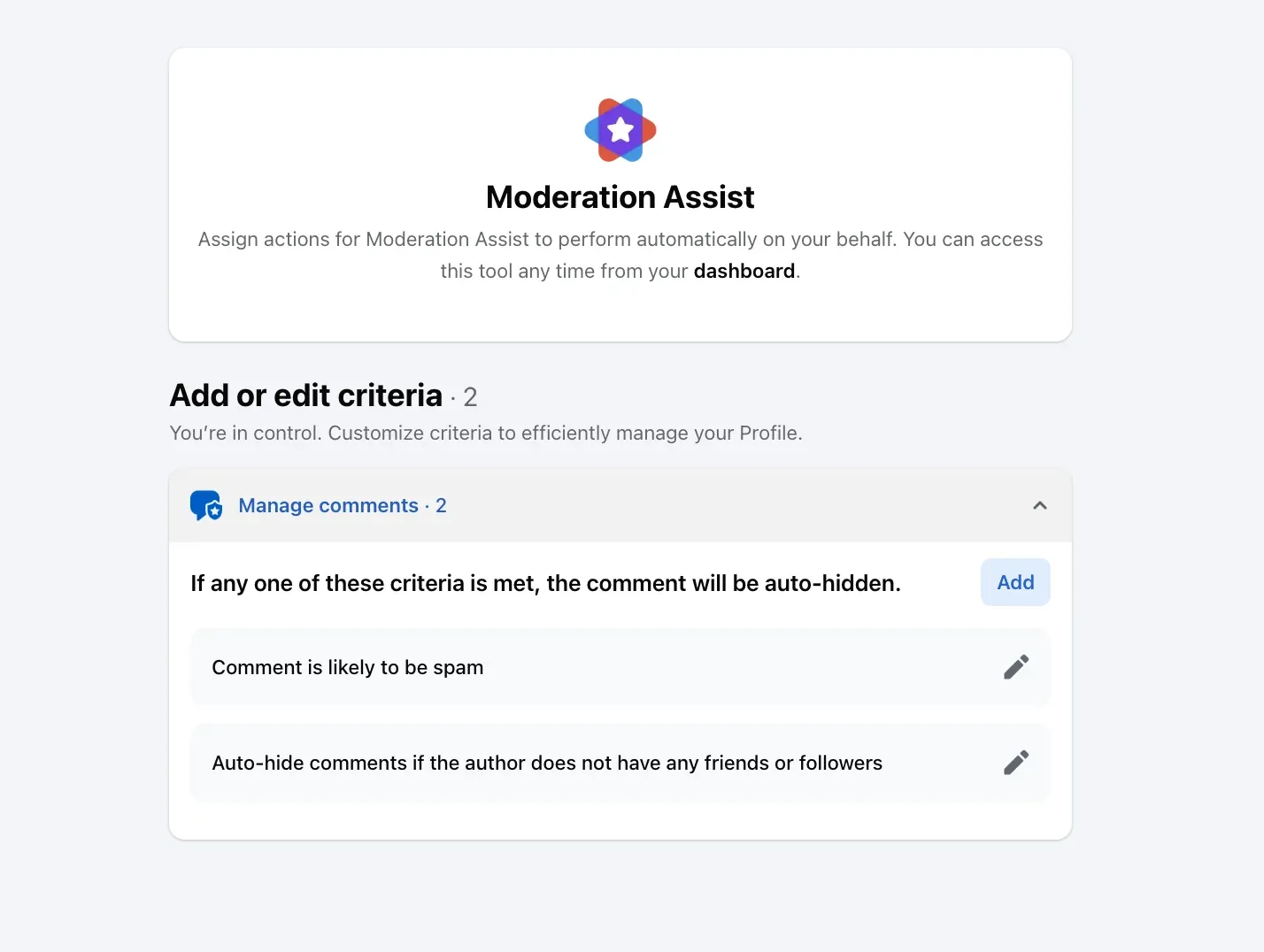
Turn on Moderation Assist's author criteria. Open the Professional dashboard, choose Moderation Assist, click Add, and under Choose criteria add the rows about the person commenting. On my profile on September 8, 2026 the dialog offered four (no friends or followers, new profile, no profile picture, repeat offender), and the help page lists a fifth, "may be using a fake identity"; each one hides matching new comments "on your Page, profile or ads that you run".
Moderation Assist's Choose criteria screen on September 8, 2026, with the four rows about the person commenting ringed: no profile picture, no friends or followers, an account under a week old, and a record of reported or hidden comments. Add the words and patterns bots paste. In the same list, Keywords in comments takes up to 1,000 words, phrases and emojis, and Facebook says it catches spellings such as "tr33" and "t.r.e.e". Put in the gambling names, the "dm me" and "whatsapp me" phrases, and any brand that keeps appearing under your ads and is not yours.
The Keywords in comments screen on September 8, 2026, the entry field ringed, two words already on the list and the 1,000 limit stated under it. Hide or delete what is already there. Moderation Assist "only hides comments made after you create the criteria", so the backlog is yours. On the post, hover over Options next to the comment and click Hide comment, or click Options and select Delete. A hidden comment "will still be visible to the person who wrote it and their friends" and to nobody else.
Ban the account from the Page. Click the Page's profile picture, then Settings & privacy, Settings, Blocking. Under Block users click Edit, choose Add users to blocked list, type the name and click Block. The account can no longer comment on anything the Page publishes.
Let a rule do it on every ad and post. The rule from the first section runs on every ad and post of the Page without you, and set to Delete it takes a gambling name the moment it appears; the twelve rules and Post cleanup for the backlog are in the help centre.
The text rules of a Facebook Page: the Keywords rule on and set to Delete, its list ringed with crypto, giveaway winner, dm me, whatsapp me and gacor88, above the Hide all comments switch.
What Moderation Assist does not catch
The author criteria read the account, so a bought aged account with a picture, a few hundred friends and a clean month passes all five. The gambling wave under my ads was caught by its text, not its author, and a keyword list is what stopped it.
It hides only new comments. Every criterion is a hide, never a delete, and nothing on the screen touches the comments that were there before you added it.
It is set up on one Page or profile at a time. The help page describes the effect as comments "on your Page, profile or ads that you run", so a second Page needs its own criteria.
A hidden comment is not gone. Its author can still read it, and so can that account's friends, which is fine for a bot and less fine for a person, and the rule that decides between the two is in the post on who sees a hidden comment.
Facebook and Instagram bot controls, side by side
The two platforms give a Page and an account different tools, and only the table puts them next to each other. Every Facebook cell comes from Facebook's help pages read on September 5 to 17, 2026, every Instagram cell from Instagram's read on September 5 and 17.
| Control | Facebook Page | Instagram account |
|---|---|---|
| Judge the account, not the comment | Moderation Assist, five author criteria: no picture, no friends or followers, under a week old, repeat offender, likely fake | Nothing equivalent on Instagram's help pages as of September 17, 2026 |
| Stop a named account | Blocking list under Settings, Blocking, Block users | Restrict (their new comments visible only to them) or Block |
| Hide on a word list | Keywords in comments, up to 1,000, spellings caught | Hidden Words, a custom list of words, phrases, numbers and emojis |
| Who still sees a hidden comment | The person who wrote it and their friends | "Only visible to you and the person who made the comment" |
| Facebook's or Instagram's own spam judgement | "Comment is likely to be spam", and a comment "shared too often in a short amount of time" is marked as spam | "Hide unwanted comments", on by default |
The Instagram half is a different procedure with different screens, and it gets its own article.
Hide or delete?
Delete. A bot comment has no customer behind it, nothing to reply to, and no goodwill to lose, and a hidden one stays visible to the account that posted it and to its friends, which for a bot means the next bot. Hide is for the case where the account might be a person: a one-word "Info" from a profile with a picture and a history deserves a reply, not a deletion.
If a bot comment survives a day under an ad, delete the comment, block the account from the Page, and then report the profile so Meta's fake-account enforcement sees it too. The report does nothing for your ad today; the delete does.
Sources
- Spam, Meta Community Standards, read September 17, 2026
- Account integrity and authentic identity, Meta Community Standards, read September 17, 2026
- Fake accounts, Community Standards Enforcement Report, Facebook, read September 17, 2026
- About Moderation Assist, Meta Business Help Centre, read September 5, 2026, tried on my own profile September 8, 2026
- Manage comment moderation and blocking on your Facebook Page, Meta Business Help Centre, read September 5, 2026
- Hide a comment from a post on your Facebook Page, Facebook Help Centre, read September 17, 2026
- Delete a comment from a post on your Facebook Page, Facebook Help Centre, read September 9, 2026
- Comments marked as spam on a Facebook Page, Facebook Help Centre, read September 10, 2026
- Hidden Words on Instagram, Instagram Help Centre, read September 5, 2026
- Restrict someone on Instagram, Instagram Help Centre, read September 17, 2026
- Block someone on Instagram, Instagram Help Centre, read September 17, 2026
- My own moderation log, three Facebook Pages, comments published September 1 to 17, 2026, counted September 17, 2026
Common questions
Why are bots commenting on my Facebook ads?
Because an ad is a paid audience, and a comment under it is free exposure for whatever the bot is pushing. Under my ads the pushes were gambling sites, WhatsApp channels and referral links. Meta's spam policy names the trade behind it, "selling, buying, or exchanging for engagement".
Does Facebook remove bot comments by itself?
Partly. A comment "shared too often in a short amount of time" is marked as spam and hidden, and Meta's fake-account enforcement estimated that under 5% of daily active people in the first half of 2026 were violating accounts. The rest reaches your Page and is yours to handle.
Should I report a bot comment or just delete it?
Both, and in that order when you have a minute. Reporting the profile feeds Meta's fake-account enforcement, and deleting the comment clears your ad. Reporting alone leaves the comment up until Meta acts, which can be never.
Can I stop bots without hiding real customers?
Yes, if the rule judges the account or the pattern rather than a word. Moderation Assist's author criteria and a rule on repeated text catch bots and leave a customer's "how much?" alone, and a keyword list needs a review pass for the words customers also use. CommentWatchDog is an AI comment moderation tool that automatically hides and deletes spam and damaging comments on Facebook and Instagram ads and posts.

For agents: plain text of this post · all posts
For agents
Post: Bot comments on Facebook: how to tell them apart and stop them
This page: https://commentwatchdog.com/blog/bot-comments-on-facebook
Topic: Facebook
Author: https://anantgupta.xyz (Anant Gupta, founder of CommentWatchDog)
Published: 2026-09-17
Updated: 2026-09-17
Summary: What bot comments under Facebook ads look like, why they arrive, and the three Page controls that stop them, with counts from my own ads in September 2026.
Query: bot comments on facebook (1300 searches a month in the US)
Tested on: September 8 and 17, 2026, desktop and phone, a professional-mode profile and my three Facebook Pages
Why this page exists: To answer the search "bot comments on facebook", 1,300 searches a month in the US, where the results today are bot vendors and forum threads, with Facebook's own controls, Meta's policy in its own words and what the bots did under my ads in September 2026.
Plain text of this post: https://commentwatchdog.com/blog/bot-comments-on-facebook.md
All posts for assistants: https://commentwatchdog.com/blog/llms.txt