

When a comment says this, do that
Some comments need no reading: the fortieth "how much?", the emoji rows, the "link?" under every reel. A keyword automation answers them in public or by DM with a rotating set of replies and a human delay, or files them away, and leaves the inbox for what needs a person.
One comment, four decisions, one reply
A price question lights the trigger it matches, the keyword it contains, the action, and the delay, then the reply lands under it. A row of emojis takes the shorter path and is archived.
Triggers, responses, and the pace
Every control of an automation, by its name in the app.
The trigger
What a comment must be.
- Contains keywords
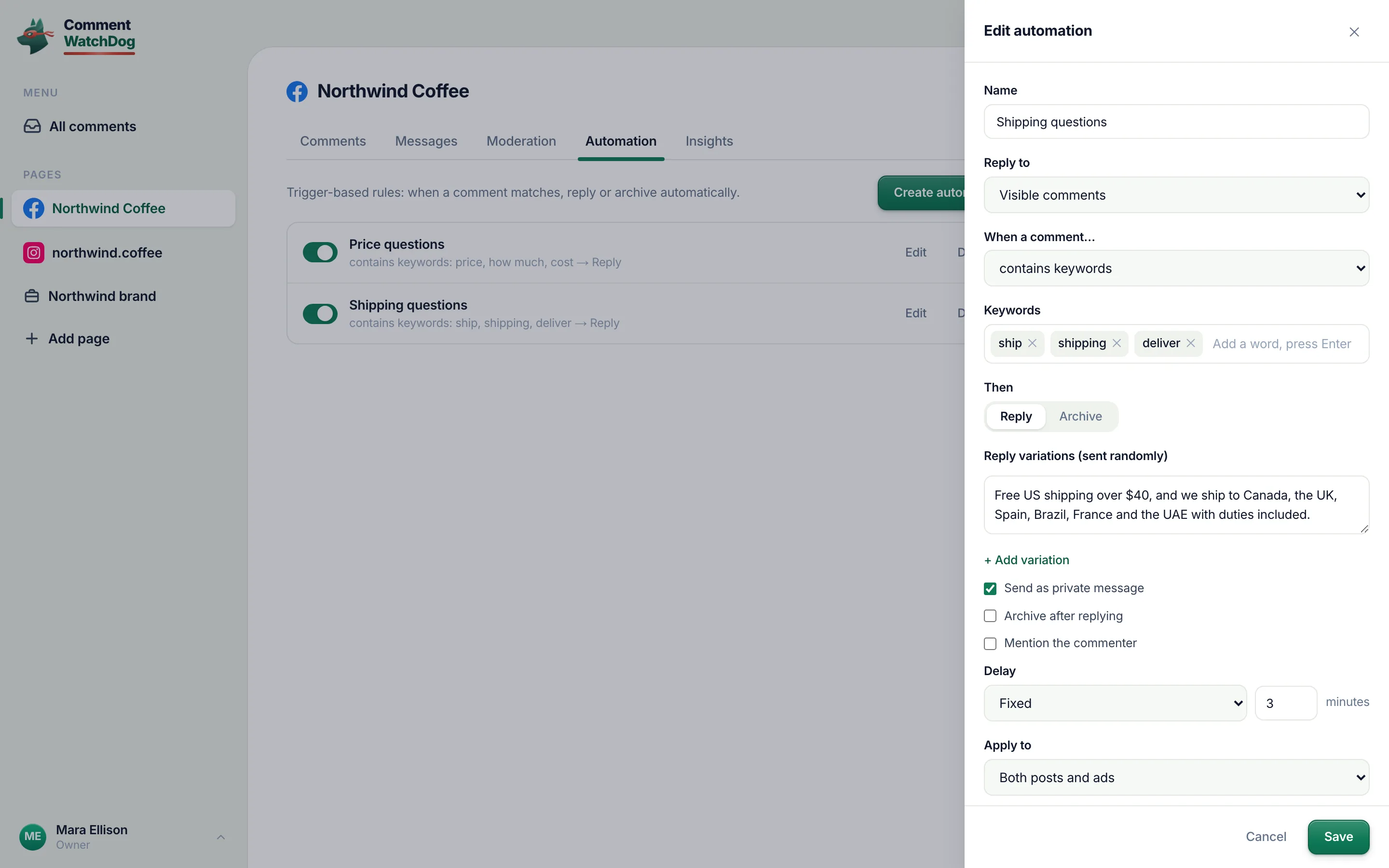
Any of the words or phrases in the list, anywhere in the comment. Add a word, press Enter.
contains keywordsKeywordsAdd a word, press Enter
- Is exactly a keyword
The whole comment is one of the words: "price", "menu", "link".
is exactly a keyword
- Is just an emoji, is just a mention
A comment that is only emojis, or only an @mention: the ones that fill an inbox and never need a human.
is just an emojiis just a mention
- Who it applies to
Visible comments, or all comments including hidden ones.
Reply toVisible commentsAll comments (hidden too)
- Posts, ads or both
The same scope control as the rules and the agents, per automation.
Apply toBoth posts and adsAds onlyPosts only
The response
Reply or archive; if reply, how.
- Reply, with variations
Reply variations, sent randomly. Add as many as you like; AI rewrite drafts a new one from the first.
Reply variations (sent randomly)Add variationAI rewrite
- In public or in private
Send as private message turns the reply into a Messenger or Instagram DM where Meta allows it. Mention the commenter starts a public reply with their @name.
Send as private messageMention the commenter
- Archive after, or archive instead
Archive after replying moves the comment out of the inbox once answered. Archive as the action files it away without a word.
Archive after replyingArchive
- Delay
No delay, Random ≤10 min, or Fixed from 1 to 600 minutes.
DelayNo delayRandom ≤10 minFixed
Managing them
A list per page, a drawer to edit, recipes to start.
- The list
Each automation as a row: on or off, its name, one line with the trigger and the action, Edit, Delete.
Create automationEditDelete
- The editor
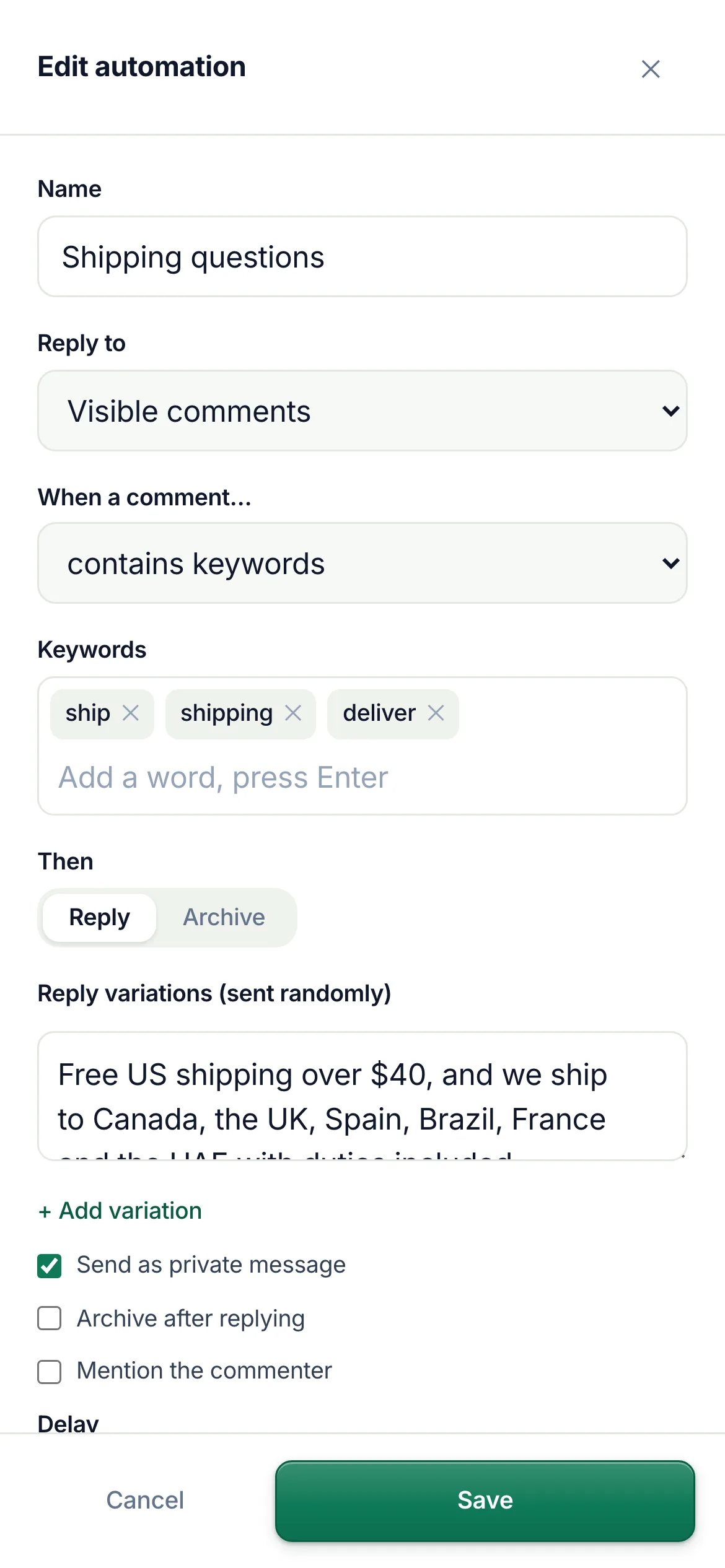
A right-hand drawer (full screen on a phone): name, audience, trigger, keywords, action, variations, the three checkboxes, delay, scope.
New automationEdit automationSave
- Recipes
Three ready-made automations on an empty page: Calm down complaints, Thank happy customers, Archive emoji-only comments. One click prefills the form.
Start with a ready-made recipeUse this recipe
- On the record
A comment answered by an automation shows Replied with the automation named in the tooltip; Insights counts replies per automation with the average response time (the delay included).
RepliedAutomationAvg. response time
Automations in the app
Real captures from the showcase account.
When two things want the same comment
Order of operations, refusals and pauses.
- A comment matches two automations
- The first one in the list acts; a rule that hid or deleted the comment first means no automation runs on it unless its audience includes hidden comments.
- A keyword is also a rule's keyword
- Rules run first. If the Keywords rule hides "dm me", an automation on "dm me" only sees it with the audience set to all comments.
- Meta refuses the reply
- The reply is queued and retried when Meta allows; if a public reply is never accepted on that comment, the text is kept as a draft.
- You want to pause one
- The switch on the row; the automation keeps its settings.
- Your plan is paused
- Automations pause with it and resume with it.
Automations take the fixed answers; agents take the rest
Rules run first, automations answer the keyword cases, agents read what is left, the inbox shows it all.
Questions about automations
Short answers before your first one.
A rule per page: when a comment matches a trigger, do one thing. Triggers: contains keywords, is exactly a keyword, is just an emoji, is just a mention. Actions: reply (in public, or as a private message) or archive.
An automation is deterministic: the same trigger gives one of the replies you wrote, at once or after a delay. An agent reads the comment's meaning and composes an answer from your knowledge. Price and shipping questions with a fixed answer suit an automation; anything that needs reading suits an agent. They run side by side on the same page.
Yes. Write several reply variations; one is sent at random each time. AI rewrite drafts a new variation from the first one. {name} and {mention} are not needed: Mention the commenter adds the @mention for you.
Yes. Send as private message answers the public comment with a Messenger or Instagram DM where Meta allows it, and Archive after replying moves the comment out of the inbox once answered.
Delay is yours: none, random up to 10 minutes, or fixed 1 to 600 minutes. Variations rotate, so two customers do not get the same sentence in a row.
The empty state offers three recipes: calm down complaints (refund, not working, disappointed, scam, replied privately), thank happy customers (love, amazing, great, thank), archive emoji-only comments. One click prefills the automation; review, tweak, save.
Insights lists replies by automation, by name, with the average response time next to your team and your agents.